Make Your Site Pop: Master These Squint Test Strategies So Visitors See What Matters Most

Make Your Site Pop: Master These Squint Test Strategies So Visitors See What Matters Most

Content Marketing UX

Did you know that users form an opinion about your website in just 50 milliseconds? That’s faster than a blink. And that snap judgment often determines whether someone will stayad or leave.

You’ve spent hours crafting the perfect About page, meticulously describing your coaching methodology or consulting process and ways of working. But when visitors land on your site, they bounce in seconds, because the design is unclear, and hard to read or navigate.

The squint test is a simple technique that can make or break the user experience (UX) of your website. It’s a way to assess the whether websites, social media posts, and marketing materials guide attention effectively.

For solopreneurs like coaches, consultants, content creators, and voice actors, who often wear multiple hats and manage their own marketing, this technique can mean the difference between a visitor who converts and one who clicks away. 94% of users judge a website based on its design within the first impression, and effective visual hierarchy can increase conversion rates by up to 591% when applied strategically.

Contents

What’s the Squint Test?

The squint test is a quick way to make sure users notice the most important parts of a website or app first.

When you squint, details blur and only the strongest elements (shapes, colors, and buttons) stand out. The big picture becomes clear. Elements that grab attention first reveal themselves. Poor contrast disappears into the background.

This simple action works because it mimics how people actually process visual information: people often scan content before deciding to whether to read it.

When someone lands on your coaching website or scrolls past your LinkedIn post, they don’t carefully read every word. Instead, their brain rapidly scans for the most prominent visual elements to decide whether to engage further or move on. So the squint test helps you check whether the main elements of your content, like headlines, buttons, and main sections, are clear and easy to spot, or if they get lost.

For solopreneurs, this matters even more because you’re competing against businesses with dedicated design teams and marketing departments.

When someone searches for “life coach in Denver,” “African American voice actor” or “business consultant for small companies,” your website might appear alongside competitors who’ve invested heavily in professional design and SEO. The squint test levels the playing field by helping you make strategic visual choices that capture attention effectively.

Why visual hierarchy matters for your solo business

In the typical customer journey, potential client finds your website, landing page, or social media profile. Within seconds, they need to understand three things: what you do, who you help, and why they should choose you. If your visual hierarchy doesn’t guide them to these answers quickly, they’ll leave.

Trust signals are even more critical for solopreneurs. Unlike established companies with brand recognition, you’re often building credibility from scratch with each new web visitor.

Source: Jagadeesh Chundru

Your visual hierarchy needs to strategically highlight testimonials, credentials, and social proof to establish authority. Studies show that business credibility depends on website quality, and professional visual hierarchy signals competence before visitors even read your content.

The psychology works in your favor when done right. Clean, organized layouts create a halo effect where visitors assume your services are equally well-organized and professional. This perception can justify charging higher rates and differentiate you from competitors with cluttered, confusing websites.

For voice actors and content creators, visual hierarchy serves additional functions:

  • Portfolio/Demos: Your portfolio needs to guide attention to your best work first.
  • Contact info: Your booking information must be immediately accessible and easy to find. Prospective clients, casting directors and producers will NOT hunt for it–they’ll just move on to the next.

Research shows that conversion-focused design relies heavily on proper visual hierarchy. According to a study by Roger West, strategic use of visual hierarchy can significantly impact conversion rates by guiding users’ attention to key conversion points like calls-to-action (CTAs) and special offers.

Your personality should shine through consistent visual branding that supports your unique voice in a crowded market.

How the Squint Test Works for Better Content Design

Performing a squint test is surprisingly straightforward, but doing it at the right time and in the right way makes the difference.

How to do a squint test

Step 1

Start with your homepage open on your computer screen. Sit back about arm’s length from your monitor, and slowly squint your eyes until text becomes blurry but you can still make out shapes, colors, and general layout. Don’t strain—just gently reduce your vision until details fade. And always test in normal lighting since too much glare or darkness can distort results.

Step 2

Now ask yourself: How do your eyes travel across the page? What grabs your attention first? Is it your headline, a client testimonial, your professional photo, or perhaps a distracting graphic element you never intended to emphasize? The elements that remain most visible when squinting represent what your visitors will notice first.

Design elements to review

Pay attention to these key indicators during your test:

  • Size and spacing create natural focal points. Larger elements command attention, while generous white space around important content makes it stand out. If your call-to-action button disappears when squinting, it’s probably too small or lacks sufficient contrast with surrounding elements.
  • Color and contrast determine visual prominence. High contrast draws the eye, while similar tones blend together. Your most important information should maintain strong contrast even when squinting. If everything looks gray and muddy, your hierarchy needs work.
  • Typography variations should create clear levels of importance. Headlines should remain visible when squinting, subheadings should be secondary, and body text should recede into the background. If all your text looks the same size when blurred, you need stronger typographic hierarchy.

Repeat the test on mobile devices

Go back and repeat steps 1 and 2 with a phone and a tablet, staying about 12 inches from the screen. Mobile visual hierarchy differs significantly from desktop because of screen constraints and different usage patterns. Your squint test results should make sense for both viewing contexts.

Benefits of Using Squint Tests for Readability

When applied correctly, the squint test offers direct benefits to usability and readability.

Customers can digest your content much easier

Users need to process information in the right order. A squint test shows whether your information architecture guides users naturally through your content. When you blur details, the remaining elements should tell a clear story about what’s most important.

It also directly impacts user engagement, as people need clear visual cues to process information efficiently.

Enhanced contrast and color accessibility compliance

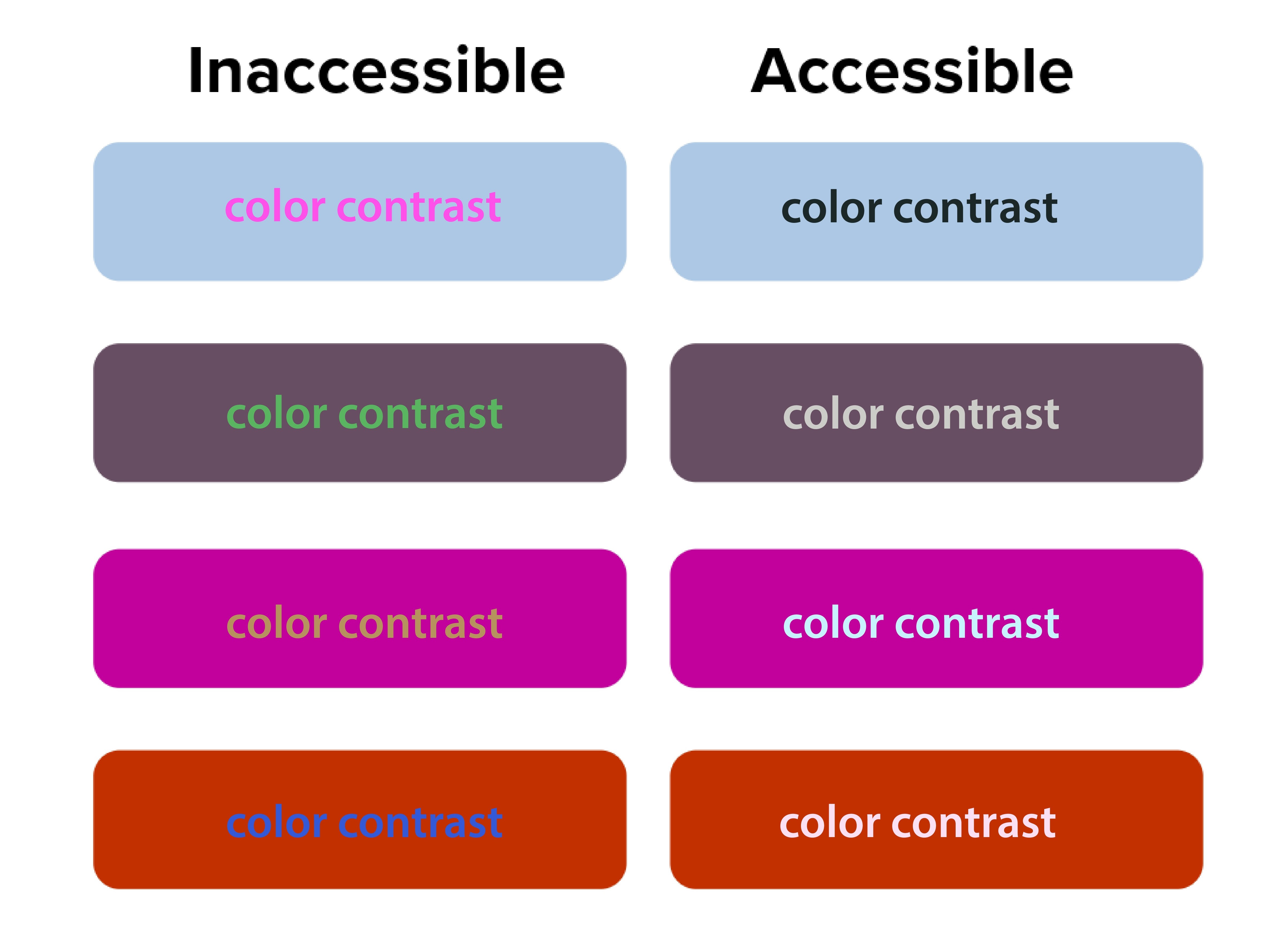
The squint test acts as a quick accessibility check. Elements that disappear when you squint likely have insufficient contrast. This is beyond aesthetics—proper contrast ratios are required for web accessibility compliance.
Source: San Diego State University

The Digital.gov accessibility guidelines emphasize creating “a clear hierarchy of importance by placing items on the screen according to their relative level of importance.”

Low contrast creates accessibility problems. The squint test naturally emphasizes contrast, making weak text-to-background combinations easy to spot. 90 million Americans over 40 have vision problems, and 7 million have vision impairment.

Orange you accessible?” featured a case where white text on orange buttons passed both squint tests and WCAG 2.1 color contrast checks. Before the fix, users with vision impairment missed key actions, but afterward, the click-through rate (CTR) improved by 18%.

Better font size and typography decisions

Typography choices become obvious during squint testing. Headers that should stand out but don’t indicate hierarchy problems. Body text that dominates the page suggests sizing issues.

If your body text disappears when squinting, your font size or weight may be too light. Adjusting typography can make a major impact.

NUMI Tech’s study on Typeform showed that the clearest forms were those with single, bold CTAs and solid font weight. People were more likely to finish forms if they quickly identified the main action, driving up completion rates.

Common Design Problems the Squint Test Reveals

Squint testing reveals hidden flaws that traditional review often misses, but many solo business owners unknowingly sabotage their own success with predictable visual hierarchy errors. These mistakes stem from trying to communicate everything at once instead of guiding visitors through a logical information sequence.

Cluttered layouts with too many competing elements

It may seem like everything is important on your website—especially the homepage. Your services, testimonials, about story, contact information, and credentials all compete for attention simultaneously. But when you squint at these sites, nothing stands out clearly because everything’s fighting for visual prominence. Then your web visitors leave because they can’t quickly identify the most relevant information.

Too many elements competing for attention creates visual chaos and overwhelms users. The squint test simplifies the noise, highlighting whether a dominant focus exists.

Ineffective CTA buttons, placement and styling

Source: EngageBay

CTAs that disappear during squint testing signal major conversion problems.

Your primary action button should be the star of your layout. If it vanishes when squinting, it’s likely too small, poorly colored, or positioned incorrectly. Conversion studies show button placement impacts click-through rates and increases revenue by 83%.

Your “Schedule a Discovery Call” or “Download My Free Guide” buttons should be among the most prominent elements when squinting. Yet many solopreneurs bury these important conversion elements in small text or low-contrast colors that disappear during the squint test.

Inconsistent branding across platforms

Your LinkedIn profile, website, email newsletters, and social media posts should pass the squint test with similar visual priorities. If your Instagram posts emphasize completely different elements than your website, you’re confusing potential clients about what matters most.

Web template constraints

Squarespace, Wix, Webflow and WordPress templates come with predetermined visual hierarchies that may not align with your business needs. Many solopreneurs accept these defaults without testing whether they actually guide attention to business-critical information.

Let’s get into more detail on the specific limitations of each platform.

Squarespace

Squarespace has beautiful templates but limits customization.

When performing the squint test on Squarespace sites, you’ll often find that template designers prioritized aesthetic appeal over conversion optimization. The large, gorgeous images that look stunning at full resolution might overwhelm your actual business message when viewed through the squint test lens.

To optimize within Squarespace’s constraints, focus on strategic content placement and typography choices. Use their built-in style editor to increase contrast on important elements. Choose templates where the navigation and primary call-to-action naturally pass the squint test, even if other elements need adjustment.

Wix

Wix provides complete creative freedom, which can be good and bad. The drag-and-drop interface allows you to place elements anywhere, but this freedom often results in layouts that fail basic hierarchy principles if you don’t have design experience.

Use Wix’s built-in design assistance features and grid alignment tools. Test your layouts frequently with the squint test as you build, rather than waiting until the site is complete. Pay special attention to mobile responsiveness, as Wix’s absolute positioning can create hierarchy problems on smaller screens.

Webflow

Webflow is best for advanced, tech savvy users, but offers powerful hierarchy control if you’re willing to learn it. The visual CSS editor allows precise control over typography, spacing, and color without coding knowledge. However, the learning curve can be steep for solopreneurs focused on growing their businesses rather than mastering web design.

WordPress

WordPress offers more flexibility but requires more decision-making.

The abundance of themes and customization options can actually hurt your visual hierarchy if you’re not careful. Many solopreneurs install multiple plugins and design elements that compete for attention, creating visual chaos that fails the squint test dramatically.

When working with WordPress, start with themes specifically designed for service businesses. Look for designs where testimonials, service descriptions, and contact information are visually prominent. Avoid themes with too many sidebar widgets or navigation options that could distract from your primary business goals.

Let’s shift to discussing how to use the squint test for your social media content.

The squint test for social media content

Social media platforms present unique visual hierarchy challenges because you’re competing for attention in crowded feeds with minimal time to make an impression. The squint test becomes even more critical when you have only seconds to capture someone’s interest as they scroll.

LinkedIn

LinkedIn requires professional hierarchy that builds authority.

Your posts need to establish credibility quickly while encouraging engagement. When you squint at successful LinkedIn content from coaches and other solopreneurs, you’ll notice that personal branding elements, key statistics, and clear value propositions remain most visible.

Here’s how you can do the same:

  • Start with an irresistible hook: Structure your LinkedIn posts with strong opening lines that remain readable when squinting.
  • White space and readable design: Use line breaks and formatting to create visual separation.
  • Branded photo: Include your professional photo consistently to build recognition.
  • CTA: Most importantly, ensure your call-to-action (whether it’s commenting, connecting, or visiting your website) stands out visually from surrounding content.

Instagram

Instagram demands immediate visual impact since the platform is inherently visual.

Your images need to pass the squint test independently of text elements. This is particularly important for content creators and voice actors who rely on visual storytelling to showcase their personality and expertise.

Test your Instagram posts by squinting at them in your phone’s preview before publishing. Your key message should be apparent even when details blur. Text overlays should contrast strongly with background images. For voice actors, ensure your recording setup or the subject of your post is prominently visible.

Facebook

Facebook’s algorithm favors engagement, making hierarchy crucial for organic reach.

Posts that capture attention quickly receive more comments and shares, which signals the algorithm to show them to additional people. The squint test helps ensure your most engaging elements like questions, compelling statistics, or striking visuals get noticed first.

YouTube

For video content across YouTube and all other social platforms, apply squint test principles to thumbnails and opening frames.

These elements determine whether people click to watch your content. Your face, key text, or compelling imagery should remain visible when squinting at thumbnail previews.

Use Visual Hierarchy in Your Email Marketing

Your email newsletters and marketing campaigns need strong visual hierarchy, because people scan emails even faster than websites.

Subject lines

Source: Grammarly

Subject lines represent the first level of your email hierarchy, but once opened, your email design takes over.

The squint test reveals whether your most important elements, like your value proposition, main CTA or key announcement, gets the appropriate visual emphasis.

Structure your emails with a single, clear focal point per message. If you’re promoting a new coaching program or event, that announcement should dominate the visual hierarchy. When you squint at the email preview, make sure the supporting elements like testimonials, bonus information, or secondary offers are visually subordinate to the main elements above.

Mobile optimization

According to Adestra, 61.9% of emails are opened on mobile devices. Your email hierarchy might work perfectly on desktop, but fail completely on phone screens. Always test your email campaigns with the squint test on both desktop and mobile before sending.

Many email marketing platforms provide mobile preview tools, but the squint test offers additional insight into whether your hierarchy actually works in practice. Your unsubscribe link should be minimally visible, while your main message and CTA should remain prominent even when squinting at a small screen.

How to Use the Squint Test for Your Content Marketing

Source: Styled Stock Society

Blog posts, resource guides, and lead magnets all benefit from strong visual hierarchy, particularly for solopreneurs who use content marketing to demonstrate expertise and attract clients.

Blogs

Long-form blog posts need hierarchical structure to maintain reader engagement. Your headline should pass the squint test by being significantly larger and more prominent than body text. Subheadings should create clear visual breaks that remain visible when squinting, helping readers scan for relevant information.

Use the squint test to evaluate whether your key points stand out sufficiently. Important statistics, quotes, or takeaways should be formatted to remain visible when details blur. This might mean using pull quotes, bullet points, or highlighting techniques that create visual emphasis.

Lead magnets

Lead magnets like webinars, checklists and resource guides serve 2 purposes: to provide immediate value to your audience and position you as an expert in your field. The squint test helps ensure these materials look professional and guide readers through the content logically.

Your lead magnets should have a clear visual hierarchy that makes them easy to scan and use. Key action items should be visually prominent, while supporting explanations can be less visually dominant.

Doing this makes your resources more valuable to busy professionals who need quick access to relevant information.

Case studies and testimonials

These items require strategic visual hierarchy to build credibility effectively.

The client’s results and your role in achieving them should be the most prominent elements when squinting. Supporting details about methodology or process can be visually secondary.

Measuring Squint Test Results and Success

Unlike large or mid-size companies with dedicated analytics teams, solopreneurs need simple ways to measure how visual hierarchy improvements impact business results. Understanding how to track and validate your design changes ensures continuous improvement in user experience.

Focus on the data that directly affect your business goals instead of vanity metrics that don’t drive revenue.

The value of squint testing shines when you measure real outcomes. All good design choices should have measurable impact. Squint testing delivers quick wins—and long-term gains.

Track website conversions

Monitor your consultation booking rates, email signup conversions, and resource download numbers before and after implementing squint test recommendations. Even small improvements in these metrics can significantly impact your business growth over time.

Set up Google Analytics goals for key actions like contact form submissions or resource downloads. Compare conversion rates month-over-month as you refine your visual hierarchy. A 1% improvement in conversion rate can mean substantial revenue increases for service-based businesses with high-value offerings.

Check your email engagement metrics

Source: Slide Team

Check whether your hierarchy improvements translate to better content performance. Open rates indicate whether your subject lines and sender name stand out in crowded inboxes.

Click-through rates (CTRs) show whether your email hierarchy successfully guides readers to take a specific action. CTRs on primary CTAs provide direct feedback about hierarchy effectiveness. If your main action button becomes more prominent after hierarchy adjustments, click-through rates should increase accordingly.

Monitor which types of visual hierarchy changes produce the best results for your specific audience. You might find that larger call-to-action buttons significantly improve click-through rates, or that restructuring your email templates increases consultation bookings.

Review your social media analytics

Source: BrandBastian

Track engagement rates on posts where you’ve applied squint test principles compared to older content. Look for patterns in which visual approaches generate more comments, shares, and profile visits.

Pay attention to the quality of engagement, not just quantity. Posts that successfully guide attention to your key messages should generate more relevant comments and inquiries from potential clients rather than just generic engagement.

Collect feedback

Qualitative feedback complements quantitative metrics. Ask visitors about their first impressions and navigation experience. This feedback often reveals hierarchy issues that metrics alone might miss.

Five-second tests work well for validating squint test improvements. If people can quickly identify your page’s purpose and main action within 5 seconds, your hierarchy is likely working effectively.

A/B test to validate squint test improvements

A/B testing validates squint test improvements with real user data.

Set up an A/B test where one design is optimized using findings from a squint test, while the other isn’t.

Focus on testing one hierarchy change at a time. This isolation helps you understand which specific improvements worked to drive results. Complex tests with multiple changes make it difficult to identify successful elements.

Monitor your design improvements over time

Visual hierarchy effectiveness can change over time as content updates and user expectations evolve. You should do squint testing regularly to be sure your design continues performing optimally.

Set up automated monitoring for key conversion metrics. Sudden drops might indicate hierarchy problems introduced during content updates or design changes. Regular testing catches these issues before they significantly impact performance.

Don’t stop testing after a single improvement. Monitor metrics monthly. Users’ expectations and devices change, so designs that pass now may need adjustments later.

Wrap Up

The squint test is a way to help improve how potential clients experience your marketing materials and websites. Instead of guessing if your content captures attention effectively, you can quickly evaluate and refine your visual hierarchy to guide visitors toward the actions that will grow your business.

Whether you’re using Squarespace templates, creating LinkedIn posts, or designing email newsletters, the squint test shows whether your most important messages get the appropriate visual emphasis. For coaches, consultants, content creators, and voice actors competing in crowded and competitive spaces, this competitive advantage costs nothing to implement, but can dramatically improve business results.

Every visual choice should either guide potential clients toward working with you or provide value that builds your authority in your field. The squint test ensures these priorities remain clear even when visitors are scanning quickly through their busy digital lives.

Start with your homepage. Squint at it, adjust what doesn’t work, and begin building a visual hierarchy that turns casual visitors into paying clients.


References

Accessibility for visual designers. (2018). Digital.gov. Retrieved from https://digital.gov/guides/accessibility-for-teams/visual-design/

Çakırca, S. (2025). 150+ UX (User Experience) Statistics and Trends (Updated for 2025). UserGuiding. Retrieved from https://userguiding.com/blog/ux-statistics-trends

Do You Look Legit? The Psychology Behind Website Design & Credibility. (n.d.). Rosewood. Retrieved from https://rosewoodmarketing.ca/do-you-look-legit-the-psychology-behind-website-design-credibility/

Fast Facts: Vision Loss. (2024). (n.d.). CDC. Retrieved from https://www.cdc.gov/vision-health/data-research/vision-loss-facts/index.html

Five-Second Testing: Step-by-Step Guide + Example. (2025). Maze. Retrieved from https://maze.co/collections/user-research/five-second-test/

Increase Conversion Rates with High Quality Design: A Comprehensive Guide. (2024). Roger West. Retrieved from https://www.rogerwest.com/design/increase-conversion-rates-with-high-quality-design/

Kennedy, E. D. (2020). UI Tutorial: Scheduling App Redesign (in under 10 Minutes). Learn UI Design. Retrieved from https://www.learnui.design/blog/squint-test-ui-design-case-study.html

Learning from the Best: Top CRO Case Studies. (2025). Retrieved from https://lineardesign.com/blog/conversion-rate-optimization-case-studies/

Lindgaard, G., Fernandes, G., Dudek, C., & Brown, J. (2006). Attention web designers: You have 50 milliseconds to make a good first impression! Behaviour & Information Technology, 25(2), 115-126. Retrieved from https://www.tandfonline.com/doi/abs/10.1080/01449290500330448

Looking Ahead: Improving Our Vision for the Future. (2024). CDC. Retrieved from https://www.cdc.gov/vision-health/data-research/vision-loss-facts/improving-vision-for-future.html

Nielsen, J. (2015). Legibility, Readability, and Comprehension: Making Users Read Your Words. Nielsen Norman Group. Retrieved from https://www.nngroup.com/articles/legibility-readability-comprehension/

Seastrand, E. (2019). Orange You Accessible? A Mini Case Study on Color Contrast. UX Design. Retrieved from https://uxdesign.cc/orange-you-accessible-65afa6cf0a2

Steven, K. (2024). 45 Urgent Call-to-Action Statistics for Marketers. Persuasion Nation. Retrieved from https://persuasion-nation.com/call-to-action-statistics/

The Squint Test: Accessibility Test for Every Interface. (n.d.). NUMI. Retrieved from https://www.numi.tech/post/the-squint-test-accessibility-test-for-every-interface

van Rijn, J. (2025). The ultimate mobile email statistics overview. Email Monday. Retrieved from https://www.emailmonday.com/mobile-email-usage-statistics/

Clean Up Your Website: Find SEO Success by Content Pruning

Clean Up Your Website: Find SEO Success by Content Pruning

Content Marketing SEO UX

As a solopreneur, every minute you spend on your website counts. Are you wasting time on content that’s actually hurting your SEO?

Content pruning is the process of removing or improving low-quality, outdated, or duplicate pages from your website to boost overall site performance.

Think of it as cleaning out your digital closet—keeping what works and tossing what doesn’t serve you anymore.

“Less is more” rings true in SEO—prune unhelpful content and watch your important pages grow. Removing old or weak web pages often leads to better search rankings. When you use content pruning as part of a content audit, you can boost traffic, streamline your site, and help search engines focus on your best work.

Contents

You might think having more content is always a good thing, but that’s not the case.

Why Content Pruning Matters for Your Site

When I first started my business, I thought a bigger blog meant more traffic.

I was wrong. More content doesn’t necessarily equal better SEO results.

Google’s algorithm focuses on quality over quantity, which means weak pages can actually hurt your site’s authority.

According to a recent case study, HomeScienceTools.com saw a 64% increase in strategic content revenue after removing just 200 underperforming blog posts. That’s impressive results from deleting content, not adding it.

How much could your business benefit from a 64% increase in revenue? A lot, I bet.

Common types of content to prune

If you’re ready to get started, you need to know what kinds of pages to look for:

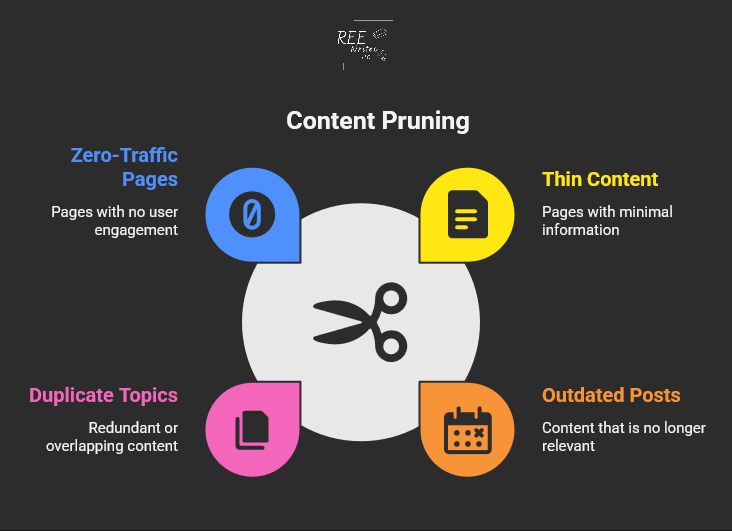
  • Thin content: Pages with little useful information
  • Outdated posts: Content with old dates or incorrect facts
  • Duplicate topics: Multiple pages targeting the same keywords
  • Zero-traffic pages: Content that gets no visits or engagement

Taking action to remove or improve your content is a crucial part of a full website review. The key is finding pages that drain your site’s SEO power without giving anything back in return.

Benefits you’ll see from pruning content

So, what’s in it for you? A clean website leads to some amazing results.

Content pruning plays a major role in comprehensive website and content audits. When you remove content with no value, you’re essentially telling search engines to focus on your best content instead of wasting time on weak material.

Robotic spider crawling the web with papers

Here’s what happens when you clean up your site:

A case study by Seer Interactive shows the real impact of content pruning. Their client experienced declining traffic for five years straight. After removing 14,000 low-value pages, they achieved a 23% increase in organic traffic year-over-year.

Imagine what a 23% traffic increase could do for your business.

Steps to Prune Your Website

Ready to clean up your site? Here’s a simple process that works for websites of any size.

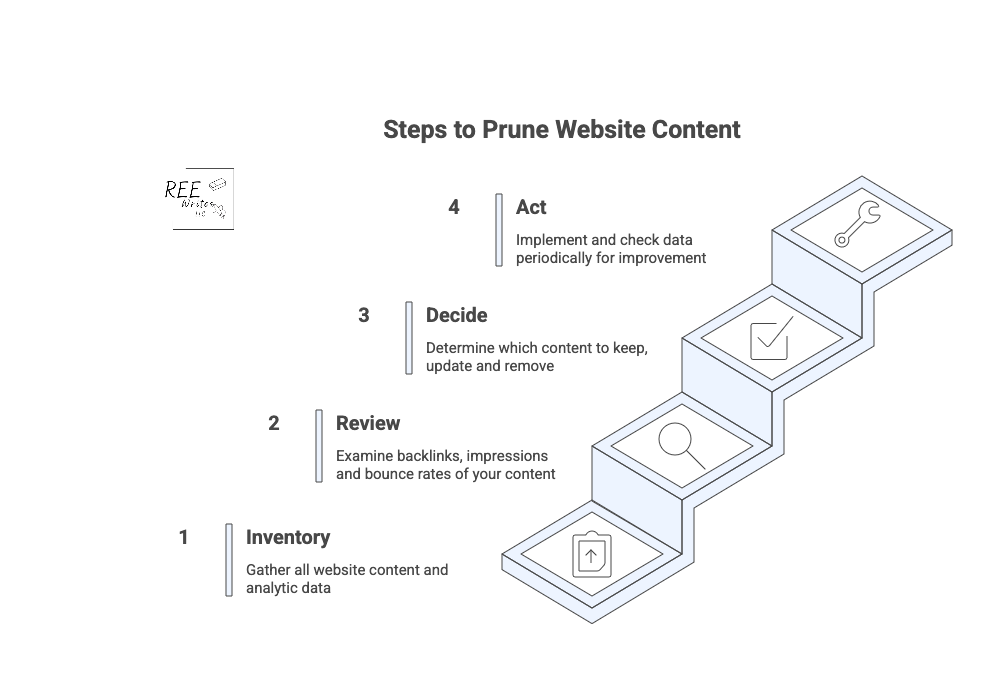
4 steps to prune your website content

Conduct a full content inventory

Start by creating a complete list of all your pages. You can use tools like:

  • Google Analytics for traffic data
  • Google Search Console for search performance
  • Screaming Frog for technical crawls
  • Your content management system (CMS) export for a basic page list

Export everything into a spreadsheet so you can analyze the data easily. (I’ve listed more tools further in this article.)

Review analytics to find problem pages

Look for pages that meet these criteria:

  • Less than 50 organic sessions in the past 12 months
  • Fewer than 50 search impressions
  • No backlinks from other sites
  • High bounce rates with short time on page

CNET’s recent content pruning experiment shows how powerful this can be. They removed thousands of articles and saw a 29% increase in organic traffic in just two months.

What could a 29% traffic increase could do for your business in two months?

Make decisions about each page

For every underperforming page, you have four options:

  1. Keep as-is: High-quality content that just needs time
  2. Update: Good topics that need fresh information
  3. Merge: Combine similar pages into one stronger piece
  4. Delete: Remove pages that serve no purpose

Don’t rush this step. Take time to evaluate each page’s potential value.

To make sure you get the best results, it’s smart to follow a clear process that we’ll go over next.

Best Practices for Effective Content Pruning

Source: Styled Stock Society

Following a clear process helps you avoid mistakes and get better results from your pruning efforts.

Keep a regular schedule

Content pruning works best as an ongoing process, not a one-time cleanup.

You should review your content every quarter, or 6 to 12 months as part of your regular SEO maintenance to prevent low-quality content from building up over time and keep your site performing at its best.

Use a systematic approach

The most successful content pruning follows these steps:

  1. Inventory: List all your content
  2. Audit: Analyze performance data
  3. Decide: Choose what to keep, fix, or remove
  4. Act: Implement your changes carefully

Follow this methodical approach so you don’t accidentally delete valuable content or create technical difficulties.

When you delete pages, always set up 301 redirects to send visitors and search engines to relevant replacement content. This preserves any SEO value the old page had.

Also check for:

Avoid These Common Pruning Mistakes

Source: Inquivix

Even with a good plan, it’s easy to make pruning mistakes. Here are the biggest pitfalls to watch out for.

Removing valuable pages that need updates

Don’t delete content just because it’s old. Some pages have good bones or evergreen content, but need fresh information or better optimization.

Before removing any page, ask yourself:

  • Does this topic still matter to my audience?
  • Could I make updates to improve this content instead of deleting it?
  • Are there any valuable backlinks I’d lose if I delete this?

Source: Bluehost

One of the costliest mistakes is deleting pages without setting up proper redirects. This creates 404 errors and frustrated users. Always redirect deleted pages to the most relevant existing content on your site.

Not involving stakeholders

Content pruning can affect other parts of your business. For instance:

  • Marketing campaigns may link to pages you’re considering for removal.
  • Sales teams might reference specific articles.

Since solopreneurs make all the decisions, you don’t have a team to notify before making major changes and deletions. Just be sure to document your decisions in case you ever decide to outsource.

Make Content Pruning Easier with These Tools

Source: Webgator

The right tools can speed up your content audit and help you make better decisions about what to keep and what to get rid of.

Essential analytics tools

Start with these free options:

  • Google Analytics: Shows traffic, bounce rates, and user behavior
  • Google Search Console: Reveals search performance and indexing issues
  • Screaming Frog: Crawls your site for technical SEO problems

For deeper analysis, consider paid tools like:

  • Ahrefs: Comprehensive SEO data and competitor research
  • SEMrush: Keyword tracking and content gap analysis
  • Clearscope: Content optimization and performance insights

Simple scoring systems

Create a simple point system to evaluate each page:

  • Traffic: 0 to 10 points based on monthly visitors
  • Engagement: 0 to 10 points for time on page and bounce rate
  • Links: 0 to 10 points for backlinks and internal links
  • Relevance: 0 to 10 points for topic alignment with your goals

Pages scoring below 15 to 20 points are good candidates for pruning.

Organizing your audit data

Use spreadsheets to track your decisions and results. Include columns for:

  • URL and page title
  • Current performance metrics
  • Action taken (keep, update, merge, delete)
  • New redirect URL (if applicable)
  • Implementation date

This documentation helps you track results and avoid repeating work.

Wrap Up

Content pruning is a smart way to strengthen your SEO and help your site’s best content shine. Include regular audits to review and trim low-quality content, to keep your site health and support higher search rankings.

It may seem like a big job, but remember, every small step you take to improve your website’s health is a win for your business. By focusing on quality, you’re not just improving your SEO; you’re building a stronger, more efficient business that works for you.

Try content pruning in your next website audit for greater visibility.

References

Ashbridge, Z. (2025). Content pruning: Boost SEO by removing underperformers. Search Engine Land. Retrieved from https://searchengineland.com/guides/content-pruning

Content Pruning: Remove Low-Quality Content to Improve SEO. (2025). Conductor. Retrieved from https://www.conductor.com/academy/content-pruning/

Content Pruning Efforts Content Pruning. (2023). Seer Interactive. Retrieved from https://www.seerinteractive.com/work/case-studies/content-pruning-efforts-help-reverse-traffic-loss

Deleting Website Content? SEO Best Practices. (n.d.). Slim SEO. Retrieved from https://wpslimseo.com/deleting-website-content-seo-best-practices/

Goodwin, D. (2023). Improving or removing content for SEO: How to do it the right way. Search Engine Land. Retrieved from https://searchengineland.com/improving-removing-content-seo-guide-430571

Gray, T. (2022). Content Pruning Case Study: How This Online Store Increased Strategic Content Revenue by 64%. Inflow. Retrieved from https://www.goinflow.com/blog/content-pruning-case-study/

Højris Bæk, D. (2024). Content Pruning Case Study: CNET search data suggests it works. SEO.AI. Retrieved from https://seo.ai/blog/content-pruning-case-study-cnet

Huang, B. (2024). What is Content Pruning and Why it Matters for SEO. Clearscope. Retrieved from https://www.clearscope.io/blog/what-is-content-pruning

Patel, N. (2024). Examining a Content Pruning Case Study. BacklinkManager. Retrieved from https://backlinkmanager.io/blog/examining-content-pruning-case-study/

In a Time Crunch? Here’s How to Do a Content Audit in 15 Minutes

In a Time Crunch? Here’s How to Do a Content Audit in 15 Minutes

Content Marketing SEO UX

A full content audit can feel like a massive project, taking days or even weeks to complete. But you’re busy running a business—nobody’s got time for that.

What if you could find your biggest content problems and opportunities in the time it takes to drink your morning coffee? ☕

You don’t need to block out your entire week to make a real impact on your website’s performance. This guide will walk you through a simple, focused process to audit your website’s content in just 15 minutes.

We don’t need to find every little flaw. In 15 minutes, you can spot the “low-hanging fruit,” or quick fixes that can boost your organic traffic and improve your site’s user experience (UX) right now.

Let’s set a timer and get started.

Contents


What’s the difference between a content gap analysis and a content audit?

Before we dive in, let’s clear something up. People often use the terms “content audit” and “content gap analysis” interchangeably, but they are two very different tasks with different goals. Knowing the difference helps you choose the right tool for the job.

Define the terms “content gap analysis” and “content audit”

A content audit is like looking in the mirror. You’re analyzing the content you already have on your website. The goal is to evaluate its performance, find weaknesses, and see what’s working well. You’ll look at metrics like page views, keyword rankings, and bounce rates to decide if a piece of content should be kept, updated, or removed.

A content gap analysis on the other hand, is like looking out the window at your neighbors. You’re researching what content your competitors have that you don’t. The goal is to find topics and keywords that your audience is searching for but that you haven’t covered. This helps you plan future content that can attract a wider audience.

When to do a content gap analysis

You should run a content gap analysis when you’re focused on growth and expansion. It’s the perfect tool for when you need to:

When to do a content audit

You should perform a content audit when you want to improve what you already have. It’s your go-to move for content consolidation and optimization. An audit is ideal when you need to:

  • Improve the performance of underperforming content.
  • Clean up outdated or irrelevant pages (thin content).
  • Find quick SEO wins to boost your rankings.
  • Ensure your existing content still meets your quality standards and business goals.

For example, case studies by cognitiveSEO show that several companies who conducted content audits led to significant increases in organic traffic just by pruning and improving existing content.

Source: Search Engine Land

What a 15-minute content audit can show you

This quick audit is all about speed and impact, so we’re not getting lost in the weeds. We’re looking for a handful of actionable insights that can make a difference right away.

Here are some things to do before you start that 15-minute timer.

Set realistic goals for a quick audit

In 15 minutes, you won’t be able to analyze every single page on your site, and that’s okay.

Your goal is simple: find 3 to 5 high-impact action items. This could be identifying a blog post to update, a title tag to rewrite, or a broken page to redirect.

Focus on big problems, not small details

This audit uses the 80/20 principle. We’re looking for the 20% of problems that are causing 80% of your performance issues.

Don’t worry about a typo on a page that gets two visits a month. Instead, focus on a high-traffic page with a terrible bounce rate or a page that has high impressions but almost no clicks. These are the big problems that, once fixed, deliver the biggest returns.

Identify your content’s “low-hanging fruit”

“Low-hanging fruit” refers to opportunities that require minimal effort for maximum gain. In a quick content audit, this typically includes:

  • Pages ranking on the bottom of page one or the top of page two in Google search results.
  • Content with high impressions but a low click-through rate (CTR).
  • Popular posts that can be updated with new information to boost their rankings further.
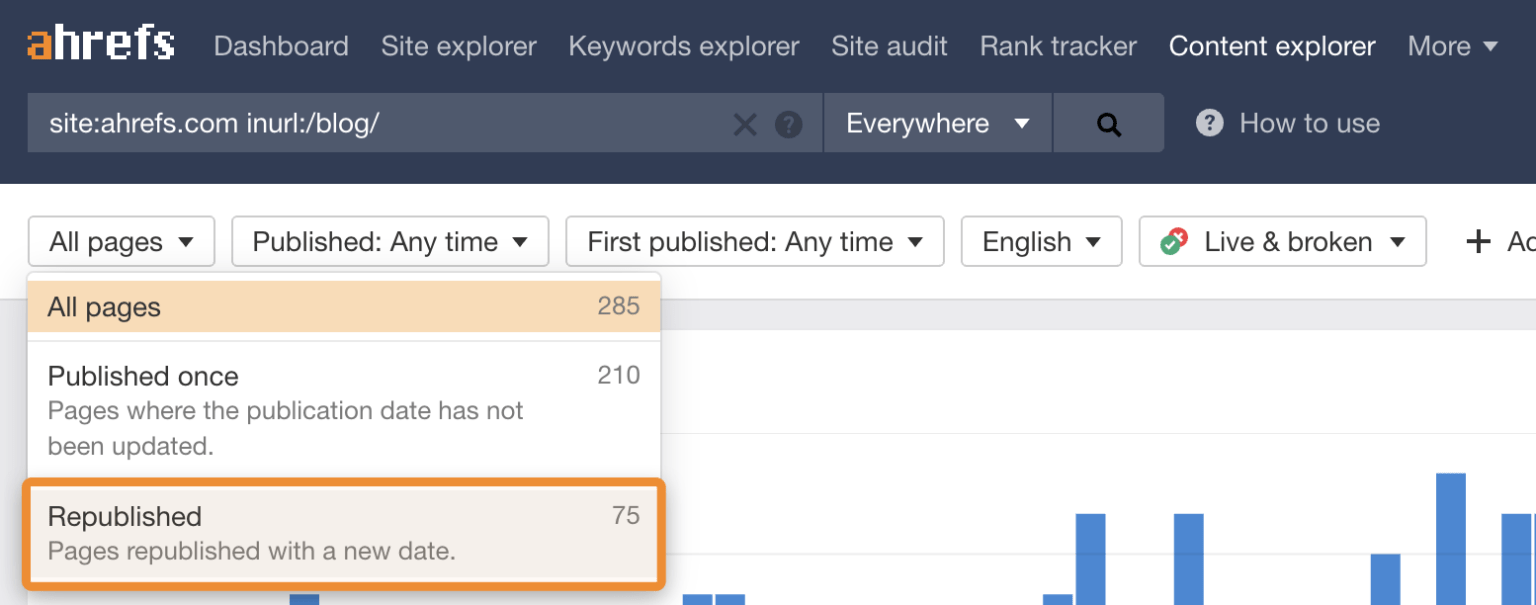
Source: Ahrefs

Updating existing content is one of the fastest ways to see results. Ahrefs continuously refreshes and republishes old blog posts with new data and optimized keywords to increase their organic traffic.

Think of this as a first step, not a complete fix

This 15-minute audit is like a health screening, not major surgery. It’s designed to give you a quick, actionable snapshot of your site’s condition. It will give you a clear to-do list to get started on, but it won’t replace the need for a deeper, more comprehensive audit every 6 to 12 months.

Create a content inventory or content audit matrix

To keep your findings organized, you need a simple content inventory spreadsheet, sometimes called an inventory or matrix.

Don’t overcomplicate it. Create a new sheet with these basic columns:

  • URL: The address of the page.
  • Topic/Keyword: The main topic the page covers.
  • Traffic (30 days): The number of sessions from organic search.
  • Impressions (30 days): How many times it appeared in search results.
  • CTR (30 days): The click-through rate, or how many times someone clicked on your webpage.
  • Action: A simple note on what to do (“Update,” “Improve Title,” “Redirect”).

Here’s how to do a content audit in 15 minutes.


Minutes 1 to 2: Get your tools ready

Source: Styled Stock Society

Okay, it’s time to start the clock! ⏱️ The first two minutes are for getting your workspace set up. Efficiency is key, so have these tools open and ready to go.

Get these tools for an effective content audit

For this quick audit, you only need three things, and they’re all free:

  1. Google Search Console (GSC): Shows how your site performs in Google search.
  2. Google Analytics (GA): Reveals what visitors do once they are on your site.
  3. A spreadsheet: Google Sheets or Excel to create your content inventory.

(Paid tools like Ahrefs and Semrush are fantastic for deep dives, but you don’t need them for this rapid-fire check-up.)

Open your Performance report in Google Search Console

Log in to your Google Search Console account. Then go to the Performance report, and set the date range to the last 28 or 30 days.

This is where you’ll find data straight from Google, including impressions, clicks, CTR, and your average position for different queries.

Access your All Pages report in Google Analytics

In a separate tab, open your Google Analytics (GA4) account. Go to Reports > Engagement > Pages and screens.

Filter the report to show only organic search traffic. This view will show you your most visited pages, average engagement time, and other on-site metrics.

Prepare a simple spreadsheet or a notepad

Have your spreadsheet ready with the columns we discussed earlier. As you go through the next steps, you’ll quickly paste in URLs and jot down notes. This prevents you from getting sidetracked and ensures you have a clear action plan when the 15 minutes are up.

Use a timer to stay on track

Set a real timer on your phone or computer for 15 minutes. This creates a sense of urgency and forces you to stay focused on the high-impact tasks instead of falling down a rabbit hole of data analysis.


Minutes 3 to 7: Find your best and worst pages

With your tools open and your timer running, it’s time to dig in. In this four-minute block, you’ll be a detective, quickly scanning for clues about your content’s health.

Spot your top-performing content

In Google Analytics, sort your Pages and screens report by organic users to see your most popular pages. These are your workhorses.

For the top 3 to 5 pages, ask yourself: “Is this content fully up-to-date?” and “Can I add internal links from this page to other important pages?” Add these URLs to your spreadsheet with a note like “Check for internal linking opportunities.”

Find pages with high impressions but low clicks

Switch back to Google Search Console. In the Performance report, click the Pages tab. Then filter your results to find pages that have a high number of impressions but a low CTR.

Backlinko found that simply moving from position #3 to position #2 in search results can double your CTR, and improving your title tag is a key way to do that. So add 2 or 3 of these URLs to your spreadsheet with the action: “Rewrite title/meta to improve CTR.”

Look for important pages with almost zero traffic

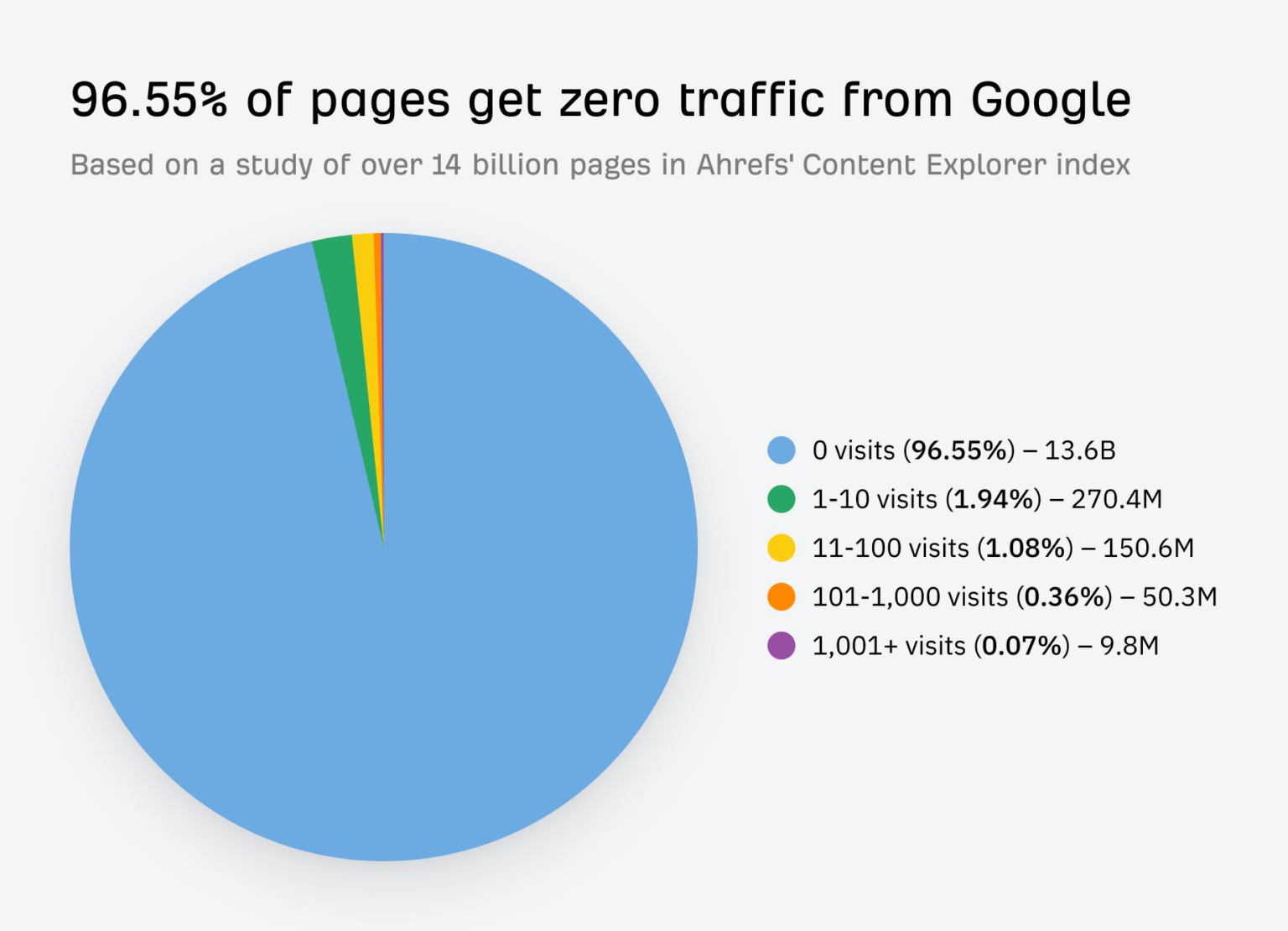
Source: Ahrefs

Do you have important product pages or cornerstone or pillar blog posts that aren’t getting any love from Google?

Scan your page list in GA for these critical assets. If they have very few organic sessions, they are prime candidates for an update. Some estimates suggest for many sites, over 50% of their content gets almost no traffic, and with the rise of AI Overviews in search, zero-click searches are the new normal.

Mark 1 or 2 of pillar posts in your spreadsheet with: “Needs a full refresh and re-optimization.”

Note pages that get traffic but have a high bounce rate

Back in Google Analytics, look for pages that get a decent amount of traffic but have a low average engagement time. This often signals a mismatch between what the user expected to find (based on your title) and what the page actually delivers.

This is a red flag for a poor user experience. Add one of these pages to your spreadsheet with the note: “Review for search intent mismatch.”


Minutes 8 to 12: Look for quick SEO wins

Now that you’ve identified some key pages, let’s spend the next four minutes looking for technical and on-page issues that are easy to fix but can have a big impact.

Check for pages with missing title tags

A missing or duplicate title tag is a basic SEO mistake that can hold your webpage back. You can spot these using GSC or a free browser extension.

If you find any, fixing them is one of the quickest wins you can get. A unique, compelling title tag is critical for both search engines and users.

Find content that ranks for the wrong keywords

In GSC, click on a specific page from your list, then click the “Queries” tab. Are the keywords listed here relevant to your page’s content?

Sometimes a page will rank for an unexpected term. This isn’t always bad! It could be an opportunity to re-optimize the page for that term or create a new piece of content that serves that search intent even better.

Source: Zyppy

Internal linking is one of the most underrated SEO tactics. It helps Google understand your information architecture and spreads authority throughout your site.

Look at one of your top-performing blog posts you found earlier. Read through it and see if there are any places where you can naturally link to a weaker (but important) page. Strategic internal linking can boost your site’s organic traffic.

Note any obvious UX problems

Quickly open the pages on your list in a new tab. How do they look? Have you viewed these pages on a mobile device?

Check for things that would annoy a user, like:

  • Aggressive pop-ups that block the content.
  • Slow load times.
  • Text that’s hard to read.
  • Broken images or videos.

Make a quick note of any glaring UX issues in your spreadsheet. Fixing these can directly impact how long people stay on your site and how Google perceives its quality.


Minutes 13 to 15: Decide what to do next

The timer is about to go off! In these final minutes, your goal is to turn your messy notes into a clean, prioritized action plan. This is where the audit becomes truly valuable.

Use a simple “keep, update, or remove” framework

Source: SEOBuddy

For every URL in your spreadsheet, assign it one of three statuses:

  • Keep: The content is performing well and is up-to-date. No action is needed right now.
  • Update: The content has potential but needs work. This could be a small tweak (like a new title), combining elements from two or more posts, or a major rewrite.
  • Remove: The content is outdated, irrelevant, and gets no traffic. These pages can be deleted and redirected (using a 301 redirect) to a more relevant page, called content pruning. Pruning this “dead weight” can sometimes improve your site’s overall SEO health.

Prioritize tasks that will have the biggest impact

How do you choose your priorities? Go back to the 80/20 rule. Which task will likely drive the most traffic or conversions for the least amount of effort? Updating the title tag on a page with 50,000 monthly impressions is more important than fixing a typo on a page with 10 monthly impressions (although you can do the latter quickly).

Look at your list of “Update” and “Remove” tasks, and choose the 3 to 5 you think will have the biggest and fastest impact. This is your official to-do list. You can’t do everything at once—save the rest for later.

Schedule a deeper audit for a later date

Finally, acknowledge that this was just a sprint. Put a reminder on your calendar three or six months from now to perform a more in-depth site audit. Consistent, iterative improvement is the key to a long-term, successful content performance strategy.

Your 15-Minute Audit is Complete!

And just like that, within just 15 minutes, you’ve moved from feeling overwhelmed by your website’s content to having a clear, prioritized list of actions that can improve your SEO.

This quick content audit proves you don’t need weeks to make real progress. While it doesn’t cover everything, it gives you an actionable list to start improving your SEO and providing more value to your audience right away. Run this quick check today and take the first step toward more organic traffic.

You don’t need weeks to make progress. By focusing on high-impact tasks and ignoring the small stuff, you can make meaningful changes quickly. Now, take that short to-do list you created and schedule time to get it done. Run this quick audit every quarter, and you’ll build powerful momentum toward better rankings and a healthier website.


References

Antara. (2025). Google AI Search Impact: Website Traffic Slashes by 50%. Analytics Insight. Retrieved from https://www.analyticsinsight.net/news/google-ai-search-impact-website-traffic-slashes-by-50

Content pruning for SEO. (n.d.). LearningSEO. Retrieved from https://learningseo.io/seo_roadmap/deepen-knowledge/content/content-pruning/

Dean, B. (2022). We Analyzed 4 Million Google Search Results. Here’s What We Learned About Organic Click Through Rate. Backlinko. Retrieved from https://backlinko.com/google-ctr-stats

Hardwick, J. (2020). Republishing Content: How to Update Old Blog Posts for SEO. Ahrefs. Retrieved from https://ahrefs.com/blog/republishing-content/

Sauciuc, A. (2025). Is Content Pruning Good for SEO? Case Studies + Experts’ Opinions. cognitiveSEO. Retrieved from https://cognitiveseo.com/blog/17548/content-pruning-for-seo/

Shepard, C. (2025). 23 Million Internal Links – SEO Case Study. Zyppy. Retrieved from https://zyppy.com/seo/seo-study/

Soulo, T. (2023). 96.55% of Content Gets No Traffic From Google. Here’s How to Be in the Other 3.45% [New Research for 2023]. Ahrefs. Retrieved from https://ahrefs.com/blog/search-traffic-study/

Content Gap Analysis: A Step-by-Step Guide for Better SEO

Content Gap Analysis: A Step-by-Step Guide for Better SEO

Content Marketing Copywriting SEO

Are you creating content, but still feel like you’re falling behind your competition? You publish blog posts, update your site, but it seems like everyone else is getting more traffic and ranking higher on Google.

Do you know exactly what your audience is searching for, that you haven’t covered in your content? A content gap analysis is a powerful way to find those hidden opportunities as a clear roadmap to attract more visitors with your content.

Let’s go over a 4-step process to find these gaps, fill them with valuable content, and grow your audience.

Contents

What Is a Content Gap Analysis?

It’s a great question, and the answer is simpler than you might think. A content gap analysis is a powerful way to find opportunities for your business.

A content gap analysis finds topics and keywords important to your audience that your business doesn’t cover. It usually involves looking at the keywords your competitors rank for in search results that you don’t.

The goal is simple: identify holes in your content that your audience needs you to fill. Creating useful resources builds trust and authority with potential customers.

Think of it like a grocery store owner checking a rival’s aisles. If they see customers constantly buying a popular brand of organic granola that they don’t stock, they’re missing out on sales. That’s called a “product gap.”

You’re doing the same thing, but with information. You’re looking for information your audience wants, but they can’t find on your site.

Content strategies must be hyper-focused on customer needs to be effective. A content gap analysis is the most direct way to align your strategy with your audience’s needs.

Now that we’ve covered the basics, let’s look at how this can help your search engine optimization (SEO) and make your content work harder for you.

How Content Gap Analysis Affects Your SEO

Conducting a content gap analysis is a core part of a smart SEO and content strategy that delivers real results. It helps you stop creating content based on guesses and start making data-driven decisions that directly impact your growth. Here’s why it’s so important.

Find new keyword opportunities

Think you know all the important keywords for your industry? There’s always more to discover.

A content gap analysis uncovers valuable keywords your competitors are using to attract visitors—visitors that could be yours. These are often long-tail keywords or specific questions that show a user is further along in their buying journey.

Long-tail keywords (phrases of 3+ words) make up a significant portion of all Google searches. These less-competitive phrases often have higher conversion rates because the user’s search intent is much more specific. By finding gaps, you’ll also find these high-intent long-tail keywords.

Different types of content gaps

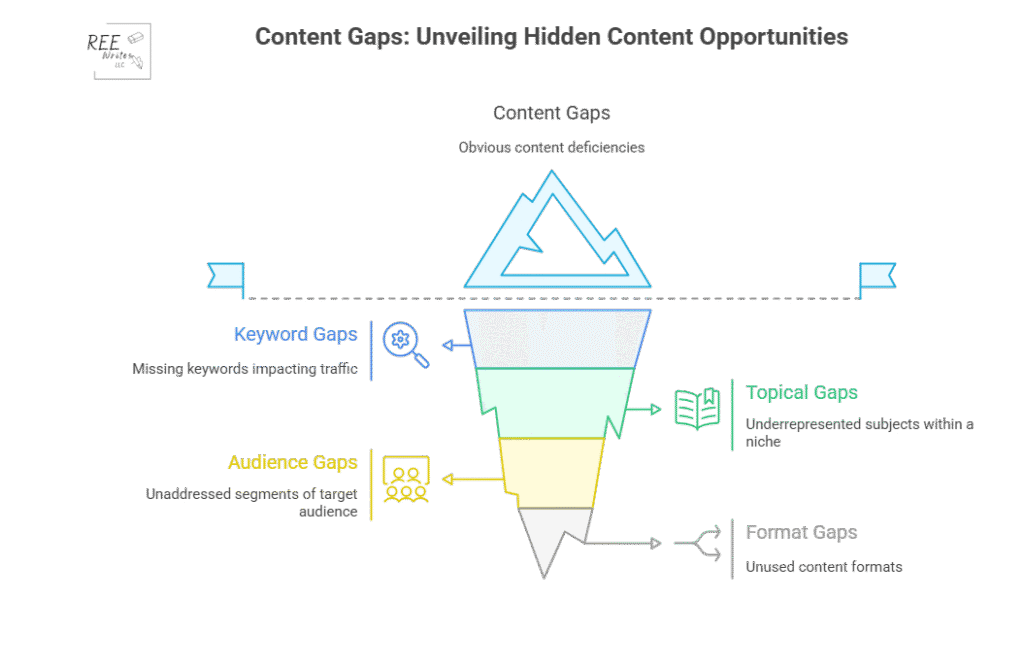
There are four types of content gaps you can address to be sure that your content strategy is thorough and promotes conversions:

  1. Keywords: Searches your competitors rank for, but you don’t.
  2. Topics: Categories and subtopics relevant to your audience that you’ve not addressed.
  3. Audiences: Segments of your target market whom you’ve neglected.
  4. Formats: Content types like videos, blogs, case studies and podcasts your audience likes, but you don’t have.

Understand your audience

What questions are your potential customers asking? What are their biggest problems? A content gap analysis helps you get a clearer picture of what your audience needs at every stage of their journey. By seeing what topics are popular on competitor sites, you get direct insight into the conversations happening in your industry. This allows you to create content that truly resonates and helps people.

Let’s say for example that you’re a B2B software company, and you see your main competitor has an entire section of their blog dedicated to “integrations with other software.” If you have no content on this topic, you could address this gap by creating a series of articles on how their product works with other popular tools, and get an increase in qualified leads from your blog within a few months.

Outperform competitors

To get ahead, you have to be better than your competitors and cover the topics they’ve missed.

You can systematically cover topics your competition already ranks for, but you can create more comprehensive, up-to-date, and helpful content to win the top spot on Google. You can also find the “gaps within the gaps”—topics that none of your competitors are adequately covering. This analysis gives you a strategic advantage.

Competitor analysis is an important piece of your marketing and content strategy. It’s the foundation for identifying opportunities to gain a competitive edge in search rankings.

Improve the customer journey

The customer journey isn’t a straight line. People move from being aware they have a problem, to considering different solutions, to making a final decision. You need content that supports them at every stage.

Source: Talkative

A content gap analysis helps you see if you’re missing content for a critical stage. For example, you might have great blog posts for the “awareness” stage, but no comparison guides for the “consideration” stage.

Ensuring a seamless customer journey with helpful information at each touchpoint can significantly increase customer satisfaction and conversion rates. Customers who receive helpful content throughout their journey are more likely to become loyal brand advocates. Filling your content gaps can help you do that.

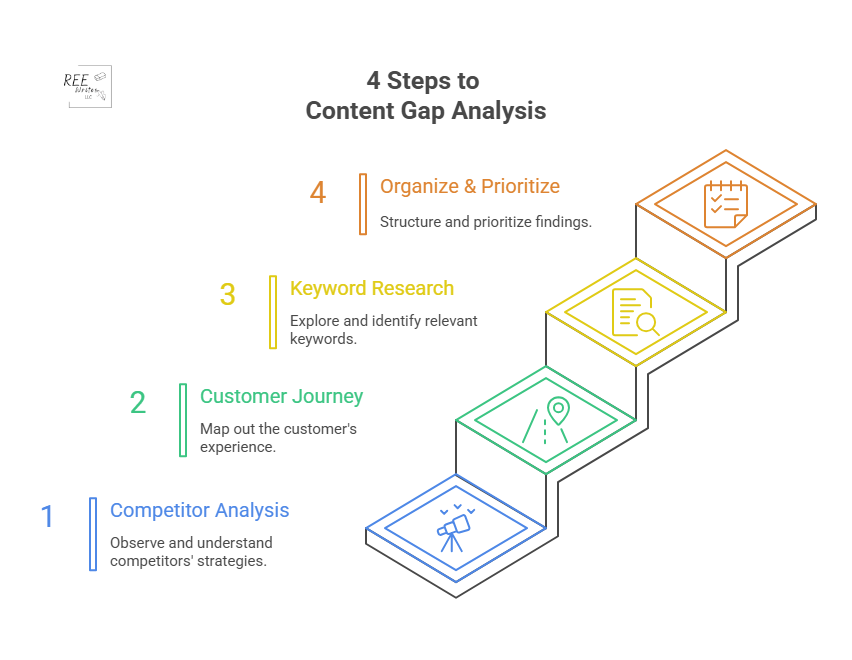
4 Steps to Content Gap Analysis

Now that you understand why it’s so important, let’s get into the how. Here’s a four-step process to find and fill the gaps in your own content strategy.

Step 1: Analyze Your Competitor’s Content

What’s already working for others in your space? Let’s find out, using SEO tools to get a data-backed look at your competitors’ content performance.

First, identify your SEO competitors. These are websites that consistently show up on the first page of Google for the keywords you want to rank for.

Next, use an SEO tool to do the heavy lifting. Tools like Ahrefs, Semrush, and Moz have specific “gap analysis” features built for this exact purpose. These competitive analysis tools are essential for your digital marketing strategy, saving you hundreds of hours of manual research.

Source: Semrush

Here’s a typical workflow using Semrush’s Keyword Gap tool:

  1. Enter the domains: Input your own website’s domain and the domains of up to four of your top SEO competitors.
  2. Run the analysis: The tool will compare the keyword profiles of all the websites.
  3. Find the gaps: Filter the results to show keywords where your competitors rank (e.g., in the top 10 results), but your site does not. Semrush has a “Missing” filter perfect for this.

This process will give you a spreadsheet full of valuable keywords and topic ideas that are already proven to attract visitors in your industry. This data-driven approach removes guesswork and gives you a clear starting point.

Step 2: Map the Customer Journey

A content gap can also exist within your own site. You might be missing content for crucial stages of the customer journey, leaving potential customers stuck.

Think about the journey in three simple stages:

  • Awareness Stage: The person knows they have a problem but doesn’t know the solution yet. They are looking for educational, top-level information.
    Examples: “Why is my skin so dry in the winter?” “How to improve team productivity.”
  • Consideration Stage: The person now understands their problem and is researching different solutions or methods to solve it. Examples: “Hyaluronic acid vs. glycerin for dry skin.” “Asana vs. Trello for project management.”
  • Decision Stage: The person has decided on a type of solution and is now comparing specific products or services to make a purchase. Examples: “CeraVe Moisturizing Cream review.” “Best price on Asana business plan.”

Now audit your existing content. To do a content audit, create a simple spreadsheet and categorize your current articles, guides, and landing pages into these three stages. You’ll quickly see where the gaps are. Do you have dozens of “awareness” blog posts but no “consideration” comparison guides? That’s a huge content gap you need to fill to guide users toward a purchase.

Step 3: Use Keyword Research to Find Questions

Sometimes the biggest opportunities lie in the specific questions people are asking. These questions are a goldmine for content ideas because they tell you exactly what’s on your audience’s mind.

Source: Swarm Digital

There are several free and easy ways to find these questions:

  • Google’s “People Also Ask” (PAA) Box: When you search for a keyword, Google often shows a box with related questions. This is a direct look into what other users are searching for. Click on a question, and more will appear.
  • AnswerThePublic: This free tool takes your keyword and generates a visualization of hundreds of questions related to it, broken down by who, what, where, when, why, and how.
  • Forums: Search for your topic on these sites like Reddit and Quora and look at the discussions. What are people confused about? What problems are they trying to solve? The language is natural, giving you raw insight into your audience’s pain points.

For example, if your main topic is “email marketing,” you might discover from the PAA box that people are asking, “How often should a small business send emails?” or “What are the best free email marketing tools?” These are perfect topics for new articles that address a very specific need.

Step 4: Organize and Prioritize Your Ideas

By now, you should have a long list of potential content ideas from your competitor analysis, customer journey mapping, and question research. The final step is to organize these ideas and decide what to work on first.

Create a master spreadsheet for your content ideas. For each idea, include these columns:

Topic IdeaTarget/Focus KeywordStage of Customer JourneyMonthly Search VolumeKeyword DifficultyBusiness Relevance
(1 to 5)
How to Choose Project Management Softwarechoose project management softwareConsideration800Medium5
Asana vs. Trelloasana vs trelloConsideration2,500High4
Best Free Email Marketing Toolsfree email marketing toolsDecision5,000High3

Use this data to prioritize. A good approach is to look for topics with a sweet spot of:

  • High business relevance
  • Decent search volume (100 to 1,000 searches per month minimum)
  • Manageable keyword difficulty (KD)

Then group related topics into topic clusters to build authority on a subject and improve your internal linking structure. This ensures you’re creating content that will not only attract traffic but attract the right leads who are likely to be interested in your products or services.

Once you’re done, you’re actually not done. Measure the success of your new or updated content by tracking keyword rankings, organic traffic, conversions, and other important metrics.

Wrap Up

A content gap analysis takes the guesswork out of your content strategy. Instead of wondering what to write next, you’ll have a clear roadmap based on real data about your audience and competitors. Do a content gap analysis regularly to fill the holes in your content, meet your audience’s needs, and steadily grow your organic traffic.

References

Ahrefs. (2023). Ahrefs Keyword Explorer Data. Ahrefs Pte. Ltd. Retrieved from [https://ahrefs.com/keywords-explorer.

AirOps (2024). Content Gap Analysis: Types, Examples & Step-by-Step Guide. Retrieved from https://www.airops.com/blog/content-gap-analysis-examples

du Plessis, C. (2022). A Scoping Review of the Effect of Content Marketing on Online Consumer Behavior. SAGE Open, 12(2). https://doi.org/10.1177/21582440221093042

Search Engine Journal. (2025). The State of SEO: A 2025 Report. Retrieved from https://www.searchenginejournal.com/state-of-seo/

“It Needs to Sound More Conversational”: Simple Hacks to Write More Human-Sounding Copy to Engage Your Audience

“It Needs to Sound More Conversational”: Simple Hacks to Write More Human-Sounding Copy to Engage Your Audience

Content Marketing Copywriting UX

Ever read a block of text and felt completely lost? It happens. A lot of writing sounds stiff, formal, and, well, robotic. It’s packed with jargon and complex sentences that make you feel like you need a secret decoder ring just to understand the main point.

But what if you could write in a way that truly connects with people? What if your words could make them feel like they’re having a friendly chat with you over a cup of coffee?

In a world where attention is the most valuable currency, how you say something is just as important as what you say.

A conversational style, with its simple language and direct address, is perfectly designed for this behavior. It grabs attention, pulls readers in, and holds them there.

Let me show you how to adopt a conversational writing style to build trust, boost engagement, and keep your readers hooked from the first sentence to the last.

Contents

What is a Conversational Writing Style?

Source: Styled Stock Society

Conversational writing is a style that mimics the patterns and rhythm of natural, spoken conversation. It’s warm, approachable, and personal.

Think of it as writing for a friend rather than for a panel of judges. The goal is to close the distance between you and your reader, making your message feel less like a lecture and more like a one-on-one dialogue.

This approach isn’t just about sounding friendly; it’s a strategic choice that can have a big impact on how your audience receives your message.

Write the way you talk (but better)

It’s popular advice to “write like you talk.” This is a great starting point, but actually, when you write the way you talk, you should make it clearer and more concise.

When we speak, we often ramble, use filler words (“um,” “like,” “you know”), and jump between ideas. But conversational writing takes the best parts of talking—the natural flow, the simple vocabulary, the personal touch—and edits out the messiness.

It’s a polished version of your spoken voice that keeps the personality, while ensuring the message is direct, organized, and easy to follow. (You’re aiming for the clarity of a great public speaker, not the rambling of a long, unfocused story.)

The difference between a conversational and a formal tone

The easiest way to understand conversational writing is to see it next to its opposite: formal writing. Formal writing is what you see in academic papers, legal documents, or traditional corporate reports. It’s impersonal, objective, and often complex.

A few examples:

Formal ToneConversational Tone
The organization will implement a new strategy to enhance customer satisfaction.We’re rolling out a new plan to make you, our customers, happier.
All employees are required to complete the mandatory training by the specified deadline.Hey team, please make sure you finish the required training by the deadline.
Further investigation is needed to ascertain the cause of the discrepancy.We need to look into what caused this issue.
It has been determined by management that remote work will be permitted on Fridays.Good news! We’ve decided you can work from home on Fridays.

See the difference? The conversational examples are direct, use personal pronouns, and feature simpler words. They feel more human and are much easier to understand at a glance.

How a conversational style builds trust with your audience

Trust is the foundation of any good relationship, which includes the one between you and your audience. A conversational tone helps build that trust by making your brand or message feel more authentic and relatable.

When you write in a stiff, corporate voice, you create a barrier. It can feel like you’re hiding behind a wall of formality. In contrast, a conversational voice feels open and honest. It signals that there’s a real person behind the words.

A brand voice that is authentic and consistent helps build customer trust and loyalty over time because it makes the brand more memorable and reliable (Gaidar, 2023). People trust what they can understand and who they feel connected to. By ditching the corporate-speak, you’re telling your readers, “We’re on the same level, and we want to help you.”

How it improves clarity and readability

Source: Styled Stock Society

Have you ever tried to assemble furniture using a poorly written instruction manual? It’s frustrating because it’s not clear.

Conversational writing is all about clarity. It prioritizes simple language, active voice, and shorter sentences—all elements that make your text easier to read and understand.

This isn’t just a matter of preference; it’s about how our brains process information. When text is easy to read, it lowers the “cognitive load,” meaning your reader doesn’t have to work as hard to get the message. This makes them more likely to stay on the page and absorb what you’re saying.

Plain language is for everyone—even experts—because all users appreciate content that is clear, concise, and easy to understand.

Now that you understand what conversational writing is and why it’s so effective, let’s get into the practical side of things. How do you do it?

Simple Tricks to Write in a Conversational Tone

Adopting a conversational tone isn’t about changing who you are; it’s about letting more of your natural voice shine through in your writing. Here are some simple, powerful techniques you can start using right now.

Use the first and second person (“we,” “I,” and “you”)

This is the fastest way to make your writing feel like a dialogue.

  • “You” and “Your”: These words speak directly to the reader, making them feel seen and included. It changes the experience from passive observation to active participation. Instead of “A user can benefit from this feature,” you’d write, “You can benefit from this feature.”
  • “I” and “We”: These pronouns establish your presence in the conversation. “I” adds a personal touch and shows you’re sharing your own perspective. “We” creates a sense of community and shared purpose, making the reader feel like they’re part of a team.

Write with simple words and avoid jargon

Source: Norman Nielsen Group

Imagine you’re explaining a topic to a friend who knows nothing about it. You wouldn’t use technical jargon or complicated vocabulary, would you? You’d use simple, everyday words. Do the same in your writing.

Industry-specific terms can make you sound smart to your peers, but they alienate everyone else. If you absolutely must use a technical term, take a moment to explain it in simple language.

For example:

  • Instead of: “We must leverage our core competencies to synergize our cross-functional teams.”
  • Try: “We need to use our team’s main strengths to work together more effectively.”

Clarity always wins over complexity.

Use contractions like “you’re,” “it’s,” and “don’t”

In spoken conversation, we naturally use contractions. We say “don’t” instead of “do not” and “it’s” instead of “it is.” Using them in your writing is a simple cue that tells the reader your tone is informal and friendly.

For a long time, formal writing guides advised against contractions, but for modern web content, they are essential for creating a natural, conversational flow. Omitting them can make your writing sound stiff and overly formal.

Ask your reader direct questions

Source: Learn English with Harry

Have you noticed how questions are used in this article? Questions are a powerful tool for engagement. They break up the text, create a mental pause for the reader, and encourage them to think about the topic in a personal way.

You can use questions to:

  • Introduce a new section.
  • Check for understanding (“Make sense?”).
  • Encourage reflection (“What would you do in this situation?”).
  • Make a point more impactful.

Asking questions turns a monologue into a dialogue, even if the reader’s answer is only in their head.

Keep your sentences and paragraphs short

When you talk, you naturally pause for breath. Short sentences and paragraphs create a similar rhythm in your writing. They serve as visual and mental resting spots for your reader.

Long walls of text are intimidating, especially on a screen. Here’s a good rule of thumb:

  • Sentences: Aim for an average of 15 to 20 words. Mix it up with some very short sentences for emphasis. Like this.
  • Paragraphs: Try to keep paragraphs to 3 to 4 sentences. A one-sentence paragraph can also be very effective for highlighting a key idea.

This structure makes your content more scannable and much less overwhelming for your audience.

Tell a story or use a good analogy

Source: Techfunnel

Humans are wired for stories. We’ve been using them to share information and connect with each other for thousands of years. A well-placed story or analogy can make even the most complex topic relatable and memorable.

Neuroeconomist Paul J. Zak’s research, featured in Harvard Business Review, shows that our brains release oxytocin—a chemical associated with empathy—when we are engaged in a compelling narrative. This neurochemical response makes us more likely to trust the storyteller and internalize the message.

  • Instead of: “Our software improves efficiency by 30%.”
  • Try: “Meet Sarah. She used to spend 10 hours a week on manual data entry. After switching to our software, she now gets the same work done in 7 hours, giving her more time to focus on what really matters.”

Stories stick with people long after they’ve forgotten the statistics.

Once you’ve written your draft using these techniques, the most important step comes next. It’s a simple action that can make the biggest difference in your writing.

Read Your Copy Aloud to Find Awkward Phrasing

This might be the single most effective editing trick in a writer’s toolkit. When you read your work aloud, you engage a different part of your brain. You’re not just seeing the words; you’re hearing them. This process reveals awkward phrasing, clunky sentences, and unnatural rhythms that your eyes might have skimmed over.

Why your ear catches what your eye misses

When you read silently, your brain is incredibly efficient. It often autocorrects small mistakes, fills in missing words, and glides over slightly awkward sentences without you even noticing. You read what you intended to write, not necessarily what’s on the page.

However, when you speak the words, that shortcut is gone. You are forced to process each word and sentence structure exactly as it is. Your ear, trained from years of listening to conversations, is a natural detector for what sounds human and what sounds robotic. If it sounds weird when you say it, it will definitely feel weird for your audience to read it.

How to spot clunky sentences and unnatural words

As you read your text aloud, listen for specific red flags:

  • Sentences where you run out of breath: This is a clear sign the sentence is too long or convoluted.
  • Words that make you stumble: If you have trouble pronouncing a word, it’s probably too complex. Swap it for a simpler alternative.
  • Clumsy or repetitive rhythms: Does every sentence sound the same? Do you use the same word too many times in one paragraph? Your ear will pick up on this monotony.
  • Phrases that just don’t sound like something a real person would say: If you find yourself thinking, “I would never say this in a real conversation,” that’s your cue to rewrite it.

A step-by-step process for an “out loud” edit

To get the most out of this technique, follow a simple process:

  1. Find a quiet space. You need to be able to hear yourself clearly without distractions.
  2. Read at a natural pace. Don’t rush. Speak the words as if you were having a conversation.
  3. Use a pen or your cursor. As you read, mark or highlight any part that feels awkward, clunky, or confusing. Don’t stop to fix it yet—just mark it and keep going to maintain the flow.
  4. Review your notes. Once you’ve finished reading, go back to the parts you highlighted. Now is the time to edit.
  5. Read it aloud again. After making your changes, do one final read-aloud to make sure the new version flows smoothly.

What to do when you find an awkward phrase

When you hit a stumbling block, don’t panic. The fix is usually straightforward.

  • If a sentence is too long, break it into two or three shorter sentences.
  • If a word is too complex, find a simpler synonym. (Use an online thesaurus to find them.)
  • If the phrasing is unnatural, ask yourself, “How would I say this to a friend?” Then write that down. Often, the most natural-sounding fix is the one that comes to mind first.

While your own ear is your best tool, you don’t have to go it alone. Technology can offer a helpful second opinion.

Tools That Help Your Conversational Tone

Modern writing tools can act as a great co-pilot, helping you spot issues and refine your tone. They can analyze your text in seconds and provide data-driven suggestions to make your writing more conversational and accessible.

Use a readability score checker

Source: Readable

Readability scores measure how easy your text is to understand. The most common one is the Flesch-Kincaid Grade Level. This score estimates the U.S. school grade level required to comprehend the text. For most web content, the best practice is to aim for a maximum 7th- or 8th-grade reading level.

Many platforms, like WordPress with the Yoast SEO plugin, have built-in readability checkers. You can also use free online tools where you simply paste your text to get a score.

How apps like Hemingway help simplify your text

The Hemingway App is a fantastic tool specifically designed to make your writing bold and clear. It doesn’t just check for spelling and grammar; it highlights common problem areas that hurt readability:

  • Sentences that are hard to read: It flags long, complex sentences in yellow.
  • Sentences that are very hard to read: These get highlighted in red.
  • Use of passive voice: It points out instances of passive voice, which can make your writing weaker and less direct.
  • Complex words: It suggests simpler alternatives for multisyllable words.
  • Adverbs: It helps you cut down on weak adverbs.

Using Hemingway is like having a tough but fair editor looking over your shoulder, constantly pushing you to be more direct and clear.

The benefit of grammar tools for flow and clarity

Source: Grammarly

Tools like Grammarly have also evolved beyond simple spell-checking. The premium versions now offer sophisticated suggestions for tone, clarity, and fluency. Grammarly can detect if your tone sounds formal, confident, or friendly, and it will offer changes to better match your intended voice.

It can also help you rewrite wordy sentences to be more concise and rephrase passages that might be unclear to the reader. These AI-powered suggestions can be incredibly helpful for catching subtle issues and ensuring your conversational style is consistent throughout your piece.

A conversational tone is powerful, but like any tool, it can be misused. To keep your writing effective and professional, you need to be aware of the common pitfalls.

Common Mistakes in Conversational Writing

Writing conversationally doesn’t mean abandoning all the rules. The goal is to be clear, engaging, and professional—not sloppy. Here are a few common mistakes to watch out for.

Overusing slang and emojis

Source: Intellum

While a well-placed emoji or a bit of modern slang can add personality, it’s easy to overdo it. The key is to know your audience. A blog post for Gen Z marketers might benefit from a 🔥 or a bit of slang, but the same approach would likely fall flat in a report for C-suite executives.

Overusing these elements can make your writing seem unprofessional or, even worse, like you’re trying too hard. Use them sparingly and only when you’re confident they match your audience’s expectations and your brand’s voice.

Mismatching the tone to your brand voice

Your conversational style should always align with your overall brand identity. Is your brand playful and witty? Or is it more helpful and reassuring? Your tone should be a reflection of that personality.

A consistent brand voice is essential for building brand recognition and fostering customer loyalty. When customers can reliably predict a brand’s personality through its voice, it builds a stronger, more trusting relationship.

If your website’s homepage is formal and corporate, but your blog is suddenly filled with casual banter, that inconsistency can be jarring for your audience. Make sure your conversational efforts feel authentic to your brand.

Forgetting basic grammar and spelling rules

Source: Your Dictionary

Conversational does not mean careless. Proper grammar, spelling, and punctuation are still essential for credibility. Errors can make your writing look unprofessional and distract the reader from your message.

While you can bend some rules (like starting a sentence with “And” or “But”), the fundamentals still matter. Always proofread your work or use a grammar tool to catch any mistakes before you publish. A clean, error-free copy shows respect for your reader’s time and attention.

Using filler words

Filler words are the verbal clutter of writing. They sneak into sentences and add length without adding any meaning. They weaken your message and make you sound less confident.

Here are some common filler words to watch out for and cut:

  • Just
  • Really
  • Very
  • Actually
  • Basically
  • In order to (just use “to”)
  • That (often unnecessary, e.g., “He said that he was going” vs. “He said he was going”)

Many filler words are adverbs (words that end with “-ly”).

Be ruthless in your editing. If a word doesn’t add value, delete it. Your writing will be stronger and more direct as a result.

Wrap Up

Mastering conversational writing doesn’t happen overnight, but it’s a skill that pays off in every piece of content you create. By using simple language, writing directly to your reader with “you,” and telling stories, you can make your work more relatable, engaging, and effective.

But if you take only one thing away from this guide: read your work aloud. It’s the most powerful tool you have for bridging the gap between the words on the screen and the human voice you want your audience to hear. It’s simplest and fastest way to ensure your message sounds natural, clear, and, most importantly, human.

Try one or two of these tips in your next email, LinkedIn article or blog post. You’ll be surprised at how a friendly, conversational tone can help you connect with your audience on a much deeper level.

References

Loranger, H. (2017). Plain Language Is for Everyone, Even Experts. Nielsen Norman Group. Retrieved from https://www.nngroup.com/articles/plain-language-experts/

Zak, P. J. (2014). Why Your Brain Loves Good Storytelling. Harvard Business Review. Retrieved from https://hbr.org/2014/10/why-your-brain-loves-good-storytelling

How to Create Consistent, High-Quality Content to Stand Out and Attract More Clients

How to Create Consistent, High-Quality Content to Stand Out and Attract More Clients

Content Marketing Copywriting UX

Ever wonder why some brands just feel more trustworthy? It’s not magic—it’s consistent high-quality content.

But producing great blog posts, videos, and social media updates week after week isn’t easy — especially when you’re a solopreneur without a team. One week you’re ahead of schedule; the next, you’re scrambling to post something.

This guide gives you a clear, repeatable content creation system to produce high-quality content every time.

Contents

Summary

To create high-quality content consistently, define a clear content style guide, use a content calendar to plan topics, follow a structured workflow for writing and editing, and leverage tools like Grammarly and Hemingway for proofreading. Maintain a consistent brand voice across all platforms, adapt your message for each format, and repurpose existing content to maximize reach. This combination builds trust, improves SEO, and keeps your audience engaged.

Why content quality and consistency matter

Before we dive into the “how,” let’s talk about the “why.”

You might think producing a lot of content is the goal. But what’s the point if it’s messy, off-brand, or full of errors?

High-quality, consistent content isn’t just a “nice-to-have.” It’s the engine that drives brand growth, builds relationships with your audience, and ultimately, helps your business succeed.

Consistency drives real results. Here’s how.

Source: Buffer

Build brand trust and authority with your audience

Trust is the currency of the modern internet. When your content is consistently helpful, well-researched, and professional, your audience learns to see you as a reliable expert.

This brand trust is critical. 77% of customers are more likely to buy a product or service if they follow that brand on social media. An audience can sense whether you’re reliable.

Every error-free article or on-brand video you publish is like a deposit in your audience’s trust bank. Inconsistent messaging or sloppy work does the opposite, eroding the confidence you’ve worked so hard to build.

Improve user experience and keep readers engaged

High-quality content creates a positive user experience. It’s easy to read, answers the user’s questions, and guides them smoothly. This engagement is a signal to search engines that your content is valuable. Clear, valuable, and predictable content keeps people on your site longer, and coming back for more.

HubSpot found that companies publishing 16+ blog posts per month get 3.5× more traffic than those posting 0 to 4 times per month.

When users enjoy your content, they stay longer, share more, and are more likely to become loyal followers.

Boost your SEO and search engine rankings

SEO vs Creativity Venn diagram

Google’s mission is to give people the best possible answers to their questions, which is why they prioritize high-quality, authoritative, and helpful content. Google’s Helpful Content update rewards sites with original, helpful, well-structured, people-first content posted consistently.

While keywords are important, Google’s algorithms have become incredibly sophisticated at recognizing content that truly satisfies user intent. Backlinko found a strong correlation between in-depth, high-quality content and top search engine rankings.

Consistently publishing excellent content sends signals to search engines that your site is a trustworthy source, which can lead to better visibility and more organic traffic over time.

Create a recognizable and memorable brand voice

Source: VTiger

Your brand voice is your company’s personality. Is it witty and fun? Professional and authoritative? Warm and friendly?

Consistency in your tone and style makes your brand instantly recognizable, no matter where someone encounters it, whether on your blog, on TikTok, or in an email newsletter. This consistent personality builds a stronger connection with your audience.

When your tone and style are consistent, readers know what to expect. This familiarity builds a stronger emotional connection as your audience gets to know you.

Your Foundation for Quality: The Style Guide

If you want to build a sturdy house, you need a blueprint. For content, that blueprint is a style guide.

A style guide is a document that outlines all your brand’s content rules. It’s the single source of truth that ensures everyone on your team—from writers to designers to marketers—is on the same page.

Think of a style guide as your brand’s rulebook for content creation. This document is what turns chaotic content creation into a smooth, streamlined process. It saves time, prevents mistakes, and ensures every piece sounds like you.

Define your brand voice and tone

Your brand voice is what you say, while your tone is how you say it in different situations. Your style guide should clearly define this.

For example, your voice might be “helpful expert,” but your tone could shift from “reassuring and calm” on a support page, to “exciting and energetic” for a new product announcement.

Your style guide should include a list of “we are” and “we are not” words (“We are: clear, friendly, direct. We are not: academic, silly, vague”).

Think: who are you online? Friendly? Straight to the point? Formal or casual? Inspirational or instructional?

Mailchimp, for example, describes its voice as “plainspoken with a dry sense of humor,” and every piece matches it.

Write a few sample sentences in your brand’s voice. Then test them: do they feel right? Ask a friend, then take the time to develop your brand personality.

Establish your editorial guidelines for grammar

Nothing shatters credibility faster than a typo. Your style guide must set clear rules for grammar, spelling, and punctuation.

Do you use the Oxford comma? Do you write out numbers one through nine? How do you format titles? These small details add up to a professional and polished final product.

A 2022 survey by a professional editing service found that 59% of consumers would be less likely to buy from a company with obvious grammar or spelling mistakes on its website (Global Lingo, 2022).

Decide whether to follow AP, Chicago, or a custom style. Document preferred word choices, and how and when you will use things like serial commas, capitalization, numbered lists, and contractions in your writing.

Make a QA checklist: “Use Oxford comma? Yes.” “Capitalize ‘Internet’? No.” Stick to it. Your brain will thank you when it’s time to review a draft.

Clear rules and guidelines make it easier to edit your content and keep a consistent look and feel.

Set content formatting rules

How your content looks is just as important as what it says. Good formatting makes your content scannable and easy to digest. Your style guide should specify standards for formatting items like:

  • headings and subheadings
  • bullet points
  • paragraph length
  • use of bold or italics

Choose heading styles (like H2 for sections, H3 for steps), bullet styles, and link style. Then build a template to write your draft copy.

Include guidelines for visual elements

Source: 350

Consistent use of colors, fonts, and imagery strengthens your brand identity and improve brand recall.

When using screenshots, charts, logos and other visuals in your content, determine and document the following in your style guide:

  • brand color palette
  • fonts and font sizes
  • exact logo sizes (in pixels)
  • hex codes (for your brand colors)
  • logo placement rules

Keep a style sheet or brand kit in Google Slides or a Canva template, and refer to it when creating visuals or approving them.

Canva Pro lets you set brand kits so every design matches your style guide, something I rely on often (affiliate link)!

Pro tip: If you’re not using Canva Pro, store your style guide in a shared, easily accessible location like Google Docs or Notion.

Now that your foundation is set, let’s build a process that uses it like a well-oiled machine.

A Simple Process for Content Creation

A style guide gives you the rules, but a defined process tells you how to win the game. A streamlined content workflow prevents bottlenecks, reduces stress, and ensures nothing falls through the cracks.

Without a standard, documented content creation process, you’ll waste hours deciding what to write next or redoing work. Here’s a simple, repeatable workflow to keep things going smoothly.

Start with a content calendar for planning

Source: Semrush

A content calendar helps you map topics weeks or months in advance. Planning your content in advance helps you stay organized, align your content with marketing campaigns, and ensure a steady flow of posts.

Use a simple calendar or tool like Notion, ClickUp or Asana to plan:

Seeing your schedule at a glance helps you stay on track and avoid gaps. Revisit it weekly and adjust ideas if needed.

Use content briefs for every piece you create

A content brief is your blueprint that outlines the goal, target audience, main points, and SEO keywords of a piece before you write it. This keeps writing focused, and freelance writers love a good content brief.

In your content brief, include the:

  • Topic or title
  • Target audience
  • Primary/focus keyword and related semantic keywords
  • Goal (drive sign ups, increase awareness)
  • Outline with key points
  • Word count
  • Format or media (blog, checklist, video)
  • Call-to-action (CTA)
  • Links to resources/research

Source: Narrato

When you have a templated content brief, it’s fast to fill and saves time later. Keep a brief template handy, duplicate it each time, and fill it in before you start writing. Jasper is an AI tool that’s great for generating content briefs.

By using briefs with freelancers, you ensure every writer starts with the same clear vision, dramatically reducing the need for heavy edits later on. While specific data on briefs is sparse, marketing agencies widely report using content briefs cuts down on revision cycles and improves alignment between strategy and execution.

Implement a clear review and approval workflow

A documented approval workflow is essential for quality control. It defines the steps a piece of content must go through before it goes live.

Even as a solopreneur, build in a pause before publishing to re-read your work with fresh eyes. Your workflow might be:

Draft → Self-edit → Editor/peer review → Final review → Publish.

Source: SpeechSilver

If you have a team, assign each step, set realistic deadlines, then mark tasks done and move on. This could be as simple as:

  1. Writer – Completes the first draft.
  2. Editor – Reviews for grammar, style, and clarity.
  3. Subject Matter Expert (SME) – Checks for technical accuracy. Use comments in Google Docs or Trello cards for feedback.
  4. Approver – You, a manager or stakeholder gives the final sign-off.

Following a clear review process prevents you from publishing content with errors or inaccuracies, which can hurt your brand reputation.

Establish a feedback loop

Your content process shouldn’t be set in stone. A feedback loop is a system for gathering insights to make your content better over time.

Once content is live, track its performance. Look at analytics like comments, shares, time on page, and bounce rate monthly to see what’s working.

  • Did it rank for its target keyword?
  • Did it engage users?
  • Also, gather feedback from your team (if you have one): Was the brief clear? Did the review process work smoothly?
Source: Emgage (sic)

This agile approach allows you to continuously refine your strategy based on real-world data and team input, ensuring your content engine gets more effective over time.

Ask readers for feedback in posts or via forms. Double down on topics that get engagement, then tweak future topics, tone, or formatting to improve your content.

With your core workflow dialed in, tools can make each step faster and more reliable.

Essential Tools for Editing and Proofreading

Even great writers make mistakes. The right editing tools act as a safety net to catch mistakes and help refine your message. Integrating these tools into your workflow automates parts of the quality control process, saving you time and improving the final product.

The tools in this section can catch mistakes, improve clarity in your writing, and keep your content fresh.

Make grammatical mistakes and spelling errors obsolete

Grammarly and ProWritingAid are tools that spot grammar errors, typos, and style issues instantly. While they have similar stats, you can compare them.

Run your draft through one tool, then skim suggestions. But don’t accept everything they suggest—these tools are meant to assist you, not to be prescriptive. Use your own judgment and style guide.

Check for originality with plagiarism checkers

Source: Elsevier

Original content is non-negotiable for building trust and for SEO. Plagiarism can damage your brand, hurt SEO, and erode audience trust. Plagiarism checkers scan your content against online sources to flag potential matches, catching poor paraphrasing, AI-generated text, and hidden text tricks.

No tool is perfect, so always review the results. Free tools offer basic protection but have smaller databases and weaker privacy. Paid tools provide better accuracy, access to premium sources, and stronger security. Tools like Copyscape and Unicheck ensure your content is unique, which is critical for SEO.

Protect your brand by ensuring every blog, ad, and social post is original before it goes live. If you find overlap, tweak phrases, and reword your ideas so they feel fresh and unique.

Improve clarity with readability analysis tools

Hemingway desktop homepage
Source: Hemingway

Readability is a measure of how easy your text is to understand. These tools analyze your writing and provide suggestions for making it clearer and more concise.

Apps like Hemingway App and Readable check sentence length, active voice, and grade level, and suggest simpler options as needed. Research shows that content written at a 7th-grade level improves engagement for a wider audience.

Paste in your draft, fix long sentences and simplify words. Your audience will thank you.

Track progress with project management tools

Trello, Monday, Asana Notion, or ClickUp can keep you on track with deadlines and help you manage your entire content workflow, from idea to publication.

Use them to assign tasks, track drafts, reviews, and schedules. Set up boards like “Ideas,” “Writing,” “Review,” “Published.” It keeps work visible and momentum strong.

These tools help polish your work. But how do you maintain quality across all kinds of content?

Maintain Quality Across Different Content Formats

Your brand exists in many places at once. You might have a blog, a YouTube channel, an Instagram account, and a weekly newsletter.

Maintaining content quality and consistency across all these different content formats is a major challenge, but it’s essential for a seamless brand experience.

Quality means consistency, no matter the format. Here’s how to repurpose your content while keeping your message strong, clear, and consistent.

Adapt your messaging for different content types

Longer content lets you go deeper. Social media content needs punch.

You can’t just copy and paste a blog post into Twitter (X). Each platform has its own language and expectations.

Long-form blog posts allow depth, while a platform like Instagram demands brevity and visuals. A detailed “how-to” guide on your blog can become a quick tip video on Instagram, a professional discussion on LinkedIn, and a short, punchy thread on Twitter.

Source: Aufgesang

Write your core ideas first, then repurpose them: It’s best to start with cornerstone or macro content like a pillar blog post, and then chunk it out to smaller pieces of content.

A quick checklist:

  • Blog – Headline + intro + body + CTA
  • Social post – Teaser copy + link + hashtag

Use templates

Templates speed up production and keep your branding consistent. Save time with reusable layouts:

  • Infographics – title, sections, icons, brand color pallette
  • Videos – intro, outro, text overlay, color palette

Duplicate, then customize.

Repurpose long-form content into smaller pieces

Source: sitecentre

Don’t let your best content die after you publish it once.

Repurposing increases the life of your content, and its reach, without increasing workload. For instance, you can re-use content from a blog post for a/an:

This strategy allows you to get the maximum value out of the time and effort you put into creating your cornerstone content pieces. It ensures your core message is distributed widely across all your channels in a format native to each one.

Bonus Tips to Keep Your Content Engine Running

Let’s add some power-ups to your content system:

  • Audit content regularly – Every few months, review what performed well and what didn’t. Delete or update posts that are outdated.
  • Batch your work for efficiency – Write three posts or make two videos in one sitting instead of piecemeal. Use that focus time to draft, then edit in batches.
  • Stay in the know – Continue learning about topics, news and trends your audience cares about. Watch for comments, questions, and common themes in social media for clues, then adapt your plan to deliver on them.
  • Keep a swipe file and resource list – Save headlines, design ideas, formats, and hooks that inspire you. When writer’s block hits, open it up for fresh ideas. (It’s ok to be inspired as long as you don’t plagiarize.)

Wrap Up

Achieving consistent, high-quality content isn’t about luck — it’s about having the right system.
By creating a style guide, following a clear content process, and using the right tools, you’ll produce work that earns trust, boosts SEO, and grows your audience.

start small—draft your style guide, make a calendar, pick your editing tools. Then add visual standards, reuse content smartly, and keep improving. Stick with your system, and in no time, your work will shine—every post, video, and update—day in, day out.Over time, you’ll see your brand authority rise, one post at a time.

References

Adelmann, J. & Kharbach, M. (2025). How Does Plagiarism Checking Work? Educators Technology. Retrieved from https://www.educatorstechnology.com/2025/04/plagiarismcheck.html

Dean, B. (2023). We Analyzed 11.8 Million Google Search Results. Here’s What We Learned About SEO. Backlinko. Retrieved from https://backlinko.com/search-engine-ranking

Dey, M. (2025). Grammarly vs ProWritingAid Statistics – Which Is Better (2025). Retrieved from https://electroiq.com/stats/grammarly-vs-prowritingaid-statistics/

Google Search Central. (2023). Helpful Content Update. https://developers.google.com/search/blog/2022/08/helpful-content-update

Johnson, H. (2020). The Big Question: Does Poor Grammar and Spelling Affect Your Business Reputation? Linguix. Retrieved from https://linguix.com/blog/the-big-question-does-poor-grammar-and-spelling-affect-your-business-reputation/

The 2025 Sprout Social Index: Edition XX. (2025). Sprout Social. Retrieved from https://sproutsocial.com/insights/index/

Ultimate Showdown: Grammarly vs ProWritingAid. (2024). Toolify. Retrieved from https://www.toolify.ai/gpts/ultimate-showdown-grammarly-vs-prowritingaid-337115

Vora, A. (2024). How Often Should You (or Your Company) Blog? [New Data]. HubSpot. Retrieved from https://blog.hubspot.com/marketing/blogging-frequency-benchmarks

Create a Brand Voice Guide in 4 Steps

Create a Brand Voice Guide in 4 Steps

Content Marketing Copywriting UX

Ever wonder how some brands just feel right? Their emails, their social media posts, and their website copy all sound like they come from the same person.

It’s not an accident. It’s the result of a strong, well-defined brand voice, and it’s one of the most powerful tools you have for connecting with your audience. Without a clear and consistent brand voice, your messages can become a jumbled mess, confusing your audience and weakening your brand identity.

In fact, consistent brand presentation across all platforms can increase revenue by up to 33%. That’s a massive advantage that comes from simply being consistent.

But you can’t be consistent without a plan. A brand voice guide IS that plan.

Your brand voice guidelines are your company’s rulebook for communication. They define your brand’s personality to ensure everyone who works for or represents your brand is speaking the same language.

This guide will walk you through the simple steps to create a brand voice guide of your own. You’ll learn how to define your voice, document it, and use it to build a stronger, more recognizable brand that truly connects with people.

Contents

What a Brand Voice Is (and Isn’t)

Source: Skrapp

Before we start building your guide, let’s make sure we’re on the same page about what a brand voice actually is. Getting this right is the foundation for everything else.

Your brand’s voice is its personality and the unique way it communicates with the world. Without defining it, your messages can become mixed, confusing your audience and weakening your identity.

The difference between brand voice and tone

Source: Brandloom

Think of it this way: Voice is your brand’s personality, while tone is its mood. Your personality (voice) stays the same, but your mood (tone) changes depending on the situation.

You have one personality, but you probably don’t speak to your boss the same way you speak to your best friend or your grandma. Your core personality doesn’t change, but your tone adapts to different situations.

It’s the same for your brand. Your brand voice should be consistent, but your tone should be flexible.

  • Voice: Who your brand is at its core (helpful, witty, inspiring).
  • Tone: How your brand expresses its voice in a specific context (e.g., using an encouraging tone in a tutorial video or a more serious tone when addressing a customer complaint).

40% of consumers want memorable content from brands, and 33% want a brand with a distinct personality. You can’t achieve either of those without first understanding the difference between your core personality (voice) and its situational expression (tone).

A brand voice is more than just a list of words

While your guide will include preferred words and phrases, your brand voice is so much bigger than a vocabulary list. It’s the underlying feeling you create. It’s the rhythm of your sentences, your use of punctuation, and the emotions you evoke.

Consumers who feel an emotional connection to a brand have a 306% higher lifetime value and are 71% more likely to recommend the company. Your voice is the primary tool for building that emotional connection.

Common mistakes

It’s easy to get style guides, brand voice, and mission statements mixed up because they are all part of your larger brand identity. But they serve very different functions. Here’s a simple breakdown:

DocumentPurposeAnswers the Question…
Brand Voice GuideDefines your brand’s communication personality.How do we sound?
Visual Style GuideDefines your brand’s look and feel.How do we look?
Mission StatementDefines your brand’s core purpose and goals.Why do we exist?

All three need to work together, but your brand voice guide is specifically focused on the words you use to bring your brand to life.

Why Your Business Needs a Brand Voice Guide

Source: Sprout Social

Okay, now you understand what a brand voice is. But is creating a whole guide for it really worth the time and effort?

Absolutely. A brand voice guide isn’t just a “nice-to-have” document for your marketing team. It’s a critical business tool that impacts everything from customer trust to your bottom line.

How a guide builds consistency across all channels

Your customers interact with you in dozens of places: your website, social media, email newsletters, chatbots, and paid ads. A brand voice guide is the single source of truth that ensures the experience is seamless everywhere.

This consistency is what separates the amateurs from the professionals.

Maintaining brand consistency across all platforms can significantly increase revenue, so a unified message is not just good for branding but also for business growth. When your voice is consistent, your brand feels more stable and reliable.

Consistency builds trust and recognition

Source: Filecamp

Humans are wired to trust what is familiar and predictable. When your brand consistently sounds the same, your audience learns what to expect. This familiarity builds trust over time.

Think about it: if a friend acted cheerful and bubbly one day, then cold and formal the next, you’d feel confused and unsure of them. The same is true for a brand.

The Edelman Trust Barometer emphasizes that consumers are more likely to trust and buy from brands that are reliable and authentic—qualities that are impossible to convey with an inconsistent voice. A consistent voice shows that your brand is dependable.

How it helps freelancers and new hires

How much time do you spend editing content from a new employee or a freelance writer to make it “sound right”? A brand voice guide practically eliminates this guesswork.

It’s an essential onboarding tool that helps new team members understand your brand’s personality from day one. It empowers your entire team to create content with confidence and reduces the time managers spend on revisions. This efficiency is a huge, often overlooked, benefit. Instead of constantly correcting people, you empower them to get it right from the start.

A strong voice makes your brand more memorable

In a crowded market, a distinct personality helps you stand out. A great case study for this is the language-learning app Duolingo.

Duolingo’s voice is famously unhinged in a playful way. Its social media presence, led by its mascot Duo the owl, is quirky, persistent, and hilarious. The brand’s TikTok is full of videos of Duo causing mischief and chasing users to do their daily lessons. This unique and consistently applied voice has made the brand a viral sensation, especially with younger audiences.

It’s memorable because it’s so different from the typically dry and educational tone of other learning apps. An analysis of their strategy shows their “entertainment-first” approach to content has been key to their massive organic reach and brand recognition.

Gather Your Core Brand Info

Ready to get practical? The first phase of creating your brand voice guide is all about gathering information. You need to look inward at your company’s foundation to define a voice that is authentic and true to who you are.

Start with your company’s mission statement

Source: Investopedia

Your mission statement is your “why.” It’s the reason your company exists beyond making money. Your brand voice should be a direct reflection of this mission:

  • If your mission is to “make technology accessible to everyone,” your voice should be simple, clear, and encouraging.
  • If your mission is to “challenge the status quo,” your voice might be bold, direct, and provocative.

Consumers are 4x to 6x more likely to purchase from, trust, and defend companies with a strong, clear purpose. Your mission is that purpose, and your voice is how you express it. Start here to ensure your voice has substance.

Review your brand values

Your values are the principles that guide your brand’s behavior. Are you honest, innovative, sustainable, or community-focused? These values should be woven into every word you write.

Source: Patagonia

A perfect example is the outdoor apparel company Patagonia. One of their core values is environmentalism. Their communication is often brutally honest, educational, and focused on activism.

Their famous “Don’t Buy This Jacket” ad campaign was a direct expression of their value of sustainability. By living their values so publicly, their voice has become one of the most trusted and authentic in any industry.

Describe your target audience or customer persona

You can’t have a conversation without knowing who you’re talking to. Take time to clearly define your target audience. Go beyond basic demographics and think about their psychographics:

  • What are their goals and motivations?
  • What are their pain points?
  • What kind of humor do they appreciate?
  • What other brands do they love?
Source: Freshworks

The more deeply you understand them, the better you can tailor your voice to resonate with them. 71% of consumers expect companies to deliver personalized interactions, and 76% get frustrated when this doesn’t happen.

Speaking in a voice that understands and reflects your audience’s world is a key form of personalization.

Use examples of existing content

Go on a treasure hunt through your own marketing materials. Look at past blog posts, emails, social media updates, and ad copy. Find the pieces that you feel “just work.”

Create a folder and save screenshots or links to these examples. For each one, ask yourself: What makes this so good? Is it the word choice? The humor? The sentence structure?

This exercise will help you identify the natural voice that may already exist within your brand, giving you a tangible starting point.

Define Your Brand’s Personality in 4 Steps

Now for the creative part. With your foundational information gathered, it’s time to translate it into a distinct personality. This is where you move from abstract ideas like “values” to a concrete communication style.

Step 1: Brainstorm 3 to 5 adjectives

Source: Stephanie Schwab

If your brand was a person, how would you describe them? Try to use personality traits for adjectives when describing how a company should sound.

Make a list of 3 to 5 core adjectives that are also personality traits. (This exercise is about making choices. You can’t be everything to everyone.) Here are some example adjectives to get you started:

  • Passionate
  • Witty
  • Authoritative
  • Playful
  • Caring
  • Formal
  • Irreverent
  • Sophisticated

This approach is rooted in the “Brand Personality Dimensions” framework, which organizes brand traits into five core dimensions (Sincerity, Excitement, Competence, Sophistication, and Ruggedness).

Choosing a few key traits gives your brand a clear and consistent character that consumers can recognize. These adjectives will become the pillars of your brand voice.

Step 2: Use a “This, not that” chart

Source: Branded Agency

This is one of the most effective tools for refining your voice. For each adjective you chose, add more context by defining what it is not. This helps clarify nuance and sets clear boundaries for your writers.

Here’s an example for a fictional tech support brand:

We Are…We Are Not…
HelpfulPatronizing
ExpertArrogant
FriendlyOverly familiar or silly
DirectAbrupt or cold

This chart is incredibly useful for course-correcting. If a piece of content feels “off,” you can check it against the “We Are Not” column to see where it went wrong.

Step 3: If your brand was a person, describe them

Source: The Hoth

This is a fun exercise that solidifies the concept: take your adjectives and your “trhis, not that” chart and write a short paragraph describing your brand as a person. This is often where brand archetypes can be useful.

Archetypes are universally recognized characters that can help provide a shorthand for your brand’s personality (The Hero, The Sage, The Jester).

For example, Nike is the classic Hero archetype, focused on mastery and overcoming challenges. Their voice is inspirational, competitive, and empowering. Google is The Sage, focused on knowledge and truth. Their voice is helpful, knowledgeable, and clear.

Choosing an archetype can give you a well-established framework to build upon, ensuring your brand’s personality feels both unique and familiar. Branding agencies still rely heavily on this framework to quickly establish a brand’s core identity.

Step 4: Use simple analogies

Imagine your brand is a person at a party. What kind of person is it?

  • Is it the friendly, approachable host making sure everyone feels welcome? That might be a brand like Zappos.
  • Or is it the witty intellectual in the corner sharing fascinating facts? That could be a brand like The New Yorker.
  • Is it the energetic life of the party telling hilarious stories? You might be thinking of a brand like Old Spice.

This “person” is your brand voice. It doesn’t matter if they’re talking to one person or a group, their personality remains the same.

Build the Sections of Your Guide

Source: Incrementors

You have the ingredients. Now, let’s structure your cookbook. A good brand voice guide is well-organized, easy to scan, and full of practical examples. Here are the essential sections to include.

Brand character

This is the introduction to your guide. It’s a high-level summary of your brand’s personality. This section should include:

It’s the first thing someone reads, giving them an immediate feel for your brand’s voice.

Tone of voice

Source: Semrush

Here, you’ll show how your voice adapts to different situations. You don’t need to cover every possible scenario, but you should outline the most common ones. For each situation, provide a short description of the tone and a “before and after” example.

For example:

  • Situation: A customer is frustrated with a product bug.
  • Tone: Empathetic, clear, and reassuring.
  • Example:
    • Before (wrong tone): “Your ticket has been received. We will investigate the issue.”
    • After (correct tone): “I’m so sorry you’re running into this bug—that sounds incredibly frustrating. I’ve passed all of your details to our engineering team, and we’ll get back to you with an update within 24 hours.”

Vocabulary and phrasing

This is where you get specific about the words you use. Create simple lists that are easy to reference.

  • Words we use:** (“team,” “folks,” “clients,” “customers”).
  • Words we avoid:** (“users,” “synergy,” “utilize,” “ninja”).
  • Company and Product Names:** How do you write your company name? Is it “MyCompany” or “My Company”? Be specific.

This section removes ambiguity and helps maintain consistency down to the smallest detail.

Grammar and punctuation

This might seem tedious, but it makes a huge difference in how professional your brand appears. 97% of readers consider brands with poor grammar and spelling as less credible. Your guide should provide clear rules on your most common style choices.

Source: Tidio

Do you use:

  • the Oxford comma? (“red, white, and blue”)
  • title case or sentence case for headlines?
  • contractions (“you’re,” “it’s”)?
  • numbers as numerals (10) or words (ten)?

You don’t need to write a full grammar textbook. Just document your top 5 to 10 rules.

Put Your Brand Voice Guide to Work

A guide sitting on a server is useless. A great brand voice guide is a living document that you should actively use and integrate into your company culture. Here’s how to make that happen.

Store the guide in an easily accessible place

Source: SecureNet Consulting

Don’t bury your guide in a complex folder system. It should be one click away for anyone who creates content. Store it in a central, cloud-based location that your whole team can access, like:

  • A pinned page in your company’s Notion or Slack.
  • A shared Google Doc with a memorable URL.
  • Your company’s internal wiki or intranet.

The key is to make it frictionless for you and those you hire to find and use.

Introduce the guide to others

Don’t just email the guide and hope people read it. Launch it! Hold a short workshop or a “lunch and learn” session to walk your team through the document and how to use it.

Make it engaging. Explain why you created it, walk through the key sections, and do a few fun exercises. You could have your team try rewriting a few sentences to match the new voice. This gets them involved and helps them understand the principles in a practical way.

Share tips on using the guide to review content

Source: Styled Stock Society

The guide should become part of your content creation workflow. One effective way to do this is to create a simple editing checklist based on the guide.

Before publishing any piece of content, the creator (or an editor) can run through the checklist:

  • Does this reflect our 3 core adjectives?
  • Does it align with our “This, Not That” chart?
  • Is the tone appropriate for the context?
  • Does it use our preferred vocabulary?
  • Does it follow our grammar rules?

This turns the guide from a static document into an active quality control tool.

Revisit your brand voice guide periodically

A brand voice guide isn’t something that you set and forget.

Your brand isn’t static, and your brand voice guide shouldn’t be either. As your company grows, your mission evolves, and your audience changes, you may need to tweak it.

Plan to review your brand voice guide at least once a year. See what’s working, what’s not, and what might be outdated. This follows agile marketing principles, where continuous iteration leads to better results over time.

According to the Content Marketing Institute, successful content marketers are much more likely to have a documented strategy and review it regularly to adapt to new challenges and opportunities. Treat your guide the same way–as a living document.

Wrap Up

Creating a brand voice guide isn’t just an exercise—it’s one of the most important steps you can take to build a powerful and consistent brand identity. By defining your character, choosing your words with intention, and setting clear communication guidelines, you empower your team and/or those you hire to speak with one, authentic voice.

This clarity and consistency will do more than just make your content better. It will build deep, lasting trust with your audience, make your brand instantly recognizable, and create a stronger connection with the people you want to serve. Use this plan to start building your guide today and watch your brand communication become clearer and more effective than ever before.

References

12 Brand Archetypes and How to Know Which to Use for Your Business. (2025). No Boring Design. Retrieved from https://www.noboringdesign.com/blog/12-brand-archetypes

Aaker, J. L. (1997). Dimensions of Brand Personality. Journal of Marketing Research, 34(3), 347–356. https://doi.org/10.2307/3151897

Arora, N., Ensslen, D., Fiedler, L., Liu, W. W., Robinson, K., Stein, E., & Schüler, G. (2021). The value of getting personalization right—or wrong—is multiplying. McKinsey & Company. Retrieved from
https://www.mckinsey.com/capabilities/growth-marketing-and-sales/our-insights/the-value-of-getting-personalization-right-or-wrong-is-multiplying

Brand Consistency: Why It’s Important and How to Achieve It. (n.d.) Marq. Retrieved from https://www.marq.com/blog/brand-consistency

Edelman. (2025). 2025 Edelman Trust Barometer. Retrieved from https://www.edelman.com/trust/2025/trust-barometer

Honigman, B. (2022). How Duolingo built a successful $250 million brand by being kind of a jerk. Fast Company. Retrieved from https://www.fastcompany.com/90741819/how-duolingo-built-a-250-million-brand-by-being-kind-of-a-jerk

Joshua. 25 Emotional Marketing Statistics – Key Facts + Case Study. (2025). eComBusinessHub.com. Retrieved from https://ecombusinesshub.com/emotional-marketing-statistics/

Meester, A. (2024). Competing On More Than Price: How Branding Can Build Revenue. Retrieved from https://www.forbes.com/councils/forbesbusinesscouncil/2024/05/09/competing-on-more-than-price-how-branding-can-build-revenue/

Our Core Values. (2022). Patagonia. Retrieved from https://www.patagonia.com/core-values/

Szaniawska-Schiavo, G. (2024). Grammar Drama: These Common Grammar Mistakes Make You’re* (sic) Company Look Dumb. Tidio. Retrieved from https://www.tidio.com/blog/common-grammar-mistakes/

Stahl, S. (2024). B2B Content Marketing Benchmarks, Budgets, and Trends: Outlook for 2025 [Research]. Retrieved from https://contentmarketinginstitute.com/b2b-research/b2b-content-marketing-trends-research

The 2025 Sprout Social Index: Edition XX. (2025). Sprout Social. Retrieved from https://sproutsocial.com/insights/index/

Unveiling the 2020 Zeno Strength of Purpose Study. (2020). Zeno Group. Retrieved from https://www.zenogroup.com/insights/2020-zeno-strength-purpose

voice. (n.d.). Duolingo Design. Retrieved from https://design.duolingo.com/writing/voice

Outsourcing Content Creation: When to Hire and How to Make It Work

Outsourcing Content Creation: When to Hire and How to Make It Work

Content Marketing Copywriting

As a solo business owner, you’re already juggling client work, admin tasks, and business development. You know you need regular blog posts, social media updates, and email newsletters to grow your business, but finding time to create quality content while serving clients and managing your business operations seems impossible.

So how do you keep up without burning out? The answer may be outsourcing your content creation.

We’ll cover everything you need to know about hiring freelance writers:

  • Deciding when it’s time to get help with your content
  • What to expect from the process
  • Finding the perfect content partner for your business
  • Making outsourcing work for your business

Contents

Why You Struggle with Content Creation

Solopreneurs have lots of irons in the fire. Let’s set the stage for why you’re here.

Time constraints and competing priorities in solo businesses

\Time management is one of the biggest challenges for solopreneurs. When you’re juggling client work, business development, accounting, and marketing, content creation often gets pushed to the bottom of your priority list. Research shows that 77% of creative teams find the speed they work challenging, while 72% struggle with the volume of work assigned to them.

As a solopreneur, you don’t have the luxury of dedicated content teams. Every hour spent writing blog posts is an hour not spent on revenue-generating activities. This creates a constant tension between growing your business through content marketing and maintaining your current operations.

Lack of specialized writing skills or content strategy

You may excel at your core business skills, but creating engaging, SEO-optimized content requires different expertise. 80% of small business owners write their own content, but that doesn’t mean they have the specialized skills needed to create content that truly drives results.

Effective content marketing requires keyword research, compelling headlines, a readable structure, and good SEO. These skills take time to develop–time many solopreneurs simply don’t have.

Difficulty maintaining consistent publishing schedules

Scattered papers vs organized planning board

Consistency builds authority and trust with your audience. Yet maintaining regular publishing schedules is incredibly challenging when you’re managing everything by yourself. 42% of B2B marketers struggle with creating content consistently, and it’s an even bigger challenge for solopreneurs without dedicated resources.

Missing publication deadlines is common when client emergencies arise or when you’re overwhelmed with other business priorities. This inconsistency can hurt your search rankings and audience engagement over time.

Writer’s block and creative burnout

Many solopreneurs experience content creation burnout because they’re forced to produce ideas and content continuously while managing every other aspect of their business.

The pressure to constantly generate fresh ideas while wearing multiple hats can lead to creative blocks. You may find yourself staring at a blank screen, unable to produce the content your business needs to grow.

Creating content while serving existing clients

The biggest dilemma solopreneurs face is choosing between serving existing clients and creating content to attract new ones. Client work pays the bills immediately, while content creation represents a longer-term investment.

This creates a feast-or-famine cycle where you’re either too busy with client work to create content or desperately creating content to find new clients.

Let’s look at how outsourcing can help.

The Benefits of Outsourcing Content Creation

Web traffic graph before and after Content Update

Save time for core business activities

Focus on revenue-generating client work. The biggest benefit of outsourcing content creation is that it frees up your time for activities that directly generate revenue. Instead of spending 10+ hours weekly on content creation, you can focus on serving clients, developing new services, or pursuing business development opportunities.

Spend more time on business development and networking. With content creation handled, you have more bandwidth for networking events, partnership opportunities, and strategic planning. These activities often provide better immediate returns than spending hours crafting blog posts.

Reduce overwhelm and improve work-life balance. Content creation demands mental energy and creativity. When you outsource this responsibility, you reduce decision fatigue and create space for strategic thinking and personal time.

Access professional writing skills

Source: Styled Stock Society

Tap into specialized expertise in your industry. Professional content writers bring skills to your project that take years to develop, along with specialized knowledge, and can:

  • Research topics thoroughly
  • Structure content for maximum impact
  • Optimize for search engines

These skills take years to develop.

Get better quality content than DIY efforts. Experienced writers know how to craft compelling headlines, create engaging introductions, and structure content that keeps readers engaged.

Benefit from fresh perspectives and ideas. Working with external writers brings new viewpoints to your content. They can identify angles and topics you may not have considered, helping you stand out in crowded markets.

Maintain consistent content publishing

Meet regular blog posting schedules. Professional writers work to deadlines and understand the importance of consistency. Many successful brands outsource at least some of their content creation, mainly because it helps maintain regular publishing schedules.

Keep social media accounts active. Content creators can develop social media content alongside blog posts, ensuring your platforms stay active even when you’re focused on client work.

Build authority through regular valuable content. Consistent publishing builds trust and authority in your industry. When audiences know they can expect regular, valuable content from you, they’re more likely to view you as an expert in your field.

Scale content production

Source: Styled Stock Society

Increase content volume without increasing your workload. Outsourcing allows you to publish more frequently without adding to your personal workload. You may move from one blog post monthly to weekly publishing, significantly increasing your content marketing impact.

Create multiple content types simultaneously. Professional content teams can create blog posts, social media content, email newsletters, and other materials concurrently, giving you a comprehensive content marketing strategy.

Expand into new content formats and platforms. With help, you can explore video scripts, podcast outlines, LinkedIn articles, and other content formats that would be impossible to manage alone.

Outsourcing sounds great, but there are some downsides to consider.

The Drawbacks of Content Outsourcing

Initial Investment and ongoing costs

Source: BUZZVALVE

Budget allocation for quality writers. Quality content writing isn’t cheap. At current market rates, you can expect to pay $0.10 to $2.00+ per word depending on expertise. For a 1,000-word blog post, costs typically range from $100 to $2,000+ based on the writer’s experience and your industry’s complexity.

Additional expenses during business growth phase. Content outsourcing requires upfront investment before you see returns.

Cost comparison with DIY content creation. Creating content yourself isn’t really “free”—it costs opportunity. If your billable rate is $100/hour and you spend 8 hours monthly on content, you’re actually spending $800 in opportunity cost—often more than hiring a professional writer.

Possible loss of brand voice

Source: Styled Stock Society

Maintaining authentic brand personality. Your unique perspective and personality are key differentiators. Outsourced content may sound professional, but lack the personal touch that makes your brand distinctive.

Ensuring content reflects your unique perspective. Generic content won’t build the personal connections that solopreneurs rely on. You need processes to ensure outsourced content reflects your specific viewpoints and experiences.

Balancing professional writing with personal touch. The challenge lies in getting professional-quality content that still sounds like you. This requires clear communication about your brand voice and ongoing feedback.

Quality control

Finding writers who understand your brand voice. Maintaining brand consistency becomes challenging when working with external writers. Inconsistent brand voice affects 17% of marketers working with outsourced content.

Ensuring accuracy and expertise in your field. Not all writers understand your industry’s nuances. You need writers who can accurately represent your expertise and avoid factual errors that could damage your credibility.

Managing revisions and feedback cycles. Quality control requires time investment. You’ll need to review content, provide feedback, and potentially request revisions – activities that consume the time you hoped to save.

Communication and management time

Source: Styled Stock Society

Briefing writers on project requirements. Each piece of content requires detailed briefings about goals, target audience, key messages, and requirements. Creating comprehensive briefs takes time but is essential for good results.

Reviewing and editing submitted content. Even excellent writers produce content that needs adjustments for your specific brand and audience. Budget time for reviews and light editing to ensure content meets your standards.

Coordinating deadlines and publishing schedules. Managing multiple writers and content pieces requires organization and communication skills. You’ll need systems for tracking progress and ensuring deadlines are met.

If these drawbacks don’t deter you, let’s figure out if you’re ready to outsource.

When to Outsource Your Content Creation

Source: Duenice

Business revenue indicators

Monthly revenue exceeds $5,000 to 10,000. Content outsourcing becomes financially viable when your business generates consistent monthly revenue.

With 2% to 5% of revenue typically allocated to marketing for B2B, and 5% to 10% for B2C, you need sufficient income to support quality content creation. If you can comfortably allocate this percentage to marketing without affecting operations, you’re ready to consider content outsourcing.

Consistent client base and predictable income. Outsourcing works best when you have predictable cash flow. Variable income makes it difficult to commit to ongoing content creation expenses.

Time management red flags

Source: Aventis Learning

Spending more than 10 hours per week on content. If content creation consumes more than 25% of your work week, outsourcing becomes a practical necessity. It’s better to spend your time on revenue-generating activities.

Missing content deadlines regularly. Inconsistent publishing hurts your content marketing effectiveness. If you regularly miss deadlines due to other priorities, professional help can maintain consistency.

Sacrificing client work for content creation. When your content creation tasks interfere with serving existing clients, then it’s time to outsource. Otherwise, you could damage your core business.

Growth and scaling signals

Source: One Page CRM

Ready to increase content frequency. If you want to publish more frequently but lack capacity, outsourcing enables scaling without overwhelming yourself.

Expanding into new content formats. Moving beyond blog posts to video scripts, social media content, or email sequences requires additional time and skills that outsourcing can provide.

Launching new services or products. New offerings require supporting content for marketing. Professional writers can create this content while you focus on service development.

Skill gap recognition

Lack confidence in writing abilities. If writing isn’t your strength, professional help can significantly improve your content quality and effectiveness.

Need expertise in specific content types. Technical writing, SEO optimization, or conversion copywriting require specialized skills that professional writers (like me) have.

Want to focus on core business strengths. Successful solopreneurs focus on their unique strengths. If content creation isn’t among them, outsourcing makes strategic sense.

If you’re ready to outsource, you need to pick which content types to start with.

Types of Content to Outsource First

Blog posts and articles

Long-form educational content. Blog posts typically provide the best return on outsourcing investment. They support SEO efforts, establish authority, and can be repurposed into multiple content formats.

Industry news and trend analysis. Writers can monitor industry developments and create timely content that positions you as informed and current.

How-to guides and tutorials. Educational content demonstrates expertise and provides value to your audience. Professional writers can structure complex information clearly and engagingly.

Social media

Source: Styled Stock Society

Daily post creation and scheduling. Social media requires consistent posting that many solopreneurs struggle to maintain. Writers can create engaging posts and captions that maintain your brand voice.

Platform-specific content adaptation. Different social platforms require different approaches. Professional writers understand these nuances and can optimize content for each platform.

Community engagement responses. Some writers can help manage social media engagement, responding to comments and messages in your brand voice.

Email marketing

Newsletter creation and design. Regular newsletters require a significant time investment. Professional writers can create engaging newsletters that drive engagement and conversions.

Automated email sequences. Welcome sequences, nurture campaigns, and follow-up emails require strategic planning and quality copywriting that professionals can provide.

Promotional campaign copy. Sales emails and promotional content require persuasive writing skills that experienced copywriters possess.

Website copy and pages

Source: Styled Stock Society

Service page descriptions. Clear, compelling service descriptions are crucial for conversions. Professional copywriters understand how to highlight benefits and address customer concerns.

About page storytelling. Your story is important for building connections, but crafting it effectively requires storytelling skills that good writers have.

Landing page optimization. High-converting landing pages require specific copywriting techniques that professionals have mastered through experience.

Now you know what content to outsource. Next, let’s find the right writer to add to your team.

How to Find Quality Freelance Writers

Source: Styled Stock Society

A few freelance writing platforms to check out:

  • Contently—This platform focuses on experienced content marketers and writers, offering higher quality but at premium rates.
  • ProBlogger—This specialized job board attracts writers specifically focused on business blogging and content marketing.
  • LinkedIn—Many professional writers maintain active LinkedIn profiles showcasing their expertise and industry knowledge.

Networking and referral sources

Ask fellow entrepreneurs for recommendations. Personal referrals often yield the best results. Fellow solopreneurs understand your needs and can recommend writers they’ve successfully worked with.

Join solopreneur Facebook groups and communities. Online communities provide opportunities to ask for recommendations and learn from others’ experiences.

Attend local business networking events. Face-to-face networking can help you find local writers who understand your market and audience.

Connect with writers in your industry. Industry-specific writers bring valuable knowledge and credibility to your content.

Content agencies and services

Full-service content marketing agencies. Agencies provide comprehensive services but typically cost more than individual freelancers. They offer account management and consistent quality control.

Specialized writing services for your niche. Industry-specific services understand your audience and can create more targeted content.

White-label content providers. These services create content under your brand name, offering scalability with less personal management.

Vetting process

Review portfolio samples relevant to your industry. Look for writers who have experience in your field and can demonstrate understanding of your audience.

Check client testimonials and case studies. Past client feedback provides insight into working relationships and results achieved.

Conduct brief interviews or trial projects. Small test projects help evaluate writing quality, communication skills, and cultural fit before committing to larger projects. If you do a trial project, expect to pay the writer a fee. Don’t ask them to do writing test for free.

Verify expertise in your subject matter. Ensure writers understand your industry’s terminology, challenges, and audience needs.

Finding a good writer is just the start. You also need to set up ways to work well together.

Setting Up Successful Content Partnerships

Create clear content briefs

Source: SEO Buddy

Define target audience and buyer personas. Provide detailed descriptions of who you’re writing for, including demographics, challenges, and goals.

Specify content goals and key messages. Each piece should have clear objectives, whether it’s driving traffic, generating leads, or establishing authority.

Provide brand voice guidelines and examples. Share existing content that exemplifies your brand voice and explain what makes it effective.

Include SEO requirements and keyword targets. Provide keyword lists and SEO guidelines to ensure content supports your search engine optimization efforts.

Set up communication systems

Source: Styled Stock Society

Set regular check-in schedules. Establish routine communication to discuss progress, address questions, and provide feedback.

Use project management tools for tracking. Tools like Trello, Asana, or Monday.com help organize projects and deadlines.

Create feedback and revision processes. Establish clear processes for providing feedback and requesting revisions to streamline collaboration.

Maintain open lines for questions. Encourage writers to ask questions rather than guess about your requirements.

Build long-term relationships

Lego blocks visual with communication at the base, then quality, then consistency, then trust

Provide consistent work opportunities. Writers prefer clients who offer regular work. Consistency benefits both parties through familiarity and reliability.

Offer fair compensation and timely payments. Competitive rates and prompt payment build loyalty and attract quality writers.

Give constructive feedback for improvement. Help writers understand your preferences and requirements through specific, actionable feedback.

Recognize and reward excellent work. Acknowledge great work and consider bonuses or rate increases for writers who consistently exceed expectations.

Good partnerships need constant work to keep quality high and your brand voice consistent.

Managing Content Quality and Brand Voice

Source: Content Marketing Institute

Brand voice documentation

Create style guide with tone examples. Document your brand’s personality, preferred language, and communication style with specific examples.

Share existing content as reference materials. Provide examples of content that captures your brand voice effectively.

Define terminology and industry language. Create glossaries of industry terms and explain how you prefer to use specific language.

Specify what to avoid in writing. Clear guidelines about language, topics, or approaches to avoid help prevent misaligned content.

Quality control processes

Implement content review and approval workflows. Establish clear processes for reviewing, requesting changes, and approving content before publication.

Use editing checklists for consistency. Create checklists covering brand voice, SEO requirements, formatting, and quality standards.

Establish revision limits and guidelines. Set expectations about revision rounds and provide clear feedback to minimize back-and-forth communication.

Monitor content performance metrics. Track engagement, traffic, and conversion metrics to assess content effectiveness and provide data-driven feedback.

How to onboard writers to your team

Provide comprehensive brand education. Invest time upfront to educate writers about your business, audience, and brand values.

Share customer feedback and success stories. Help writers understand your customers’ language, concerns, and motivations.

Offer ongoing support and resources. Maintain relationships by providing additional guidance and resources as needed.

Schedule regular training updates. Keep writers informed about business changes, new services, or evolving brand guidelines.

Managing quality gets easier when you know how much to spend and what writers cost.

Budget Planning for Content Outsourcing

Source: Vecteezy

Pricing models and expectations

Per-word rates ($0.10-$2.00+ depending on expertise). Entry-level writers typically charge $0.10-$0.30 per word, while experienced specialists can charge $0.50-$2.00+ per word.

Per-project pricing for specific deliverables. Many writers prefer project-based pricing, which can range from $100-$2,000+ for blog posts depending on length and complexity.

Monthly retainer agreements for ongoing work. Retainers provide predictable costs and ensure writer availability. Expect to pay $2,000-$6,000+ monthly for consistent content creation.

Performance-based compensation structures. Some writers accept lower base rates with bonuses tied to content performance metrics like traffic or leads generated.

Budget allocation strategies

Start with 5-10% of monthly revenue. This provides a realistic budget for quality content while maintaining business profitability.

Prioritize high-impact content types first. Begin with blog posts or other content that supports your primary business goals before expanding to other formats.

Scale investment based on content ROI. Increase content investment as you see positive returns from initial efforts.

Plan for additional costs like editing and design. Budget for graphics, editing, and other support services beyond writing costs.

Cost-benefit analysis

Source: Helpful Professor

Calculate time savings value. If your billable rate is $100/hour and content creation takes 10 hours monthly, outsourcing for less than $1,000 saves money.

Measure content performance improvements. Professional content often generates better engagement and conversion rates, improving overall ROI.

Track lead generation from outsourced content. Monitor how outsourced content contributes to new business to justify ongoing investment.

Compare costs to hiring full-time employees. Freelancers eliminate benefits, office space, and management overhead associated with employees.

Making Content Outsourcing Work for Your Business

Outsourcing content creation can be a game-changer when you’re ready to scale your business without sacrificing quality or burning out. While there are costs and challenges to consider, the benefits of professional writing, consistent publishing, and freed-up time likely outweigh the investment.

The key to success lies in treating content outsourcing as a business partnership rather than a simple transaction. Decide which content tasks drain you the most, set a realistic budget, and start searching for your first content partner. Start small with one type of content – perhaps blog posts – and gradually expand as you develop systems and relationships.

Focus on finding writers who understand your industry and audience, even if they cost more up front. The investment in quality typically pays off through better results and fewer headaches. The “write” choice will help amplify your brand voice to reach more of your ideal clients.

References

Murton Beets, L. (2024). 57+ Content Marketing Statistics to Help You Succeed in 2025. Content Marketing institute. Retrieved from https://contentmarketinginstitute.com/content-marketing-strategy/content-marketing-statistics

Nanji, A. (2020). The Top Challenges Facing Creative Teams That Develop Content. MarketingProfs. Retrieved from https://www.marketingprofs.com/charts/2020/42530/the-top-challenges-facing-creative-teams-that-develop-content

Think Big with AI: Small Business Content Marketing in 2024. Semrush. Retrieved from https://es.semrush.com/content-hub/ai-content-marketing-report/

What is the average marketing budget for a small business? (2023). BDC. Retrieved from https://www.bdc.ca/en/articles-tools/marketing-sales-export/marketing/what-average-marketing-budget-for-small-business

7 Mistakes Solopreneurs Make with Their Content Marketing (and How to Avoid Them)

7 Mistakes Solopreneurs Make with Their Content Marketing (and How to Avoid Them)

Content Marketing Copywriting SEO

Many small businesses dive into content creation with high hopes, only to find themselves spinning their wheels without results. Their content marketing fails not for lack of effort, but because of easily avoidable mistakes.

You’re not alone in this struggle. Solopreneurs everywhere face the same content marketing pitfalls, but once you know what they are, you can sidestep them completely.

Let’s go over the 7 most common content marketing mistakes that sabotage your success, and exactly how to avoid them.

Contents

Mistake #1: Publishing Content Without Planning or Clear Business Goals

Scattered papers vs organized planning board

When you’re running a one-person business, time is your most precious (and limited) resource. Yet many solopreneurs jump straight into content creation without a strategic plan, wasting countless hours on content that doesn’t move the needle. This scattershot approach is the fastest way to burn out without getting good results in return.

Don’t post without a purpose

A golden pathway to an online storefront with signs pointing to the door

Content without clear goals becomes “pseudo content”–material that looks like marketing, but fails to serve any real business purpose. Publishing blog posts and engaging social media updates means nothing if they’re not aligned with your business goals.

Signs your content strategy lacks direction include:

  • Creating content based only on what interests you
  • Publishing sporadically without considering timing or frequency
  • Focusing on vanity metrics instead of meaningful business outcomes

The hidden cost of directionless content runs deeper than wasted time. When your content lacks strategic focus, you confuse your audience about what you actually do. Potential clients can’t see the connection between your expertise and their problems, which doesn’t motivate them to take the next step toward working with you.

Align your content with what your audience needs

Before you create content, answer these questions:

  • What specific business goal does this serve?
  • Who exactly am I trying to reach?
  • What action do I want them to take after consuming this content?

Without clear answers to these, you’re not doing content marketing–you’re just making more noise in an already-noisy online world.

Sources: Content Marketing Institute & MarketingProfs

In 2025, 87% of B2B companies with documented content strategies were more successful than those without. This data is even more important for solopreneurs like you and me, who can’t afford to waste resources.

Change random content into strategic assets by aligning every piece of content with your customer’s journey. Map your content to specific stages (awareness, consideration, and decision), ensuring each piece serves a clear purpose in moving prospects closer to hiring you.

Mistake #2: Trying to Be Everywhere Instead of Choosing Strategic Platforms

The biggest trap solopreneurs fall into is platform overload.

Platform overload symptoms include:

  • Posting the same content across all channels without customization
  • Struggling to keep up with posting schedules
  • Seeing declining engagement as you add more platforms to your mix9

Each platform has its own culture, optimal posting times, and content preferences. Ignoring these nuances ensures your content gets lost in the noise.

Doing “all the things” will wear you out

You don’t need to maintain an active presence across every social media channel to succeed. That shotgun approach dilutes your message and exhausts your limited resources, leaving you burned out with mediocre results everywhere instead of excellent results somewhere.

When you spread yourself thin across multiple platforms, each one receives a fraction of your attention. The quality of your content suffers, your posting becomes inconsistent, and you never build the momentum needed to establish authority on any single platform. It’s like trying to dig a bunch of shallow holes instead of one deep well. All that effort backfires.

Prioritize quality over quantity

Research shows that focusing on 1 to 2 platforms where your audience actually spends time produces better engagement and conversions than maintaining a weak presence across 5 to 6 platforms.

For most solopreneurs, this means 1 to 2 primary platforms with occasional cross-posting to 1 to 2 secondary channels.

For consultants and coaches, this often means prioritizing LinkedIn, where 70% of CEOs maintain active profiles.

Quality beats quantity every time.

Choose the right platforms for success

The platform selection process should start with audience research, not platform popularity. Your ideal clients may not be scrolling TikTok during their lunch break–they could be reading industry publications or chatting in professional forums.

A strategic approach involves choosing platforms based on:

  • Where your ideal clients spend their professional time
  • Which formats allow you to best showcase your expertise
  • Which platforms you can realistically and consistently maintain with high-quality content

Building authority on one platform is WAY more valuable than being mediocre on many. When potential clients see that you consistently deliver value in their preferred space, they will associate you with expertise in your field.

Mistake #3: Creating Content Your Audience Doesn’t Want

The most expensive mistake solopreneurs make is creating content based on assumptions rather than audience insights. The gap between what you think provides value and what your audience actually wants can kill your content marketing efforts before they gain traction.

You may love discussing industry trends or sharing behind-the-scenes glimpses of your work process, but if your audience is looking for practical solutions to specific problems, your content will fall flat.

Create content that serves your audience (not you)

Source: Connected Social Media

Most solopreneurs assume their personal interests align with business strategy, leading to content that fails to address real pain points or advance the customer journey. This self-serving approach may satisfy your creative urges, but it won’t generate leads or sales.

The disconnect between creator/business owner interests and audience needs is pretty common. Uberflip’s research revealed that marketers consistently overestimate their content’s effectiveness compared to how buyers actually rate it.

The answer lies in doing systematic audience research before you create content.

Research your audience’s needs and desires

Woman using magnifying glass on computer with research

You need data to evaluate which topics truly matter to your market. Here’s how to get it:

  • Survey your existing clients about their biggest challenges
  • Monitor industry forums where your target audience discusses problems
  • Analyze which of your past content pieces generated the most meaningful engagement.

Using client interviews, one consultant discovered that while she was creating content about general business strategy, her audience desperately wanted tactical advice about managing remote teams. When she shifted her content focus accordingly, her email list grew by 300% in 6 months!

To discover your audience’s preferences, use:

  • Customer surveys using platforms like Typeform
  • Social media listening to understand conversations around industry topics
  • Analytics reviews to identify which existing content drives the most conversions (not just traffic)

Validate your content ideas

Content validation becomes crucial before investing time in creation. Test content ideas through polls, direct messages, or small email segments before producing full pieces. For instance, if your LinkedIn post gets strong engagement, you may want to create a blog article or video series on that topic.

The most successful solopreneurs create content that showcases their expertise while solving immediate problems for their audience. This helps to build trust with your audience, and positions you as the obvious choice when they’re ready to hire help.

Mistake #4: Publishing on an Inconsistent Schedule

Sporadic posting destroys your momentum

Source: Small Business Coach

The stop-and-start content cycle is a momentum killer that undermines everything you’re trying to build. Posting 5 times in one week, and then disappearing for a month sends a message that you’re unreliable.

It’s exactly the opposite of what potential clients want to see from someone they may hire.

Inconsistent publishing habits hurt you in other ways too:

  • Search engines favor websites with regular content updates, meaning sporadic posting limits your organic visibility.
  • Your audience can easily forget about you during those gaps, requiring you to rebuild awareness every time you return to publishing.

Sporadic content creation could be a sign of perfectionism or a lack of systems in your business. Waiting for the “perfect” post or video idea means missing dozens of opportunities to stay connected with your audience. Meanwhile, competitors with consistent but imperfect content gain market share.

Set up a content creation schedule

Content calendars

To help you create and maintain content consistently, set up a content calendar with a realistic publishing schedule to batch your content creation.

Instead of creating content day-by-day, dedicate specific time blocks to producing multiple pieces at once. This approach maintains creative flow while building a content buffer for busy periods.

Batch your content

A practical batching system may involve spending 4 hours every Sunday creating the following week’s content: writing 2 blog posts, filming 3 short videos, and designing social media graphics.

This front-loaded approach prevents the daily scramble to create something new while maintaining consistent audience touchpoints.

Repurpose your content

Smart solopreneurs also repurpose content to maintain consistency without constant creation. One well-researched blog post can become a video, multiple social media posts, a newsletter segment, and a podcast episode. This maintains your publishing frequency and maximizes the value of each piece of original content you’ve made.

The key is setting expectations you can realistically meet long-term. Publishing twice weekly consistently is better than publishing daily for 3 weeks, and then disappearing for 2 months. Your audience would rather know they’ll hear from you every Tuesday and Friday than wonder when you’ll show up next.

Mistake #5: Not Doing SEO or Keyword Research Before Content Creation

Many solopreneurs treat SEO as either too technical to attempt or unnecessary for their small-scale operations. But this mindset costs them countless opportunities to be discovered by ideal clients actively searching for their expertise.

Ignoring SEO limits your reach

Toolbox with different SEO monitoring icons

You don’t need to be an SEO expert, but ignoring basic SEO principles will severely limit your content’s reach. A successful content strategy must include keyword research.

The most common SEO mistakes are:

  • Skipping keyword research entirely
  • Stuffing keywords unnaturally into content
  • Neglecting on-page optimization elements like meta descriptions and header tags.

These oversights mean your carefully crafted content remains invisible to people specifically looking for solutions you provide.

Do keyword research using local and on-page SEO

Keyword research doesn’t require expensive tools or technical expertise. The goal is to find and use specific, relevant phrases your ideal clients actually use in your content.

Local SEO presents opportunities for businesses who serve specific geographic areas or industries. For example, optimizing for phrases like “marketing consultant for nonprofits” or “executive coach in Austin” can dramatically improve your visibility for qualified prospects.

These longer, more specific search terms often have less competition and higher intent.

On-page SEO is fairly easy, and makes a huge difference in search performance:

  • Include your target keyword in the title, first paragraph, and one or two header tags throughout your content.
  • Write compelling meta descriptions that encourage clicks, and ensure your website loads quickly on mobile devices.

Keyword research resources

Magnifying glass doing keyword research

Free SEO tools provide actionable insights without breaking your budget:

  • Google’s Keyword Planner and Ubersuggest provide sufficient data for most solopreneurs to identify terms their target audience uses when searching for help.
  • Google Search Console reveals which terms people use to find your content.
  • Google Analytics shows which organic traffic converts best.
  • Bing Webmaster Tools offers additional keyword research and site analysis features that many solopreneurs overlook.

Content that answers specific questions performs well in search results. Structure blog posts around problems your audience frequently asks about, using natural language that matches how people search. This approach attracts organic traffic while demonstrating your expertise to potential clients.

The effect of consistent SEO basics compounds over time. Content published today may rank poorly initially, but is likely to improve steadily as search engines recognize your topical authority if you do your SEO correctly.

This long-term visibility provides sustainable lead generation that doesn’t require ongoing advertising spend.

Mistake #6: Producing Too Much Pushy Content

Source: Mental Floss

Serve more than you sell

The hard sell approach backfires in content marketing. If every piece of content you publish includes a pitch, you’re training your audience to ignore your messages, or unsubscribe entirely. This promotional overload destroys the trust and authority that effective content marketing builds.

Social media users don’t log in to see ads. They want connection, entertainment, and valuable information. When your content feels like a constant sales pitch, people tune out because you’re not meeting their needs. The result is declining engagement and missed opportunities to build meaningful relationships with potential clients.

Balance value and promotional content

The 80/20 rule provides the ideal balance between value and promotion. Educational content builds stronger business relationships than promotional material.

When you consistently help people solve problems through your content, they begin to trust your expertise and see you as a valuable resource. This trust becomes the foundation for future business relationships when they need professional help.

One method you could use is to dedicate 80% of your content to educating, entertaining, or solving problems for your audience, with only 20% focused on promotion. This ratio ensures your audience receives substantial value while still learning about your services.

A study by Conductor found that consumers are 131% more likely to buy from a brand immediately after consuming educational content, and 83.6% chose the educational brand when presented with four options. This shows the power of leading with value rather than sales messages.

Showcase your expertise without being salesy

The most effective solopreneurs show their expertise with helpful and educational content, not self-promotional messages.

Source: Forrest Performance Group

Content types that build trust include:

Be sure to:

  • Share your methodologies with clients
  • Explain complex concepts in simple terms
  • Give actionable advice that people can implement immediately

This approach positions you as the obvious choice when they need professional guidance.

People need multiple touchpoints before making buying decisions. Content that serves them creates those positive touchpoints, building the relationship equity that eventually converts into clients. Every helpful blog or video becomes a deposit in your trust account with potential customers.

Mistake #7: Obsessing Over Metrics That Don’t Drive Business Results

Source: Express Writers

Measure your business impact, not vanity metrics

Likes, shares, and follower counts may provide an ego boost and make you feel good, but they don’t pay your bills or indicate whether your content marketing is working.

Vanity metrics are easy to track, but create a false sense of success. You may celebrate a blog post that received thousands of views while ignoring that it generated zero email subscribers or consultation requests. This focus on surface-level metrics prevents you from optimizing for outcomes that actually matter.

Focus on metrics that affect your bottom line and ROI

Analytics dashboard trending upward

Meaningful metrics directly connect to business objectives. The most important content marketing metrics for solopreneurs include:

  • email subscriber growth rate
  • consultation or discovery call bookings
  • qualified lead generation
  • revenue attributed to content marketing efforts

These indicators reveal whether your content is moving prospects through your business funnel.

Instead of tracking total followers, measure how many followers convert into email subscribers, consultation requests or inquiries. Rather than celebrating blog traffic, analyze which posts generate the most qualified leads and then repeat those topics and formats.

Track conversions and ROI

Set up goals in Google Analytics to monitor when website visitors complete actions like downloading resources, booking calls, or requesting proposals. This data shows which content pieces contribute to your bottom line versus those that merely entertain.

Your prospects will likely consume multiple pieces of content before hiring you, so track the entire customer journey—not single touchpoints.

To calculate the ROI of content marketing, compare the revenue generated from content-driven leads against your total content creation and distribution costs. If you spend $500 monthly on content creation and it generates $3,000 in new business, your 600% ROI justifies the investment and suggests scaling your efforts.

When to pivot your content strategy

Sources: Content Marketing Institute & MarketingProfs

The most successful solopreneurs regularly audit their content performance to identify patterns in what drives business results. They double down on formats, topics, and distribution channels that generate clients while eliminating or reducing efforts that only produce vanity metrics.

When you shift from vanity metrics to business impact measurements, your entire content strategy becomes more focused and effective. Every piece of content gets evaluated based on its contribution to your actual business goals rather than its ability to generate social media engagement.

Wrap Up

Be sure your content is strategic, consistent, and focused on serving your audience. Avoid these common pitfalls, and you’ll be ahead of the solopreneurs who give up too soon. Small improvements compound over time.

Ready to turn your content around? Pick a mistake from this list and commit to fixing it this week. Your future customers are waiting for the value you provide.

References

7 SEO Mistakes Local Businesses Are Making in 2024. (2024). Explore Digital. Retrieved from https://www.exploredigital.com/blog/7-seo-mistakes-local-businesses-are-making/

Cisco, P. (2015). Educational Content Wins Over Promotional Every Time. Marketing Essentials. Retrieved from https://mktgessentials.com/blog/educational-content-wins-over-promotional-every-time/

Edouard, N. (2022). Educational Content Makes Consumers 131% More Likely to Buy. Conductor. Retrieved from https://www.conductor.com/academy/winning-customers-educational-content/

Foo, S. (2020). 21 Content Marketing Metrics to Track for Maximum ROI. SpeechSilver. Retrieved from https://speechsilver.com/content-marketing-metrics/

Isaacs, L. (2024). Stop counting likes, start measuring results: Vanity metrics vs. actionable metrics. Tallwave. Retrieved from https://tallwave.com/blog/actionable-metrics-vs-vanity-metrics/

Murton Beets, L. (2024). 57+ Content Marketing Statistics to Help You Succeed in 2025. Content Marketing institute. Retrieved from https://contentmarketinginstitute.com/content-marketing-strategy/content-marketing-statistics

Qureshi, A. (2024). Mastering Audience Identification for Small Businesses. Small Business Association of Michigan (SBAM). Retrieved from https://www.sbam.org/mastering-audience-identification-for-small-businesses/

Pineda, D. (2022). 3 Mistakes Solopreneurs Make When Trying to Position Themselves. Medium. Retrieved from https://medium.com/better-marketing/3-mistakes-solopreneurs-make-when-trying-to-position-themselves-8aade1463769

Reynolds, J. (2025). CEOs on Social Media: A Guide to Doing It Right. The Helm. Retrieved from https://csuitecontent.com/ceos-and-social-media-a-guide-to-doing-it-right/

Unlocking B2B Buyer Engagement: The Experience Disconnect Report. (2021). Uberflip. Retrieved from https://hub.uberflip.com/ebook/unlocking-b2b-buyer-engagement-the-experience-disconnect-report

What is Educational Content Marketing? (n.d.). The New York Times Licensing. Retrieved from https://nytlicensing.com/latest/marketing/why-educational-content-strategy-so-valuable/

How to Create a Content Strategy as a Solopreneur to Build Authority and Grow Your Business

How to Create a Content Strategy as a Solopreneur to Build Authority and Grow Your Business

Content Marketing Copywriting SEO

Are you struggling with consistent content creation? Creating a content strategy as a solopreneur doesn’t have to be complicated.

While building a content strategy as a one-person business can feel overwhelming, you don’t need a big team or endless budget to create content that works.

With 72.7 million independent workers in the US in 2024, and 84% of businesses run by solopreneurs as of 2020, building a content strategy as a solopreneur is a must. This guide shows you exactly how to build a content strategy that fits your solo business, using simple steps to create content that connects with your audience and drives real results.

Contents

Why Solopreneurs Need a Content Strategy

Source: Content Hacker

What is content strategy?

Posting randomly and hoping for the best is NOT a content strategy. Creating a content strategy as a solopreneur means building a systematic approach that turns your expertise into trust, your knowledge into authority, and your consistency into customers.

A content strategy is your roadmap for creating content that builds relationships with your audience and supports your business goals. Unlike random posting, a strategic approach ensures every piece of content serves a purpose in your customer journey.

Content marketing generates 3x more leads per dollar than traditional advertising methods, making it valuable for solopreneurs working with limited budgets.

The key difference lies in having a documented plan: 80% of very successful content marketers have a documented content strategy, while only 52% of unsuccessful content marketers do.

Random posts vs. strategic content

Random posting is not a strategy—it’s like throwing darts blindfolded. Strategic content answers specific questions your audience has and guides them through their decision-making process.

Strategic content creation is the way. It involves:

  • understanding your audience
  • planning your topics
  • aligning your content with your business goals

Use high-quality content to build trust and authority

Source: Kapwing

Content marketing helps establish you as a thought leader in your industry, and quality content influences buying decisions. 58% of decision-makers spend an hour or more each week engaging with thought leadership content.

When you consistently provide valuable information, solve your audience’s problems, and share insights, you build credibility that builds their trust.

Consistent content creation has long-term benefits

Source: Shutterstock

Consistency builds familiarity and reliability. When your audience knows they can count on you for valuable insights, they’re more likely to turn to you when they need your services.

Consumers favor custom content, and businesses that create content consistently see better brand recognition and customer loyalty.

Common myths about content marketing for solopreneurs

Myth 1: You need viral content to succeed.

Reality: Evergreen content that consistently provides value outperforms one-hit wonders.

Myth 2: Content marketing only works for certain industries.

Reality: 90% of all organizations use content marketing. Every business can benefit from educational, helpful content.

Myth 3: More content equals more success.

Reality: Quality trumps quantity. It’s better to post high-quality content once a month than post mediocre content every week.

Know Your Audience Before You Create Content

Source: HubSpot

Identify your ideal customer profile

Start by creating detailed buyer personas that go beyond basic demographics. Your ideal customer profile should include pain points, goals, challenges, and how they consume information.

When you understand your audience’s behavior, needs, interests, and motivations, it helps you create content that resonates with them.

Research where your audience spends time online

Different audiences prefer different platforms. B2B audiences favor LinkedIn, while creatives prefer Instagram and TikTok. Use analytics tools to identify where your current customers spend their time online.

Create simple buyer personas without complex tools

You don’t need expensive software to create effective buyer personas. Start with basic questions:

  • What problems do they face?
  • What solutions are they seeking?
  • How do they prefer to consume content?

Free templates from HubSpot and Delve AI can help you get started.

Use social media insights to understand audience behavior

Platform analytics provide valuable data about your audience’s behavior. Check metrics like:

  • engagement rates
  • peak activity times
  • content preferences

This data helps you understand what resonates with your audience and when they’re most likely to engage.

Test content ideas with your existing network

Before investing heavily in content creation, test your ideas with your existing network. Share concepts with current clients, colleagues, or social media followers to gauge interest and gather feedback.

Define Your Brand Voice and Style

Source: brandloom

Define your unique perspective and personality

Your brand voice is what sets you apart from competitors. If your business were a person, how would you describe it? Are you approachable and friendly, or authoritative and professional?

Your voice should reflect your values and resonate with your target audience.

Create simple brand guidelines for consistency

Source: Aimtal

Document your brand voice characteristics, tone variations for different scenarios, and do’s and don’ts. Brand voice guidelines should include your brand’s personality traits, audience insights, and examples of appropriate messaging.

Create style guides for consistency

To maintain high-quality content, document your brand voice, writing style, and content standards for your internal team, freelancers and other vendors to follow. Following a style guide ensures consistency and reduces the time needed for revisions.

Use storytelling to connect with your audience

Source: Hubspot

Stories create emotional connections and make your content more memorable. Share your entrepreneurial journey, client success stories, and behind-the-scenes insights. People need to connect with you before they trust what you have to say.

Maintain authenticity while staying professional

Authenticity builds trust, but maintain professionalism appropriate for your industry. Share personal insights while keeping your business goals in mind. Balance personality with expertise to build credibility.

Adapt your voice for different platforms

While maintaining consistency, adapt your voice for platform-specific audiences and formats. LinkedIn content may be more professional, while Instagram content can be more casual and visual.

Pick the Right Content Types for Your Business

Compare blog posts, videos, podcasts, and social media content

The choices of how to distribute your content are endless:

  • Blog posts are SEO-friendly and help establish authority. They’re cost-effective and can be repurposed into other formats.
  • Videos are highly engaging and can succinctly deliver complex messages.
  • Podcasts offer convenience for busy audiences and provide intimacy through voice connection.
  • Social media content enables real-time engagement and community building.

Choose content formats that align with your skills and available time. If you’re a natural writer, start with blogging. If you’re comfortable on camera, consider video content.

Consider preferred content formats

Your audience’s preferences are another factor that should guide your content format choices. B2B audiences may prefer in-depth white papers, while consumer audiences may engage more with visual content. Use surveys or analytics to understand their preferences.

Start with one or two content types before expanding

Focus on mastering one or two content types before expanding. This approach prevents overwhelm and allows you to build systems and workflows that can scale. Quality execution of fewer formats beats mediocre execution across many.

Repurpose content across different platforms

One piece of core content can be adapted for multiple platforms. You could use a portion of a blog post in a video script, social media posts, and/or email newsletter content. This strategy maximizes your content investment while maintaining consistency across channels.

Create a Content Calendar That Works

Woman looking at calendar on her computer

Plan content themes around your business goals

Your content calendar should align with your business objectives. If you’re launching a new service, create content that educates your audience about related topics. Align your content marketing goals with your overall business goals like brand awareness, lead generation, and customer retention.

Use free tools to organize your content schedule

Content calendars

Tools like Google Sheets, Trello, and Notion (my favorite!) can help you organize your content calendar to help you visualize your content pipeline and maintain consistency. Many content creators on YouTube offer free content calendar templates on platforms like Gumroad and Etsy.

Balance promotional and educational content

Follow a content mix that provides value while promoting your services. One approach is the 80/20 rule: 80% educational/helpful content, 20% promotional. For example, you could do 2 educational posts, 2 storytelling posts, and 1 promotional post each month. (And if that seems like a lot, I’m here to help!)

Plan content around industry conferences, holidays, and seasonal trends relevant to your business. This approach helps you stay relevant and capitalize on increased interest in specific topics.

While planning is important, leave room for spontaneous content that responds to industry news or trending topics. This flexibility helps you stay current and engage in real-time conversations with your audience.

Batch Content Creation for Maximum Efficiency

Content batching can help you create multiple pieces efficiently by dedicating focused time blocks to create similar content types together.

Set up dedicated content creation blocks

Source: Plannerfly

Block out specific times for content creation rather than trying to create content daily. This approach reduces task-switching and helps you maintain focus and creative flow.

Develop templates for different content types

Templates speed up the creation process and ensure consistency across your content. Create templates for blog posts, social media content, email newsletters, or whatever content you produce. Include elements like headlines, introductions, and call-to-action (CTA) sections.

Create multiple pieces of content in single sessions

Content batching can help you create a month’s worth of content in just a few hours.

During batching sessions, create multiple pieces of similar content. Write several blog posts, record multiple videos, or create a week’s worth of social media content.

Use content pillars to generate ideas quickly

A central pillar with smaller topics connected to it

Content pillars are main themes/categories that guide your content creation. They may include industry insights, behind-the-scenes content, educational tutorials, and client success stories. The Breezy Company recommends 5 content pillars:

  • educational
  • personal
  • client-focused
  • industry insights
  • promotional

Establish an organized workflow to save time

Develop a repeatable process for content creation, from ideation to publication. This may include research, writing, editing, visual creation, and scheduling. A systematic approach ensures scalability, quality, and efficiency.

Distribute Content Across Multiple Channels

Source: Ahrefs

Choose platforms where your audience is most active

Instead of spreading yourself thin across all platforms, concentrate on those where your audience is most engaged and likely to convert. Focus your efforts on the one or two channels that bring you the best return.

Customize content for each platform’s requirements

Each platform has unique requirements and audience expectations. LinkedIn posts should be professional and industry-focused, while Instagram content should be visual and engaging. Adapt your content format and tone accordingly.

Use scheduling tools to maintain consistent posting

Source: Hootsuite

Social media planning tools like Buffer, Hootsuite, and Later help you maintain consistent posting schedules without being tied to your devices. Scheduling tools can maintain consistent posting and allow you to focus on content creation instead of daily posting.

Cross-promote content between different channels

Promote your blog posts on social media, mention your podcast in your newsletter, and share social media highlights in your blog. Cross-promotion maximizes the reach of your content across your entire audience.

Track which platforms drive the most engagement

Use analytics to identify which platforms generate the most engagement, traffic, and conversions. To compare ROI, divide sales by your time and resources.

Measure Your Content Success

Source: Wordable.io

Set up simple tracking for key metrics

You can’t scale your content marketing efforts effectively without seeing your analytics. Focus on engagement, traffic and lead generation.

The formula for content marketing ROI is (Return – Investment) / Investment × 100.

Key metrics to track include:

  • website traffic
  • social media engagement
  • email subscribers
  • lead generation

Use free analytics tools to monitor performance

Source: Ecwid

Google Analytics, social media insights, and email marketing analytics provide valuable data for free!

Google Analytics helps you understand website visitor behavior, goal tracking, and provides customizable reporting.

Track metrics that align with your business goals using Google Analytics for your website, and use platform-specific analytics for social media and email.

Adjust your strategy based on what works

Regularly review your analytics to identify high-performing content and successful strategies. 33% of marketers report difficulty measuring ROI due to integration issues, so start simple and build complexity over time.

Create monthly reviews to improve your approach

Schedule monthly reviews to assess content performance, adjust your strategy, and plan for the following month. Look for patterns in successful content and replicate those elements in future pieces.

Scale Your Content Strategy as You Grow

Source: Content Marketing Institute

Content creation is often one of the first areas solopreneurs need to outsource. In a survey from Content Marketing Institute, 64% of content marketers say their greatest educational need is understanding how to create a scalable content strategy. Plan your content budget and identify tasks that can be delegated as your business grows.

Build systems and document your processes

Source: Similarweb

Create standardized processes for content creation, review, and approval.

Search engines prioritize valuable, relevant, high-quality content. Focus on creating systems that support quality while enabling increased production.

Delegate tasks outside your wheelhouse

Break down your writing process into small steps to identify which tasks to delegate while maintaining quality. Consider outsourcing the tasks that don’t require your direct expertise, which could be graphic design, editing, or content formatting.

Wrap Up

Your audience wants to hear from you, and they need to hear your unique perspective and expertise. Start with one platform, create valuable content for your audience, and gradually expand your efforts as you gain experience and resources.

Update your content strategy as your business grows. By implementing these strategies systematically, you’ll build a content marketing system that supports your business growth while establishing you as a trusted authority in your field.

The best content strategy is one you can actually stick with. Focus on progress over perfection, and watch your content strategy become a powerful engine for business growth.

References

2019 B2B Thought Leadership Impact Study. (2019). Edelman. Retrieved from https://www.edelman.com/research/2019-b2b-thought-leadership-impact-study

30+Interesting Solopreneur Statistics. (n.d.) Higo Creative. Retrieved from https://www.higocreative.com/blog/solopreneur-statistics

Content Marketing Infographic. (n.d.). Demand Metric. Retrieved from https://www.demandmetric.com/content/content-marketing-infographic

Heitzman, A. (2024). 30 Content Marketing Statistics for 2024 and Beyond. HigherVisibility. Retrieved from https://www.highervisibility.com/seo/learn/content-marketing-statistics-trends-data-strategy/

McCoy, J. (2024). ROI-driven content marketing: Aligning strategies with revenue goals. Search Engine Land. Retrieved from https://searchengineland.com/roi-driven-content-marketing-align-strategies-revenue-goals-439116

Miller, D. (2016). How Small Businesses Can Optimize Content Better for ROI. Entrepreneur. Retrived from https://www.entrepreneur.com/growing-a-business/how-small-businesses-can-optimize-content-for-better-roi/282470

Scaglione, J. (2020). The Ultimate List of Content Marketing Analytics Tools (+ Free Benchmark Report!). Media Shower. Retrieved from https://mediashower.com/blog/the-ultimate-list-of-content-marketing-analytics-tools/

Shehu, A. (2021). How to Measure the ROI of Content Marketing: A Step-by-Step Guide. CoSchedule. Retrieved from https://coschedule.com/content-marketing/content-marketing-roi

The Independent by Choice Movement: Authentic and Intentional State of Independence in America 2024. (2024). MBO partners. Retrieved from https://www.mbopartners.com/state-of-independence/

Whalen, H. (2024). 6 Tips for Scaling Up Content Production Without Sacrificing Quality. Single Grain. Retrieved from https://www.singlegrain.com/content-marketing-3/6-tips-for-scaling-up-content-production-without-sacrificing-quality/