Make Your Site Pop: Master These Squint Test Strategies So Visitors See What Matters Most

Make Your Site Pop: Master These Squint Test Strategies So Visitors See What Matters Most

Content Marketing UX

Did you know that users form an opinion about your website in just 50 milliseconds? That’s faster than a blink. And that snap judgment often determines whether someone will stayad or leave.

You’ve spent hours crafting the perfect About page, meticulously describing your coaching methodology or consulting process and ways of working. But when visitors land on your site, they bounce in seconds, because the design is unclear, and hard to read or navigate.

The squint test is a simple technique that can make or break the user experience (UX) of your website. It’s a way to assess the whether websites, social media posts, and marketing materials guide attention effectively.

For solopreneurs like coaches, consultants, content creators, and voice actors, who often wear multiple hats and manage their own marketing, this technique can mean the difference between a visitor who converts and one who clicks away. 94% of users judge a website based on its design within the first impression, and effective visual hierarchy can increase conversion rates by up to 591% when applied strategically.

Contents

What’s the Squint Test?

The squint test is a quick way to make sure users notice the most important parts of a website or app first.

When you squint, details blur and only the strongest elements (shapes, colors, and buttons) stand out. The big picture becomes clear. Elements that grab attention first reveal themselves. Poor contrast disappears into the background.

This simple action works because it mimics how people actually process visual information: people often scan content before deciding to whether to read it.

When someone lands on your coaching website or scrolls past your LinkedIn post, they don’t carefully read every word. Instead, their brain rapidly scans for the most prominent visual elements to decide whether to engage further or move on. So the squint test helps you check whether the main elements of your content, like headlines, buttons, and main sections, are clear and easy to spot, or if they get lost.

For solopreneurs, this matters even more because you’re competing against businesses with dedicated design teams and marketing departments.

When someone searches for “life coach in Denver,” “African American voice actor” or “business consultant for small companies,” your website might appear alongside competitors who’ve invested heavily in professional design and SEO. The squint test levels the playing field by helping you make strategic visual choices that capture attention effectively.

Why visual hierarchy matters for your solo business

In the typical customer journey, potential client finds your website, landing page, or social media profile. Within seconds, they need to understand three things: what you do, who you help, and why they should choose you. If your visual hierarchy doesn’t guide them to these answers quickly, they’ll leave.

Trust signals are even more critical for solopreneurs. Unlike established companies with brand recognition, you’re often building credibility from scratch with each new web visitor.

Source: Jagadeesh Chundru

Your visual hierarchy needs to strategically highlight testimonials, credentials, and social proof to establish authority. Studies show that business credibility depends on website quality, and professional visual hierarchy signals competence before visitors even read your content.

The psychology works in your favor when done right. Clean, organized layouts create a halo effect where visitors assume your services are equally well-organized and professional. This perception can justify charging higher rates and differentiate you from competitors with cluttered, confusing websites.

For voice actors and content creators, visual hierarchy serves additional functions:

  • Portfolio/Demos: Your portfolio needs to guide attention to your best work first.
  • Contact info: Your booking information must be immediately accessible and easy to find. Prospective clients, casting directors and producers will NOT hunt for it–they’ll just move on to the next.

Research shows that conversion-focused design relies heavily on proper visual hierarchy. According to a study by Roger West, strategic use of visual hierarchy can significantly impact conversion rates by guiding users’ attention to key conversion points like calls-to-action (CTAs) and special offers.

Your personality should shine through consistent visual branding that supports your unique voice in a crowded market.

How the Squint Test Works for Better Content Design

Performing a squint test is surprisingly straightforward, but doing it at the right time and in the right way makes the difference.

How to do a squint test

Step 1

Start with your homepage open on your computer screen. Sit back about arm’s length from your monitor, and slowly squint your eyes until text becomes blurry but you can still make out shapes, colors, and general layout. Don’t strain—just gently reduce your vision until details fade. And always test in normal lighting since too much glare or darkness can distort results.

Step 2

Now ask yourself: How do your eyes travel across the page? What grabs your attention first? Is it your headline, a client testimonial, your professional photo, or perhaps a distracting graphic element you never intended to emphasize? The elements that remain most visible when squinting represent what your visitors will notice first.

Design elements to review

Pay attention to these key indicators during your test:

  • Size and spacing create natural focal points. Larger elements command attention, while generous white space around important content makes it stand out. If your call-to-action button disappears when squinting, it’s probably too small or lacks sufficient contrast with surrounding elements.
  • Color and contrast determine visual prominence. High contrast draws the eye, while similar tones blend together. Your most important information should maintain strong contrast even when squinting. If everything looks gray and muddy, your hierarchy needs work.
  • Typography variations should create clear levels of importance. Headlines should remain visible when squinting, subheadings should be secondary, and body text should recede into the background. If all your text looks the same size when blurred, you need stronger typographic hierarchy.

Repeat the test on mobile devices

Go back and repeat steps 1 and 2 with a phone and a tablet, staying about 12 inches from the screen. Mobile visual hierarchy differs significantly from desktop because of screen constraints and different usage patterns. Your squint test results should make sense for both viewing contexts.

Benefits of Using Squint Tests for Readability

When applied correctly, the squint test offers direct benefits to usability and readability.

Customers can digest your content much easier

Users need to process information in the right order. A squint test shows whether your information architecture guides users naturally through your content. When you blur details, the remaining elements should tell a clear story about what’s most important.

It also directly impacts user engagement, as people need clear visual cues to process information efficiently.

Enhanced contrast and color accessibility compliance

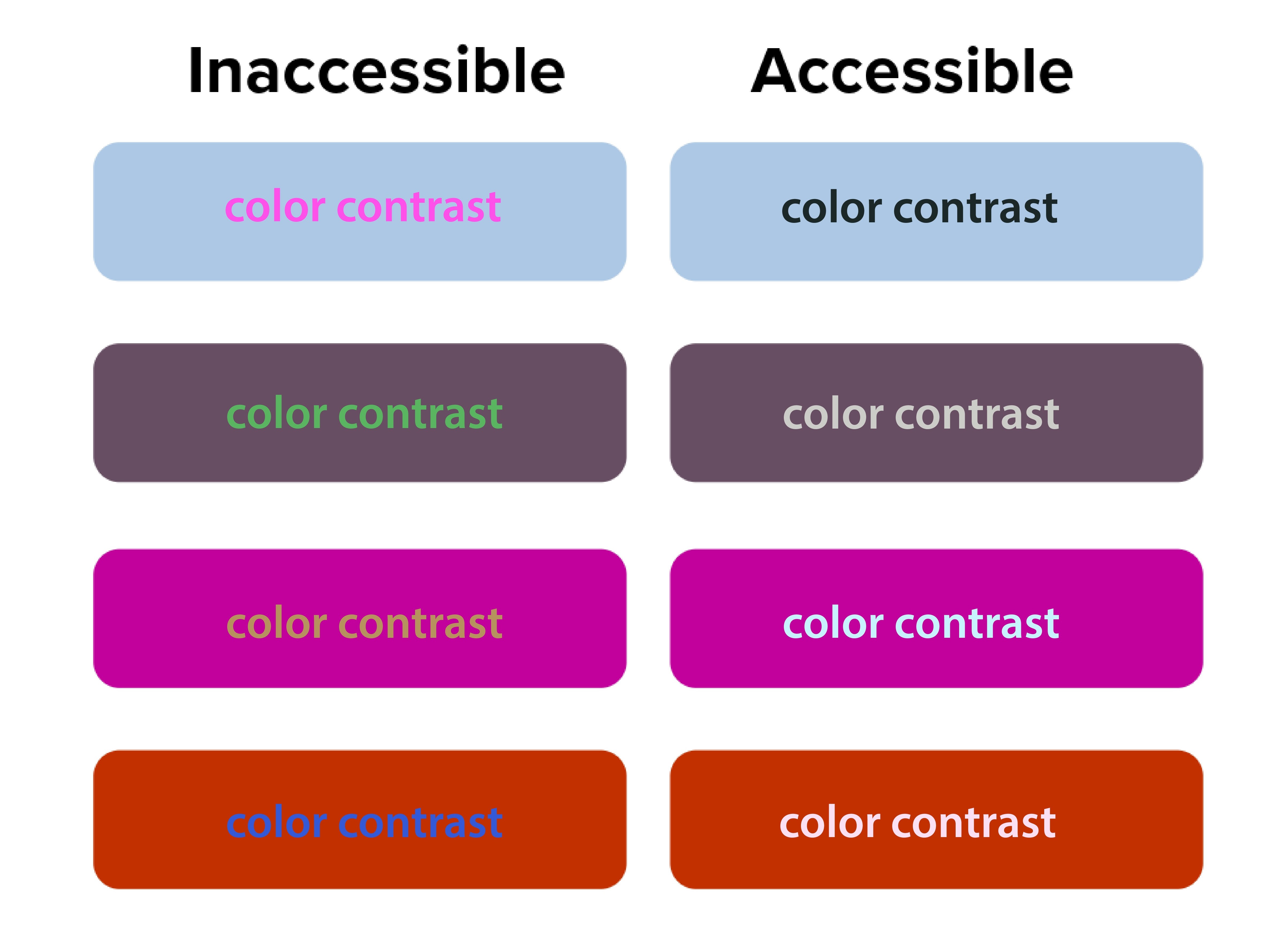
The squint test acts as a quick accessibility check. Elements that disappear when you squint likely have insufficient contrast. This is beyond aesthetics—proper contrast ratios are required for web accessibility compliance.
Source: San Diego State University

The Digital.gov accessibility guidelines emphasize creating “a clear hierarchy of importance by placing items on the screen according to their relative level of importance.”

Low contrast creates accessibility problems. The squint test naturally emphasizes contrast, making weak text-to-background combinations easy to spot. 90 million Americans over 40 have vision problems, and 7 million have vision impairment.

Orange you accessible?” featured a case where white text on orange buttons passed both squint tests and WCAG 2.1 color contrast checks. Before the fix, users with vision impairment missed key actions, but afterward, the click-through rate (CTR) improved by 18%.

Better font size and typography decisions

Typography choices become obvious during squint testing. Headers that should stand out but don’t indicate hierarchy problems. Body text that dominates the page suggests sizing issues.

If your body text disappears when squinting, your font size or weight may be too light. Adjusting typography can make a major impact.

NUMI Tech’s study on Typeform showed that the clearest forms were those with single, bold CTAs and solid font weight. People were more likely to finish forms if they quickly identified the main action, driving up completion rates.

Common Design Problems the Squint Test Reveals

Squint testing reveals hidden flaws that traditional review often misses, but many solo business owners unknowingly sabotage their own success with predictable visual hierarchy errors. These mistakes stem from trying to communicate everything at once instead of guiding visitors through a logical information sequence.

Cluttered layouts with too many competing elements

It may seem like everything is important on your website—especially the homepage. Your services, testimonials, about story, contact information, and credentials all compete for attention simultaneously. But when you squint at these sites, nothing stands out clearly because everything’s fighting for visual prominence. Then your web visitors leave because they can’t quickly identify the most relevant information.

Too many elements competing for attention creates visual chaos and overwhelms users. The squint test simplifies the noise, highlighting whether a dominant focus exists.

Ineffective CTA buttons, placement and styling

Source: EngageBay

CTAs that disappear during squint testing signal major conversion problems.

Your primary action button should be the star of your layout. If it vanishes when squinting, it’s likely too small, poorly colored, or positioned incorrectly. Conversion studies show button placement impacts click-through rates and increases revenue by 83%.

Your “Schedule a Discovery Call” or “Download My Free Guide” buttons should be among the most prominent elements when squinting. Yet many solopreneurs bury these important conversion elements in small text or low-contrast colors that disappear during the squint test.

Inconsistent branding across platforms

Your LinkedIn profile, website, email newsletters, and social media posts should pass the squint test with similar visual priorities. If your Instagram posts emphasize completely different elements than your website, you’re confusing potential clients about what matters most.

Web template constraints

Squarespace, Wix, Webflow and WordPress templates come with predetermined visual hierarchies that may not align with your business needs. Many solopreneurs accept these defaults without testing whether they actually guide attention to business-critical information.

Let’s get into more detail on the specific limitations of each platform.

Squarespace

Squarespace has beautiful templates but limits customization.

When performing the squint test on Squarespace sites, you’ll often find that template designers prioritized aesthetic appeal over conversion optimization. The large, gorgeous images that look stunning at full resolution might overwhelm your actual business message when viewed through the squint test lens.

To optimize within Squarespace’s constraints, focus on strategic content placement and typography choices. Use their built-in style editor to increase contrast on important elements. Choose templates where the navigation and primary call-to-action naturally pass the squint test, even if other elements need adjustment.

Wix

Wix provides complete creative freedom, which can be good and bad. The drag-and-drop interface allows you to place elements anywhere, but this freedom often results in layouts that fail basic hierarchy principles if you don’t have design experience.

Use Wix’s built-in design assistance features and grid alignment tools. Test your layouts frequently with the squint test as you build, rather than waiting until the site is complete. Pay special attention to mobile responsiveness, as Wix’s absolute positioning can create hierarchy problems on smaller screens.

Webflow

Webflow is best for advanced, tech savvy users, but offers powerful hierarchy control if you’re willing to learn it. The visual CSS editor allows precise control over typography, spacing, and color without coding knowledge. However, the learning curve can be steep for solopreneurs focused on growing their businesses rather than mastering web design.

WordPress

WordPress offers more flexibility but requires more decision-making.

The abundance of themes and customization options can actually hurt your visual hierarchy if you’re not careful. Many solopreneurs install multiple plugins and design elements that compete for attention, creating visual chaos that fails the squint test dramatically.

When working with WordPress, start with themes specifically designed for service businesses. Look for designs where testimonials, service descriptions, and contact information are visually prominent. Avoid themes with too many sidebar widgets or navigation options that could distract from your primary business goals.

Let’s shift to discussing how to use the squint test for your social media content.

The squint test for social media content

Social media platforms present unique visual hierarchy challenges because you’re competing for attention in crowded feeds with minimal time to make an impression. The squint test becomes even more critical when you have only seconds to capture someone’s interest as they scroll.

LinkedIn

LinkedIn requires professional hierarchy that builds authority.

Your posts need to establish credibility quickly while encouraging engagement. When you squint at successful LinkedIn content from coaches and other solopreneurs, you’ll notice that personal branding elements, key statistics, and clear value propositions remain most visible.

Here’s how you can do the same:

  • Start with an irresistible hook: Structure your LinkedIn posts with strong opening lines that remain readable when squinting.
  • White space and readable design: Use line breaks and formatting to create visual separation.
  • Branded photo: Include your professional photo consistently to build recognition.
  • CTA: Most importantly, ensure your call-to-action (whether it’s commenting, connecting, or visiting your website) stands out visually from surrounding content.

Instagram

Instagram demands immediate visual impact since the platform is inherently visual.

Your images need to pass the squint test independently of text elements. This is particularly important for content creators and voice actors who rely on visual storytelling to showcase their personality and expertise.

Test your Instagram posts by squinting at them in your phone’s preview before publishing. Your key message should be apparent even when details blur. Text overlays should contrast strongly with background images. For voice actors, ensure your recording setup or the subject of your post is prominently visible.

Facebook

Facebook’s algorithm favors engagement, making hierarchy crucial for organic reach.

Posts that capture attention quickly receive more comments and shares, which signals the algorithm to show them to additional people. The squint test helps ensure your most engaging elements like questions, compelling statistics, or striking visuals get noticed first.

YouTube

For video content across YouTube and all other social platforms, apply squint test principles to thumbnails and opening frames.

These elements determine whether people click to watch your content. Your face, key text, or compelling imagery should remain visible when squinting at thumbnail previews.

Use Visual Hierarchy in Your Email Marketing

Your email newsletters and marketing campaigns need strong visual hierarchy, because people scan emails even faster than websites.

Subject lines

Source: Grammarly

Subject lines represent the first level of your email hierarchy, but once opened, your email design takes over.

The squint test reveals whether your most important elements, like your value proposition, main CTA or key announcement, gets the appropriate visual emphasis.

Structure your emails with a single, clear focal point per message. If you’re promoting a new coaching program or event, that announcement should dominate the visual hierarchy. When you squint at the email preview, make sure the supporting elements like testimonials, bonus information, or secondary offers are visually subordinate to the main elements above.

Mobile optimization

According to Adestra, 61.9% of emails are opened on mobile devices. Your email hierarchy might work perfectly on desktop, but fail completely on phone screens. Always test your email campaigns with the squint test on both desktop and mobile before sending.

Many email marketing platforms provide mobile preview tools, but the squint test offers additional insight into whether your hierarchy actually works in practice. Your unsubscribe link should be minimally visible, while your main message and CTA should remain prominent even when squinting at a small screen.

How to Use the Squint Test for Your Content Marketing

Source: Styled Stock Society

Blog posts, resource guides, and lead magnets all benefit from strong visual hierarchy, particularly for solopreneurs who use content marketing to demonstrate expertise and attract clients.

Blogs

Long-form blog posts need hierarchical structure to maintain reader engagement. Your headline should pass the squint test by being significantly larger and more prominent than body text. Subheadings should create clear visual breaks that remain visible when squinting, helping readers scan for relevant information.

Use the squint test to evaluate whether your key points stand out sufficiently. Important statistics, quotes, or takeaways should be formatted to remain visible when details blur. This might mean using pull quotes, bullet points, or highlighting techniques that create visual emphasis.

Lead magnets

Lead magnets like webinars, checklists and resource guides serve 2 purposes: to provide immediate value to your audience and position you as an expert in your field. The squint test helps ensure these materials look professional and guide readers through the content logically.

Your lead magnets should have a clear visual hierarchy that makes them easy to scan and use. Key action items should be visually prominent, while supporting explanations can be less visually dominant.

Doing this makes your resources more valuable to busy professionals who need quick access to relevant information.

Case studies and testimonials

These items require strategic visual hierarchy to build credibility effectively.

The client’s results and your role in achieving them should be the most prominent elements when squinting. Supporting details about methodology or process can be visually secondary.

Measuring Squint Test Results and Success

Unlike large or mid-size companies with dedicated analytics teams, solopreneurs need simple ways to measure how visual hierarchy improvements impact business results. Understanding how to track and validate your design changes ensures continuous improvement in user experience.

Focus on the data that directly affect your business goals instead of vanity metrics that don’t drive revenue.

The value of squint testing shines when you measure real outcomes. All good design choices should have measurable impact. Squint testing delivers quick wins—and long-term gains.

Track website conversions

Monitor your consultation booking rates, email signup conversions, and resource download numbers before and after implementing squint test recommendations. Even small improvements in these metrics can significantly impact your business growth over time.

Set up Google Analytics goals for key actions like contact form submissions or resource downloads. Compare conversion rates month-over-month as you refine your visual hierarchy. A 1% improvement in conversion rate can mean substantial revenue increases for service-based businesses with high-value offerings.

Check your email engagement metrics

Source: Slide Team

Check whether your hierarchy improvements translate to better content performance. Open rates indicate whether your subject lines and sender name stand out in crowded inboxes.

Click-through rates (CTRs) show whether your email hierarchy successfully guides readers to take a specific action. CTRs on primary CTAs provide direct feedback about hierarchy effectiveness. If your main action button becomes more prominent after hierarchy adjustments, click-through rates should increase accordingly.

Monitor which types of visual hierarchy changes produce the best results for your specific audience. You might find that larger call-to-action buttons significantly improve click-through rates, or that restructuring your email templates increases consultation bookings.

Review your social media analytics

Source: BrandBastian

Track engagement rates on posts where you’ve applied squint test principles compared to older content. Look for patterns in which visual approaches generate more comments, shares, and profile visits.

Pay attention to the quality of engagement, not just quantity. Posts that successfully guide attention to your key messages should generate more relevant comments and inquiries from potential clients rather than just generic engagement.

Collect feedback

Qualitative feedback complements quantitative metrics. Ask visitors about their first impressions and navigation experience. This feedback often reveals hierarchy issues that metrics alone might miss.

Five-second tests work well for validating squint test improvements. If people can quickly identify your page’s purpose and main action within 5 seconds, your hierarchy is likely working effectively.

A/B test to validate squint test improvements

A/B testing validates squint test improvements with real user data.

Set up an A/B test where one design is optimized using findings from a squint test, while the other isn’t.

Focus on testing one hierarchy change at a time. This isolation helps you understand which specific improvements worked to drive results. Complex tests with multiple changes make it difficult to identify successful elements.

Monitor your design improvements over time

Visual hierarchy effectiveness can change over time as content updates and user expectations evolve. You should do squint testing regularly to be sure your design continues performing optimally.

Set up automated monitoring for key conversion metrics. Sudden drops might indicate hierarchy problems introduced during content updates or design changes. Regular testing catches these issues before they significantly impact performance.

Don’t stop testing after a single improvement. Monitor metrics monthly. Users’ expectations and devices change, so designs that pass now may need adjustments later.

Wrap Up

The squint test is a way to help improve how potential clients experience your marketing materials and websites. Instead of guessing if your content captures attention effectively, you can quickly evaluate and refine your visual hierarchy to guide visitors toward the actions that will grow your business.

Whether you’re using Squarespace templates, creating LinkedIn posts, or designing email newsletters, the squint test shows whether your most important messages get the appropriate visual emphasis. For coaches, consultants, content creators, and voice actors competing in crowded and competitive spaces, this competitive advantage costs nothing to implement, but can dramatically improve business results.

Every visual choice should either guide potential clients toward working with you or provide value that builds your authority in your field. The squint test ensures these priorities remain clear even when visitors are scanning quickly through their busy digital lives.

Start with your homepage. Squint at it, adjust what doesn’t work, and begin building a visual hierarchy that turns casual visitors into paying clients.


References

Accessibility for visual designers. (2018). Digital.gov. Retrieved from https://digital.gov/guides/accessibility-for-teams/visual-design/

Çakırca, S. (2025). 150+ UX (User Experience) Statistics and Trends (Updated for 2025). UserGuiding. Retrieved from https://userguiding.com/blog/ux-statistics-trends

Do You Look Legit? The Psychology Behind Website Design & Credibility. (n.d.). Rosewood. Retrieved from https://rosewoodmarketing.ca/do-you-look-legit-the-psychology-behind-website-design-credibility/

Fast Facts: Vision Loss. (2024). (n.d.). CDC. Retrieved from https://www.cdc.gov/vision-health/data-research/vision-loss-facts/index.html

Five-Second Testing: Step-by-Step Guide + Example. (2025). Maze. Retrieved from https://maze.co/collections/user-research/five-second-test/

Increase Conversion Rates with High Quality Design: A Comprehensive Guide. (2024). Roger West. Retrieved from https://www.rogerwest.com/design/increase-conversion-rates-with-high-quality-design/

Kennedy, E. D. (2020). UI Tutorial: Scheduling App Redesign (in under 10 Minutes). Learn UI Design. Retrieved from https://www.learnui.design/blog/squint-test-ui-design-case-study.html

Learning from the Best: Top CRO Case Studies. (2025). Retrieved from https://lineardesign.com/blog/conversion-rate-optimization-case-studies/

Lindgaard, G., Fernandes, G., Dudek, C., & Brown, J. (2006). Attention web designers: You have 50 milliseconds to make a good first impression! Behaviour & Information Technology, 25(2), 115-126. Retrieved from https://www.tandfonline.com/doi/abs/10.1080/01449290500330448

Looking Ahead: Improving Our Vision for the Future. (2024). CDC. Retrieved from https://www.cdc.gov/vision-health/data-research/vision-loss-facts/improving-vision-for-future.html

Nielsen, J. (2015). Legibility, Readability, and Comprehension: Making Users Read Your Words. Nielsen Norman Group. Retrieved from https://www.nngroup.com/articles/legibility-readability-comprehension/

Seastrand, E. (2019). Orange You Accessible? A Mini Case Study on Color Contrast. UX Design. Retrieved from https://uxdesign.cc/orange-you-accessible-65afa6cf0a2

Steven, K. (2024). 45 Urgent Call-to-Action Statistics for Marketers. Persuasion Nation. Retrieved from https://persuasion-nation.com/call-to-action-statistics/

The Squint Test: Accessibility Test for Every Interface. (n.d.). NUMI. Retrieved from https://www.numi.tech/post/the-squint-test-accessibility-test-for-every-interface

van Rijn, J. (2025). The ultimate mobile email statistics overview. Email Monday. Retrieved from https://www.emailmonday.com/mobile-email-usage-statistics/
Clean Up Your Website: Find SEO Success by Content Pruning

Clean Up Your Website: Find SEO Success by Content Pruning

Content Marketing SEO UX

As a solopreneur, every minute you spend on your website counts. Are you wasting time on content that’s actually hurting your SEO?

Content pruning is the process of removing or improving low-quality, outdated, or duplicate pages from your website to boost overall site performance.

Think of it as cleaning out your digital closet—keeping what works and tossing what doesn’t serve you anymore.

“Less is more” rings true in SEO—prune unhelpful content and watch your important pages grow. Removing old or weak web pages often leads to better search rankings. When you use content pruning as part of a content audit, you can boost traffic, streamline your site, and help search engines focus on your best work.

Contents

You might think having more content is always a good thing, but that’s not the case.

Why Content Pruning Matters for Your Site

When I first started my business, I thought a bigger blog meant more traffic.

I was wrong. More content doesn’t necessarily equal better SEO results.

Google’s algorithm focuses on quality over quantity, which means weak pages can actually hurt your site’s authority.

According to a recent case study, HomeScienceTools.com saw a 64% increase in strategic content revenue after removing just 200 underperforming blog posts. That’s impressive results from deleting content, not adding it.

How much could your business benefit from a 64% increase in revenue? A lot, I bet.

Common types of content to prune

If you’re ready to get started, you need to know what kinds of pages to look for:

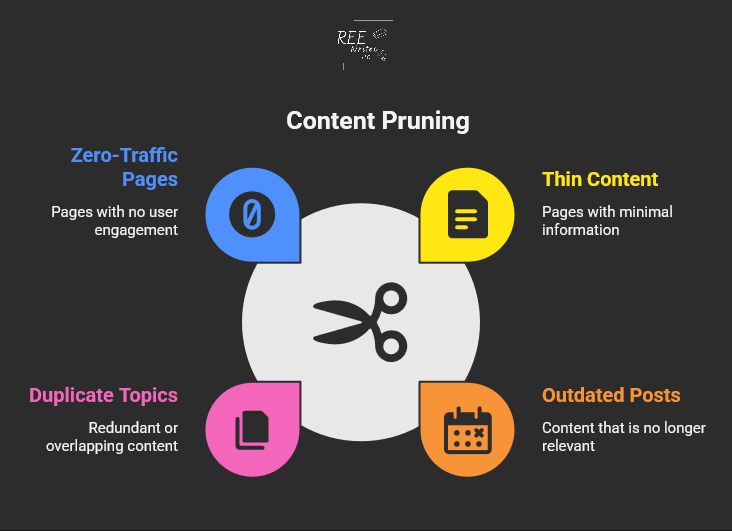
  • Thin content: Pages with little useful information
  • Outdated posts: Content with old dates or incorrect facts
  • Duplicate topics: Multiple pages targeting the same keywords
  • Zero-traffic pages: Content that gets no visits or engagement

Taking action to remove or improve your content is a crucial part of a full website review. The key is finding pages that drain your site’s SEO power without giving anything back in return.

Benefits you’ll see from pruning content

So, what’s in it for you? A clean website leads to some amazing results.

Content pruning plays a major role in comprehensive website and content audits. When you remove content with no value, you’re essentially telling search engines to focus on your best content instead of wasting time on weak material.

Robotic spider crawling the web with papers

Here’s what happens when you clean up your site:

A case study by Seer Interactive shows the real impact of content pruning. Their client experienced declining traffic for five years straight. After removing 14,000 low-value pages, they achieved a 23% increase in organic traffic year-over-year.

Imagine what a 23% traffic increase could do for your business.

Steps to Prune Your Website

Ready to clean up your site? Here’s a simple process that works for websites of any size.

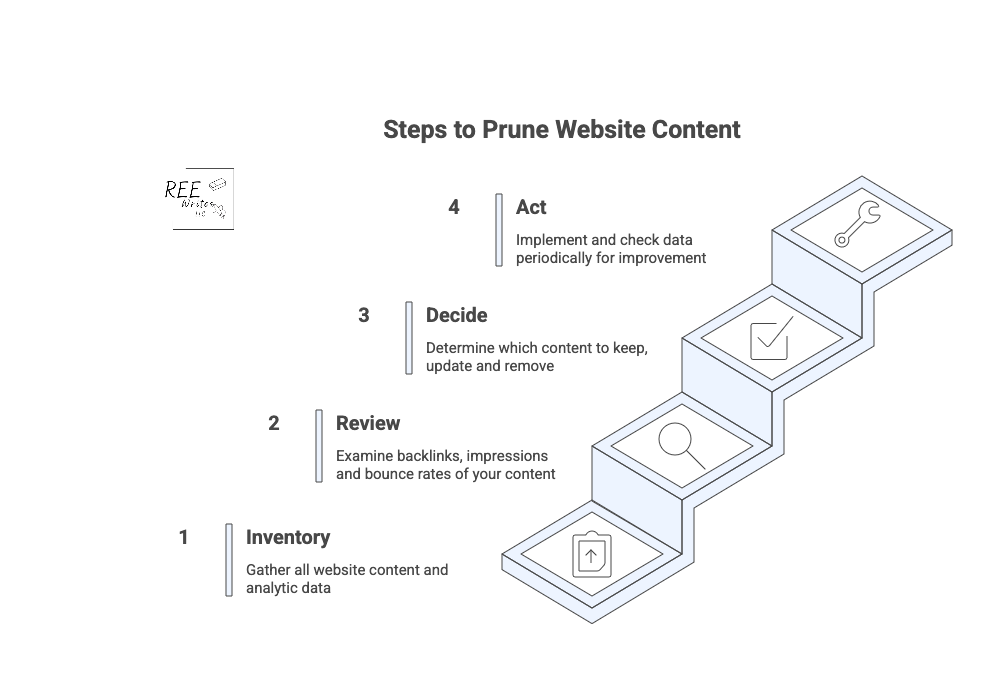
4 steps to prune your website content

Conduct a full content inventory

Start by creating a complete list of all your pages. You can use tools like:

  • Google Analytics for traffic data
  • Google Search Console for search performance
  • Screaming Frog for technical crawls
  • Your content management system (CMS) export for a basic page list

Export everything into a spreadsheet so you can analyze the data easily. (I’ve listed more tools further in this article.)

Review analytics to find problem pages

Look for pages that meet these criteria:

  • Less than 50 organic sessions in the past 12 months
  • Fewer than 50 search impressions
  • No backlinks from other sites
  • High bounce rates with short time on page

CNET’s recent content pruning experiment shows how powerful this can be. They removed thousands of articles and saw a 29% increase in organic traffic in just two months.

What could a 29% traffic increase could do for your business in two months?

Make decisions about each page

For every underperforming page, you have four options:

  1. Keep as-is: High-quality content that just needs time
  2. Update: Good topics that need fresh information
  3. Merge: Combine similar pages into one stronger piece
  4. Delete: Remove pages that serve no purpose

Don’t rush this step. Take time to evaluate each page’s potential value.

To make sure you get the best results, it’s smart to follow a clear process that we’ll go over next.

Best Practices for Effective Content Pruning

Source: Styled Stock Society

Following a clear process helps you avoid mistakes and get better results from your pruning efforts.

Keep a regular schedule

Content pruning works best as an ongoing process, not a one-time cleanup.

You should review your content every quarter, or 6 to 12 months as part of your regular SEO maintenance to prevent low-quality content from building up over time and keep your site performing at its best.

Use a systematic approach

The most successful content pruning follows these steps:

  1. Inventory: List all your content
  2. Audit: Analyze performance data
  3. Decide: Choose what to keep, fix, or remove
  4. Act: Implement your changes carefully

Follow this methodical approach so you don’t accidentally delete valuable content or create technical difficulties.

When you delete pages, always set up 301 redirects to send visitors and search engines to relevant replacement content. This preserves any SEO value the old page had.

Also check for:

Avoid These Common Pruning Mistakes

Source: Inquivix

Even with a good plan, it’s easy to make pruning mistakes. Here are the biggest pitfalls to watch out for.

Removing valuable pages that need updates

Don’t delete content just because it’s old. Some pages have good bones or evergreen content, but need fresh information or better optimization.

Before removing any page, ask yourself:

  • Does this topic still matter to my audience?
  • Could I make updates to improve this content instead of deleting it?
  • Are there any valuable backlinks I’d lose if I delete this?

Source: Bluehost

One of the costliest mistakes is deleting pages without setting up proper redirects. This creates 404 errors and frustrated users. Always redirect deleted pages to the most relevant existing content on your site.

Not involving stakeholders

Content pruning can affect other parts of your business. For instance:

  • Marketing campaigns may link to pages you’re considering for removal.
  • Sales teams might reference specific articles.

Since solopreneurs make all the decisions, you don’t have a team to notify before making major changes and deletions. Just be sure to document your decisions in case you ever decide to outsource.

Make Content Pruning Easier with These Tools

Source: Webgator

The right tools can speed up your content audit and help you make better decisions about what to keep and what to get rid of.

Essential analytics tools

Start with these free options:

  • Google Analytics: Shows traffic, bounce rates, and user behavior
  • Google Search Console: Reveals search performance and indexing issues
  • Screaming Frog: Crawls your site for technical SEO problems

For deeper analysis, consider paid tools like:

  • Ahrefs: Comprehensive SEO data and competitor research
  • SEMrush: Keyword tracking and content gap analysis
  • Clearscope: Content optimization and performance insights

Simple scoring systems

Create a simple point system to evaluate each page:

  • Traffic: 0 to 10 points based on monthly visitors
  • Engagement: 0 to 10 points for time on page and bounce rate
  • Links: 0 to 10 points for backlinks and internal links
  • Relevance: 0 to 10 points for topic alignment with your goals

Pages scoring below 15 to 20 points are good candidates for pruning.

Organizing your audit data

Use spreadsheets to track your decisions and results. Include columns for:

  • URL and page title
  • Current performance metrics
  • Action taken (keep, update, merge, delete)
  • New redirect URL (if applicable)
  • Implementation date

This documentation helps you track results and avoid repeating work.

Wrap Up

Content pruning is a smart way to strengthen your SEO and help your site’s best content shine. Include regular audits to review and trim low-quality content, to keep your site health and support higher search rankings.

It may seem like a big job, but remember, every small step you take to improve your website’s health is a win for your business. By focusing on quality, you’re not just improving your SEO; you’re building a stronger, more efficient business that works for you.

Try content pruning in your next website audit for greater visibility.

References

Ashbridge, Z. (2025). Content pruning: Boost SEO by removing underperformers. Search Engine Land. Retrieved from https://searchengineland.com/guides/content-pruning

Content Pruning: Remove Low-Quality Content to Improve SEO. (2025). Conductor. Retrieved from https://www.conductor.com/academy/content-pruning/

Content Pruning Efforts Content Pruning. (2023). Seer Interactive. Retrieved from https://www.seerinteractive.com/work/case-studies/content-pruning-efforts-help-reverse-traffic-loss

Deleting Website Content? SEO Best Practices. (n.d.). Slim SEO. Retrieved from https://wpslimseo.com/deleting-website-content-seo-best-practices/

Goodwin, D. (2023). Improving or removing content for SEO: How to do it the right way. Search Engine Land. Retrieved from https://searchengineland.com/improving-removing-content-seo-guide-430571

Gray, T. (2022). Content Pruning Case Study: How This Online Store Increased Strategic Content Revenue by 64%. Inflow. Retrieved from https://www.goinflow.com/blog/content-pruning-case-study/

Højris Bæk, D. (2024). Content Pruning Case Study: CNET search data suggests it works. SEO.AI. Retrieved from https://seo.ai/blog/content-pruning-case-study-cnet

Huang, B. (2024). What is Content Pruning and Why it Matters for SEO. Clearscope. Retrieved from https://www.clearscope.io/blog/what-is-content-pruning

Patel, N. (2024). Examining a Content Pruning Case Study. BacklinkManager. Retrieved from https://backlinkmanager.io/blog/examining-content-pruning-case-study/

In a Time Crunch? Here’s How to Do a Content Audit in 15 Minutes

In a Time Crunch? Here’s How to Do a Content Audit in 15 Minutes

Content Marketing SEO UX

A full content audit can feel like a massive project, taking days or even weeks to complete. But you’re busy running a business—nobody’s got time for that.

What if you could find your biggest content problems and opportunities in the time it takes to drink your morning coffee? ☕

You don’t need to block out your entire week to make a real impact on your website’s performance. This guide will walk you through a simple, focused process to audit your website’s content in just 15 minutes.

We don’t need to find every little flaw. In 15 minutes, you can spot the “low-hanging fruit,” or quick fixes that can boost your organic traffic and improve your site’s user experience (UX) right now.

Let’s set a timer and get started.

Contents


What’s the difference between a content gap analysis and a content audit?

Before we dive in, let’s clear something up. People often use the terms “content audit” and “content gap analysis” interchangeably, but they are two very different tasks with different goals. Knowing the difference helps you choose the right tool for the job.

Define the terms “content gap analysis” and “content audit”

A content audit is like looking in the mirror. You’re analyzing the content you already have on your website. The goal is to evaluate its performance, find weaknesses, and see what’s working well. You’ll look at metrics like page views, keyword rankings, and bounce rates to decide if a piece of content should be kept, updated, or removed.

A content gap analysis on the other hand, is like looking out the window at your neighbors. You’re researching what content your competitors have that you don’t. The goal is to find topics and keywords that your audience is searching for but that you haven’t covered. This helps you plan future content that can attract a wider audience.

When to do a content gap analysis

You should run a content gap analysis when you’re focused on growth and expansion. It’s the perfect tool for when you need to:

When to do a content audit

You should perform a content audit when you want to improve what you already have. It’s your go-to move for content consolidation and optimization. An audit is ideal when you need to:

  • Improve the performance of underperforming content.
  • Clean up outdated or irrelevant pages (thin content).
  • Find quick SEO wins to boost your rankings.
  • Ensure your existing content still meets your quality standards and business goals.

For example, case studies by cognitiveSEO show that several companies who conducted content audits led to significant increases in organic traffic just by pruning and improving existing content.

Source: Search Engine Land

What a 15-minute content audit can show you

This quick audit is all about speed and impact, so we’re not getting lost in the weeds. We’re looking for a handful of actionable insights that can make a difference right away.

Here are some things to do before you start that 15-minute timer.

Set realistic goals for a quick audit

In 15 minutes, you won’t be able to analyze every single page on your site, and that’s okay.

Your goal is simple: find 3 to 5 high-impact action items. This could be identifying a blog post to update, a title tag to rewrite, or a broken page to redirect.

Focus on big problems, not small details

This audit uses the 80/20 principle. We’re looking for the 20% of problems that are causing 80% of your performance issues.

Don’t worry about a typo on a page that gets two visits a month. Instead, focus on a high-traffic page with a terrible bounce rate or a page that has high impressions but almost no clicks. These are the big problems that, once fixed, deliver the biggest returns.

Identify your content’s “low-hanging fruit”

“Low-hanging fruit” refers to opportunities that require minimal effort for maximum gain. In a quick content audit, this typically includes:

  • Pages ranking on the bottom of page one or the top of page two in Google search results.
  • Content with high impressions but a low click-through rate (CTR).
  • Popular posts that can be updated with new information to boost their rankings further.
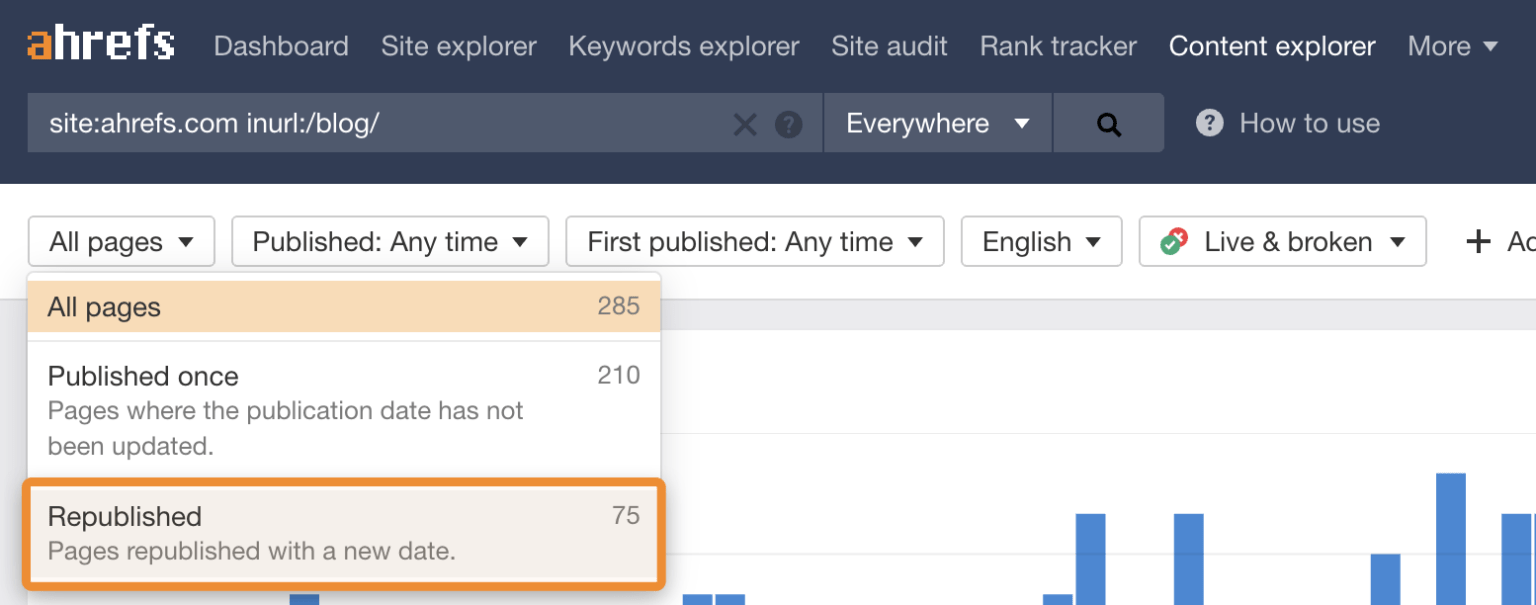
Source: Ahrefs

Updating existing content is one of the fastest ways to see results. Ahrefs continuously refreshes and republishes old blog posts with new data and optimized keywords to increase their organic traffic.

Think of this as a first step, not a complete fix

This 15-minute audit is like a health screening, not major surgery. It’s designed to give you a quick, actionable snapshot of your site’s condition. It will give you a clear to-do list to get started on, but it won’t replace the need for a deeper, more comprehensive audit every 6 to 12 months.

Create a content inventory or content audit matrix

To keep your findings organized, you need a simple content inventory spreadsheet, sometimes called an inventory or matrix.

Don’t overcomplicate it. Create a new sheet with these basic columns:

  • URL: The address of the page.
  • Topic/Keyword: The main topic the page covers.
  • Traffic (30 days): The number of sessions from organic search.
  • Impressions (30 days): How many times it appeared in search results.
  • CTR (30 days): The click-through rate, or how many times someone clicked on your webpage.
  • Action: A simple note on what to do (“Update,” “Improve Title,” “Redirect”).

Here’s how to do a content audit in 15 minutes.


Minutes 1 to 2: Get your tools ready

Source: Styled Stock Society

Okay, it’s time to start the clock! ⏱️ The first two minutes are for getting your workspace set up. Efficiency is key, so have these tools open and ready to go.

Get these tools for an effective content audit

For this quick audit, you only need three things, and they’re all free:

  1. Google Search Console (GSC): Shows how your site performs in Google search.
  2. Google Analytics (GA): Reveals what visitors do once they are on your site.
  3. A spreadsheet: Google Sheets or Excel to create your content inventory.

(Paid tools like Ahrefs and Semrush are fantastic for deep dives, but you don’t need them for this rapid-fire check-up.)

Open your Performance report in Google Search Console

Log in to your Google Search Console account. Then go to the Performance report, and set the date range to the last 28 or 30 days.

This is where you’ll find data straight from Google, including impressions, clicks, CTR, and your average position for different queries.

Access your All Pages report in Google Analytics

In a separate tab, open your Google Analytics (GA4) account. Go to Reports > Engagement > Pages and screens.

Filter the report to show only organic search traffic. This view will show you your most visited pages, average engagement time, and other on-site metrics.

Prepare a simple spreadsheet or a notepad

Have your spreadsheet ready with the columns we discussed earlier. As you go through the next steps, you’ll quickly paste in URLs and jot down notes. This prevents you from getting sidetracked and ensures you have a clear action plan when the 15 minutes are up.

Use a timer to stay on track

Set a real timer on your phone or computer for 15 minutes. This creates a sense of urgency and forces you to stay focused on the high-impact tasks instead of falling down a rabbit hole of data analysis.


Minutes 3 to 7: Find your best and worst pages

With your tools open and your timer running, it’s time to dig in. In this four-minute block, you’ll be a detective, quickly scanning for clues about your content’s health.

Spot your top-performing content

In Google Analytics, sort your Pages and screens report by organic users to see your most popular pages. These are your workhorses.

For the top 3 to 5 pages, ask yourself: “Is this content fully up-to-date?” and “Can I add internal links from this page to other important pages?” Add these URLs to your spreadsheet with a note like “Check for internal linking opportunities.”

Find pages with high impressions but low clicks

Switch back to Google Search Console. In the Performance report, click the Pages tab. Then filter your results to find pages that have a high number of impressions but a low CTR.

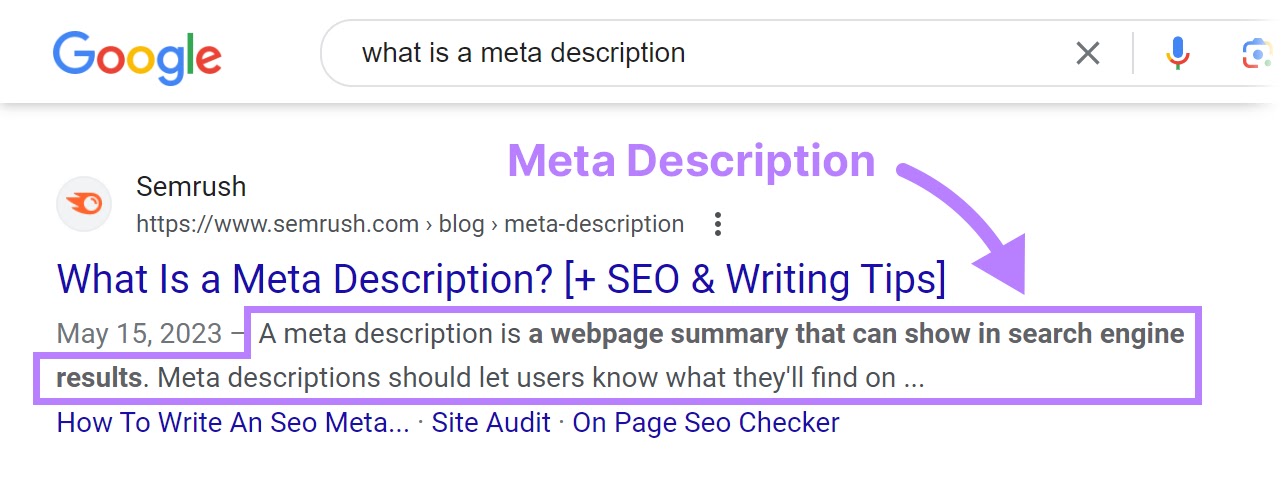
Backlinko found that simply moving from position #3 to position #2 in search results can double your CTR, and improving your title tag is a key way to do that. So add 2 or 3 of these URLs to your spreadsheet with the action: “Rewrite title/meta to improve CTR.”

Look for important pages with almost zero traffic

Source: Ahrefs

Do you have important product pages or cornerstone or pillar blog posts that aren’t getting any love from Google?

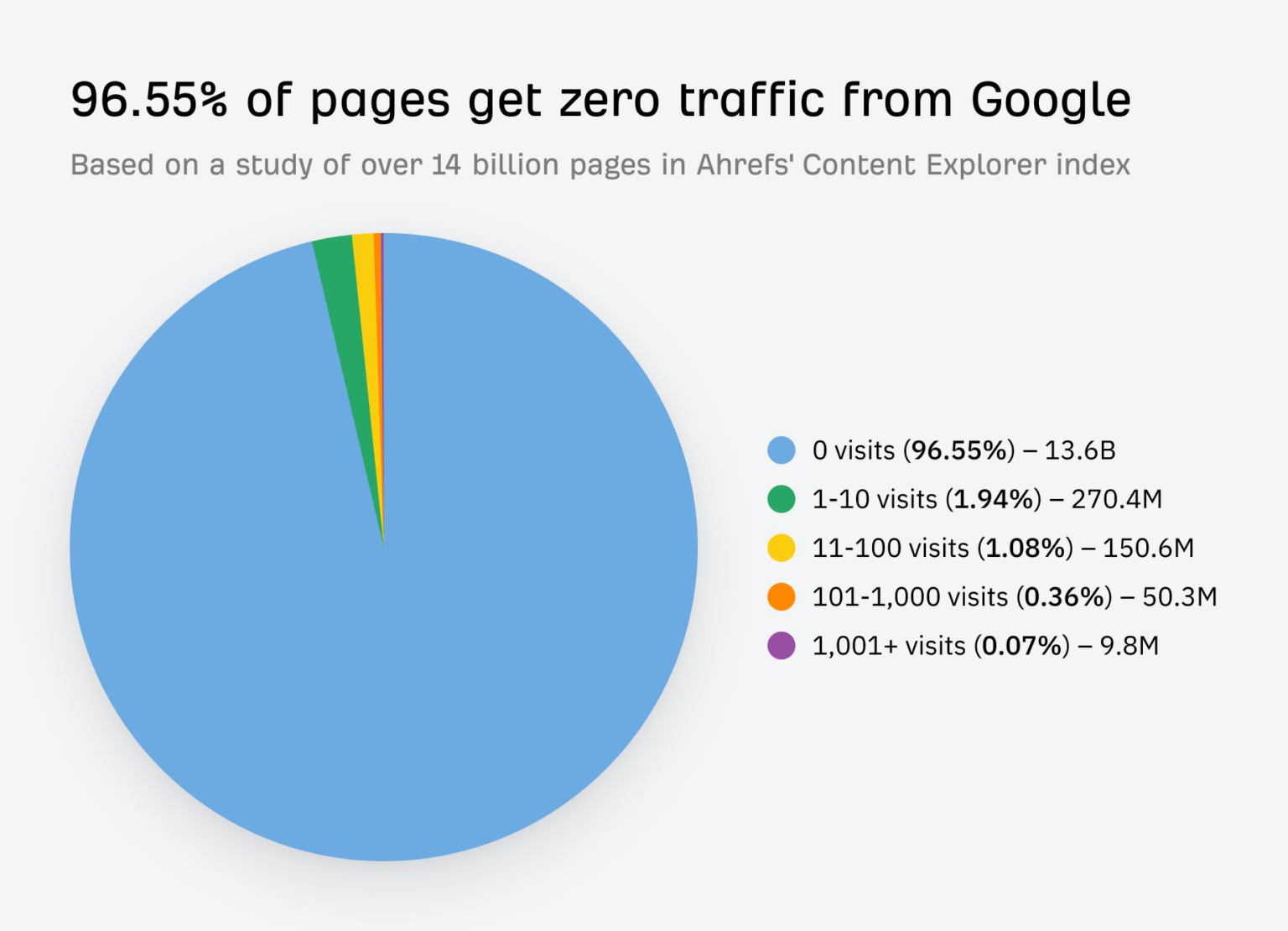
Scan your page list in GA for these critical assets. If they have very few organic sessions, they are prime candidates for an update. Some estimates suggest for many sites, over 50% of their content gets almost no traffic, and with the rise of AI Overviews in search, zero-click searches are the new normal.

Mark 1 or 2 of pillar posts in your spreadsheet with: “Needs a full refresh and re-optimization.”

Note pages that get traffic but have a high bounce rate

Back in Google Analytics, look for pages that get a decent amount of traffic but have a low average engagement time. This often signals a mismatch between what the user expected to find (based on your title) and what the page actually delivers.

This is a red flag for a poor user experience. Add one of these pages to your spreadsheet with the note: “Review for search intent mismatch.”


Minutes 8 to 12: Look for quick SEO wins

Now that you’ve identified some key pages, let’s spend the next four minutes looking for technical and on-page issues that are easy to fix but can have a big impact.

Check for pages with missing title tags

A missing or duplicate title tag is a basic SEO mistake that can hold your webpage back. You can spot these using GSC or a free browser extension.

If you find any, fixing them is one of the quickest wins you can get. A unique, compelling title tag is critical for both search engines and users.

Find content that ranks for the wrong keywords

In GSC, click on a specific page from your list, then click the “Queries” tab. Are the keywords listed here relevant to your page’s content?

Sometimes a page will rank for an unexpected term. This isn’t always bad! It could be an opportunity to re-optimize the page for that term or create a new piece of content that serves that search intent even better.

Source: Zyppy

Internal linking is one of the most underrated SEO tactics. It helps Google understand your information architecture and spreads authority throughout your site.

Look at one of your top-performing blog posts you found earlier. Read through it and see if there are any places where you can naturally link to a weaker (but important) page. Strategic internal linking can boost your site’s organic traffic.

Note any obvious UX problems

Quickly open the pages on your list in a new tab. How do they look? Have you viewed these pages on a mobile device?

Check for things that would annoy a user, like:

  • Aggressive pop-ups that block the content.
  • Slow load times.
  • Text that’s hard to read.
  • Broken images or videos.

Make a quick note of any glaring UX issues in your spreadsheet. Fixing these can directly impact how long people stay on your site and how Google perceives its quality.


Minutes 13 to 15: Decide what to do next

The timer is about to go off! In these final minutes, your goal is to turn your messy notes into a clean, prioritized action plan. This is where the audit becomes truly valuable.

Use a simple “keep, update, or remove” framework

Source: SEOBuddy

For every URL in your spreadsheet, assign it one of three statuses:

  • Keep: The content is performing well and is up-to-date. No action is needed right now.
  • Update: The content has potential but needs work. This could be a small tweak (like a new title), combining elements from two or more posts, or a major rewrite.
  • Remove: The content is outdated, irrelevant, and gets no traffic. These pages can be deleted and redirected (using a 301 redirect) to a more relevant page, called content pruning. Pruning this “dead weight” can sometimes improve your site’s overall SEO health.

Prioritize tasks that will have the biggest impact

How do you choose your priorities? Go back to the 80/20 rule. Which task will likely drive the most traffic or conversions for the least amount of effort? Updating the title tag on a page with 50,000 monthly impressions is more important than fixing a typo on a page with 10 monthly impressions (although you can do the latter quickly).

Look at your list of “Update” and “Remove” tasks, and choose the 3 to 5 you think will have the biggest and fastest impact. This is your official to-do list. You can’t do everything at once—save the rest for later.

Schedule a deeper audit for a later date

Finally, acknowledge that this was just a sprint. Put a reminder on your calendar three or six months from now to perform a more in-depth site audit. Consistent, iterative improvement is the key to a long-term, successful content performance strategy.

Your 15-Minute Audit is Complete!

And just like that, within just 15 minutes, you’ve moved from feeling overwhelmed by your website’s content to having a clear, prioritized list of actions that can improve your SEO.

This quick content audit proves you don’t need weeks to make real progress. While it doesn’t cover everything, it gives you an actionable list to start improving your SEO and providing more value to your audience right away. Run this quick check today and take the first step toward more organic traffic.

You don’t need weeks to make progress. By focusing on high-impact tasks and ignoring the small stuff, you can make meaningful changes quickly. Now, take that short to-do list you created and schedule time to get it done. Run this quick audit every quarter, and you’ll build powerful momentum toward better rankings and a healthier website.


References

Antara. (2025). Google AI Search Impact: Website Traffic Slashes by 50%. Analytics Insight. Retrieved from https://www.analyticsinsight.net/news/google-ai-search-impact-website-traffic-slashes-by-50

Content pruning for SEO. (n.d.). LearningSEO. Retrieved from https://learningseo.io/seo_roadmap/deepen-knowledge/content/content-pruning/

Dean, B. (2022). We Analyzed 4 Million Google Search Results. Here’s What We Learned About Organic Click Through Rate. Backlinko. Retrieved from https://backlinko.com/google-ctr-stats

Hardwick, J. (2020). Republishing Content: How to Update Old Blog Posts for SEO. Ahrefs. Retrieved from https://ahrefs.com/blog/republishing-content/

Sauciuc, A. (2025). Is Content Pruning Good for SEO? Case Studies + Experts’ Opinions. cognitiveSEO. Retrieved from https://cognitiveseo.com/blog/17548/content-pruning-for-seo/

Shepard, C. (2025). 23 Million Internal Links – SEO Case Study. Zyppy. Retrieved from https://zyppy.com/seo/seo-study/

Soulo, T. (2023). 96.55% of Content Gets No Traffic From Google. Here’s How to Be in the Other 3.45% [New Research for 2023]. Ahrefs. Retrieved from https://ahrefs.com/blog/search-traffic-study/

“It Needs to Sound More Conversational”: Simple Hacks to Write More Human-Sounding Copy to Engage Your Audience

“It Needs to Sound More Conversational”: Simple Hacks to Write More Human-Sounding Copy to Engage Your Audience

Content Marketing Copywriting UX

Ever read a block of text and felt completely lost? It happens. A lot of writing sounds stiff, formal, and, well, robotic. It’s packed with jargon and complex sentences that make you feel like you need a secret decoder ring just to understand the main point.

But what if you could write in a way that truly connects with people? What if your words could make them feel like they’re having a friendly chat with you over a cup of coffee?

In a world where attention is the most valuable currency, how you say something is just as important as what you say.

A conversational style, with its simple language and direct address, is perfectly designed for this behavior. It grabs attention, pulls readers in, and holds them there.

Let me show you how to adopt a conversational writing style to build trust, boost engagement, and keep your readers hooked from the first sentence to the last.

Contents

What is a Conversational Writing Style?

Source: Styled Stock Society

Conversational writing is a style that mimics the patterns and rhythm of natural, spoken conversation. It’s warm, approachable, and personal.

Think of it as writing for a friend rather than for a panel of judges. The goal is to close the distance between you and your reader, making your message feel less like a lecture and more like a one-on-one dialogue.

This approach isn’t just about sounding friendly; it’s a strategic choice that can have a big impact on how your audience receives your message.

Write the way you talk (but better)

It’s popular advice to “write like you talk.” This is a great starting point, but actually, when you write the way you talk, you should make it clearer and more concise.

When we speak, we often ramble, use filler words (“um,” “like,” “you know”), and jump between ideas. But conversational writing takes the best parts of talking—the natural flow, the simple vocabulary, the personal touch—and edits out the messiness.

It’s a polished version of your spoken voice that keeps the personality, while ensuring the message is direct, organized, and easy to follow. (You’re aiming for the clarity of a great public speaker, not the rambling of a long, unfocused story.)

The difference between a conversational and a formal tone

The easiest way to understand conversational writing is to see it next to its opposite: formal writing. Formal writing is what you see in academic papers, legal documents, or traditional corporate reports. It’s impersonal, objective, and often complex.

A few examples:

Formal ToneConversational Tone
The organization will implement a new strategy to enhance customer satisfaction.We’re rolling out a new plan to make you, our customers, happier.
All employees are required to complete the mandatory training by the specified deadline.Hey team, please make sure you finish the required training by the deadline.
Further investigation is needed to ascertain the cause of the discrepancy.We need to look into what caused this issue.
It has been determined by management that remote work will be permitted on Fridays.Good news! We’ve decided you can work from home on Fridays.

See the difference? The conversational examples are direct, use personal pronouns, and feature simpler words. They feel more human and are much easier to understand at a glance.

How a conversational style builds trust with your audience

Trust is the foundation of any good relationship, which includes the one between you and your audience. A conversational tone helps build that trust by making your brand or message feel more authentic and relatable.

When you write in a stiff, corporate voice, you create a barrier. It can feel like you’re hiding behind a wall of formality. In contrast, a conversational voice feels open and honest. It signals that there’s a real person behind the words.

A brand voice that is authentic and consistent helps build customer trust and loyalty over time because it makes the brand more memorable and reliable (Gaidar, 2023). People trust what they can understand and who they feel connected to. By ditching the corporate-speak, you’re telling your readers, “We’re on the same level, and we want to help you.”

How it improves clarity and readability

Source: Styled Stock Society

Have you ever tried to assemble furniture using a poorly written instruction manual? It’s frustrating because it’s not clear.

Conversational writing is all about clarity. It prioritizes simple language, active voice, and shorter sentences—all elements that make your text easier to read and understand.

This isn’t just a matter of preference; it’s about how our brains process information. When text is easy to read, it lowers the “cognitive load,” meaning your reader doesn’t have to work as hard to get the message. This makes them more likely to stay on the page and absorb what you’re saying.

Plain language is for everyone—even experts—because all users appreciate content that is clear, concise, and easy to understand.

Now that you understand what conversational writing is and why it’s so effective, let’s get into the practical side of things. How do you do it?

Simple Tricks to Write in a Conversational Tone

Adopting a conversational tone isn’t about changing who you are; it’s about letting more of your natural voice shine through in your writing. Here are some simple, powerful techniques you can start using right now.

Use the first and second person (“we,” “I,” and “you”)

This is the fastest way to make your writing feel like a dialogue.

  • “You” and “Your”: These words speak directly to the reader, making them feel seen and included. It changes the experience from passive observation to active participation. Instead of “A user can benefit from this feature,” you’d write, “You can benefit from this feature.”
  • “I” and “We”: These pronouns establish your presence in the conversation. “I” adds a personal touch and shows you’re sharing your own perspective. “We” creates a sense of community and shared purpose, making the reader feel like they’re part of a team.

Write with simple words and avoid jargon

Source: Norman Nielsen Group

Imagine you’re explaining a topic to a friend who knows nothing about it. You wouldn’t use technical jargon or complicated vocabulary, would you? You’d use simple, everyday words. Do the same in your writing.

Industry-specific terms can make you sound smart to your peers, but they alienate everyone else. If you absolutely must use a technical term, take a moment to explain it in simple language.

For example:

  • Instead of: “We must leverage our core competencies to synergize our cross-functional teams.”
  • Try: “We need to use our team’s main strengths to work together more effectively.”

Clarity always wins over complexity.

Use contractions like “you’re,” “it’s,” and “don’t”

In spoken conversation, we naturally use contractions. We say “don’t” instead of “do not” and “it’s” instead of “it is.” Using them in your writing is a simple cue that tells the reader your tone is informal and friendly.

For a long time, formal writing guides advised against contractions, but for modern web content, they are essential for creating a natural, conversational flow. Omitting them can make your writing sound stiff and overly formal.

Ask your reader direct questions

Source: Learn English with Harry

Have you noticed how questions are used in this article? Questions are a powerful tool for engagement. They break up the text, create a mental pause for the reader, and encourage them to think about the topic in a personal way.

You can use questions to:

  • Introduce a new section.
  • Check for understanding (“Make sense?”).
  • Encourage reflection (“What would you do in this situation?”).
  • Make a point more impactful.

Asking questions turns a monologue into a dialogue, even if the reader’s answer is only in their head.

Keep your sentences and paragraphs short

When you talk, you naturally pause for breath. Short sentences and paragraphs create a similar rhythm in your writing. They serve as visual and mental resting spots for your reader.

Long walls of text are intimidating, especially on a screen. Here’s a good rule of thumb:

  • Sentences: Aim for an average of 15 to 20 words. Mix it up with some very short sentences for emphasis. Like this.
  • Paragraphs: Try to keep paragraphs to 3 to 4 sentences. A one-sentence paragraph can also be very effective for highlighting a key idea.

This structure makes your content more scannable and much less overwhelming for your audience.

Tell a story or use a good analogy

Source: Techfunnel

Humans are wired for stories. We’ve been using them to share information and connect with each other for thousands of years. A well-placed story or analogy can make even the most complex topic relatable and memorable.

Neuroeconomist Paul J. Zak’s research, featured in Harvard Business Review, shows that our brains release oxytocin—a chemical associated with empathy—when we are engaged in a compelling narrative. This neurochemical response makes us more likely to trust the storyteller and internalize the message.

  • Instead of: “Our software improves efficiency by 30%.”
  • Try: “Meet Sarah. She used to spend 10 hours a week on manual data entry. After switching to our software, she now gets the same work done in 7 hours, giving her more time to focus on what really matters.”

Stories stick with people long after they’ve forgotten the statistics.

Once you’ve written your draft using these techniques, the most important step comes next. It’s a simple action that can make the biggest difference in your writing.

Read Your Copy Aloud to Find Awkward Phrasing

This might be the single most effective editing trick in a writer’s toolkit. When you read your work aloud, you engage a different part of your brain. You’re not just seeing the words; you’re hearing them. This process reveals awkward phrasing, clunky sentences, and unnatural rhythms that your eyes might have skimmed over.

Why your ear catches what your eye misses

When you read silently, your brain is incredibly efficient. It often autocorrects small mistakes, fills in missing words, and glides over slightly awkward sentences without you even noticing. You read what you intended to write, not necessarily what’s on the page.

However, when you speak the words, that shortcut is gone. You are forced to process each word and sentence structure exactly as it is. Your ear, trained from years of listening to conversations, is a natural detector for what sounds human and what sounds robotic. If it sounds weird when you say it, it will definitely feel weird for your audience to read it.

How to spot clunky sentences and unnatural words

As you read your text aloud, listen for specific red flags:

  • Sentences where you run out of breath: This is a clear sign the sentence is too long or convoluted.
  • Words that make you stumble: If you have trouble pronouncing a word, it’s probably too complex. Swap it for a simpler alternative.
  • Clumsy or repetitive rhythms: Does every sentence sound the same? Do you use the same word too many times in one paragraph? Your ear will pick up on this monotony.
  • Phrases that just don’t sound like something a real person would say: If you find yourself thinking, “I would never say this in a real conversation,” that’s your cue to rewrite it.

A step-by-step process for an “out loud” edit

To get the most out of this technique, follow a simple process:

  1. Find a quiet space. You need to be able to hear yourself clearly without distractions.
  2. Read at a natural pace. Don’t rush. Speak the words as if you were having a conversation.
  3. Use a pen or your cursor. As you read, mark or highlight any part that feels awkward, clunky, or confusing. Don’t stop to fix it yet—just mark it and keep going to maintain the flow.
  4. Review your notes. Once you’ve finished reading, go back to the parts you highlighted. Now is the time to edit.
  5. Read it aloud again. After making your changes, do one final read-aloud to make sure the new version flows smoothly.

What to do when you find an awkward phrase

When you hit a stumbling block, don’t panic. The fix is usually straightforward.

  • If a sentence is too long, break it into two or three shorter sentences.
  • If a word is too complex, find a simpler synonym. (Use an online thesaurus to find them.)
  • If the phrasing is unnatural, ask yourself, “How would I say this to a friend?” Then write that down. Often, the most natural-sounding fix is the one that comes to mind first.

While your own ear is your best tool, you don’t have to go it alone. Technology can offer a helpful second opinion.

Tools That Help Your Conversational Tone

Modern writing tools can act as a great co-pilot, helping you spot issues and refine your tone. They can analyze your text in seconds and provide data-driven suggestions to make your writing more conversational and accessible.

Use a readability score checker

Source: Readable

Readability scores measure how easy your text is to understand. The most common one is the Flesch-Kincaid Grade Level. This score estimates the U.S. school grade level required to comprehend the text. For most web content, the best practice is to aim for a maximum 7th- or 8th-grade reading level.

Many platforms, like WordPress with the Yoast SEO plugin, have built-in readability checkers. You can also use free online tools where you simply paste your text to get a score.

How apps like Hemingway help simplify your text

The Hemingway App is a fantastic tool specifically designed to make your writing bold and clear. It doesn’t just check for spelling and grammar; it highlights common problem areas that hurt readability:

  • Sentences that are hard to read: It flags long, complex sentences in yellow.
  • Sentences that are very hard to read: These get highlighted in red.
  • Use of passive voice: It points out instances of passive voice, which can make your writing weaker and less direct.
  • Complex words: It suggests simpler alternatives for multisyllable words.
  • Adverbs: It helps you cut down on weak adverbs.

Using Hemingway is like having a tough but fair editor looking over your shoulder, constantly pushing you to be more direct and clear.

The benefit of grammar tools for flow and clarity

Source: Grammarly

Tools like Grammarly have also evolved beyond simple spell-checking. The premium versions now offer sophisticated suggestions for tone, clarity, and fluency. Grammarly can detect if your tone sounds formal, confident, or friendly, and it will offer changes to better match your intended voice.

It can also help you rewrite wordy sentences to be more concise and rephrase passages that might be unclear to the reader. These AI-powered suggestions can be incredibly helpful for catching subtle issues and ensuring your conversational style is consistent throughout your piece.

A conversational tone is powerful, but like any tool, it can be misused. To keep your writing effective and professional, you need to be aware of the common pitfalls.

Common Mistakes in Conversational Writing

Writing conversationally doesn’t mean abandoning all the rules. The goal is to be clear, engaging, and professional—not sloppy. Here are a few common mistakes to watch out for.

Overusing slang and emojis

Source: Intellum

While a well-placed emoji or a bit of modern slang can add personality, it’s easy to overdo it. The key is to know your audience. A blog post for Gen Z marketers might benefit from a 🔥 or a bit of slang, but the same approach would likely fall flat in a report for C-suite executives.

Overusing these elements can make your writing seem unprofessional or, even worse, like you’re trying too hard. Use them sparingly and only when you’re confident they match your audience’s expectations and your brand’s voice.

Mismatching the tone to your brand voice

Your conversational style should always align with your overall brand identity. Is your brand playful and witty? Or is it more helpful and reassuring? Your tone should be a reflection of that personality.

A consistent brand voice is essential for building brand recognition and fostering customer loyalty. When customers can reliably predict a brand’s personality through its voice, it builds a stronger, more trusting relationship.

If your website’s homepage is formal and corporate, but your blog is suddenly filled with casual banter, that inconsistency can be jarring for your audience. Make sure your conversational efforts feel authentic to your brand.

Forgetting basic grammar and spelling rules

Source: Your Dictionary

Conversational does not mean careless. Proper grammar, spelling, and punctuation are still essential for credibility. Errors can make your writing look unprofessional and distract the reader from your message.

While you can bend some rules (like starting a sentence with “And” or “But”), the fundamentals still matter. Always proofread your work or use a grammar tool to catch any mistakes before you publish. A clean, error-free copy shows respect for your reader’s time and attention.

Using filler words

Filler words are the verbal clutter of writing. They sneak into sentences and add length without adding any meaning. They weaken your message and make you sound less confident.

Here are some common filler words to watch out for and cut:

  • Just
  • Really
  • Very
  • Actually
  • Basically
  • In order to (just use “to”)
  • That (often unnecessary, e.g., “He said that he was going” vs. “He said he was going”)

Many filler words are adverbs (words that end with “-ly”).

Be ruthless in your editing. If a word doesn’t add value, delete it. Your writing will be stronger and more direct as a result.

Wrap Up

Mastering conversational writing doesn’t happen overnight, but it’s a skill that pays off in every piece of content you create. By using simple language, writing directly to your reader with “you,” and telling stories, you can make your work more relatable, engaging, and effective.

But if you take only one thing away from this guide: read your work aloud. It’s the most powerful tool you have for bridging the gap between the words on the screen and the human voice you want your audience to hear. It’s simplest and fastest way to ensure your message sounds natural, clear, and, most importantly, human.

Try one or two of these tips in your next email, LinkedIn article or blog post. You’ll be surprised at how a friendly, conversational tone can help you connect with your audience on a much deeper level.

References

Loranger, H. (2017). Plain Language Is for Everyone, Even Experts. Nielsen Norman Group. Retrieved from https://www.nngroup.com/articles/plain-language-experts/

Zak, P. J. (2014). Why Your Brain Loves Good Storytelling. Harvard Business Review. Retrieved from https://hbr.org/2014/10/why-your-brain-loves-good-storytelling

How to Create Consistent, High-Quality Content to Stand Out and Attract More Clients

How to Create Consistent, High-Quality Content to Stand Out and Attract More Clients

Content Marketing Copywriting UX

Ever wonder why some brands just feel more trustworthy? It’s not magic—it’s consistent high-quality content.

But producing great blog posts, videos, and social media updates week after week isn’t easy — especially when you’re a solopreneur without a team. One week you’re ahead of schedule; the next, you’re scrambling to post something.

This guide gives you a clear, repeatable content creation system to produce high-quality content every time.

Contents

Summary

To create high-quality content consistently, define a clear content style guide, use a content calendar to plan topics, follow a structured workflow for writing and editing, and leverage tools like Grammarly and Hemingway for proofreading. Maintain a consistent brand voice across all platforms, adapt your message for each format, and repurpose existing content to maximize reach. This combination builds trust, improves SEO, and keeps your audience engaged.

Why content quality and consistency matter

Before we dive into the “how,” let’s talk about the “why.”

You might think producing a lot of content is the goal. But what’s the point if it’s messy, off-brand, or full of errors?

High-quality, consistent content isn’t just a “nice-to-have.” It’s the engine that drives brand growth, builds relationships with your audience, and ultimately, helps your business succeed.

Consistency drives real results. Here’s how.

Source: Buffer

Build brand trust and authority with your audience

Trust is the currency of the modern internet. When your content is consistently helpful, well-researched, and professional, your audience learns to see you as a reliable expert.

This brand trust is critical. 77% of customers are more likely to buy a product or service if they follow that brand on social media. An audience can sense whether you’re reliable.

Every error-free article or on-brand video you publish is like a deposit in your audience’s trust bank. Inconsistent messaging or sloppy work does the opposite, eroding the confidence you’ve worked so hard to build.

Improve user experience and keep readers engaged

High-quality content creates a positive user experience. It’s easy to read, answers the user’s questions, and guides them smoothly. This engagement is a signal to search engines that your content is valuable. Clear, valuable, and predictable content keeps people on your site longer, and coming back for more.

HubSpot found that companies publishing 16+ blog posts per month get 3.5× more traffic than those posting 0 to 4 times per month.

When users enjoy your content, they stay longer, share more, and are more likely to become loyal followers.

Boost your SEO and search engine rankings

SEO vs Creativity Venn diagram

Google’s mission is to give people the best possible answers to their questions, which is why they prioritize high-quality, authoritative, and helpful content. Google’s Helpful Content update rewards sites with original, helpful, well-structured, people-first content posted consistently.

While keywords are important, Google’s algorithms have become incredibly sophisticated at recognizing content that truly satisfies user intent. Backlinko found a strong correlation between in-depth, high-quality content and top search engine rankings.

Consistently publishing excellent content sends signals to search engines that your site is a trustworthy source, which can lead to better visibility and more organic traffic over time.

Create a recognizable and memorable brand voice

Source: VTiger

Your brand voice is your company’s personality. Is it witty and fun? Professional and authoritative? Warm and friendly?

Consistency in your tone and style makes your brand instantly recognizable, no matter where someone encounters it, whether on your blog, on TikTok, or in an email newsletter. This consistent personality builds a stronger connection with your audience.

When your tone and style are consistent, readers know what to expect. This familiarity builds a stronger emotional connection as your audience gets to know you.

Your Foundation for Quality: The Style Guide

If you want to build a sturdy house, you need a blueprint. For content, that blueprint is a style guide.

A style guide is a document that outlines all your brand’s content rules. It’s the single source of truth that ensures everyone on your team—from writers to designers to marketers—is on the same page.

Think of a style guide as your brand’s rulebook for content creation. This document is what turns chaotic content creation into a smooth, streamlined process. It saves time, prevents mistakes, and ensures every piece sounds like you.

Define your brand voice and tone

Your brand voice is what you say, while your tone is how you say it in different situations. Your style guide should clearly define this.

For example, your voice might be “helpful expert,” but your tone could shift from “reassuring and calm” on a support page, to “exciting and energetic” for a new product announcement.

Your style guide should include a list of “we are” and “we are not” words (“We are: clear, friendly, direct. We are not: academic, silly, vague”).

Think: who are you online? Friendly? Straight to the point? Formal or casual? Inspirational or instructional?

Mailchimp, for example, describes its voice as “plainspoken with a dry sense of humor,” and every piece matches it.

Write a few sample sentences in your brand’s voice. Then test them: do they feel right? Ask a friend, then take the time to develop your brand personality.

Establish your editorial guidelines for grammar

Nothing shatters credibility faster than a typo. Your style guide must set clear rules for grammar, spelling, and punctuation.

Do you use the Oxford comma? Do you write out numbers one through nine? How do you format titles? These small details add up to a professional and polished final product.

A 2022 survey by a professional editing service found that 59% of consumers would be less likely to buy from a company with obvious grammar or spelling mistakes on its website (Global Lingo, 2022).

Decide whether to follow AP, Chicago, or a custom style. Document preferred word choices, and how and when you will use things like serial commas, capitalization, numbered lists, and contractions in your writing.

Make a QA checklist: “Use Oxford comma? Yes.” “Capitalize ‘Internet’? No.” Stick to it. Your brain will thank you when it’s time to review a draft.

Clear rules and guidelines make it easier to edit your content and keep a consistent look and feel.

Set content formatting rules

How your content looks is just as important as what it says. Good formatting makes your content scannable and easy to digest. Your style guide should specify standards for formatting items like:

  • headings and subheadings
  • bullet points
  • paragraph length
  • use of bold or italics

Choose heading styles (like H2 for sections, H3 for steps), bullet styles, and link style. Then build a template to write your draft copy.

Include guidelines for visual elements

Source: 350

Consistent use of colors, fonts, and imagery strengthens your brand identity and improve brand recall.

When using screenshots, charts, logos and other visuals in your content, determine and document the following in your style guide:

  • brand color palette
  • fonts and font sizes
  • exact logo sizes (in pixels)
  • hex codes (for your brand colors)
  • logo placement rules

Keep a style sheet or brand kit in Google Slides or a Canva template, and refer to it when creating visuals or approving them.

Canva Pro lets you set brand kits so every design matches your style guide, something I rely on often (affiliate link)!

Pro tip: If you’re not using Canva Pro, store your style guide in a shared, easily accessible location like Google Docs or Notion.

Now that your foundation is set, let’s build a process that uses it like a well-oiled machine.

A Simple Process for Content Creation

A style guide gives you the rules, but a defined process tells you how to win the game. A streamlined content workflow prevents bottlenecks, reduces stress, and ensures nothing falls through the cracks.

Without a standard, documented content creation process, you’ll waste hours deciding what to write next or redoing work. Here’s a simple, repeatable workflow to keep things going smoothly.

Start with a content calendar for planning

Source: Semrush

A content calendar helps you map topics weeks or months in advance. Planning your content in advance helps you stay organized, align your content with marketing campaigns, and ensure a steady flow of posts.

Use a simple calendar or tool like Notion, ClickUp or Asana to plan:

Seeing your schedule at a glance helps you stay on track and avoid gaps. Revisit it weekly and adjust ideas if needed.

Use content briefs for every piece you create

A content brief is your blueprint that outlines the goal, target audience, main points, and SEO keywords of a piece before you write it. This keeps writing focused, and freelance writers love a good content brief.

In your content brief, include the:

  • Topic or title
  • Target audience
  • Primary/focus keyword and related semantic keywords
  • Goal (drive sign ups, increase awareness)
  • Outline with key points
  • Word count
  • Format or media (blog, checklist, video)
  • Call-to-action (CTA)
  • Links to resources/research

Source: Narrato

When you have a templated content brief, it’s fast to fill and saves time later. Keep a brief template handy, duplicate it each time, and fill it in before you start writing. Jasper is an AI tool that’s great for generating content briefs.

By using briefs with freelancers, you ensure every writer starts with the same clear vision, dramatically reducing the need for heavy edits later on. While specific data on briefs is sparse, marketing agencies widely report using content briefs cuts down on revision cycles and improves alignment between strategy and execution.

Implement a clear review and approval workflow

A documented approval workflow is essential for quality control. It defines the steps a piece of content must go through before it goes live.

Even as a solopreneur, build in a pause before publishing to re-read your work with fresh eyes. Your workflow might be:

Draft → Self-edit → Editor/peer review → Final review → Publish.

Source: SpeechSilver

If you have a team, assign each step, set realistic deadlines, then mark tasks done and move on. This could be as simple as:

  1. Writer – Completes the first draft.
  2. Editor – Reviews for grammar, style, and clarity.
  3. Subject Matter Expert (SME) – Checks for technical accuracy. Use comments in Google Docs or Trello cards for feedback.
  4. Approver – You, a manager or stakeholder gives the final sign-off.

Following a clear review process prevents you from publishing content with errors or inaccuracies, which can hurt your brand reputation.

Establish a feedback loop

Your content process shouldn’t be set in stone. A feedback loop is a system for gathering insights to make your content better over time.

Once content is live, track its performance. Look at analytics like comments, shares, time on page, and bounce rate monthly to see what’s working.

  • Did it rank for its target keyword?
  • Did it engage users?
  • Also, gather feedback from your team (if you have one): Was the brief clear? Did the review process work smoothly?
Source: Emgage (sic)

This agile approach allows you to continuously refine your strategy based on real-world data and team input, ensuring your content engine gets more effective over time.

Ask readers for feedback in posts or via forms. Double down on topics that get engagement, then tweak future topics, tone, or formatting to improve your content.

With your core workflow dialed in, tools can make each step faster and more reliable.

Essential Tools for Editing and Proofreading

Even great writers make mistakes. The right editing tools act as a safety net to catch mistakes and help refine your message. Integrating these tools into your workflow automates parts of the quality control process, saving you time and improving the final product.

The tools in this section can catch mistakes, improve clarity in your writing, and keep your content fresh.

Make grammatical mistakes and spelling errors obsolete

Grammarly and ProWritingAid are tools that spot grammar errors, typos, and style issues instantly. While they have similar stats, you can compare them.

Run your draft through one tool, then skim suggestions. But don’t accept everything they suggest—these tools are meant to assist you, not to be prescriptive. Use your own judgment and style guide.

Check for originality with plagiarism checkers

Source: Elsevier

Original content is non-negotiable for building trust and for SEO. Plagiarism can damage your brand, hurt SEO, and erode audience trust. Plagiarism checkers scan your content against online sources to flag potential matches, catching poor paraphrasing, AI-generated text, and hidden text tricks.

No tool is perfect, so always review the results. Free tools offer basic protection but have smaller databases and weaker privacy. Paid tools provide better accuracy, access to premium sources, and stronger security. Tools like Copyscape and Unicheck ensure your content is unique, which is critical for SEO.

Protect your brand by ensuring every blog, ad, and social post is original before it goes live. If you find overlap, tweak phrases, and reword your ideas so they feel fresh and unique.

Improve clarity with readability analysis tools

Hemingway desktop homepage
Source: Hemingway

Readability is a measure of how easy your text is to understand. These tools analyze your writing and provide suggestions for making it clearer and more concise.

Apps like Hemingway App and Readable check sentence length, active voice, and grade level, and suggest simpler options as needed. Research shows that content written at a 7th-grade level improves engagement for a wider audience.

Paste in your draft, fix long sentences and simplify words. Your audience will thank you.

Track progress with project management tools

Trello, Monday, Asana Notion, or ClickUp can keep you on track with deadlines and help you manage your entire content workflow, from idea to publication.

Use them to assign tasks, track drafts, reviews, and schedules. Set up boards like “Ideas,” “Writing,” “Review,” “Published.” It keeps work visible and momentum strong.

These tools help polish your work. But how do you maintain quality across all kinds of content?

Maintain Quality Across Different Content Formats

Your brand exists in many places at once. You might have a blog, a YouTube channel, an Instagram account, and a weekly newsletter.

Maintaining content quality and consistency across all these different content formats is a major challenge, but it’s essential for a seamless brand experience.

Quality means consistency, no matter the format. Here’s how to repurpose your content while keeping your message strong, clear, and consistent.

Adapt your messaging for different content types

Longer content lets you go deeper. Social media content needs punch.

You can’t just copy and paste a blog post into Twitter (X). Each platform has its own language and expectations.

Long-form blog posts allow depth, while a platform like Instagram demands brevity and visuals. A detailed “how-to” guide on your blog can become a quick tip video on Instagram, a professional discussion on LinkedIn, and a short, punchy thread on Twitter.

Source: Aufgesang

Write your core ideas first, then repurpose them: It’s best to start with cornerstone or macro content like a pillar blog post, and then chunk it out to smaller pieces of content.

A quick checklist:

  • Blog – Headline + intro + body + CTA
  • Social post – Teaser copy + link + hashtag

Use templates

Templates speed up production and keep your branding consistent. Save time with reusable layouts:

  • Infographics – title, sections, icons, brand color pallette
  • Videos – intro, outro, text overlay, color palette

Duplicate, then customize.

Repurpose long-form content into smaller pieces

Source: sitecentre

Don’t let your best content die after you publish it once.

Repurposing increases the life of your content, and its reach, without increasing workload. For instance, you can re-use content from a blog post for a/an:

This strategy allows you to get the maximum value out of the time and effort you put into creating your cornerstone content pieces. It ensures your core message is distributed widely across all your channels in a format native to each one.

Bonus Tips to Keep Your Content Engine Running

Let’s add some power-ups to your content system:

  • Audit content regularly – Every few months, review what performed well and what didn’t. Delete or update posts that are outdated.
  • Batch your work for efficiency – Write three posts or make two videos in one sitting instead of piecemeal. Use that focus time to draft, then edit in batches.
  • Stay in the know – Continue learning about topics, news and trends your audience cares about. Watch for comments, questions, and common themes in social media for clues, then adapt your plan to deliver on them.
  • Keep a swipe file and resource list – Save headlines, design ideas, formats, and hooks that inspire you. When writer’s block hits, open it up for fresh ideas. (It’s ok to be inspired as long as you don’t plagiarize.)

Wrap Up

Achieving consistent, high-quality content isn’t about luck — it’s about having the right system.
By creating a style guide, following a clear content process, and using the right tools, you’ll produce work that earns trust, boosts SEO, and grows your audience.

start small—draft your style guide, make a calendar, pick your editing tools. Then add visual standards, reuse content smartly, and keep improving. Stick with your system, and in no time, your work will shine—every post, video, and update—day in, day out.Over time, you’ll see your brand authority rise, one post at a time.

References

Adelmann, J. & Kharbach, M. (2025). How Does Plagiarism Checking Work? Educators Technology. Retrieved from https://www.educatorstechnology.com/2025/04/plagiarismcheck.html

Dean, B. (2023). We Analyzed 11.8 Million Google Search Results. Here’s What We Learned About SEO. Backlinko. Retrieved from https://backlinko.com/search-engine-ranking

Dey, M. (2025). Grammarly vs ProWritingAid Statistics – Which Is Better (2025). Retrieved from https://electroiq.com/stats/grammarly-vs-prowritingaid-statistics/

Google Search Central. (2023). Helpful Content Update. https://developers.google.com/search/blog/2022/08/helpful-content-update

Johnson, H. (2020). The Big Question: Does Poor Grammar and Spelling Affect Your Business Reputation? Linguix. Retrieved from https://linguix.com/blog/the-big-question-does-poor-grammar-and-spelling-affect-your-business-reputation/

The 2025 Sprout Social Index: Edition XX. (2025). Sprout Social. Retrieved from https://sproutsocial.com/insights/index/

Ultimate Showdown: Grammarly vs ProWritingAid. (2024). Toolify. Retrieved from https://www.toolify.ai/gpts/ultimate-showdown-grammarly-vs-prowritingaid-337115

Vora, A. (2024). How Often Should You (or Your Company) Blog? [New Data]. HubSpot. Retrieved from https://blog.hubspot.com/marketing/blogging-frequency-benchmarks

How to Write SEO-Friendly Content That Keeps Your Creative Spark

How to Write SEO-Friendly Content That Keeps Your Creative Spark

Copywriting SEO UX

Do you ever feel like you’re caught in a tug-of-war with your content? 55% of B2B marketers and content creators struggle to create content. Part of that struggle is finding a balance SEO requirements with creative expression. It’s normal to feel torn between pleasing search engines and connecting with real people by writing something fresh, engaging, and authentically you (or your business).

Well, you don’t have to choose. Creating SEO-friendly creative content isn’t about sacrificing your voice for rankings. It’s about finding a smart way to satisfy both.

Let’s go through some practical strategies and techniques to craft content for good SEO, while still satisfying your audience—not boring them.

Contents

SEO and Creativity Are Not Enemies

SEO vs Creativity Venn diagram

There’s a myth floating around that SEO forces writers into creating dull, robotic content stuffed with keywords. Maybe you’ve heard that SEO kills creativity, turning vibrant writing into formulaic text designed only for machines.  

But actually, search engines have gotten much smarter. They’re no longer just looking for keywords; they’re looking for content that genuinely helps people by focusing on user intent (the info a person is looking for online).

Think about it: what makes content great for readers? Often, it’s creativity! A unique perspective, an engaging story, a clear explanation with helpful visuals – these creative elements keep people on your page longer, encourage them to explore more, and even prompt them to share your content. These are known as engagement metrics, and they matter for SEO.

Search engines reward authentic, valuable content

Authenticity isn’t just nice to have; it’s becoming an SEO advantage. Modern search algorithms enhanced by AI prioritize understanding context, user intent, and overall content quality.

Google explicitly states its systems aim to reward original, high-quality, people-first content demonstrating Expertise, Experience, Authoritativeness, and Trustworthiness (E-E-A-T). This means content that offers real value for humans, answers their questions thoroughly, and comes from a place of genuine experience or expertise, is more likely to rank well.  

Google’s “Helpful Content Update” specifically targets content written primarily for search engines instead of humans. This system rewards content that provides a satisfying user experience (UX) and demonstrates first-hand experience or deep knowledge.  

Creative approaches improve engagement metrics

Source: Styled Stock Society

When you use creative techniques like storytelling, compelling visuals, or interactive elements, you make your content more engaging. This isn’t just good for the reader; it sends positive signals to search engines.

Metrics like average engagement time (how long people stay on your page), engagement rate (the percentage of visits with meaningful interaction), and lower bounce rates (people leaving after viewing only one page) indicate that users find your content valuable. Search engines interpret these signals as signs of quality content that satisfies user intent.  

According to Contentsquare’s 2024 Digital Experience Benchmarking Report, poor page interaction (measured by Interaction to Next Paint or INP) reduces engagement by -11.7%. Creative, engaging content naturally improves interaction and keeps users on the page longer. Longer average engagement time suggests users find your content valuable.  

Brands who successfully balance SEO and creativity

Many successful brands prove that SEO and creativity can coexist and thrive. They create content that’s not only optimized for search but also genuinely interesting, helpful, and reflective of their unique brand voice. Some examples include:

  • Flyhomes: Achieved massive organic growth (over 1.1M monthly visits) by creating comprehensive, data-rich cost of living guides. This balanced a creative approach to a common user need (housing information) with strong SEO content strategy.  

  • Brainly: Leveraged user-generated content (questions and answers) to create millions of unique pages targeting long-tail keywords, tripling their keyword rankings by fostering a creative, peer-to-peer learning environment.  

  • ZOE: Focused on optimizing creative visual content (images) with descriptive alt text and filenames, resulting in 72.1K image snippets and significant organic growth by making their unique visual health insights discoverable.  

  • Liquid Death, CeraVe, E.L.F. Cosmetics: These brands demonstrate the power of a “social-first” brand building approach, often involving creative, engaging content that resonates with communities, which can indirectly boost SEO through increased visibility and brand mentions.  

These examples show that focusing on user needs with creative execution, supported by smart SEO, is a winning formula.

Next, let’s look at the first crucial step before you even start writing: understanding why someone is searching in the first place.

Understand User Search Intent Before You Write

Before you pour your creative energy into a piece of content, you need to know why someone would search for your topic. What are they really trying to achieve? The “why” behind a search query is called search intent or user intent.  

Understanding search intent is critical because Google’s #1 goal is to provide users with the most relevant results that satisfy their underlying need. If your creative masterpiece doesn’t match the searcher’s intent, it’s unlikely to rank well, no matter how brilliant it is.  

There are four main types of search intent:

Source: Ahava Leibtag at AHA Media

Four Types of Search Intent

Intent TypeDefinition (What the user wants)Example Keywords/IndicatorsBest Content Types
InformationalTo learn something, find answers, get explanations, or guidance“how to,” “what is,” “why,” “guide,” “tips,” question wordsBlog posts, guides, tutorials, infographics, videos, FAQs, explainers
NavigationalTo find a specific website, brand, or pageBrand names (“Nike”), specific site terms (“Instagram login”)Official website homepage, specific product/service pages, login pages, brand profiles
Commercial InvestigationTo compare options, research products/services before buying“best,” “top,” “vs,” “review,” “comparison,” “alternatives”Comparison articles, reviews, listicles, buyer’s guides, case studies, testimonials
TransactionalTo complete an action (buy, sign up, download, find location)“buy,” “discount,” “coupon,” “price,” “order,” “near me,” product namesProduct pages, service pages, e-commerce category pages, pricing pages, sign-up forms

Knowing which intent you’re targeting helps direct your creative approach.

Informational intent (I want to know)

Users with informational intent are looking for knowledge. They may be asking “how to fix a leaky faucet,” “what are the benefits of meditation,” or “history of the Eiffel Tower.”

Your creative challenge here is to present information clearly, engagingly, and comprehensively. Think step-by-step guides, insightful explainers, helpful tutorials, or visually appealing infographics (linkable assets).  

Informational searches make up the largest chunk of queries. SparkToro/Datos suggests 52.65% of Google searches are informational. Another source suggests it could be as high as 70%.  

Navigational intent (I want to go)

Here, the user already knows the destination – a specific website or brand. They may search for “YouTube,” “Amazon login,” or “Backlinko blog.”

This isn’t the place to get creative, because the goal is to ensure your official pages (homepage, login page, key product pages) are easy to find. Your creativity can focus on clear branding and UX on those specific pages.  

Navigational searches are also significant, with data indicating 32.15% of Google searches fall into this category.  

Commercial intent (I want to compare before doing)

These users are in the research phase before making a purchase or commitment. They’re comparing options, looking for reviews, and trying to find the best fit.

Searches may include “best running shoes for beginners,” “Surfer SEO vs Clearscope,” or “Mailchimp alternatives.” Your creative opportunity lies in providing persuasive, helpful comparisons, in-depth reviews, detailed case studies, or compelling testimonials.  

Commercial intent searches represent the crucial middle-of-the-funnel stage, at 14.51% of Google searches.  

Transactional intent (I want to do/buy)

Users with transactional intent are ready to act. They’re looking to “buy noise-canceling headphones,” find “pizza delivery near me,” or get a “free trial for project management software.”

Creativity here focuses on clear calls-to-action (CTAs), persuasive product descriptions, easy checkout processes, and highlighting value propositions like discounts or free shipping.  

While purely transactional searches may seem low (0.69% according to SparkToro/Datos), many commercial searches lead directly to a transaction. Optimizing product and service pages for this intent is vital for conversions.  

Understanding these types is the first step. But how do you figure out the intent behind your specific keywords?

Use keyword modifiers as clues

Often, the words used in the search query itself hint at the intent.  

  • Informational: “how,” “what,” “why,” “guide,” “tips,” “learn”
  • Commercial: “best,” “top,” “vs,” “review,” “comparison,” “alternatives”
  • Transactional: “buy,” “order,” “discount,” “coupon,” “price,” “deal,” “near me”
  • Navigational: Brand names, specific product names

While titles with question-based keywords may have a slightly lower click-through rate (CTR) overall (15.5% vs 16.3% for non-question titles), they are strong indicators of informational intent.

Analyze the SERPs (Search Engine Results Pages)

The best way to determine intent is to Google your primary keyword (also known as a target or focus keyword) and look at the results on the first page. What kinds of pages are ranking?  

  • Are they mostly blog posts and guides? (Informational)
  • Are they product pages from online stores? (Transactional)
  • Are they comparison articles and review sites? (Commercial)
  • Is it the brand’s official homepage? (Navigational)
  • Which SERP features appear? Featured snippets suggest informational intent, while shopping ads or local map packs point towards transactional or local intent.  

Moz observed that searching “blender” brings up mixed results (the software and the kitchen appliance), indicating Google isn’t sure of the primary intent. However, searching “coffee maker” predominantly shows e-commerce category pages, clearly signaling commercial or transactional intent.


The PAA boxes directly show questions users are asking related to your keyword. These questions are a goldmine for understanding specific informational needs or comparison points. Similarly, the “Related searches” section at the bottom of the SERP shows how users refine or continue their search, offering clues about their ultimate goal.  

If you search “best email marketing tools,” the PAA section may include questions like “What is the #1 email marketing tool?” or “Which email platform is best for small business?” This clearly signals users are in a commercial investigation phase, comparing options.  


Leverage keyword research tools with intent labels

Many SEO tools can save you time, as they automatically categorize keywords by search intent, such as Moz Pro, Semrush, Ahrefs, seoClarity, and various AI platforms. However, always double-check the SERPs yourself, especially for keywords that could have mixed intent.  

For instance, using Moz Pro’s Keyword Suggestions, you can see that the tool identifies “coffee maker” as having high commercial intent, confirming the manual SERP analysis.  

By understanding the why behind the search, you can tailor your creative approach to meet that specific need, making your content far more effective for both users and search engines.

With a clear understanding of user intent, how do you find the actual words and phrases your audience uses? The answer is keyword research.

Keyword Research for Creative Minds

Often, keyword research gets a bad rap among creative types. It can feel like a purely technical, data-driven chore that stifles creativity. But what if we reframed it? Think of keyword research not as a restriction, but as a powerful tool for audience insight.  

Keywords are the actual words and phrases your potential readers use when they’re looking for information, solutions, or inspiration online. Understanding these terms helps you:  

  • Know the language your audience speaks.
  • Identify their specific questions and pain points.  
  • Discover content topics they’re actively interested in.  
  • Find angles that resonate with their needs.

Approached this way, keyword research becomes a source of creative inspiration, not a barrier to it.

Use question-based keywords for content inspiration

Keywords phrased as questions (starting with “who,” “what,” “where,” “when,” “why,” or “how”) are direct lines into your audience’s minds. They explicitly state the problem or information gap the user is trying to fill.

Each question is a potential blog post, video topic, or section within a larger guide. Tools like AnswerThePublic or simply analyzing the PAA boxes in Google search results are great ways to find these.  

While only about 8% of searches are phrased as questions, these queries often have clear intent, making them valuable targets for focused, creative content that provides direct answers.

Explore long-tail keywords for specific creative angles

Long-tail keywords are longer, more specific phrases, typically three or more words. Think “easy vegan weeknight dinner recipes” instead of just “vegan recipes.” Because they’re specific, they usually have lower search volume but also less competition and much clearer intent.

These niche queries are perfect for sparking targeted, creative content ideas. They often reflect conversational language used in voice search, which is increasingly common.  

Long-tail keywords account for 70% of all search traffic, and 10 to 15 words get 1.76 times more clicks than single-word queries, indicating users find specific queries yield more relevant results.


When you research a primary keyword (also called a focus keyword), tools and Google itself will show you related terms and topics. Google’s “Related Searches” (or “People Also Search For”) section shows what users search for next.

Exploring these related areas helps you understand the broader context around your topic and identify adjacent themes your audience cares about. This allows you to create a richer, more comprehensive (and creative!) exploration of a subject, rather than just a single, narrow piece.  

Researching “how to start a podcast” may reveal related searches like “podcast equipment for beginners,” “podcast hosting platforms,” “how to monetize a podcast,” and “podcast interview techniques.” Each of these could become a separate creative content piece supporting the main topic.

Search semantic and LSI keywords

Modern search engines like Google don’t just match keywords; they understand meaning and context, which is called semantic search. They recognize synonyms, related concepts, and the relationships between words. Latent Semantic Indexing (LSI) keywords are terms conceptually linked to your main topic.

Using these related terms helps Google grasp the full meaning of your content and allows you to write more naturally and creatively without awkwardly repeating your main keyword.  

Because Google understands semantics, using varied language and explaining concepts in different ways actually helps your SEO by providing richer contextual clues. This directly rewards creative expression in writing.  

Go beyond simple keywords and identify the main entities (people, places, organizations, concepts) associated with your topic.

Also, actively look for synonyms and related phrases by using SEO tools, analyzing top-ranking content, or simply brainstorming related ideas. Weaving these terms and entities naturally into your writing adds semantic depth and demonstrates comprehensive understanding.  

For example, if your content is about “sustainable travel,” related terms may include “eco-tourism,” “carbon offsetting,” “responsible travel,” “low-impact accommodation.” Related entities could be “Greta Thunberg,” “Costa Rica” (as a destination known for eco-tourism), “WWF,” or specific eco-lodges.

Organize keywords into topic clusters

A powerful way to structure your content strategy is using topic clusters. This involves choosing a broad “pillar” topic and creating a comprehensive central page about it. Then, you create multiple “cluster” pages that cover specific subtopics related to the pillar in more detail.

All these pages are linked together internally. Grouping your researched keywords into these clusters helps you plan content systematically.  

Topic clusters provide a framework that supports creativity. The pillar page establishes the foundation, while the cluster pages allow you to explore specific angles using diverse creative formats (videos, infographics, deep-dive articles, case studies). This structure also signals topical authority to Google, boosting your credibility and rankings.  

Use clusters to guide creative content planning

Once you’ve grouped your keywords into clusters, use this structure as a roadmap. Plan out your pillar content and the supporting cluster content.

Decide which creative formats best suit each subtopic based on its specific keywords and user intent. This ensures you cover the subject comprehensively while keeping your content organized and interconnected. Use keyword clustering tools (which group keywords based on semantic meaning or shared SERP results) to help automate this grouping process.  

Building content around topics where your website demonstrates expertise and trustworthiness (Topic Authority) can significantly improve your search rankings. Topic clusters are key to building and showing your authority.  

Okay, you’ve got your intent figured out and a list of keywords that actually spark some creative ideas. How do you weave those keywords into your writing and still sound human?

Smart, Natural Keyword Placement

The goal here is simple: integrate keywords seamlessly so they support the reader’s journey, not interrupt it. Forget about “keyword density” percentages and focus on natural language. Keyword stuffing (jamming keywords in unnaturally) creates a terrible reading experience and can get your site penalized by search engines.  

Instead, focus on placing your keywords strategically in key areas where they have the most impact for both readers and search engines, always prioritizing clarity and flow.

Include keywords in your title tag

Your page’s title tag (the clickable headline shown in search results) is prime real estate. It’s a strong signal to search engines about your page’s topic and heavily influences whether users click.

Try to place your primary keyword near the beginning of the title tag, but only if it sounds natural and accurately reflects the content. Keep it concise (under 60 characters is a good guideline) and compelling.  

Google often rewrites title tags if they’re too long, stuffed with keywords, or don’t seem to match the content’s intent well. A clear, relevant title tag that includes the keyword naturally has a better chance of being displayed as you intended.  

Weave keywords into headings and subheadings

Headings (H1, H2, H3, etc.) break up your text and create a clear structure, making it easier for readers to scan and understand the content. They also help search engines understand the hierarchy and main points of your page.

Use your primary keyword in your main title (H1) using a conversational tone. Incorporate variations or related keywords into your subheadings (H2s, H3s) where they fit logically and describe the section’s content accurately.  

Good heading structure directly improves UX by making content readable and scannable. When users can quickly find the information they need, they’re more likely to stay engaged – a positive signal for SEO.  

Place keywords early in your introduction

Include your primary keyword somewhere in the first paragraph, or at least within the first 100 to 150 words of your content. This immediately confirms the topic for your audience and search engines, which shows its relevance right from the start.  

For example, if your article targets “mindfulness techniques for stress,” your introduction could start with: “Feeling overwhelmed? Discover simple mindfulness techniques for stress reduction that you can practice anywhere…” 

Integrate keywords naturally within the body content

Sprinkle your primary keyword, along with synonyms and related terms (semantic keywords), throughout the main body of your text. Don’t obsess over frequency or density; focus on whether the language sounds natural and makes sense in context. If a sentence sounds awkward with the keyword, rephrase it or use a variation.  

Use keywords in URLs

Your page’s web address (URL) is another place to include your primary keyword, if possible. Keep URLs short, descriptive, and use hyphens (-) to separate words (yourwebsite.com/seo-friendly-creative-content).

A clear URL helps users and search engines understand the page topic at a glance. Pages with the primary keyword in the URL tend to have a 45% higher click-through rate from search results.  

Optimize meta descriptions with keywords

Source: Semrush

The meta description is the short snippet of text that appears under your title tag in search results.

For this article, a meta description could be: “Learn proven techniques to create SEO-friendly content while maintaining your creative voice. Boost rankings without boring readers.”

While it’s not a direct ranking factor, it heavily influences whether someone clicks on your link. Write a compelling description (around 155 characters or less) that accurately summarizes the page and includes your primary keyword naturally. Think of it as ad copy for your content.  

Add keywords to image file names and alt text

Source: Ahrefs

Don’t forget to optimize your visuals. Webpages with 7 or more images get 116% more organic traffic.

The digital health platform ZOE saw significant organic growth (754% in 6 months) partly by optimizing their images with descriptive alt text and filenames, earning them over 72,000 image snippets in search results.

Search engines can’t “see” images like humans do, so you need to provide context:

  1. Use descriptive file names that include keywords like “creative-seo-writing-tips.png” instead of generic names like “IMG_001.jpg.”
  2. Write descriptive alt text for each image, incorporating keywords naturally where relevant. Alt text helps search engines understand the image and is crucial for accessibility (screen readers use it).  

To make this clearer, let’s look at how forced keyword use compares to natural integration.

Natural vs. Forced Keyword Integration

KeywordForced/Awkward UsageNatural/Smooth Usage
Best vacuum cleaner“Looking for the best vacuum cleaner? Our best vacuum cleaner is the best vacuum cleaner for pet hair. Buy the best vacuum cleaner today!”“Choosing the best vacuum cleaner depends on your home. Do you need powerful suction for pet hair, or a lightweight model for stairs? Let’s explore top-rated options.”
Cloud computing solutions“We offer cloud computing solutions. Our cloud computing solutions provide scalable cloud computing solutions for your business.”“Explore our enterprise cloud features for scalable performance. These cloud-based services adapt as your business grows, offering flexible computing solutions.”
SEO writing tips“Get SEO writing tips here. These SEO writing tips improve SEO writing. Use our SEO writing tips for better SEO writing.”“Need effective SEO writing tips? This guide covers keyword integration, readability, and how to craft content that ranks well and engages readers.”

See the difference? Natural integration flows better and focuses on providing value, while forced usage sounds repetitive and spammy.

If using the exact keyword phrase sounds unnatural, you can also use synonyms and related terms. Using variations like “content optimization techniques,” “writing for search engines,” or “creative SEO strategies” instead of just “SEO-friendly creative content” keeps your language fresh and provides broader semantic signals to Google.  

Keyword placement is important, but it’s only part of the puzzle. How you structure and format the entire piece plays a huge role in keeping both readers and search engine bots happy.

Good Structure and Formatting for Bots and People

Think about the last time you landed on a webpage that was just a giant wall of text. Did you read it, or did you go elsewhere for the info?

How your content looks and flows—content design—is just as important as what it says. Good structure and formatting make your content easy to read and digest for humans, which improves UX.  

Luckily, the formatting elements that make content user-friendly also help search engine crawlers understand your content’s structure, hierarchy, and key points. It’s a win-win!  

Use clear headings and subheadings

Source: SEOwind

We already talked about headings in the context of keyword placement, but their primary role is structure. Use a clear heading hierarchy:

  • H1: Your main title (only one per page).  
  • H2s: Major sections of your article.
  • H3s (up to H6 if needed): Sub-points within those sections, which
    • breaks up your content into digestible chunks,
    • allows readers to scan for relevant information quickly, and
    • tells search engines how your content is organized.  

Well-structured content using headings logically improves readability scores and helps search engines parse the information effectively. Ensure your headings accurately describe the content that follows.


Write short paragraphs and sentences

Keep your paragraphs focused and brief, with no more than 4 sentences or lines each.

Shorter paragraphs are less intimidating and much easier to read, especially on mobile screens. Similarly, vary your sentence length but lean towards shorter, clearer sentences (averaging under 20 to 25 words is a good target).  

Many readability formulas, like the Flesch-Kincaid Grade Level, penalize long sentences and paragraphs. Aim for a 7th-grade reading level or below to make your content accessible to a wider audience.

86% of users favor readable websites. Readability tools can help you measure the reading level.  

Use bullet points and numbered lists

Whenever you’re listing items, steps, or key takeaways, use bullet points or numbered lists. Lists break up the visual monotony of paragraphs, make information highly scannable, and help readers digest complex information quickly.  

Google frequently uses content formatted as lists (both bulleted and numbered) to generate Featured Snippets at the top of search results. Structuring key information in lists is a creative way to potentially capture this valuable SERP real estate.

Employ bold and italic text strategically

Use bold text or italics sparingly to emphasize key terms, definitions, or important phrases within your paragraphs. This helps guide the reader’s eye and makes the content easier to scan for crucial information. Don’t overdo it though, or the formatting loses its impact and makes the content harder to read.  

It helps to create your own internal style guide for governance. For instance, you may want to bold takeaway sentences or put important terms in italics the first time you define them.

Beyond these specific elements, ensure your content flows logically from one section to the next. Start with an introduction that sets the stage, develop your main points with clear transitions, and end with a conclusion that summarizes the key message.  

Visuals also play a critical role in structure and engagement.

Incorporate relevant images and infographics

Linkable assets like images, charts, screenshots, and infographics break up text, illustrate concepts, add visual appeal, and make complex information much easier to understand. Content with unique visual elements like diagrams and charts attract higher engagement than text-only content.

Ensure your visuals are high-quality, directly relevant to the surrounding text, and properly optimized with descriptive file names and alt text. Compressing images is also vital for page speed.  

Websites with visual content get 94% more views and traffic than text-only pages.  

Embed videos where appropriate

Videos are incredibly engaging and can significantly increase the amount of time visitors spend on your page.

Including video content on a page can increase organic search traffic by as much as 157%, and often leads to higher click-through rates compared to plain text results.  

If it’s better to explain a concept visually so that your audience will understand it more easily, embed a relevant video. Make sure to optimize the video’s title and description as well.

Ensure your site is mobile-friendly

Source: Styled Stock Society

With over half of web traffic coming from smartphones and tablets, your content must look good and be easy to navigate on smaller screens. This means using a mobile-responsive design, ensuring text is readable without zooming in, and checking that buttons and links are easy to access on different devices.

Google uses mobile-first indexing, meaning it primarily looks at the mobile version of your site for ranking purposes. A poor mobile experience leads to high bounce rates and hurts your SEO.  

Structure and formatting lay the groundwork for a positive UX, but to get the most impact, the words you choose need to resonate with your audience. So let’s talk about how to keep your unique writing voice alive (and creative) while still hitting those important SEO marks.

Writing Techniques That Boost SEO Without Killing Your Voice

This is where the magic happens—blending the art of writing with the science of SEO.

Think of SEO principles not as rigid rules that suffocate creativity, but as guidelines that help your brilliant writing get discovered. The key is to prioritize your reader and write naturally, then layer in optimization techniques thoughtfully.

Start with a compelling introduction

Your introduction is your first impression – make it count! Grab the reader’s attention immediately with a strong hook (use a relatable question, surprising statistic, or brief story).

Clearly introduce the topic or problem your content addresses and briefly state what the reader will gain by sticking around. Instead of a dry opening like, “This post will discuss creative SEO,” try something more engaging: “Tired of choosing between writing content you love and content that ranks? What if you could do both? This guide explores practical ways to inject your creative spark into SEO writing.”

Don’t forget to naturally weave your primary keyword into this opening paragraph to signal relevance right away.  

Write naturally and authentically

Source: Styled Stock Society

Above all, write for the humans who will be reading your content. Use language that feels natural to you and resonates with your target audience.  

Readers (and increasingly, algorithms) can often detect content that feels forced, overly optimized, or purely AI-generated without a human touch. So don’t try to force keywords or sentence structures that feel awkward or unlike you.

Let your unique perspective and personality shine through. Your unique, genuine voice and experience are the differentiators in a crowded market, and that authenticity builds trust and connection, which aligns perfectly with Google’s emphasis on E-E-A-T.

Write in a conversational tone

Imagine you’re explaining your topic to a friend. Writing in a conversational tone – using “you,” asking questions, incorporating contractions (like “you’re” or “it’s”), and keeping the language approachable makes your content feel more personal and easier to read. This style naturally aligns with how people search using voice assistants, and helps search engines understand the context through natural language processing (NLP).  

Conversational writing often naturally includes the long-tail keywords and question-based phrases that are vital for modern SEO, especially voice search. Plus, it enhances UX, a known ranking factor.  

Use active voice for clarity and impact

Whenever possible, use active voice (“The writer crafted the sentence”) rather than passive voice (“The sentence was crafted by the writer”). Active voice is more direct, concise, energetic, and easier to understand. It makes your writing feel more confident and engaging.  

Readability tools flag passive voice. Using passive voice is fine on occasion, but aim to keep passive voice under 10% as suggested by Yoast) to improve clarity, readability and flow.  

Incorporate storytelling to engage and rank

Humans are wired for stories. Weaving narratives, personal anecdotes, relatable examples, or compelling case studies into your content makes it far more engaging and memorable.

Stories capture attention, evoke emotion, and can dramatically increase the time readers spend on your page (dwell time), and reduce how often they bounce away immediately. These improved engagement metrics send positive signals to search engines, indirectly boosting your SEO.  

A 2025 Digidop study suggested practical elements may outperform storytelling for immediate utility, storytelling excels at driving engagement metrics like time on page. The most effective content balances providing practical value quickly with engaging narrative elements.  

Offer unique insights and value

What makes your content stand out? Go beyond rehashing information found elsewhere:

  • Offer your unique perspective
  • Share original data or research
  • Provide expert tips based on your experience
  • Tell stories that illustrate your points in a fresh way

Doing so provides E-E-A-T, makes your content more valuable to readers, and increases the likelihood it will be shared and linked to. Original research and content showcasing deep expertise are highly effective and can generate 40% more engagement.  

Maintaining your creative voice while optimizing for SEO is achievable with these techniques. And thankfully, you don’t have to manage every single detail manually. There are some fantastic tools available to help streamline the process.

Tools That Support Both SEO and Creative Writing

Leveraging the right tools can make creating SEO-friendly creative content much smoother and more efficient. These tools can handle some of the more technical aspects of SEO, freeing up your mental energy to focus on the creative side – crafting compelling narratives, developing unique angles, and polishing your prose.

Keyword research tools

Keyword research tools like Semrush, Ahrefs, Moz Keyword Explorer, Google Keyword Planner, and Keywords Everywhere are essential for the audience insight phase. They help you:  

  • Find relevant keywords your audience is searching for.
  • Analyze search volume (how many people search) and keyword difficulty (how hard it is to rank).
  • Understand search intent (many tools now offer intent labels).  
  • Discover related terms, questions, and topic ideas.

Some tools like Keyword Insights or Surfer SEO even help group keywords into topic clusters.  

You could use Semrush’s Keyword Magic Tool to find primary keywords for your topic, or its Topic Research tool to identify content gaps by analyzing competitors.  

Content optimization tools

Once you have your topic and keywords, use tools like Surfer SEO, Clearscope or MarketMuse to help optimize your content for ranking. They typically work by analyzing the current top-ranking pages for your primary keyword and providing data-driven recommendations on the:  

  • Ideal content length
  • Keywords and related terms (NLP terms) to include
  • Content structure (the number of headings, paragraphs, images)
  • Topics to cover to ensure comprehensiveness
  • Readability scores

These are powerful tools, but be careful to only rely on these tools for guidance, not instructions. Over-optimizing based solely on tool recommendations can sometimes lead to content that sounds stiff and robotic. Always use your judgment to maintain your voice and prioritize the experience of your audience.  

AI writing assistants

AI tools like ChatGPT, Jasper, Claude, Perplexity, Gemini, and Copy.ai can be incredibly helpful assistants in the creative process to:  

  • Brainstorm ideas and angles
  • Generate outlines based on a topic or keyword
  • Draft sections of content (introductions, conclusions, specific points)
  • Rewrite sentences or paragraphs for clarity, tone, or conciseness
  • Summarize research
  • Check grammar and spelling

AI tools designed specifically for SEO (like Writesonic or SEO.AI) can often integrate keyword research and optimization suggestions directly into the writing workflow.

Use AI tools to enhance human creativity, not replace it. Studies show that AI-assisted content (human oversight and input) performs significantly better than purely AI-generated content. Although 86% of SEOs use AI, most top-ranking content still has little AI involvement.  

Readability checkers

Readability tools like Hemingway App, Grammarly and Readable analyze your writing and provide feedback on its clarity and simplicity. They typically check:  

  • Sentence length and complexity
  • Paragraph length
  • Use of passive voice
  • Complex or jargon-filled words

Overall readability score (often using metrics like Flesch Reading Ease or Flesch-Kincaid Grade Level). Using these tools helps ensure your creative writing is still accessible and easy for your target audience (and search engines) to understand, helping you hit that target 7th-grade reading level. Grammarly also offers tone detection to help maintain consistency. 

I love the Hemingway App. When you paste your text there, it highlights sentences that are too long or complex, prompting you to simplify them for better readability and flow.  

SEO plugins

If you use a content management system like WordPress, SEO plugins are invaluable. They provide real-time feedback directly within your writing interface on:  

  • Keyword usage and placement
  • Title tag and meta description optimization
  • Readability
  • Internal linking
  • Other on-page SEO factors. These plugins make it easier to check the essential SEO boxes as you write and edit

SEO plugins to try include Yoast SEO, Rank Math, and AIOSEO (All in One SEO). Yoast SEO includes specific checks for readability based on metrics like Flesch Reading Ease, sentence length, paragraph length, passive voice, and transition words.

When choosing tools, consider your budget, technical comfort level, and specific needs. Many offer free versions or trials, so you can experiment to find the ones that best complement your creative workflow.

Strike the Right Chord with SEO and Creativity

Finding the sweet spot between SEO requirements and your creative expression will help make your voice heard in the crowded online world. Don’t let perceived constraints of SEO dim your creative spark.

Embrace these techniques, leverage helpful tools, and start crafting content that resonates deeply with the people you want to reach, and watch your content climb search rankings. When you focus on creating high-quality, engaging, and helpful content that reflects your unique perspective, your content will naturally align with the core principles of good SEO.  And your audience and the search engines will thank you for it.  


References

2025 Digital Experience Benchmarks. Contentsquare. Retrieved from https://go.contentsquare.com/en/digital-experience-benchmark

6 Types of Content That Attract Backlinks. Digital SEO Land. Retrieved from https://digitalseoland.com/blog/linkable-content-types-that-attracts-backlinks/

Alves, L. (2025). 15 of the Best Readability Scoring and Checker Tools (2025). Search Atlas. Retrieved from https://searchatlas.com/blog/readability-tools/

Balancing SEO and Readability — An Editor’s Perspective. (2025). Blueleaf Editing. Retrieved from https://blueleafediting.com/balancing-seo-and-readability-an-editors-perspective/

Bleeding Edge. (n.d.). A Complete Guide to Search Intent & AI: Winning the Search Game in 2025. BleedingEdge.tv. Retrieved from https://bleedingedge.tv/a-complete-guide-to-search-intent-ai-winning-the-search-game-in-2025/

D., S. (2025). 18 SEO Case Studies from First-Person Accounts. Surfer SEO. Retrieved from https://surferseo.com/blog/seo-case-studies/

Dean, B. (2025). Google’s 200 Ranking Factors: The Complete List. Backlinko. Retrieved from https://backlinko.com/google-ranking-factors

Dean, B. (2025). Search Intent: The Definitive Guide. Backlinko SEO Hub. Retrieved from https://backlinko.com/hub/seo/search-intent

Dean, B. (2025). Here’s What We Learned About Organic Click Through Rate. Backlinko. Retrieved from https://backlinko.com/google-ctr-stats

Dean, B. (n.d.). 74 Important SEO Statistics for 2025. Backlinko. Retrieved from https://backlinko.com/seo-stats

Drexler, O. (2024). The Ultimate Keyword Research Guide [EASY WAY]. Mayple. Retrieved from https://www.mayple.com/resources/digital-marketing/keyword-research

Emperado, M. L. G. (2025). Top 30 SEO Statistics 2025: Key Trends and Insights to Optimize Your Search Strategy. DesignRush. Retrieved from https://www.designrush.com/agency/search-engine-optimization/trends/seo-statistics

Envisionit Agency. (2025). SEO metrics that matter: Ditch the outdated and track these instead. Envisionit Agency. Retrieved from https://envisionitagency.com/blog/envisionitagency-com-blog-seo-metrics-that-matter/

Deda, Y. (2025). 150+ Crucial SEO & Marketing Stats for 2025. SE Ranking. Retrieved by https://seranking.com/blog/seo-statistics/

Fishkin, R. (2024). New Research: We analyzed 332 million queries over 21 months to uncover never-before-published data on how people use Google. SparkToro. Retrieved from https://sparktoro.com/blog/new-research-we-analyzed-332-million-queries-over-21-months-to-uncover-never-before-published-data-on-how-people-use-google

Greenlane Marketing. (n.d.). User Intent in SEO: A Practical Guide for 2024. GreenlaneMarketing.com. Retrieved from https://www.greenlanemarketing.com/resources/articles/user-intent-seo

Greesonboch, S. (n.d.) How to Start and How to Finish: Intros and Conclusions. Retrieved from https://b2bwritinginstitute.com/how-to-start-and-how-to-finish-intros-and-conclusions/

How a Nutrition App Grew Site Traffic by 754% in 6 Months. AIOSEO. Retrieved from https://aioseo.com/trends/zoe-seo-case-study/
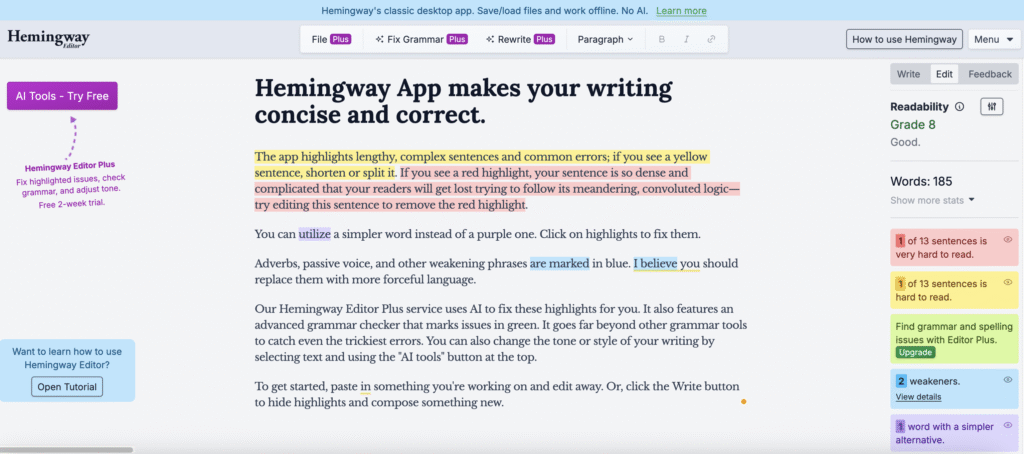
How to structure content for better readability and SEO in 2024? JEMSU. Retrieved from https://jemsu.com/how-to-structure-content-for-better-readability-and-seo-in-2024/

Ichir, L. (2022). Leverage Synonyms in your SEO Content Strategy. Topicseed. Retrieved from https://topicseed.com/blog/synonyms-seo/

Ineza, O. (n.d.). Why Keyword Research is Still Important for ASO in 2025. RPLG.io. Retrieved from https://rplg.io/why-app-keyword-research-is-important-for-aso/

Jeske, S. (2024). Enhancing Your Content Strategy with SEO Best Practices. MarketMuse. Retrieved from https://blog.marketmuse.com/enhancing-your-content-strategy-with-seo-best-practices/

Jhean, G. (2025). 19 SEO Case Studies: Strategies That Work in 2025. All in One SEO. Retrieved from https://aioseo.com/seo-case-studies/

Jhean, G. (2025). 83 SEO Statistics for 2025 (Current & Verified). AIOSEO.com. Retrieved from https://aioseo.com/seo-statistics

Kaatz, J. (n.d.) Is Readability Important For SEO? Illumination Marketing. Retrieved from https://www.marketingillumination.com/blogs/readability-important-for-seo

Lunn, M. (n.d.). The Ultimate Guide to Keyword Research in 2025. LeadPoint Digital. Retrieved from https://www.leadpointdigital.com/the-ultimate-guide-to-keyword-research-in-2025/

Mahale, N. (2025). What is Search Intent? Types, Examples & How to Optimize. Writesonic. Retrieved from https://writesonic.com/blog/what-is-search-intent

McKenzie, L. (2025). The Complete SEO Checklist. Backlinko. Retrieved from https://backlinko.com/seo-checklist/

Mortensen, O. (2025). 6 Tips on How to Avoid Keyword Stuffing in 2025 [That Actually Work]. SEO.ai. Retrieved from https://seo.ai/blog/how-to-avoid-keyword-stuffing

Moz. (2024). Search Intent: Understand What Searchers Want. Moz Learn SEO. Retrieved from https://moz.com/learn/seo/search-intent

Murton Beets, L. (2024). 57+ Content Marketing Statistics to Help You Succeed in 2025. Content Marketing Institute. Retrieved from https://contentmarketinginstitute.com/content-marketing-strategy/content-marketing-statistics

Ogilvy. (2025). Social Trends 2025: Social-First Brand Building & Key Shifts for 2025. Ogilvy.com. Retrieved from https://www.ogilvy.com/ideas/social-trends-2025-social-first-brand-building-key-shifts-2025/

Optimizing Content with Keyword Clustering for SEO in 2025 [Tips + Tools + Examples]. SlamMediaLab.com. Retrieved from https://www.slammedialab.com/post/keyword-clustering

Pandey, S. (2020). Semantic SEO Guide 2025: Optimizing for Topics & Entities. NiuMatrix.com. Retrieved from https://niumatrix.com/semantic-seo-guide/

Patel, N. (n.d.). Search Engine Trends for 2024. NeilPatel.com. Retrieved from https://neilpatel.com/blog/search-engine-trends/

Rose-Collins, F. (2025). Visual Storytelling in SEO: How Infographics & Slides Improve User Engagement and Rankings. Ranktracker. Retrieved from https://www.ranktracker.com/blog/visual-storytelling-in-seo-how-infographics-slides-improve-user-engagement-and-rankings/

S., M. (2025). 18 Tips to Write SEO-Friendly Content That Ranks in 2025. Hostinger. Retrieved from https://www.hostinger.com/tutorials/write-seo-friendly-content

Search Engine Land. (n.d.). Your 2025 playbook for AI-powered cross-channel brand visibility. SearchEngineLand.com. Retrieved from https://searchengineland.com/your-2025-playbook-for-ai-powered-cross-channel-brand-visibility-454026  

SEO Statistics That Prove Its Effectiveness in 2023. (2023). Markitors. Retrieved from https://markitors.com/seo-statistics-that-prove-its-effectiveness-in-2023/

SEO Trends 2025: 20 Stats to Boost Your Search Rankings. (2025). Digidop. Retrieved from https://www.digidop.com/blog/seo-trends-2025-20-stats

User Intent in SEO: Understanding the “Why” Behind the Search. (n.d.). seoClarity. Retrieved from https://www.seoclarity.net/blog/user-intent-seo

What Is Search Intent? + How It Shapes Content Strategy. (2025). SiegeMedia. Retrieved from https://www.siegemedia.com/seo/search-intent

Shepard, C. (2023). Google Rewrites 61% of Page Title Tags [SEO Study]. Zyppy SEO. Retrieved from https://zyppy.com/seo/title-tags/google-title-rewrite-study/

Spera, M. (2022). The Only 12 SEO Best Practices You Need to Know [2025 Checklist]. GrowthMarketingPro. Retrieved from https://www.growthmarketingpro.com/seo-best-practices-checklist/

Super, S. (2024). Keyword Integration: A Comprehensive Guide For SEO Success. Linkbot Library. Retrieved from https://library.linkbot.com/keyword-integration/

Super, S. (2024). What Is the Significance of Meta Descriptions for SEO? Linkbot Library. Retrieved from https://library.linkbot.com/what-is-the-significance-of-meta-descriptions-for-seo/

Tallwave. (n.d.). SEO in 2024: Riding the Wave of Change. Tallwave.com. Retrieved from https://tallwave.com/blog/seo-in-2024/

Tanguay, A. (2024). Topic clusters and SEO: Everything you need to know in 2025. Search Engine Land. Retrieved from https://searchengineland.com/topic-clusters-and-seo-everything-you-need-to-know-in-2025-448378

The Complete Guide to Optimized Content for SEO in 2025. (2024). The AD Firm. Retrieved from https://www.theadfirm.net/the-complete-guide-to-optimized-content-for-seo-in-2025/

The Power of Storytelling in SEO: How to Engage and Rank Higher. (2025). Content Whale. Retrieved from https://content-whale.com/us/blog/power-of-storytelling-in-seo/

Zarudnyi, A. (2024). Keyword Stuffing: Definition, Examples & How to Avoid It. SE Ranking. Retrieved from https://seranking.com/blog/keyword-stuffing/