Think of it as cleaning out your digital closet—keeping what works and tossing what doesn’t serve you anymore.
“Less is more” rings true in SEO—prune unhelpful content and watch your important pages grow. Removing old or weak web pages often leads to better search rankings. When you use content pruning as part of a content audit, you can boost traffic, streamline your site, and help search engines focus on your best work.
How much could your business benefit from a 64% increase in revenue? A lot, I bet.
Common types of content to prune
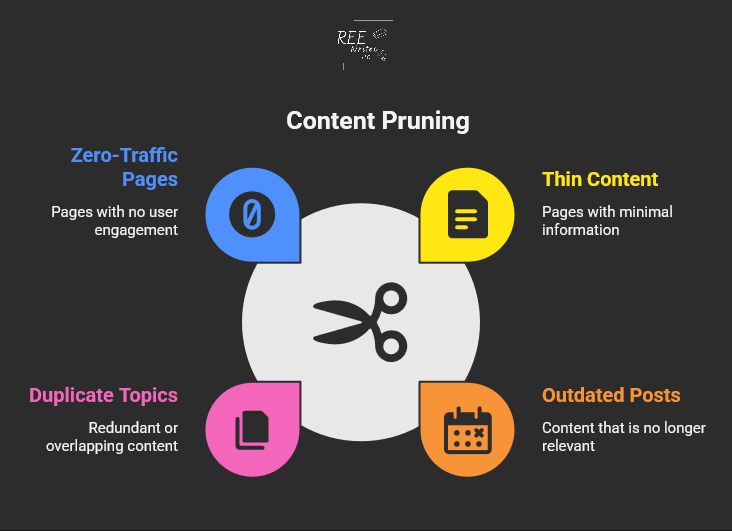
If you’re ready to get started, you need to know what kinds of pages to look for:
Thin content: Pages with little useful information
Outdated posts: Content with old dates or incorrect facts
Duplicate topics: Multiple pages targeting the same keywords
Zero-traffic pages: Content that gets no visits or engagement
Taking action to remove or improve your content is a crucial part of a full website review. The key is finding pages that drain your site’s SEO power without giving anything back in return.
Benefits you’ll see from pruning content
So, what’s in it for you? A clean website leads to some amazing results.
A case study by Seer Interactive shows the real impact of content pruning. Their client experienced declining traffic for five years straight. After removing 14,000 low-value pages, they achieved a 23% increase in organic traffic year-over-year.
Imagine what a 23% traffic increase could do for your business.
Steps to Prune Your Website
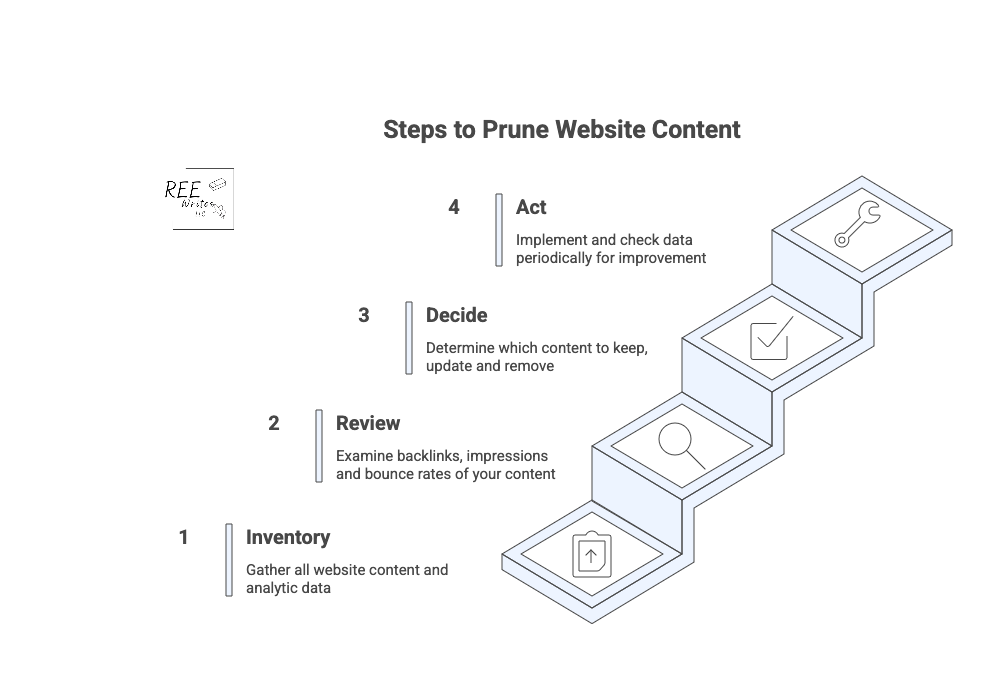
Ready to clean up your site? Here’s a simple process that works for websites of any size.
Conduct a full content inventory
Start by creating a complete list of all your pages. You can use tools like:
Google Analytics for traffic data
Google Search Console for search performance
Screaming Frog for technical crawls
Your content management system (CMS) export for a basic page list
Export everything into a spreadsheet so you can analyze the data easily. (I’ve listed more tools further in this article.)
Review analytics to find problem pages
Look for pages that meet these criteria:
Less than 50 organic sessions in the past 12 months
When you delete pages, always set up 301 redirects to send visitors and search engines to relevant replacement content. This preserves any SEO value the old page had.
The right tools can speed up your content audit and help you make better decisions about what to keep and what to get rid of.
Essential analytics tools
Start with these free options:
Google Analytics: Shows traffic, bounce rates, and user behavior
Google Search Console: Reveals search performance and indexing issues
Screaming Frog: Crawls your site for technical SEO problems
For deeper analysis, consider paid tools like:
Ahrefs: Comprehensive SEO data and competitor research
SEMrush: Keyword tracking and content gap analysis
Clearscope: Content optimization and performance insights
Simple scoring systems
Create a simple point system to evaluate each page:
Traffic: 0 to 10 points based on monthly visitors
Engagement: 0 to 10 points for time on page and bounce rate
Links: 0 to 10 points for backlinks and internal links
Relevance: 0 to 10 points for topic alignment with your goals
Pages scoring below 15 to 20 points are good candidates for pruning.
Organizing your audit data
Use spreadsheets to track your decisions and results. Include columns for:
URL and page title
Current performance metrics
Action taken (keep, update, merge, delete)
New redirect URL (if applicable)
Implementation date
This documentation helps you track results and avoid repeating work.
Wrap Up
Content pruning is a smart way to strengthen your SEO and help your site’s best content shine. Include regular audits to review and trim low-quality content, to keep your site health and support higher search rankings.
It may seem like a big job, but remember, every small step you take to improve your website’s health is a win for your business. By focusing on quality, you’re not just improving your SEO; you’re building a stronger, more efficient business that works for you.
Try content pruning in your next website audit for greater visibility.
A full content audit can feel like a massive project, taking days or even weeks to complete. But you’re busy running a business—nobody’s got time for that.
What if you could find your biggest content problems and opportunities in the time it takes to drink your morning coffee? ☕
You don’t need to block out your entire week to make a real impact on your website’s performance. This guide will walk you through a simple, focused process to audit your website’s content in just 15 minutes.
We don’t need to find every little flaw. In 15 minutes, you can spot the “low-hanging fruit,” or quick fixes that can boost your organic traffic and improve your site’s user experience (UX) right now.
What’s the difference between a content gap analysis and a content audit?
Before we dive in, let’s clear something up. People often use the terms “content audit” and “content gap analysis” interchangeably, but they are two very different tasks with different goals. Knowing the difference helps you choose the right tool for the job.
Define the terms “content gap analysis” and “content audit”
A content audit is like looking in the mirror. You’re analyzing the content you already have on your website. The goal is to evaluate its performance, find weaknesses, and see what’s working well. You’ll look at metrics like page views, keyword rankings, and bounce rates to decide if a piece of content should be kept, updated, or removed.
A content gap analysis on the other hand, is like looking out the window at your neighbors. You’re researching what content your competitors have that you don’t. The goal is to find topics and keywords that your audience is searching for but that you haven’t covered. This helps you plan future content that can attract a wider audience.
When to do a content gap analysis
You should run a content gap analysis when you’re focused on growth and expansion. It’s the perfect tool for when you need to:
You should perform a content audit when you want to improve what you already have. It’s your go-to move for content consolidation and optimization. An audit is ideal when you need to:
Improve the performance of underperforming content.
Clean up outdated or irrelevant pages (thin content).
Find quick SEO wins to boost your rankings.
Ensure your existing content still meets your quality standards and business goals.
For example, case studies by cognitiveSEO show that several companies who conducted content audits led to significant increases in organic traffic just by pruning and improving existing content.
Source: Search Engine Land
What a 15-minute content audit can show you
This quick audit is all about speed and impact, so we’re not getting lost in the weeds. We’re looking for a handful of actionable insights that can make a difference right away.
Here are some things to do before you start that 15-minute timer.
Set realistic goals for a quick audit
In 15 minutes, you won’t be able to analyze every single page on your site, and that’s okay.
Your goal is simple: find 3 to 5 high-impact action items. This could be identifying a blog post to update, a title tag to rewrite, or a broken page to redirect.
Focus on big problems, not small details
This audit uses the 80/20 principle. We’re looking for the 20% of problems that are causing 80% of your performance issues.
Don’t worry about a typo on a page that gets two visits a month. Instead, focus on a high-traffic page with a terrible bounce rate or a page that has high impressions but almost no clicks. These are the big problems that, once fixed, deliver the biggest returns.
Identify your content’s “low-hanging fruit”
“Low-hanging fruit” refers to opportunities that require minimal effort for maximum gain. In a quick content audit, this typically includes:
Pages ranking on the bottom of page one or the top of page two in Google search results.
Content with high impressions but a low click-through rate (CTR).
Popular posts that can be updated with new information to boost their rankings further.
This 15-minute audit is like a health screening, not major surgery. It’s designed to give you a quick, actionable snapshot of your site’s condition. It will give you a clear to-do list to get started on, but it won’t replace the need for a deeper, more comprehensive audit every 6 to 12 months.
Create a content inventory or content audit matrix
To keep your findings organized, you need a simple content inventory spreadsheet, sometimes called an inventory or matrix.
Don’t overcomplicate it. Create a new sheet with these basic columns:
URL: The address of the page.
Topic/Keyword: The main topic the page covers.
Traffic (30 days): The number of sessions from organic search.
Impressions (30 days): How many times it appeared in search results.
CTR (30 days): The click-through rate, or how many times someone clicked on your webpage.
Action: A simple note on what to do (“Update,” “Improve Title,” “Redirect”).
Okay, it’s time to start the clock! ⏱️ The first two minutes are for getting your workspace set up. Efficiency is key, so have these tools open and ready to go.
Get these tools for an effective content audit
For this quick audit, you only need three things, and they’re all free:
Google Search Console (GSC): Shows how your site performs in Google search.
Google Analytics (GA): Reveals what visitors do once they are on your site.
A spreadsheet: Google Sheets or Excel to create your content inventory.
(Paid tools like Ahrefs and Semrush are fantastic for deep dives, but you don’t need them for this rapid-fire check-up.)
Open your Performance report in Google Search Console
Log in to your Google Search Console account. Then go to the Performance report, and set the date range to the last 28 or 30 days.
This is where you’ll find data straight from Google, including impressions, clicks, CTR, and your average position for different queries.
Access your All Pages report in Google Analytics
In a separate tab, open your Google Analytics (GA4) account. Go to Reports > Engagement > Pages and screens.
Filter the report to show only organic search traffic. This view will show you your most visited pages, average engagement time, and other on-site metrics.
Prepare a simple spreadsheet or a notepad
Have your spreadsheet ready with the columns we discussed earlier. As you go through the next steps, you’ll quickly paste in URLs and jot down notes. This prevents you from getting sidetracked and ensures you have a clear action plan when the 15 minutes are up.
Use a timer to stay on track
Set a real timer on your phone or computer for 15 minutes. This creates a sense of urgency and forces you to stay focused on the high-impact tasks instead of falling down a rabbit hole of data analysis.
Minutes 3 to 7: Find your best and worst pages
With your tools open and your timer running, it’s time to dig in. In this four-minute block, you’ll be a detective, quickly scanning for clues about your content’s health.
Spot your top-performing content
In Google Analytics, sort your Pages and screens report by organic users to see your most popular pages. These are your workhorses.
For the top 3 to 5 pages, ask yourself: “Is this content fully up-to-date?” and “Can I add internal links from this page to other important pages?” Add these URLs to your spreadsheet with a note like “Check for internal linking opportunities.”
Find pages with high impressions but low clicks
Switch back to Google Search Console. In the Performance report, click the Pages tab. Then filter your results to find pages that have a high number of impressions but a low CTR.
This is a red flag for a poor user experience. Add one of these pages to your spreadsheet with the note: “Review for search intent mismatch.”
Minutes 8 to 12: Look for quick SEO wins
Now that you’ve identified some key pages, let’s spend the next four minutes looking for technical and on-page issues that are easy to fix but can have a big impact.
Check for pages with missing title tags
A missing or duplicate title tag is a basic SEO mistake that can hold your webpage back. You can spot these using GSC or a free browser extension.
If you find any, fixing them is one of the quickest wins you can get. A unique, compelling title tag is critical for both search engines and users.
Find content that ranks for the wrong keywords
In GSC, click on a specific page from your list, then click the “Queries” tab. Are the keywords listed here relevant to your page’s content?
Sometimes a page will rank for an unexpected term. This isn’t always bad! It could be an opportunity to re-optimize the page for that term or create a new piece of content that serves that search intent even better.
Identify opportunities for internal links
Source: Zyppy
Internal linking is one of the most underrated SEO tactics. It helps Google understand your information architecture and spreads authority throughout your site.
Quickly open the pages on your list in a new tab. How do they look? Have you viewed these pages on a mobile device?
Check for things that would annoy a user, like:
Aggressive pop-ups that block the content.
Slow load times.
Text that’s hard to read.
Broken images or videos.
Make a quick note of any glaring UX issues in your spreadsheet. Fixing these can directly impact how long people stay on your site and how Google perceives its quality.
Minutes 13 to 15: Decide what to do next
The timer is about to go off! In these final minutes, your goal is to turn your messy notes into a clean, prioritized action plan. This is where the audit becomes truly valuable.
Use a simple “keep, update, or remove” framework
Source: SEOBuddy
For every URL in your spreadsheet, assign it one of three statuses:
Keep: The content is performing well and is up-to-date. No action is needed right now.
Update: The content has potential but needs work. This could be a small tweak (like a new title), combining elements from two or more posts, or a major rewrite.
Remove: The content is outdated, irrelevant, and gets no traffic. These pages can be deleted and redirected (using a 301 redirect) to a more relevant page, called content pruning. Pruning this “dead weight” can sometimes improve your site’s overall SEO health.
Prioritize tasks that will have the biggest impact
How do you choose your priorities? Go back to the 80/20 rule. Which task will likely drive the most traffic or conversions for the least amount of effort? Updating the title tag on a page with 50,000 monthly impressions is more important than fixing a typo on a page with 10 monthly impressions (although you can do the latter quickly).
Look at your list of “Update” and “Remove” tasks, and choose the 3 to 5 you think will have the biggest and fastest impact. This is your official to-do list. You can’t do everything at once—save the rest for later.
Schedule a deeper audit for a later date
Finally, acknowledge that this was just a sprint. Put a reminder on your calendar three or six months from now to perform a more in-depth site audit. Consistent, iterative improvement is the key to a long-term, successful content performance strategy.
Your 15-Minute Audit is Complete!
And just like that, within just 15 minutes, you’ve moved from feeling overwhelmed by your website’s content to having a clear, prioritized list of actions that can improve your SEO.
This quick content audit proves you don’t need weeks to make real progress. While it doesn’t cover everything, it gives you an actionable list to start improving your SEO and providing more value to your audience right away. Run this quick check today and take the first step toward more organic traffic.
You don’t need weeks to make progress. By focusing on high-impact tasks and ignoring the small stuff, you can make meaningful changes quickly. Now, take that short to-do list you created and schedule time to get it done. Run this quick audit every quarter, and you’ll build powerful momentum toward better rankings and a healthier website.
References
Antara. (2025). Google AI Search Impact: Website Traffic Slashes by 50%. Analytics Insight. Retrieved from https://www.analyticsinsight.net/news/google-ai-search-impact-website-traffic-slashes-by-50
Content pruning for SEO. (n.d.). LearningSEO. Retrieved from https://learningseo.io/seo_roadmap/deepen-knowledge/content/content-pruning/
Dean, B. (2022). We Analyzed 4 Million Google Search Results. Here’s What We Learned About Organic Click Through Rate. Backlinko. Retrieved from https://backlinko.com/google-ctr-stats
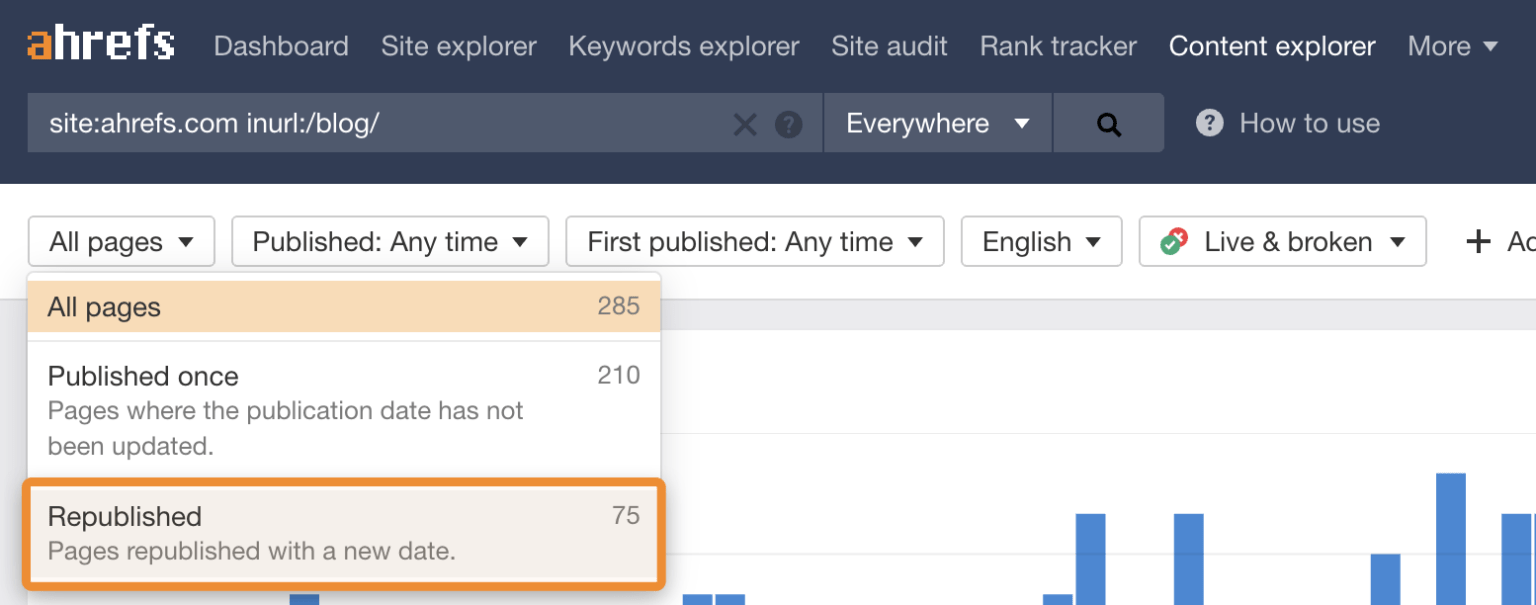
Hardwick, J. (2020). Republishing Content: How to Update Old Blog Posts for SEO. Ahrefs. Retrieved from https://ahrefs.com/blog/republishing-content/
Sauciuc, A. (2025). Is Content Pruning Good for SEO? Case Studies + Experts’ Opinions. cognitiveSEO. Retrieved from https://cognitiveseo.com/blog/17548/content-pruning-for-seo/
Shepard, C. (2025). 23 Million Internal Links – SEO Case Study. Zyppy. Retrieved from https://zyppy.com/seo/seo-study/
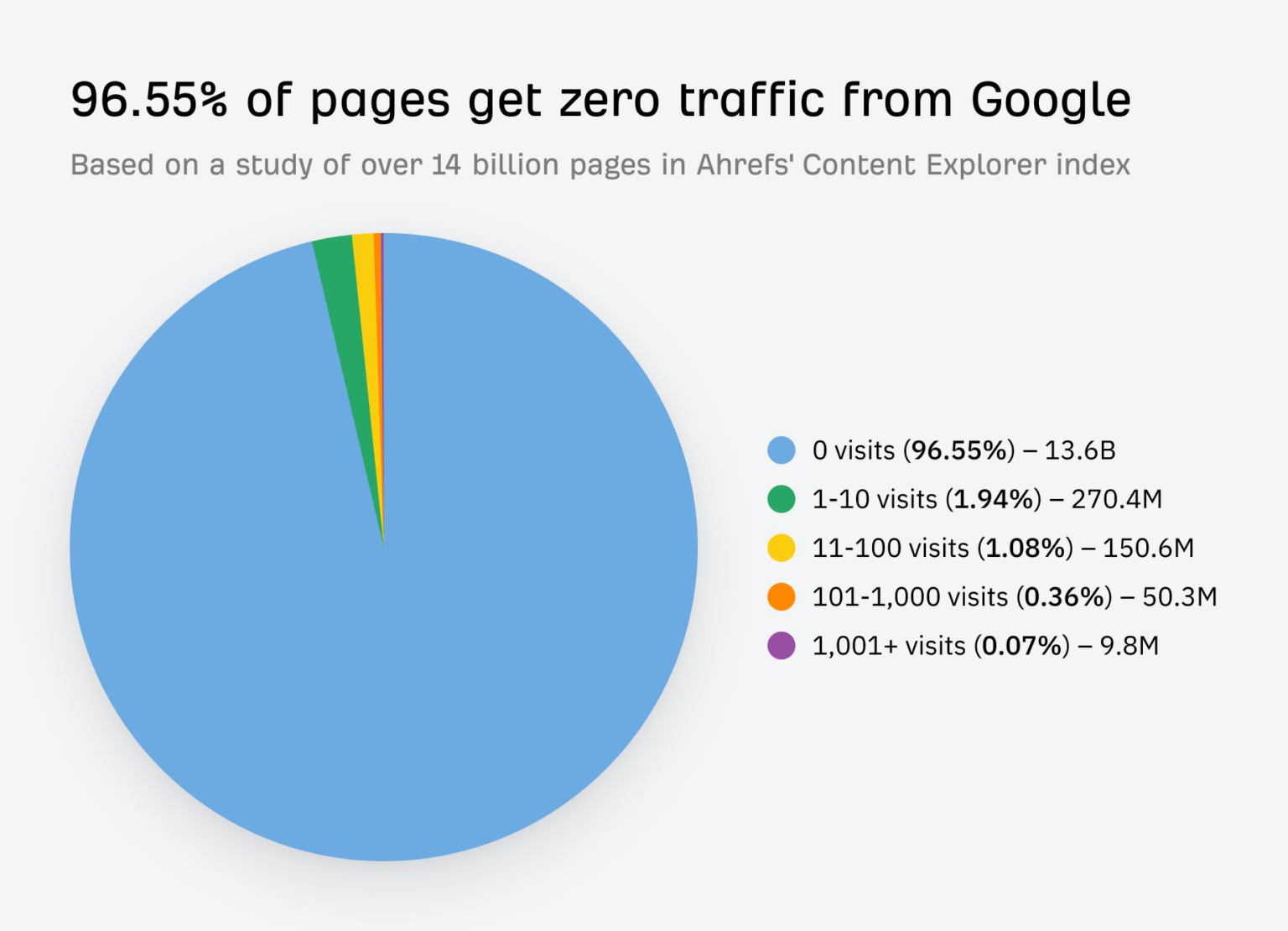
Soulo, T. (2023). 96.55% of Content Gets No Traffic From Google. Here’s How to Be in the Other 3.45% [New Research for 2023]. Ahrefs. Retrieved from https://ahrefs.com/blog/search-traffic-study/
Although 68% of online experiences begin with a search engine, many solopreneur and small businesses without a marketing department or a big budget struggle to get their websites ranked on the first page of search results. “The best place to hide a dead body is page two of Google,” is the digital marketing joke that rings true for many solopreneurs trying to improve their website’s SEO.
On-page SEO forms the foundation of your website’s visibility in search engines. You have direct control over these elements and can optimize without specialized technical knowledge.
Keyword research techniques tailored for solopreneurs with limited time
Finding the right keywords doesn’t have to be time-consuming or complicated. For solopreneurs, focusing on keyword difficulty rather than search volume often yields better results. According to Semrush, “Keyword difficulty is more important than volume” for small businesses looking to gain traction.
Start by identifying questions your target audience is asking. What problems do they need solved? Use free tools like Google’s Keyword Planner or affordable options like Mangools to identify low-competition, long-tail keywords relevant to your business.
When selecting keywords, prioritize phrases with:
Lower difficulty scores (under 40)
Clear relevance to your products or services
Specific intent that matches what you offer
For example, if you run a handmade pottery business, targeting “handcrafted ceramic pots” will bring more qualified traffic than a broader, more general keyword like “pottery.”
Essential on-page elements to optimize
Once you’ve identified your target keywords, incorporate them strategically into these critical on-page elements:
Title tags: Include your primary keyword near the beginning of your title. Keep titles under 60 characters to ensure they display fully in search results.
Meta descriptions: While not a direct ranking factor, compelling meta descriptions improve click-through rates. Include your keyword naturally and create a clear call to action within 155 characters.
Header tags: Structure your content with H1, H2, and H3 tags that include relevant keywords. Your H1 should contain your primary keyword, while subheadings can target related terms.
Content structure best practices that both search engines and readers love
Well-structured content keeps readers engaged and helps search engines understand your page. Follow these guidelines:
Start with a clear, keyword-rich headline
Use subheadings (H2s and H3s) to organize information logically
Keep paragraphs short (2-3 sentences) for better readability
Include bulleted or numbered lists to break up text
Bold important concepts or keywords (sparingly)
“SEO isn’t about gaming the system anymore; it’s about learning how to play by the rules,” notes content strategist Jordan Teicher. This means creating genuinely helpful content that’s structured in a way that both readers and search engines can easily digest.
Image optimization to improve page load speed and accessibility
Images significantly impact both your site’s load time and accessibility. Optimize them by:
Compressing all images before uploading
Using descriptive, keyword-rich file names (e.g., “handmade-ceramic-bowl.jpg” instead of “IMG12345.jpg”)
Adding alt text that describes the image while naturally incorporating keywords
Choosing the appropriate file format (JPEG for photographs, PNG for graphics with transparency)
Schema markup helps search engines understand your content better, potentially improving how your site appears in search results. For non-technical users:
Install a schema markup plugin (like Yoast SEO or All-in-One SEO for WordPress)
Configure basic business information (name, address, phone)
Set up product, service, or review schema as appropriate for your business
HTTPS is both a ranking signal and a trust factor for visitors. Most hosting companies now offer free SSL certificates through Let’s Encrypt. Make sure:
Old HTTP URLs redirect properly to their HTTPS versions
Google Chrome marks non-HTTPS sites as “Not Secure,” which can significantly increase bounce rates and reduce conversions.
Submit sitemap to search engines
Sitemaps help search engines discover and index your content more efficiently. To implement:
Use a plugin like Yoast SEO or Google XML Sitemaps to automatically generate a sitemap
Create accounts in Google Search Console and Bing Webmaster Tools
Submit your sitemap URL to both platforms
Check periodically for any indexing errors
A well-structured sitemap ensures search engines can find and index all your important pages, including new content you publish.
Content Strategy That Drives Traffic
Content remains the cornerstone of effective SEO. Creating strategic content that serves both users and search engines is essential for sustained growth.
Create content that serves both your audience and search engines
The most effective content satisfies both human readers and search algorithms. To achieve this balance:
Start with real questions and problems your audience faces
Provide comprehensive, actionable answers
Include relevant keywords naturally throughout your content
Support claims with data, examples, or case studies
Make content scannable with clear subheadings and formatting
“Quality content about a topic” is the first criterion for ranking high in organic search, emphasizing that content quality trumps all other factors.
Establish content pillars relevant to your business
Content pillars are comprehensive resources addressing core topics in your niche. They help establish your authority and create a foundation for your content strategy:
Identify 3 to 5 main topics central to your business
Create in-depth, authoritative content (2,000+ words) for each pillar
Develop related subtopic content that links back to your pillar pages
Update pillar content regularly to maintain relevance
This approach not only strengthens your topical authority but also creates a logical site structure that search engines reward. Research shows that content between 2,000 to 2,500 words tends to rank higher in search results.
Repurposing strategies to maximize your content
As a solopreneur, maximizing every piece of content is essential. Effective repurposing includes:
Turning blog posts into video tutorials
Creating infographics from data-heavy articles
Extracting key points for social media posts
Compiling related articles into downloadable guides
Converting written content into podcast episodes
This approach can triple your content output without requiring three times the effort, making it ideal for time-strapped solopreneurs.
Updating older content to maintain relevance and rankings
Content isn’t “set it and forget it.” Regular updates help maintain and improve rankings:
Audit content performance quarterly using Google Analytics
Prioritize updating high-traffic or previously high-ranking pages
Add new information, examples, or data points
Refresh outdated statistics or references
Improve formatting and readability
Update your content every year to keep it fresh and relevant.
Publishing frequency recommendations based on your resources
Consistency matters more than volume. Based on your available time:
1 to 2 hours per week: Publish one high-quality post monthly
3 to 5 hours week: Aim for bi-weekly content
6 hours week or more: Consider weekly publishing
“Would you rather spend 5 hours on a post that could get you thousands of hits per month over 2 years?” suggests one SEO professional, highlighting that quality and strategic targeting outweigh quantity.
AI’s Impact on Modern SEO
Artificial intelligence is reshaping SEO practices. Understanding these changes helps you adapt your strategy effectively.
How Google’s AI-powered search is changing traditional SEO rules
Google’s AI systems like BERT and MUM transformed how search works:
Focus has shifted from exact keyword matching to understanding user intent
Content depth and expertise matter more than keyword density
Natural language processing better understands conversational queries
Featured snippets and knowledge panels answer questions directly in search results
These changes mean your content needs to provide genuine value rather than just targeting keywords. Studies show that comprehensive content that answers related questions often ranks better than content optimized for a single keyword.
Using AI tools to create SEO-friendly content
AI can help solopreneurs create better content more efficiently:
However, remember that “Google prioritizes quality, human-written content over AI-generated or keyword-stuffed content.” Use AI as a tool, not a replacement for your expertise and unique perspective.
Perplexity and other AI search engines: preparing your content for AI discovery
According to SEOMATOR, marketers are leveraging AI in their SEO strategy with great results:
86.07% of SEO professionals have integrated AI into their strategy.
Companies leveraging AI in their SEO strategies saw a 30% improvement in search engine rankings within six months.
As AI search engines gain popularity, optimizing for them requires:
Structuring content with clear headers that frame specific questions
Providing direct, concise answers early in each section
Including relevant data points, statistics, and citations
Using schema markup to help AI understand your content’s context
While these engines are still evolving, content that’s well-structured and information-rich tends to perform best across all platforms.
What the integration of Reddit results in Google search means for your strategy
Google’s increasing inclusion of Reddit content signals a preference for authentic discussion:
Consider participating in relevant Reddit communities to build visibility
Create content that addresses real questions found in Reddit discussions
Incorporate conversational elements and authentic perspectives in your content
Use Reddit as a research tool to identify emerging topics in your niche
This trend underscores the value of genuine expertise and community engagement over traditionally optimized content.
Adapting to search intent in AI-first search
Search intent (the “why” behind a search query) is now central to SEO success:
Identify whether queries are informational, navigational, commercial, or transactional
Match your content format to the appropriate intent (guides for informational, product pages for commercial)
Analyze what’s currently ranking to understand what Google considers relevant
Structure content to directly address the specific questions behind search queries
Citations (mentions of your business name, address, and phone number) build local authority:
Ensure NAP (Name, Address, Phone) consistency across all platforms
Start with major directories like Yelp, Yellow Pages, and Bing Places
Target industry-specific directories relevant to your business
Consider using a citation management tool to maintain consistency
Research shows that citation consistency ranks as the fourth most important factor in local search ranking, making it a high-priority task for local businesses.
Generating authentic customer reviews ethically
Reviews directly impact both rankings and customer decisions:
Create a simple process for customers to leave reviews
Send follow-up emails with direct links to your review platforms
Respond thoughtfully to all reviews, positive and negative
Local keyword optimization requires a slightly different approach:
Include city/region names in title tags, headers, and content
Target neighborhood terms for businesses in large cities
Create location-specific pages for businesses serving multiple areas
Optimize for “near me” searches by including proximity terms
Local search has grown by more than 900% in recent years, with 46% of all Google searches having local intent, making local keyword optimization essential for area-based businesses.
Leveraging local events and community for better visibility
Community involvement creates both backlink opportunities and local relevance. Some ideas include:
Sponsor local events or sports teams
Host workshops or educational sessions
Partner with complementary local businesses
Participate in community service and charity events
These activities create natural opportunities for local press coverage, mentions, and backlinks that boost your local SEO profile.
Link Building On A Solopreneur’s Schedule
Backlinks remain crucial for SEO success, but traditional link building can be time-consuming. These strategies work with limited resources.
Guest posting opportunities that provide actual value
Quality guest posts can build authority and referral traffic:
Target sites that reach your ideal audience, not just high-domain-authority sites
Pitch unique insights based on your specific expertise
Create original, valuable content that serves the host site’s audience
Include a natural contextual link back to relevant content on your site
Building relationships with complementary businesses
Network with businesses that serve your same audience but aren’t direct competitors. You can:
Cross-promote content on each other’s blogs
Develop co-branded resources or tools
Participate in joint webinars or events
Mention and link to each other when relevant
This collaborative approach creates mutual benefits, and require less time than a cold outreach campaign.
Leveraging social media for link building
While social media links are typically nofollow, they can lead to valuable linking opportunities:
Share your best content consistently across platforms
Join and participate in industry-specific groups
Connect with journalists and content creators in your field
Use social listening tools to find linking opportunities
A study by Hootsuite found that content shared on social media receives, on average, 40% more backlinks than content without social promotion.
How to monitor your backlink profile efficiently
Stay informed about your backlink status without daily monitoring:
Set up Google Search Console to receive alerts about new links
Schedule monthly backlink audits using free tools like Ahrefs’ Backlink Checker
Create Google Alerts for your brand name to catch unlinked mentions
Focus primarily on link quality metrics rather than quantity
Quality matters more than quantity. Research shows that a few links from authoritative, relevant sites outperform many low-quality links.
Measuring SEO Success
Effective measurement helps you understand what’s working and where to focus your limited time.
Essential metrics every solopreneur should track
Focus on metrics that directly impact your business goals:
Organic traffic growth: Month-over-month and year-over-year changes
Conversion rate from organic search: How many visitors take desired actions
Keyword rankings: For your top 10-15 target terms
Page performance: Which pages attract the most traffic and conversions
Bounce rate and time on page: Indicators of content quality
Setting up basic analytics without getting overwhelmed
Start with a simple analytics setup:
Install Google Analytics 4 on your website
Connect Google Search Console to your Analytics
Set up basic goal tracking for important actions
Create a custom dashboard with only your most important metrics
Schedule monthly review sessions to assess performance
This approach provides essential insights without requiring daily monitoring. Solopreneurs who review their analytics for just 1 to 2 hours a month make better strategic decisions than those who check stats daily but never deeply analyze them.
Interpreting your data to guide future decisions
Turn analytics into actionable insights:
Identify your highest-performing content and create more similar material
Find pages with high impressions but low click-through rates and improve their titles/descriptions
Spot keywords where you rank on page two and target them for improvement
Analyze user behavior to identify potential website improvements
Effective SEO for solopreneurs isn’t about implementing every possible tactic—it’s about choosing the right strategies that align with your business goals and available resources. Start with the fundamentals, gradually implement more advanced techniques, and measure your results over time to refine your approach.
SEO is a marathon, not a sprint. With consistent effort and the strategies we’ve discussed here, you’ll steadily improve your website’s visibility and connect with more potential customers online.