Epic and Oracle Health shipped consumer-grade AI patient interfaces within a year of each other: Epic’s Emmie launched in 2025, and Oracle’s AI-powered patient portal followed in August 2026.
That resets the baseline for what “good” patient communication looks like, and it raises the bar for every smaller healthtech SaaS vendor still selling to the buyer instead of building for the user.
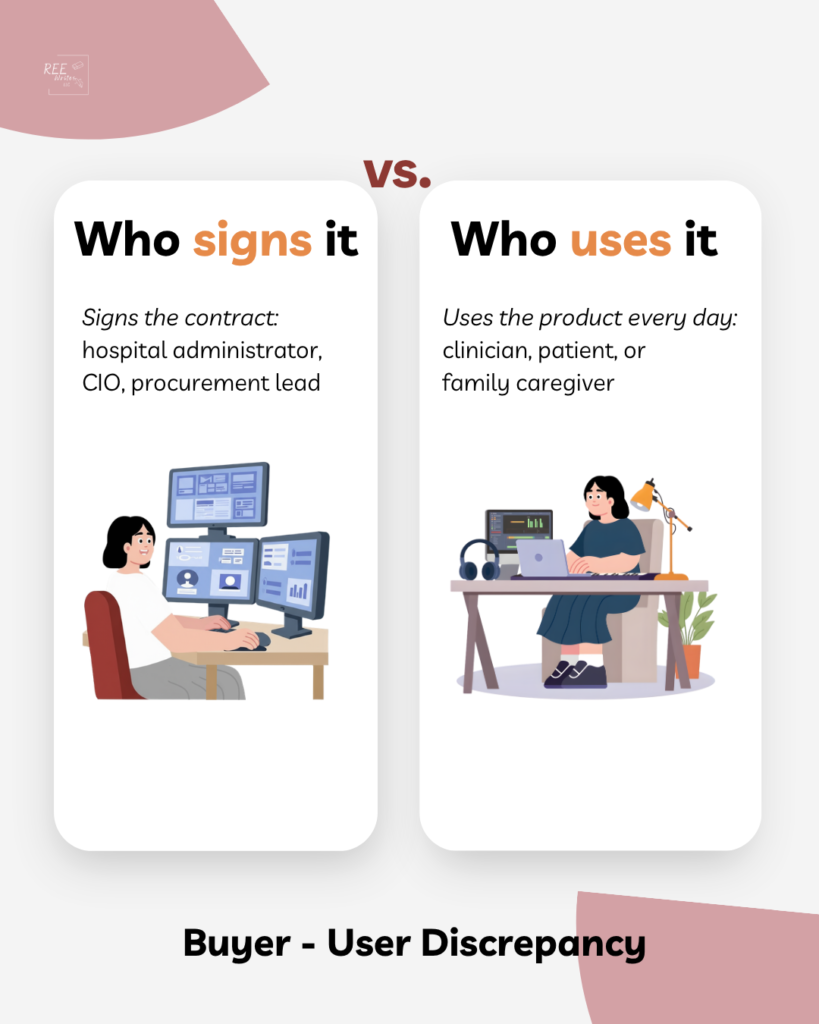
They still need to address the buyer/user gap, the distance between who signs the contract, and who actually has to use the thing.
What did Oracle and Epic build?
Oracle Health made their AI-powered Patient Portal available across the U.S. in August 2026, built on the EHR platform the company designed after its $28 billion Cerner acquisition.
Answers direct questions like “how am I managing my diabetes?” grounded in that patient’s chart
Handles appointment scheduling using natural language processing (NLP)
Redirects diagnosis or treatment questions to the care team or 911 instead of answering them itself
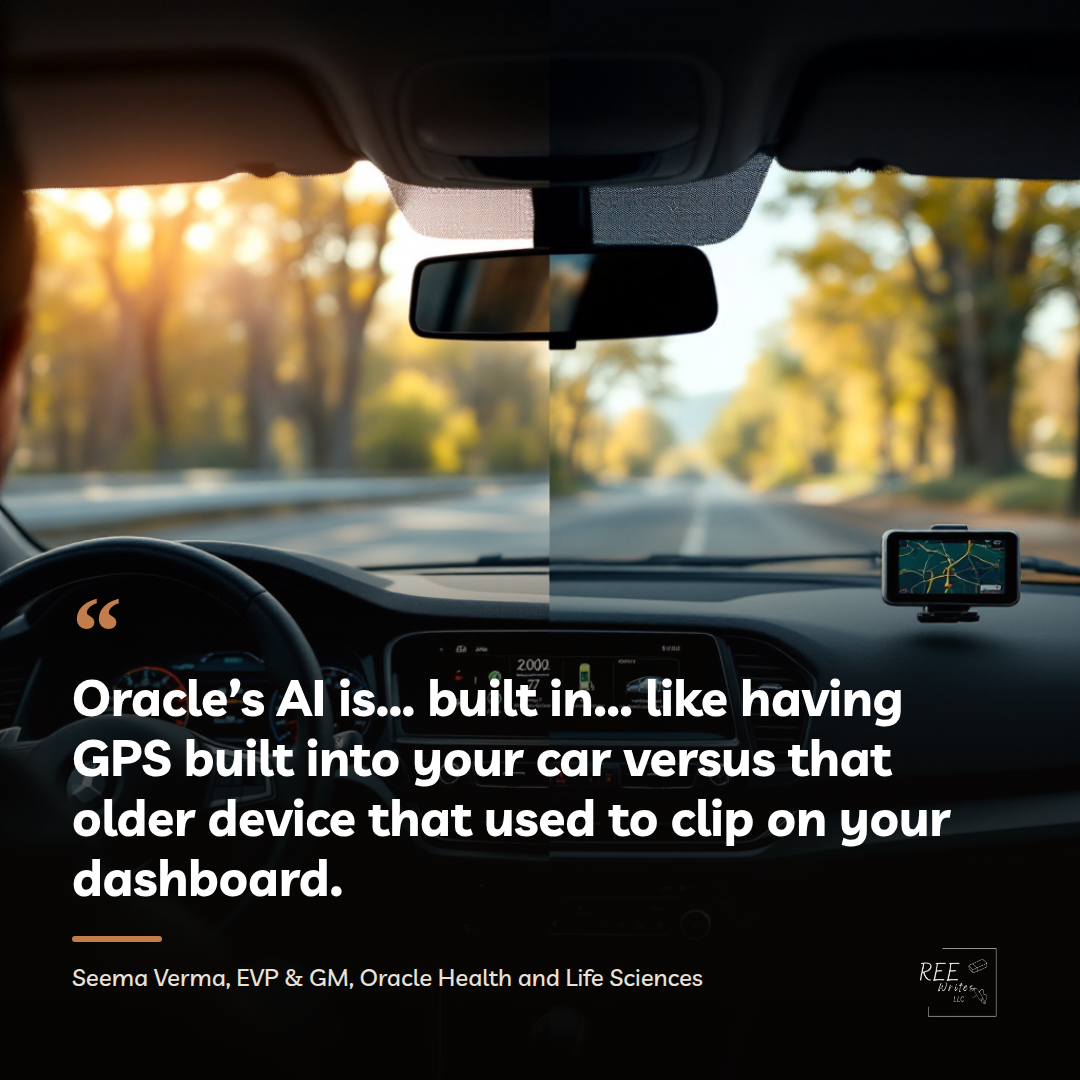
Seema Verma, EVP and GM of Oracle Health and Life Sciences, described the positioning: “Oracle’s AI isn’t bolted on, it’s built in. So it’s like having GPS built into your car versus that older device that used to clip on your dashboard.”
That’s a direct shot at Epic, whose own patient-facing AI tool, Emmie, launched roughly a year earlier and does the same job: scheduling and visit prep.
Two things to pay attention to:
The 2 largest EHR vendors in the country have both decided a plain-language, source-cited AI layer belongs inside the patient’s primary record system, not bolted on as a third-party add-on.
They did so almost simultaneously, which means this wasn’t a one-off bet by a single company chasing a headline.
It’s now a category baseline.
If you don’t sell to Epic or Oracle’s customers, why should you care?
This dynamic created the buyer/user gap in healthtech content and product design, not a startup: platforms and vendors build for the person who signs the contract, while the person who has to log in, read the message, and act on it gets whatever’s left over.
When the systems didn’t talk to each other, I built my own spreadsheet, and later a Notion workspace, because none of the vendor platforms agreed on formatting or gave me a way to see the whole picture at once.
That workaround is the tell. Every time a caregiver or patient builds their own system to route around a product, it means the education and communication layer inside that product doesn’t exist.
Oracle and Epic can absorb the cost of closing part of that gap because they’re the two largest EHR companies in the country with the engineering budget to do it. Series A or B healthtech SaaS vendors selling point solutions into the same health systems don’t have that budget, and now has a buyer who’s seen what “built in, not bolted on” looks like at the platform level.
The standard moved. Every smaller vendor now has to answer, before the demo and not during it, what their product does for the actual user that the EHR’s own AI won’t.
What does Rock Health’s H1 2026 data reveal about how vendors are responding?
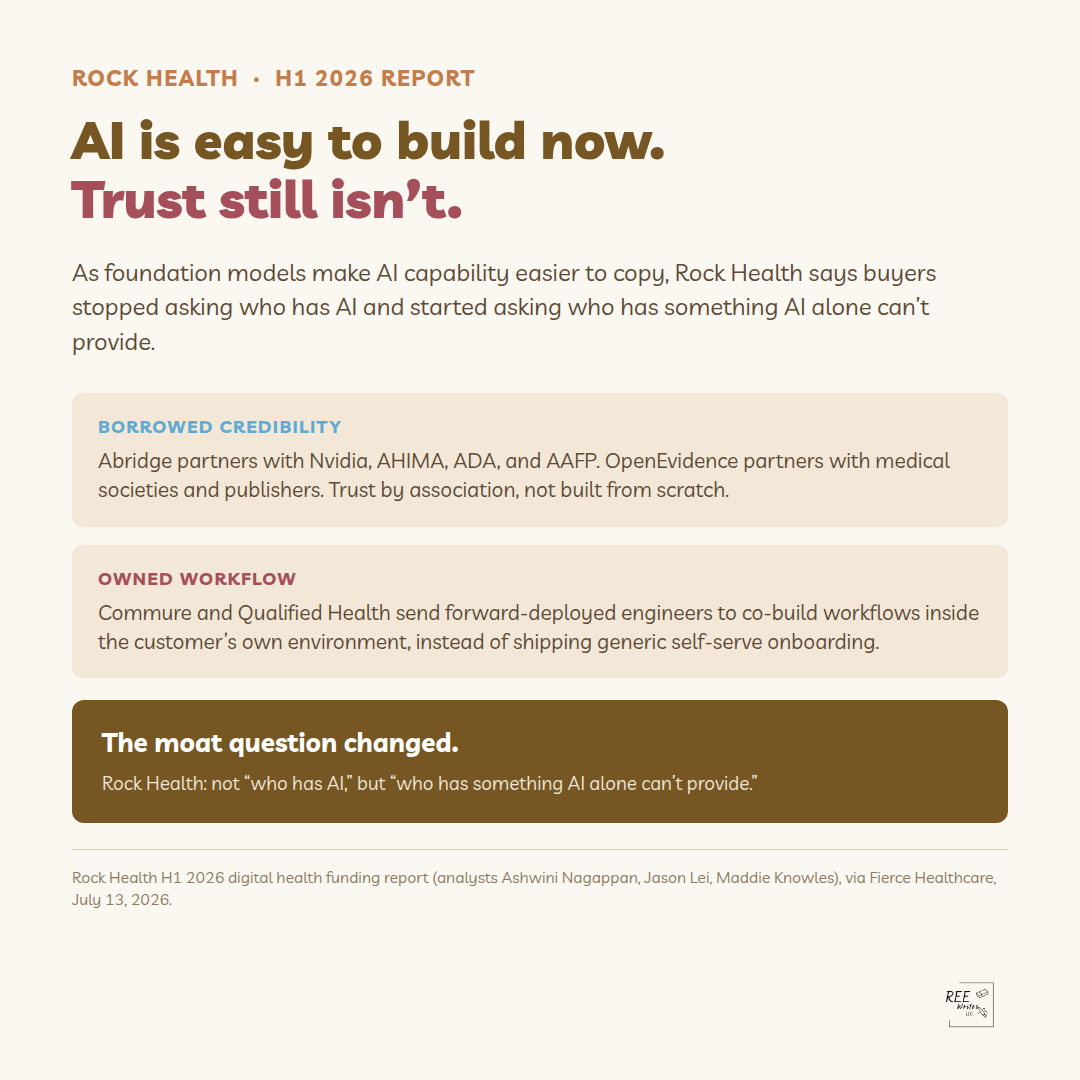
Rock Health’s first-half 2026 digital health funding report calls out two patterns here, because both are responses to the same pressure Oracle and Epic just applied.
The first is borrowed credibility through partnership.
Abridge’s partnerships with Nvidia, American Health Information Management Association (AHIMA), the American Diabetes Association (ADA), and the American Academy of Family Physicians (AAFP)
OpenEvidence’s partnerships with medical societies and publishers, as a strategy for building trust without spending years earning it through content alone.
A partnership with the AAFP is a shortcut past the “why should I trust you” conversation (the same conversation many vendors try and fail to have through their content).
The second is the forward-deployed engineer, or FDE, model.
Companies like Commure and Qualified Health are building go-to-market motions around engineers who work directly inside a customer’s environment to co-develop workflows. They don’t rely on a standard onboarding flow and hope it sticks. You don’t need to hire engineers to embed on-site to learn from that.
High-touch onboarding has to follow one principle: Build it around the specific workflow your buyer has.
An education sequence has to follow that same principle if it’s going to shorten the distance between the person who bought the product and the person who has to run it.
What should a healthtech SaaS company do differently?
Three things, in order:
Say what your product does that the EHR’s AI won’t. If your pitch is “plain-language patient communication” or “explains the record back to the patient,” Oracle and Epic just did that at the platform level. Your differentiation has to sit somewhere more specific, in a workflow, a population, or a moment in care they’re not built to reach.
Check whether your content is still written for the signer instead of the user. A demo deck built for a CIO, and an onboarding sequence built for the clinician or patient who has to live inside the product every day, are two different documents. Most companies only have the first one.
Borrow trust deliberately (like Abridge and OpenEvidence). If you don’t have a partnership with an institution your buyer already trusts, your content has to do all of that trust-building work by itself. Know which job it’s doing before you write it.
You have to be honest about who opens and uses the product after the contract is signed, and then build the education for them.
The buyer/user gap describes the distance between the person who signs a healthtech contract, usually a hospital administrator, CIO, or procurement lead, and the person who actually has to use the product day to day, whether that’s a clinician, a patient, or a family caregiver.
Vendors that build and market for the buyer while ignoring the user see stalled deals and quiet churn even when the product itself works.
What did Oracle Health’s AI patient portal launch in August 2026?
Oracle Health released a generally available, AI-powered patient portal across the U.S. in August 2026. The embedded assistant explains a patient’s own medical record in plain language, cites its sources, answers direct questions grounded in that patient’s chart, and handles natural-language appointment scheduling.
Instead of giving a diagnosis or treatment advice, it redirects those questions to the care team or emergency services.
How is Oracle’s AI patient portal different from Epic’s Emmie?
Both tools handle scheduling and visit prep through an AI layer built directly into the EHR rather than added on top. Epic’s Emmie launched roughly a year before Oracle’s equivalent.
Oracle has positioned its version explicitly against Epic’s, describing its approach as “built in, not bolted on.”
Why does a platform-level AI feature affect smaller healthtech SaaS vendors?
When the two largest EHR vendors in the country both ship the same category of feature, they reset what health system buyers expect “good” patient communication to look like.
A smaller vendor selling a point solution into the same health systems now has to explain, in plain language and before the demo, what their product does that the platform’s own AI does not.
What does Rock Health’s H1 2026 report say about building buyer trust?
Rock Health’s first-half 2026 funding report highlights two strategies:
1- Borrowing credibility through partnerships with institutions the buyer already trusts (Abridge with the AAFP and ADA, OpenEvidence with medical societies and publishers)
2- Using forward-deployed engineers who work inside a customer’s actual environment instead of a standard onboarding flow, as seen at Commure and Qualified Health.
How can a healthtech company tell if it’s still selling to the wrong person?
Check whether the demo deck and the onboarding sequence are the same document with different formatting. If the content built for the CIO who signs the contract is the same content handed to the clinician or patient who has to use the product, it was written for one audience and is being asked to do a second job it was never built for.
Why the Person Who Signs Your Contract isn’t the Person Who Has to Use it
I spent 18 months coordinating my late husband’s care across 10 doctors. Not one platform I touched during that time (the portal, scheduling app or discharge paperwork), ever told me why I’d need to log back in after that first appointment.
No one assumed I’d still be there in month four, cross-referencing lab results across three systems that didn’t talk to each other.
No one walked me through what came next.
The tool showed up already finished, built for someone who wasn’t me and sold to someone who wasn’t me either.
I wasn’t in the room when that software got designed. I wasn’t in the room when it got purchased. That’s the room your healthtech company keeps missing.
The Wrong Person, Right Product Problem
Here’s the pattern behind almost every stalled deal and every churn spike I’ve dug into: the vendor builds for the product team, markets to procurement, and loses adoption. Not because the product fails. Because education never reaches the person who has to use the thing every day.
Three different people touch your platform before it succeeds or dies quietly inside someone’s EHR. They rarely overlap, and they almost never hear from you in the same language.
The buyer decides whether your product gets funded.
The user decides whether your product gets opened.
The quitter decides whether your product gets abandoned three months after go-live.
Your sales content, your demo, your case study deck all get built for the first person on that list. The other two find out about your product secondhand, if they find out at all.
Question 1: Who Actually Decides
The buyer is procurement, an IT steering committee, a CMO signing off on a six-figure line item. They evaluate in a language your user never hears: integration burden, security review, board-level ROI, budget cycle timing.
Treating “the buyer” as one persona is where a lot of vendor content goes wrong. athenahealth’s 2026 Physician Sentiment Survey (fielded by the Harris Poll on athenahealth’s behalf, October 2025, 1,045 physicians) found 65% of physicians at enterprise organizations report comfort with AI, compared to 43% at small practices. That’s a 22-point swing in comfort level for the exact same product, which means your enterprise buyer and your five-physician-practice buyer are running two different evaluations of what you’re selling.
The independent practice buyer is evaluating you against a harder backdrop than most vendors account for. The same survey found 89% of physicians say staying independent has gotten harder, including 88% of those in practices of five or fewer. That buyer isn’t asking “will this innovate my workflow.” They’re asking “will this be one more thing that breaks.”
Your enterprise buyer and your five-physician-practice buyer are not the same person wearing a different badge. They’re running different math, and a pitch deck built for one alienates the other.
Question 2: Who Actually Uses
The user is the clinician, the caregiver, the frontline staffer who opens your app at seven in the morning with a patient already in the room. This is the person your buyer conversation never mentions by name.
The same 2026 survey reports 62% of physicians say their EHR has gotten more efficient, and 42% say AI is already reducing administrative burden. Those are real gains. But efficiency on a slide deck and efficiency felt by the person doing the clicking are two different claims, and the second one only holds if someone trained that person on why the tool exists, not just how to click through it.
I watched this happen with paper discharge instructions no one explained. It happens the same way with software: a nurse gets handed a new interface with no context, decides in the first 5 minutes whether it saves her time or costs her more of it, and that decision gets made long before your onboarding email sequence finishes sending.
Undertrained adoption doesn’t fail loudly. It goes quiet, the way expensive software always does when the people meant to run it never got a reason to.
Question 3: Who Actually Quits
The quitter is whoever hits the point where the distance between what the buyer promised and what the user needed becomes unworkable. Sometimes that’s the clinician. More often, in caregiving specifically, it’s the family member who was never in the design conversation at all.
Most patient engagement tools are built around a single named user: the patient. The portal login, the app onboarding, the “welcome” email; all of it assumes one person is managing one account. It rarely assumes a caregiver is the one actually logging in, translating lab results, and deciding what the patient needs to know today versus what can wait.
That’s the part of “wrong language” that isn’t about reading level. It’s about who the product assumed would be in the room, and what that person needed to know that no one told them. When the caregiver isn’t accounted for anywhere in onboarding, she doesn’t file a support ticket. She just stops logging in, and your churn report records that as a patient engagement problem instead of what it actually was: a design decision no one made on purpose.
The backdrop makes this worse. Physician optimism about the U.S. healthcare system overall sits flat at 30% in the same 2026 survey, the third straight year in that range. Your buyer and your user already expect the system to disappoint them. A tool that reinforces the split between who decided and who needed something different just confirms what they walked in believing.
The Question Worth Asking Before Your Next Demo
None of this means rebuilding your product. It means asking, honestly, who was actually in the room when this tool got designed, and who’s going to be in the room when someone has to use it at 7 a.m. with a patient in front of them or a parent on the phone.
Those are rarely the same person. Your content, your demo, and your onboarding sequence were probably built for only one of them.
A new JAMA study found that patient portal messages jumped 153% in five years. Here’s what the headline isn’t saying — and what healthtech SaaS companies should do with it.
Published June 29, 2026 | Daree Allen Nieves | ReeWrites.com
A study published in JAMA on June 22, 2026 drew on more than 8 billion patient-provider interactions across 2,067 hospitals and 47,100 clinics. The finding that’s bouncing around health IT circles is that patient-authored portal messages rose 153% between 2020 and 2025.
That number deserves more than a headline treatment.
The 153% figure is only half of what the NYU Langone researchers documented. The other half is where the argument lives.
The study used Epic Cosmos data, which makes it the largest-ever analysis of EHR-based patient-provider communication. A few notable stats:
153% — how much patient-authored portal messages increased from January 2020 to December 2025
42 million — the number of active Epic patients who sent a portal or health app message to a clinician in the first quarter of 2025 alone (~30% of the active Epic patient population)
17% — the increase in in-person visits over the same period
6% — the decrease in phone calls
The last two numbers are more important than the 153% headline.
In-person visits went up, portal messages went up, and phone calls went down. Patients added another channel. The system on the receiving end absorbed it without any structural redesign.
If Patient Access Improved, Why Are Clinicians Still Overwhelmed?
Expanding digital access worked. Patients found the portal, learned to use it, and 42 million of them used it in a single quarter.
However, the infrastructure built to receive them didn’t keep pace:
Clinical schedules didn’t build in time for inbox management.
Compensation structures didn’t change to reflect the work.
I know what it feels like to be on the other end of a portal at 11pm with a question nobody is going to answer before morning.
When my late husband George was in treatment, I sat in front of a treatment options dropdown with no plain-language context and no decision support. The secure messaging function was right there on the screen. There was no one on the other end of it who was going to respond before the window for that decision closed.
Clinicians read these messages, then triage and respond to them. But as AJMC‘s noted, that work happens inside a care layer that health systems and payers haven’t built a payment structure around.
Health systems now effectively operate two workflows: one in the exam room and one in the message queue.
The exam room workflow has decades of design behind it including staffing models, scheduling logic, triage protocols, documentation standards.
The message queue workflow is largely being improvised in real time.
Patients are in the portal, but no one built the system for receiving them at this volume.
The JAMA study is the structural data behind why: volume doubled, workflows didn’t, and there’s no billing code for the gap between them.
As Dr. Mark Sendak noted in a HIMSS webinar, “AI dies silently because of clinical workflow, not the tech.”
The NYU Langone data is the empirical evidence that the tool is working. The surrounding system wasn’t built to absorb what the tool created.
The Uncompensated Care Layer
There’s a Chronic Care Management (CCM) parallel to consider here. The Chronic Care Management Improvement Act was introduced in April 2026 because chronic care coordination has been a separately billable Medicare service since 2015, and only 4% of eligible patients use it.
The infrastructure to communicate, consent, and coordinate it was never built. Portal messaging is following the same pattern on a faster timeline.
The care layer exists. Clinicians are doing the work. The reimbursement structure hasn’t moved, and the workflows supporting that labor are largely ad hoc.
SeamlessMD’s early data found that 48% of patient questions come in after 6 pm or before 8 am. That’s almost half of the actual message volume landing outside the hours any staffed inbox was designed to absorb. The inbox that’s already uncompensated during business hours is also receiving messages at 11 pm.
Healthtech SaaS products sit inside this. Say that plainly.
Who is and isn’t in “the 153%”
The study also documented persistent digital divide patterns showing the following groups messaged at significantly lower rates than others:
Rural populations
People with high social vulnerability index scores
Men
Patients who are very young and very old
The 153% represents the people who adopted the portal and use it heavily. It doesn’t represent the patients who couldn’t, didn’t know how, or didn’t have consistent access to the technology required.
This has two implications for health systems and for healthtech companies.
The patients generating high portal message volume do so because they are engaged, connected, and have the health literacy to navigate a digital communication tool.
The system is struggling to keep up with its best-positioned patients. What that suggests about its capacity for patients who are harder to reach is not a footnote; it’s the next research question.
Digital divide data is often treated as an equity metric and filed accordingly. It should also function as a product design signal.
If rural, high-SVI, and age-extreme patients are messaging at lower rates, the question for every patient engagement company is whether the platform was designed to meet those patients, or designed assuming they’d eventually behave like the patients already generating the 153%.
What Healthtech SaaS Companies Should Do Now
We see the structural failure that healthtech SaaS companies are not responsible for creating, and not positioned to fully resolve on their own. That framing matters, because the alternative framing (“here’s a market opportunity”) misreads the room and misses the actual implication.
Here’s how to implement this:
Audit what your product is adding to the inbox. If your platform generates portal messages, automated check-ins, or outreach communications, the question is whether you’ve designed those touchpoints to route, triage, or reduce load, or simply add to it. Adding features to an already-overwhelmed communication layer without an education and triage design is not a neutral product decision.
Design for the message that shouldn’t need to be sent. Most portal messages exist because a patient has a question the onboarding process didn’t answer, the discharge summary didn’t explain, or the care plan didn’t anticipate.
Patient and caregiver education content structured in plain-language and delivered before the question gets sent is a workflow intervention, not a nice-to-have. Every question answered upstream is a message the clinician doesn’t have to read at 9 pm.
Name the clinician’s experience in your product and content strategy. The physicians who are 63% overwhelmed are also the ones your platform depends on for adoption.
If your thought leadership, product marketing, and sales conversations don’t account for what your product looks like from inside an already-saturated inbox, that’s a gap in how you’re positioning to buyers who experience that saturation daily.
Take the digital divide data seriously as a design constraint, not a footnote. The patients generating the 153% were already best-positioned to adopt. The patients your platform may underserve aren’t in that number.
Rural access, high SVI, and age-extreme populations require intentional design decisions like plain language, alternative access pathways, caregiver-inclusive communication.
The Part That Doesn’t Make Headlines
The 42 million patients who sent a message to a clinician in Q1 2025 alone trusted that someone would read it. Most of them were right — the messages are getting read. What clinicians are absorbing to make that happen, without a workflow or compensation structure built for that volume, is the part the headline skips.
The access problem got solved. That was the right thing to do, and the utilization data confirms patients wanted it. The workflow problem — what happens on the other end of the send button — is still open.
Healthtech SaaS companies build products that live in that space. The JAMA study is the clearest structural case to date for why the education and workflow layer inside those products isn’t optional infrastructure.
It’s the only part of the system that reduces the inbox before it fills.
Daree Allen Nieves is a B2B ghostwriter and content strategist for Series A/B healthtech companies. She writes patient and caregiver education content, SaaS onboarding sequences, and thought leadership for executives making the argument publicly. Learn more at reewrites.com.
Sources
Long, J.J., McAdams-DeMarco, M.A., Schwartz, M.D., et al. Trends in Patient Portal Messages, Office Visits, and Telephone Encounters. JAMA. Published online June 22, 2026. doi:10.1001/jama.2026.8690
Shaw, M.L. Patient Portal Messages Outpace Office Visits. American Journal of Managed Care (AJMC), June 22, 2026.
“Epic Portal Messages Up 153% Since 2020, Study Finds.” Becker’s Health IT, June 2026.
Sendak, Mark, MD. Remarks on clinical AI workflow. HIMSS 2026.
Chronic Care Management Improvement Act. Introduced April 14, 2026, Reps. Suzan DelBene (D-WA) and Mike Kelly (R-PA). Utilization data sourced from ASPE HHS 2022 report, linked in congressional press release.
SeamlessMD. Internal platform data on after-hours patient question volume. Published May 2026.
“Providers Back New Bipartisan Bill Eliminating Medicare Chronic Care Management Cost-Sharing.” Fierce Healthcare, April 15, 2026.
FAQ
Does portal message volume going up mean patients are more engaged — or just more anxious?
Both, probably, and the distinction matters. A well-designed patient education layer reduces the volume of anxiety-driven messages — the “is this normal?” and “what does this symptom mean?” questions that arrive at 10pm — while leaving intact the messages that actually require clinical response. The 153% increase doesn’t distinguish between those two categories. What it confirms is that the current system isn’t designed to sort them efficiently either.
Why aren’t portal messages compensated?
Clinicians are generally compensated for documented, billable encounters — office visits, telehealth appointments, specific procedure codes. Portal messages don’t fit cleanly into that structure. CMS has explored asynchronous communication reimbursement, and some CPT codes exist for e-visits and online digital evaluation, but uptake is inconsistent and most portal message volume falls outside what gets captured.
So clinicians are doing billable-equivalent work — triaging symptoms, adjusting medications, fielding post-discharge questions — through a channel the payment system still doesn’t consistently recognize. The Chronic Care Management program is a useful parallel: it’s been a separately billable Medicare service since 2015, and only 4% of eligible patients currently use it, partly because the communication infrastructure to support consent and coordination was never built around it. Portal messaging is following the same pattern at a faster pace.
What does the digital divide data mean for healthtech product teams?
The patients generating the 153% increase were already the best-positioned to adopt — they had broadband access, health literacy, and enough familiarity with the portal to use it repeatedly. The JAMA study found that rural populations, patients with high social vulnerability index scores, men, and age-extreme patients messaged at significantly lower rates.
For a product team, that split is worth reading as a design signal rather than a demographic footnote. If your platform’s usage data shows the same skew — high engagement from already-engaged patients, low engagement from the populations your health system partner is most accountable for — the question is whether the product was designed for the people using it or for the people who need it. Those aren’t always the same group. Equity in patient engagement isn’t only a values question. It’s a coverage question, and eventually a contract question, for any platform operating inside value-based care arrangements.
Should healthtech SaaS companies be worried about adding to portal fatigue?
Yes, with specificity. Not all additions to the communication layer are equal. A platform that generates automated check-ins without a triage or routing function is adding volume without reducing load. A platform that answers common post-discharge questions before they become portal messages is doing the opposite — intercepting demand before it hits the inbox.
The distinction matters because “we integrate with the portal” and “we reduce what goes into the portal” describe two very different product decisions. In a system where 63% of physicians already report feeling overwhelmed by portal message volume (Athenahealth 2026 Physician Sentiment Survey), the relevant question for any new communication feature isn’t whether it works — it’s whether it adds to the pile or reduces it.
In that training, I learned body mechanics, skin integrity checks, how to take a blood pressure reading with a manual cuff, and how to communicate a change in condition to a nurse in under sixty seconds. It took weeks of classroom instruction and supervised clinical hours before I was cleared to provide hands-on care.
Nobody offered a refresher when my husband came home from the hospital needing the same level of care I’d been trained to give strangers.
That’s not a complaint. It’s an observation about how the system is designed. The discharge folder is thick, packed with follow-up appointments, medication lists, wound care instructions, and equipment order confirmations.
Sometimes there’s a printed care plan with sections and checkboxes, written for a clinician, because it was. Then the hospital doors close.
The hospital-at-home market is one of the fastest-growing verticals in healthtech. What it hasn’t solved is the person running the operation from inside that house — and what she was never taught before she got there.
When a patient moves from a hospital bed to their own bed, the clinical tasks don’t disappear.
They transfer to the family.
“Care at home” can be a formal Hospital-at-Home program, or the more common situation where someone is simply discharged and expected to recover. It means someone in that household is responsible for medication management, symptom monitoring, wound care, positioning, and knowing when something is wrong enough to call.
That someone rarely has clinical training. And the system rarely tells them that’s a problem until something goes wrong.
The specialty pharmacy runaround
I recently met a woman I’ll call “Ruby” at a local senior care expo. She’s her husband’s caregiver (he has Parkinson’s). She told me the story of when she spent 2 1/2 months cycling through 3 specialty pharmacies, while managing her husband’s progressive neurological disease at home. It’s enough to make your head spin.
The second pharmacy she worked with missed shipments repeatedly. When she complained, they apologized. When she asked, “How can we prevent this from happening again?,” they didn’t have an answer.
The next month, it happened again.
She eventually found a pharmacy that worked. But she had to do that legwork by herself, while managing everything else.
That story shows an example of what “care at home” actually transfers to families, and how ill-prepared they are for it.
Families Don’t Get CNA Training
The skills required to deliver safe care at home are taught in formal programs. It takes weeks to develop these skills. The people who have them go by different titles like:
certified nursing assistants (CNAs)
home health aides (HHAs)
patient care technicians (PCTs)
They’re all are paid professionals who spent time learning those specialized skills.
But family caregivers who do the same thing, unpaid, have nothing more than a folder with their loved one’s discharge papers.
Caregiving training
I know this from both sides, because I worked as a CNA and home health aide before I became a family caregiver myself. When my husband came home from the hospital needing hands-on physical care, I had training that most families never receive. (I got this training in the 90s and wasn’t offered a refresher course, but thankfully I still remembered the most important things.)
Caregiving training includes things like:
Body mechanics, which refers to a technique of how to reposition someone safely without injuring your own back.
A skin integrity check, where you run your hands across pressure points, looking for the redness that precedes a pressure ulcer.
How to properly take someone’s blood pressure with a cuff that you pump yourself.
Communicating a change in condition to a nurse who has 90 seconds for your call, means you have to know which words to say them so your concerns are taken seriously instead of getting triaged to voicemail.
The training teaches you what to look for, why, and the physical consequences of doing it wrong.
I happened to have those skills, but most family caregivers don’t. The gap between what the care plan assumes and what families actually know is where preventable complications live.
Caregivers continue to be overlooked and underappreciated
To quote AARP CEO Myechia Minter-Jordan:
“Family caregivers are a backbone of our health and long-term care systems — often providing complex care with little or no training, sacrificing their financial future and their own health, and too often doing it alone.”
That’s the operating reality the care-at-home market is building into.
According to AARP’s 2025 Caregiving in the U.S. report, only 11% of family caregivers receive any formal training to help with activities of daily living like bathing, dressing, mobility, while two-thirds are doing those tasks. Only 22% receive training for medical or nursing tasks, yet the majority assist with them anyway.
The care is happening, but the prep is sorely lacking.
The Healthcare Market Is Building Around a Patient and Caregiver Education Gap (Instead of Trying to Close it)
There are 63 million family caregivers in the United States — nearly one in four adults — and most of them are managing complex medical tasks at home with little or no formal skills training, according to AARP’s 2025 Caregiving in the U.S. report.
That’s who the hospital-at-home market is building for, whether it’s named that way or not.
The hospital-at-home market is one of the most active verticals in healthtech. It includes remote patient monitoring (RPM), care coordination platforms, and discharge planning tools.
Venture capital has been moving into this space for years, and CMS policy is accelerating that movement with models like the ACCESS program starting July 5, 2026.
But most of the investment is going into the clinical and operations (monitoring devices, alert systems, and care team workflows). Meanwhile, education for family caregivers who executing the care plan are doing so from a thinly packed folder and random online searches.
Let’s say an RPM device sends a blood pressure alert to a clinician. The family caregiver is in the room with the patient, trying to decide whether they should call 911 now, or wait for the nurse to call back.
The device works and the clinical protocol is in place. But the person in the room hasn’t been taught how serious a blood pressure of 160/100 is, or what to say when the nurse calls.
The device has a protocol, but the person in the room just has a folder.
That gap is not a caregiver failure; it’s a system design gap.
The Consequences of Not Pre-Educating Patients and Caregivers
When patients and their caregivers are not educated on these important measures, it shows up in:
hospital readmissions
ER visits
care collapses
The person trying to follow the care plan didn’t have what they needed to execute it safely.
30-day readmission rates for patients with complex chronic conditions like heart failure, kidney disease and COPD run from 15% to 25%.
Every readmission is expensive for the patient and the hospital, and many of are preventable.
The research on what drives preventable readmissions consistently points to the same factors: inadequate discharge preparation, insufficient caregiver support, and gaps between what the care team assumed the family could manage and what the family actually knew how to do.
Caregiver-led errors aren’t usually due to negligence. A family caregiver who doesn’t know how to recognize early wound infection isn’t being careless. They do what they knows how to do, which is not the same thing as what a CNA or nurse knows.
The caregivers who manage complex care at home without preventable crises aren’t lucky. They’re either trained, or they’ve been through enough that they’ve built up their knowledge and skills the hard way.
Both of those are expensive ways to learn.
The most effective thing a healthtech company building in the care-at-home space can do is:
Involve patients and caregivers as they develop the product, and
Treat the family caregiver as an important care team member who needs onboarding just like paid nursing staff.
What Good Preparation Looks Like
The caregivers who manage well have information the others don’t.
Pre-discharge caregiver education typically covers things like:
What to watch for and when to call. Not every change in condition is a 911 situation, but families need a decision framework for the middle ground. Fever thresholds, wound appearance, changes in breathing, altered mental status — what each one means and what to do next.
How to move someone safely. Body mechanics aren’t intuitive. Caregivers who aren’t taught proper transfer and repositioning techniques injure themselves, sometimes seriously, within the first weeks of providing care. The patient isn’t the only one at risk.
What the medications actually do. Not the full pharmacology, but enough to recognize when something looks wrong. Knowing that a missed dose of a Parkinson’s medication can trigger a rapid symptom change is different from knowing the drug’s mechanism of action. Families need the former. They rarely get either.
How to work alongside home health aides. A home health aide visits for a few hours. The family caregiver is there the rest of the time. Without a clear handoff structure with what the aide observed, what changed, and what the caregiver needs to know, continuity breaks down between visits, and nobody flags it until something escalates.
None of this is complicated to teach. It requires someone deciding it’s worth teaching before the patient comes home.
I started Care Without Compromise because I know how it feels when you’re handed a folder and expected to figure it out. That newsletter exists for the people inside those houses.
This article is for the people building the tools they use.
If your product ends up in a family caregiver’s hands, the question you should ask is what they need to know so they can use it safely.
That’s the work I do. I write patient education and onboarding content for healthtech companies that are ready to close that gap. If that’s the conversation you’re trying to have, this is the place to start it.
Your patients don’t stop using your product because it’s bad. They disengage because no one taught them how to use it, nor explain why they should.
I didn’t come to patient education content through a certification program or a content strategy course. I came to it through a stack of medical devices on my nightstand, a peritoneal dialysis machine running in my living room every night, and the slow realization that every piece of content we received about managing George’s conditions had been written for someone who wasn’t us.
Not because we weren’t capable. Because we were overwhelmed — and nobody who wrote that content had accounted for the difference.
I’ve thought about that a lot since I started writing onboarding and education content for healthtech companies. The information existed. The problem was never the information. Someone just packaged it for a patient who doesn’t survive a serious diagnosis intact.
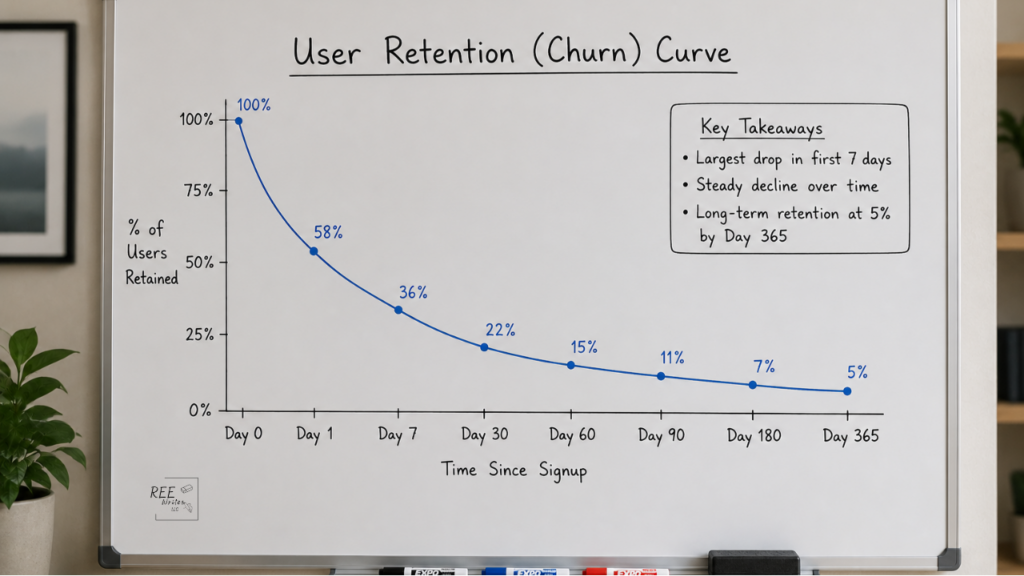
Most healthtech SaaS companies solve the post-signup silence with a drip sequence where:
A welcome email goes out on Day 0.
Something like “here’s what you can do with the platform” follows on Day 3.
A check-in on Day 7.
The sequence runs automatically, open rates look fine, and then the team moves on to the next.
Drip sequences were built for marketing to move a prospect through a funnel, warm them up before a sales conversation, and keep a brand top of mind.
They’re timed and trigger-based. They’re also written for someone who has attention to spare. Not a patient living with 3 chronic conditions, and trying to figure out why their reading looks wrong.
The assumptions inside a standard drip sequence don’t hold up in a patient onboarding context. The assumption that information delivered on a schedule gets absorbed on that same schedule. The assumption that a “next steps” email sent on Day 7 will be acted on by Day 8. The assumption that if you include the information, people will find it.
None of that is how it works when someone is exhausted, managing competing health priorities, and staring at a device they don’t fully understand yet.
What an educational email course does differently
Here’s the difference:
A drip sequence asks: when should we contact this user?
An educational email course asks: what does this person need to understand to succeed, and in what order?
That difference changes the structure, the language, the pacing, and honestly, the results.
Each email has one job—one specific action the patient can complete within 5 minutes. The sequence is built so that Day 1 makes Day 2 easier, and Day 2 makes Day 3 make sense.
The patient is being walked through a process, not nudged along a timeline.
That’s almost everyone who uses your product. If your onboarding assumes otherwise, you’re starting with a comprehension gap you’ll never close.
The communication problem runs deeper than literacy alone. According to the 2026 State of Patient Communications Report, 87% of providers rate their patient-facing technology as up to date. But only 25% of patients report receiving multiple proactive outreach attempts from their provider in the past year.
Providers believe they’re communicating. Patients aren’t experiencing it that way. That’s not a technology failure. That’s a content and sequencing failure, and it shows up in the same activation data you’re already tracking.
Critically, each email explains why patients should do what they’re being asked to do. Instead of just saying “take your blood pressure twice daily,” explain that twice-daily readings produce the pattern data your care team needs to catch a problem before it becomes an emergency.
Patients who understand the reason behind an action are significantly more likely to do it consistently.
Medication adherence research has documented this for decades. The same principle applies to every health behavior your product depends on.
Which version works better?
Here’s an example with 2 versions of the same onboarding instruction for an RPM blood pressure monitor:
Version A:“Ensure proper cuff placement at heart level for accurate systolic and diastolic readings.”
Version B:“Wrap the cuff around your upper arm so the bottom edge sits about an inch above your elbow. The tube should line up with the inside of your arm. Sit quietly for 5 minutes. Even a short walk can affect your reading.”
It’s the same information. Version A passes regulatory review, but Version B is the one people can actually follow.
The patient who reads Version A and gets a confusing number will assume they did something wrong, feel embarrassed about it, and probably not try again. The patient who reads Version B has enough context to troubleshoot on their own.
That’s the difference between content written for compliance and content written for comprehension. (You can be both, by the way. It just takes more effort.)
How PX problems affect your business
Patient engagement isn’t abstract for a Series A or B healthtech company. The patient experience (PX) shows up in:
Contract renewal discussions
The number of re-onboarding calls your customer success team has to field
Churn
When patients don’t activate your device, or when they half-set-up the device and drift away, the cost lands somewhere—on your CS team, your NPS score, and eventually your retention numbers.
A well-built educational email course is cheaper than all of that. It also isn’t a knowledge base article, an in-app tooltip, or a PDF in the resource center that nobody opens. It’s a structured sequence that meets patients where they already are — in their inbox in plain language, in the right order, at the right moment.
Most healthtech companies haven’t built one. That gap is not small.
The companies that avoid these issues asked a different question: “Did anyone understand our email well enough to act?”
That question changes everything downstream: the structure, the language, the sequence, and ultimately whether the patient who needed the product most ever got anything out of it.
Half the people logging into patient portals aren’t patients. They’re caregivers, and the AI being built on top of those systems doesn’t know that.
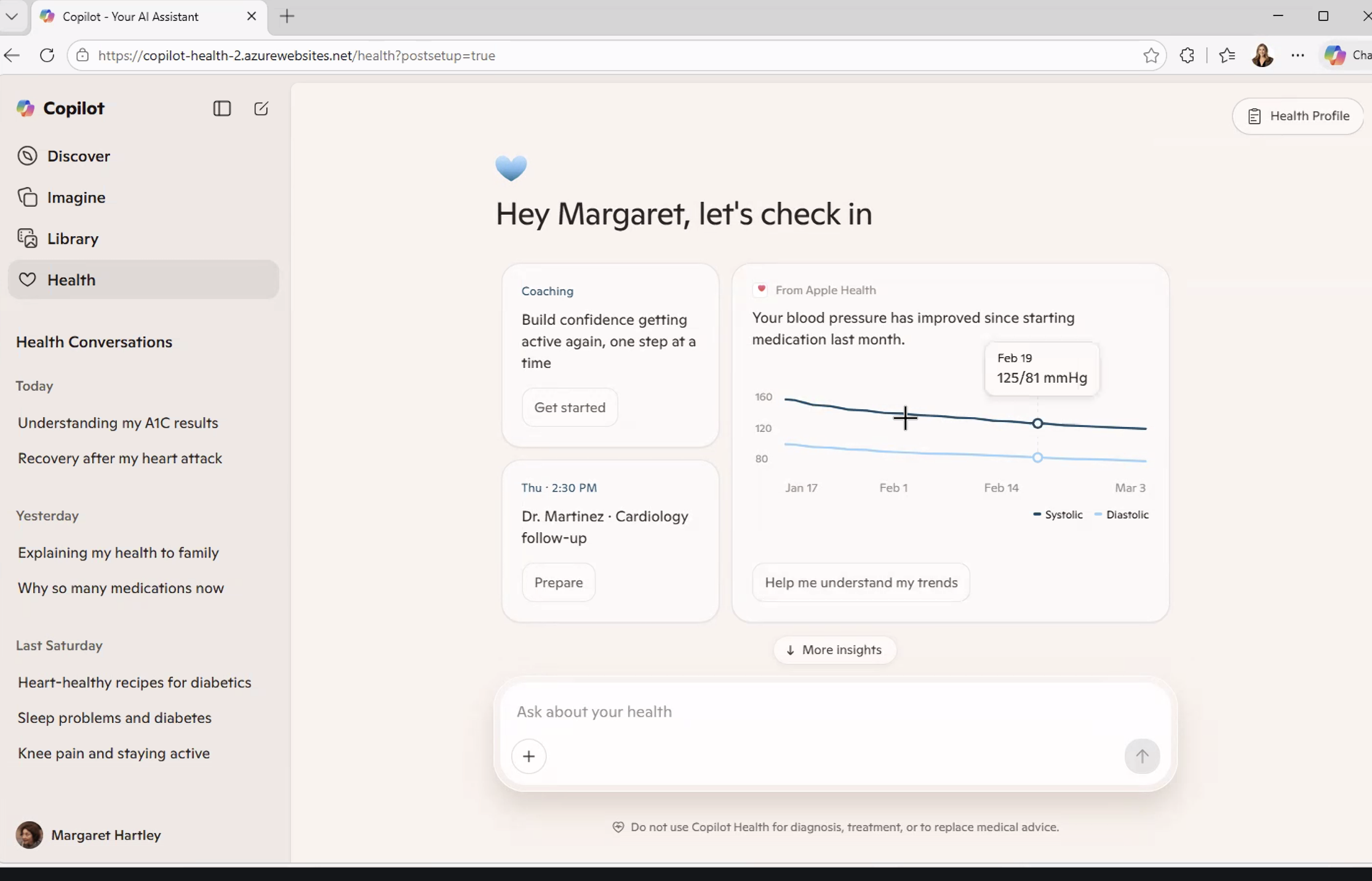
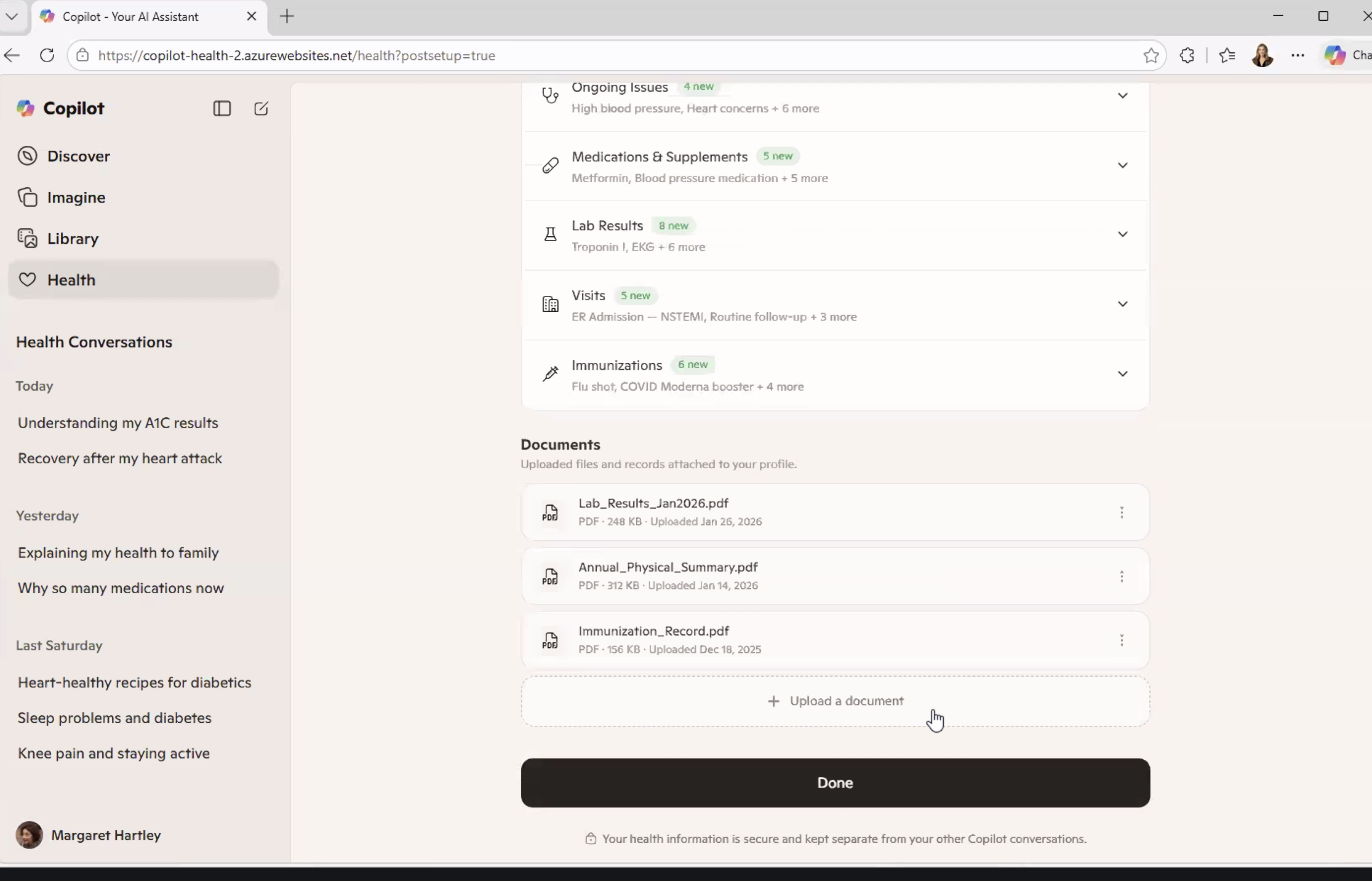
In March 2026 I attended a Microsoft Copilot Health demo and a patient-centered AI panel hosted by the National Health Council. The technology was impressive. The conversation was thoughtful. And the caregiver — the person managing someone else’s health, signing forms under pressure, and navigating systems that were never built for them…
… was invisible.
This article reflects what I think needs to change before we build the next layer of health AI on the same blind spot.
Copilot Health is a consumer-facing AI health companion that pulls from multiple data sources simultaneously with:
Medical records from connected providers
Lab results
Wearable data from Apple Health or an Oura ring
Previous health conversations from within the Copilot ecosystem
Uploaded documents
It’s all synthesized into a single, conversational interface.
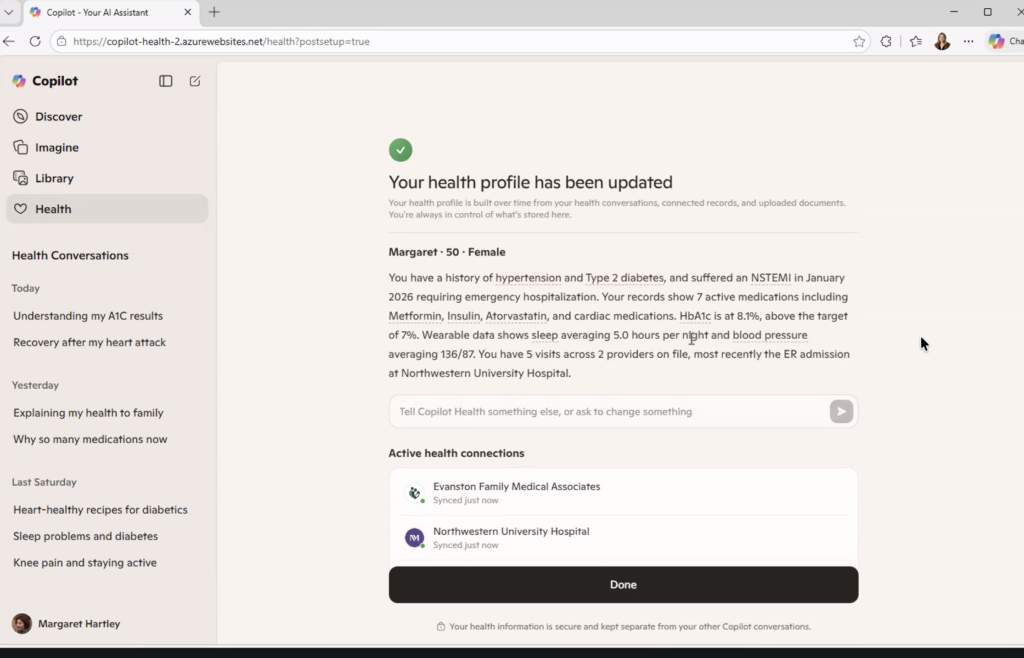
The demo persona was “Margaret.” She’s 50 years old with a history of hypertension, Type 2 diabetes, high cholesterol, and a recent heart attack (an NSTEMI requiring emergency hospitalization in January 2026). Her health profile showed 7 active medications, an HbA1c of 8.1% against a target of 7%, a resting blood pressure averaging 136/87, and sleep averaging 5 hours a night from her wearable data.
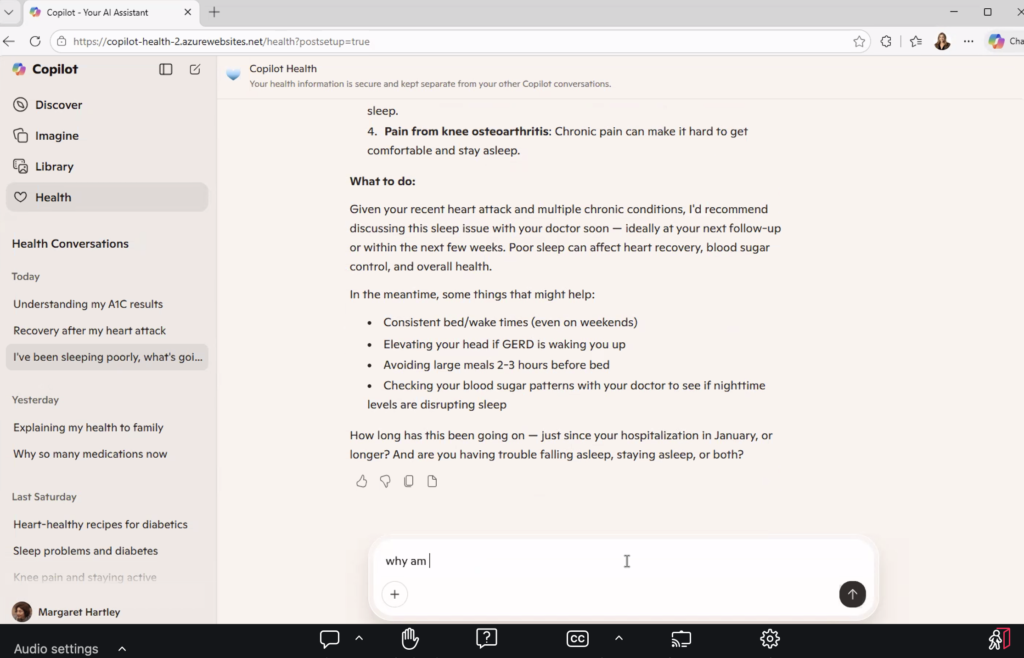
She asked why she was taking metoprolol, which is common after a serious cardiac event when discharge summaries are hard to process in real time. The system explained the medication, what it does, and invited follow-up questions about side effects.
When she entered in the Copilot that she’d woken up with severe jaw pain, Copilot flagged it as a potential cardiac symptom and recommended calling 911 immediately.
That’s not a trivial capability. For someone managing multiple chronic conditions, trying to understand why they’re on seven medications, wondering whether a symptom is serious, this tool offers something the healthcare system rarely does: an answer, in plain language, right now.
Rachel Gruner led the demo for Microsoft, and described the goal clearly: bring everything together, make it usable, help people navigate care. She named the 3 a.m. moment explicitly, being someone searching for health answers because they can’t reach a doctor. Someone who needs information and has nowhere else to turn.
She was describing a patient. But she was also unknowingly describing a caregiver.
The Number Nobody Mentioned
Here is a statistic that did not come up once during the demo, nor during the hour-long panel that followed it.
According to the Health Information National Trends Survey (federal data collected by the National Cancer Institute), the number of people logging into a patient portal on behalf of someone else more than doubled between 2020 and 2024. It went from 24% to 51%.
Half the people navigating these systems aren’t patients. They’re caregivers, like:
A daughter checking her mother’s lab results after a cancer scare.
A husband refilling his wife’s prescriptions while she recovers from surgery.
An adult child scheduling a follow-up for a parent who doesn’t speak English.
A spouse who has memorized every medication, every specialist, every prior authorization number (because if they don’t, no one will)
They’re exhausted, scared, and running someone else’s health on top of everything going on in their own life. And they are doing it inside systems that were never built to recognize them.
Most patient portals still don’t have a proper caregiver login. The formal proxy access process, where it exists, is often so confusing or slow that caregivers just use the patient’s credentials instead. So there’s no:
Audit trail
Role separation
Way for the system to know who’s logged in asking questions, making decisions, or interpreting results
Copilot Health connects to health records, wearables, and labs. It builds a profile over time based on conversations and data. It learns.
But what is it learning from? And about whom?
If half the behavioral data flowing through these systems is caregiver behavior that the system is reading as patient behavior (usage patterns, questions asked, drop-off points, topics searched at all hours of the night), then the AI being trained on that data has a foundational problem.
Patient-centered AI built on a misread of who the patient actually is isn’t patient-centered. It’s just a more confident version of the same blind spot.
What the AI Actually Learns
Maya Friedman, Director of Product Design and UX at Tidepool, made an observation about Copilot Health that she shared during a CES session in January 2026. She noted that the system synthesizes data across multiple sources to provide guidance. And in doing so, it creates a layer of coherence on top of information that was never designed to fit together.
Health records, wearables, and labs all operate on different standards, different levels of reliability, and different contexts.
Copilot doesn’t fix that fragmentation. It builds a coherent surface on top of it.
That coherence is genuinely useful for the person searching for answers at midnight. It’s also the source of risk.
A confident answer that’s built on misidentified behavior is harder to question than an incomplete answer. Think of the person on the other end of that conversation. A caregiver who has learned medical terminology not in school but out of necessity, who is tired and has 17 other things to manage, is not going to interrogate the data sources behind the insight. They’re going to act on it.
There’s a compounding problem that goes beyond accuracy. As these tools learn over time, they build profiles with personalization. They adapt to the user.
But if the system thinks the user it’s serving is Margaret, while the actual user is Margaret’s daughter navigating her mother’s post-cardiac recovery from three states away, then the personalization is wrong from the first conversation. And it compounds with every interaction.
The AI is getting better and better at serving the wrong person.
This isn’t an argument against tools like Copilot Health. It’s that the founders who build these tools should be precise about who they’re actually serving and build it accordingly. The 3 a.m. user isn’t always the patient. Sometimes she’s the person who can’t sleep because she’s worried about someone she loves and doesn’t know who else to ask.
She deserves a system that knows she’s there.
Ownership vs. Control
David Jost, Chief Technology Innovations Officer at the Epilepsy Foundation, said something during the panel that I haven’t been able to stop thinking about.
“Ownership and control are not the same thing.”
He was making a technical point about data governance — about the difference between having rights to your data and having actual agency over how it moves, who sees it, and what it’s used for.
But as a former family caregiver, I heard it as something more personal.
I owned my husband’s story. I was in every appointment. I tracked every medication change, every lab result, every specialist referral across multiple chronic conditions (diabetes, kidney failure, cancer, and limb loss). I knew his conditions better than most of the providers treating him.
But I didn’t control what happened to his data.
When we signed intake forms — and we signed a lot of them — we did it because we needed to get into the room. Steve Winawer, Head of Data, Digital, and Technology at Takeda described this dynamic plainly during the panel: “You walk into a doctor’s office. You sign the forms because what you want to do is see the doctor. You don’t really read them.”
That consent is what the entire data ecosystem is built on.
Not informed consent in the full sense of the phrase.
Transactional consent. The kind you give because the alternative is not being seen.
For caregivers, this is even more layered. You’re not just consenting on your own behalf. You’re consenting or not, because often there’s no mechanism to do so separately on behalf of someone else. Someone who may not be able to read the form themselves. Someone whose data is being collected, moved, and used in ways neither of you will ever fully trace.
Owning your health data and controlling it are two different things. Most of us have the first. Almost none of us have the second.
As AI health tools expand to connect more records, pull more data and build richer profiles, the gap between ownership and control will widen.
And caregivers, who have always been the system’s most active unpaid navigators, will feel that gap the most.
The Longer History
At the end of the panel, I asked about Henrietta Lacks.
Henrietta Lacks Source: Jstor.org
For those unfamiliar: Henrietta Lacks was a Black woman whose cancer cells were taken during a medical procedure in 1951, without her knowledge or consent. Those cells, known as HeLa cells, became one of the most important biological tools in modern medicine. They contributed to the polio vaccine, to cancer research, to countless pharmaceutical breakthroughs. The medical system built billions of dollars of value on her biology.
Her family only found out decades later.
I asked the panel: as AI systems become better at attributing value to data — tracking whose information contributed to which insight, which drug, which discovery — what can we learn from Henrietta Lacks about making sure that value flows back to the people it came from?
Heather Flannery, Founder and CEO of AI MINDSystems Foundation, gave the only answer, and it was direct.
She said that the same technologies being developed for computational governance and democratic-scale consent (making it possible to track and trace how data moves through a system) can also administer value attribution. Verifiably, continuously, and at scale.
Contributions of training data, lived experience, insight, problem-framing and caregiving itself are all valuable. None of it is currently tracked, traced, or remunerated.
The same infrastructure that fixes consent, Heather said, can fix attribution.
Henrietta Lacks didn’t consent. Caregivers consent constantly to forms they don’t read, in moments when they have no other choice, on behalf of people who are too sick or too scared to read them either.
The extraction looks different, but the pattern is the same.
The history of health data in America is, in part, a history of taking value from people who were never designed to benefit from the systems they fed. That history didn’t end in 1951. It continues every time a caregiver logs into a portal, answers a chatbot’s questions, uploads a discharge summary, and walks away having contributed data to a system that will use it to build something she will never own and cannot control.
National Minority Health Month exists to name these patterns. The question for this moment in health AI is whether we’re going to repeat them, or build something different.
What Caregivers Should Ask For
This is not an argument against AI in healthcare. The Copilot Health demo showed real capability. The panel included people genuinely committed to getting this right. The conversation about data sovereignty, computational governance, and equitable AI is happening — slowly, imperfectly, but sincerely.
This is an argument for specificity.
Patient-centered design that ignores the caregiver isn’t patient-centered. It’s incomplete. And the window for building these systems correctly is now, before:
the behavioral data compounds
the profiles deepen
the coherence layer becomes too established to question
So here’s what caregivers should be asking for, from the tools being built, from the organizations building them, and from the policymakers shaping the rules:
A login that knows who you are. Not a workaround. Not a borrowed password. A formal caregiver access model that distinguishes your behavior from the patient’s, maintains an audit trail, and allows the AI to serve you based on your actual role.
Proxy access that takes minutes, not phone calls. The formal process exists in some systems. It is almost universally too slow, too confusing, and too rarely completed. If half your users are caregivers, that’s not an edge case for product teams to accommodate. That’s their primary use case.
Consent that means something. Not a form signed under duress. A clear, plain-language explanation of what data is being collected, how it will be used, and what the caregiver retains the right to revoke. Separately from the patient’s consent, because the caregiver is a separate user with separate stakes.
AI trained on who’s actually in the room. If the behavioral data flowing through these systems includes caregiver behavior, the models need to know that. Not to exclude it — to interpret it correctly. The questions a caregiver asks at 3 a.m. are different from the questions a patient asks. The guidance each one needs is different too.
Recognition that caregiving is a data contribution. The labor of coordinating care, navigating systems, tracking medications, interpreting results, and advocating in clinical settings generates information that health AI is being built on. That contribution deserves to be visible, and eventually, as the infrastructure Heather described matures, remunerated.
If you’re a caregiver navigating any of this, my newsletter Care Without Compromise goes deeper on the practical and systemic dimensions of what it means to manage someone else’s health in a system that wasn’t built for either of you.
The tools are getting smarter. Let’s make sure they’re learning about the right person.
Sources
Health Information National Trends Survey (HINTS) 2024, National Cancer Institute.
PXI Q1 Convening: Building the Patient-Centered AI Ecosystem, National Health Council, March 26, 2026. Microsoft Copilot Health demo presented by Rachel Gruner. Panel quotes from David Jost (Epilepsy Foundation), Heather Flannery (AI MINDSystems Foundation), Steve Winawer (Takeda), Ian Miller (Digital Medicine Society); moderated by Rene Quashie (Consumer Technology Association).
Hospital-at-home programs have expanded rapidly across the U.S., but most patients have no idea this option exists when facing admission.
When my husband George was cycling through hospital stays every month for his end-stage renal disease and cancer in 2018, nobody told us there might be another way. We assumed the hospital was our only option. Month after month, we dealt with the ER waits, the uncomfortable chairs, the sleepless nights, and the parade of specialists who never seemed to talk to each other.
Things have changed since then. Hospital-at-home care has gone from experimental to mainstream. Medicare now covers it permanently. Your insurance probably covers it too.
But you have to know to ask for it.
Let’s break down everything you need to know about hospital-at-home versus traditional hospitalization, including:
a comparison of clinical outcomes
the hidden costs nobody talks about
how to decide which option makes sense for your situation
Hospital-at-home means exactly what it sounds like: you receive acute-level medical care in your own home instead of in a hospital facility. This isn’t the same as regular home healthcare or skilled nursing. We’re talking about the same intensity of care you’d get if you were admitted to a hospital bed.
What conditions qualify for hospital-at-home care?
The key word here is “acute.” You need to be sick enough to require hospitalization, but stable enough to be safely monitored at home.
What does hospital-level care actually include?
Your care team visits you at home daily, and sometimes twice a day. This includes physicians, nurses, physical therapists, and care coordinators. You’ll get IV medications if you need them. You’ll wear devices that monitor your vital signs and send data to your medical team in real-time. It’s like having a hospital room set up in your living room, but without the hospital smell and terrible food.
When George was using his Dexcom continuous glucose monitor, I got alerts on my phone whenever his blood sugar spiked or dropped dangerously low. That technology exists for heart rate, oxygen levels, blood pressure, and more. Your care team watches these numbers from their computers and can intervene before small problems become emergencies.
Who provides the care?
A dedicated hospital-at-home team manages your case. You’ll have a primary physician who oversees your treatment plan. Nurses visit to check on you, administer medications, and assess your condition. The big difference from traditional home health? These visits happen daily, and you have 24/7 access to your care team by phone or video.
When you’re admitted to a traditional hospital, you check in through the emergency department or for a scheduled admission. A nurse takes your vitals, you change into a hospital gown, and you’re assigned to a room (if one’s available—sometimes you wait for hours).
The hospital routine
Nurses check your vitals every few hours, day and night. Yes, even at 3 a.m. Doctors round in the morning, usually between 7 and 10 AM. If you’re asleep when they come by, too bad. Meals arrive on a fixed schedule whether you’re hungry or not.
With George’s 10 different specialists, we never knew who would walk through the door or when. His nephrologist didn’t talk to his oncologist. His endocrinologist had no idea what his cardiologist prescribed. I became the central hub of information, keeping my own spreadsheet because the hospital’s electronic records didn’t seem to connect the dots.
Family involvement and visiting limitations
Even before COVID-19 restrictions, hospitals limited visiting hours. During the pandemic, many hospitals banned visitors entirely. In 2025, most facilities still have restrictions like limited hours, limited number of visitors, no children under 12.
If you want to be there when doctors round to ask questions, you’d better arrive early and stay all day.
Need to go home to shower or check on your kids? You might miss critical conversations about your loved one’s treatment plan.
That’s not surprising. People sleep better when they’re in their own beds. They get to eat their own food, and see their family members whenever they want.
The medical care is just as good, but the experience is dramatically better.
Hospital readmission rates
Getting sent back to the hospital within 30 days of discharge is a sign something went wrong.
That’s because closer monitoring catches problems earlier. Patients understand their care plan better because they’re not overwhelmed and sleep-deprived. The transition from acute care to regular life is smoother when you’re already home.
The mortality rates? Comparable. For appropriate patients, hospital-at-home is just as safe as traditional hospital care.
The Hidden Costs Nobody Tells You About
The hospital bill is just the beginning. Let’s talk about what you’ll actually pay and what costs don’t show up on an invoice.
Out-of-pocket expenses for traditional hospitalization
Even with good insurance, a three-day hospital stay can cost you $1,500 to $3,000 in co-pays and deductibles. That’s the baseline. Then come the surprise charges.
Facility fees can add hundreds of dollars:
Labs processed by an out-of-network pathologist costs extra.
And let’s not forget parking. $15 per day adds up when you’re visiting daily for weeks. Hospital cafeteria meals for family members is $10 to $15 each.
These “small” costs can easily hit $500 to $1,000 for a typical hospital stay.
Out-of-pocket expenses for hospital at home
Medicare covers hospital-at-home the same way it covers traditional hospitalization. You pay the standard hospital deductible and any applicable co-pays. Most private insurers follow Medicare’s lead, but coverage varies.
The surprise? Hospital-at-home often costs you less out-of-pocket because there’s no:
You might need to buy a few things—maybe a shower chair or grab bars if you don’t have them. But the program provides equipment like IV poles and monitoring devices.
The invisible costs for caregivers
The economic impact on caregivers is often overlooked. I burned through my vacation days and sick leave taking George to appointments and managing his care, even while working remotely. Many caregivers do the same.
Both hospital settings require serious caregiver involvement, just in different ways.
Caregiving during traditional hospitalization
You become an advocate and information manager. When doctors round at 8 a.m. and you can’t be there because you have a job, you miss critical conversations. So you take time off. You show up early. You stay late.
I kept notes from every specialist visit, cross-referenced medications, and flagged contradictions. The nutritionist told George to eat high-protein foods for his kidney disease. The renal dietitian told him to eat low-protein foods for his kidney disease. Guess who had to figure that out?
You’re also managing communication with the rest of the family. Who’s visiting when? Who needs updates? Coordinating schedules becomes a part-time job.
Caregiving with hospital at home
At home, you’re more hands-on with daily care:
You help your loved one to the bathroom.
You make sure they eat.
You learn to manage medications (when to give them, and spot side effects)
The medical team trains you. They don’t just hand you a list of tasks and disappear. They show you how to help with care, what to watch for, and when to call for help.
When I was managing George’s peritoneal dialysis at home, his nephrologist’s team trained me thoroughly. I set up the machine every night, monitored the process, troubleshot issues.
It was a big responsibility, but I wasn’t alone. I had 24/7 access to the dialysis team by phone.
The benefits of hospital-at-home care:
You have more control over the environment
You can maintain some routine
You sleep in your own bed
The stress of feeling “on call” is real, but many caregivers prefer it to feeling helpless in a hospital where they can’t be present all the time.
How to Know if Hospital at Home is Right for Your Situation
Hospital-at-home isn’t for everyone. Here’s how to figure out if it makes sense for you.
Medical eligibility criteria
Your condition needs to be serious enough to require hospitalization but stable enough to monitor at home. This includes conditions like:
Pneumonia (non-ICU level)
Heart failure exacerbations
COPD flare-ups
Cellulitis and other serious infections
Certain post-surgical recoveries
You don’t qualify if you need ICU-level care, constant monitoring, or procedures that can only be done in a hospital. You also need to live within 30 minutes of the hospital in case you need emergency transfer.
Home environment assessment
You need a space for medical equipment, like a corner where an IV pole can stand and monitoring equipment can plug in.
If you’re taking advantage of telehealth, you’ll also need reliable internet for video visits and data transmission and a phone.
Safety matters too. Can you get to the bathroom safely? Are there trip hazards that could cause falls? A nurse will assess your home before admission to make sure it’s appropriate.
Insurance coverage check
Call your insurance company and ask these specific questions:
“What’s my co-pay compared to traditional hospitalization?”
“Do I need pre-authorization?”
“Which hospitals in my area participate in your hospital-at-home network?”
Get the answers in writing. Insurance representatives make mistakes, and you don’t want surprises later.
Family readiness factors
Someone needs to be home or nearby. Not necessarily 24/7, but available. The medical team handles the clinical care, but you need a person there to help with activities of daily living and to be present during visits.
Consider your other responsibilities:
Do you have young kids?
Other family members who need care?
A job with no flexibility?
Be honest about your capacity. There’s no shame in saying traditional hospitalization is the better fit for your situation.
How to Access Hospital-at-Home Programs
Most doctors won’t automatically offer this option. You have to ask for it.
When your doctor says you need to be admitted, ask: “Am I eligible for a hospital-at-home program?” If they say they don’t know or haven’t heard of it, ask them to check. Many physicians are still learning about these programs.
Call your insurance company before admission if possible. Verify coverage and get any necessary pre-authorizations. Some programs accept patients directly from the emergency department, which can save you hours in the ER waiting room.
To find hospitals offering hospital-at-home in your area, check the Medicare website’s Hospital Compare tool or call hospitals directly and ask if they participate in hospital-at-home programs.
Questions to Ask Before You Decide
Before you commit to hospital-at-home, get clear answers to these questions.
For your medical team:
“Am I medically stable enough for hospital-at-home?”
“What happens if my condition gets worse at night or on weekends?”
“How quickly can I be transferred to the hospital if needed?”
For the program coordinator:
“How many times per day will someone visit me?”
“Will I see the same nurses and doctors, or will it change?”
“What equipment will be in my home, and who maintains it?”
For your insurance:
“What will my total out-of-pocket cost be?”
“How many days of hospital-at-home care are covered?”
“Is there a limit to how many times I can use this benefit?”
For your family:
“What will I be responsible for as a caregiver?”
“What training will I receive?”
“Who can I call when I’m overwhelmed or unsure?”
Get these answers before you decide. Understanding what you’re signing up for prevents surprises and helps you plan.
Making the Right Choice for Your Family
Hospital-at-home delivers the same quality of clinical care as traditional hospitalization—sometimes better.
But the right choice depends on your medical situation, your home environment, your insurance coverage, and your family’s capacity to help with care.
If George had the option for hospital-at-home care during his treatment, would it have changed the outcome? Probably not. His conditions were too complex and unstable.
But it would have changed our experience. Fewer nights in uncomfortable hospital chairs. More time in our own home. Better sleep for both of us. For the right patient and the right family, those differences matter tremendously.
Know that you have options. Ask questions and advocate for yourself. Don’t assume the hospital is the only place to receive acute care, because it’s not.
If you’re facing hospitalization decisions for yourself or a loved one, share this information with your family. Ask your doctor about hospital-at-home before admission. You might be surprised by what’s possible.
Cryer, L., Shannon, S. B., Van Amsterdam, M., & Leff, B. (2023). Costs for Hospital at Home Patients Were 19 Percent Lower, With Equal or Better Outcomes Compared to Similar Inpatients. Health Affairs, 42(6), 861-868. Retrieved from https://pubmed.ncbi.nlm.nih.gov/22665835/
Edgar, K., Iliffe, S., Doll, H. A., Clarke, M.J., Gonçalves-Bradley, D.C., Wong E., & Shepperd, S. (2024). Admission avoidance hospital at home. Cochrane Database of Systematic Reviews. Mar 5;3(3):CD007491. doi: 10.1002/14651858.CD007491.pub3. Retrieved from https://pubmed.ncbi.nlm.nih.gov/38438116/
Federman, A. D., Soones, T., DeCherrie, L. V., Leff, B., & Siu, A. L. (2018). Association of a Bundled Hospital-at-Home and 30-Day Postacute Transitional Care Program With Clinical Outcomes and Patient Experiences. JAMA Internal Medicine. Aug 1;178(8):1033-1040. doi: 10.1001/jamainternmed.2018.2562. Retrieved from https://pubmed.ncbi.nlm.nih.gov/29946693/
HAI and Antimicrobial Use Prevalence Surveys. (2024). Centers for Disease Control. Retrieved from https://www.cdc.gov/healthcare-associated-infections/php/haic-eip/antibiotic-use.html
Horwitz, L. I., Moriarty, J. P., Chen, C., et al. (2020). Quality of discharge practices and patient understanding at an academic medical center. JAMA Internal Medicine, 180(8), 1125-1131. Retrieved from https://pubmed.ncbi.nlm.nih.gov/23958851/
Levine, D. M., Ouchi, K., Blanchfield, B., et al. (2023). Hospital-Level Care at Home for Acutely Ill Adults: A Randomized Controlled Trial. Annals of Internal Medicine, 176(11), 1455-1466. Retrieved from https://pubmed.ncbi.nlm.nih.gov/31842232/
The House spending bill dropped a bombshell for digital health companies: a proposed 5-year extension for hospital-at-home waivers and 2-year extension for Medicare telehealth flexibilities.
Five years sounds like forever in tech time. But it’s actually a strategic planning nightmare.
Do you build for temporary policy, or bet everything on permanence?
I spent 2 years managing care for my terminally ill husband across 10 different doctors. Every month, he landed back in the hospital with high A1C, low hemoglobin, unbearable pain. If hospital-at-home programs had existed in 2016 with the right technology backing them, he could have avoided dozens of ER visits.
Hospital at home is the future. The question is, what should Series A, B and C health tech founders build in the next 24 months that creates value regardless of what Congress does in 2030?
This isn’t about policy speculation. It’s about strategic planning with incomplete information—which is exactly what building a health tech company requires.
What the Proposed Funding Package Actually Changes
Source: Modern Healthcare
The proposed House spending bill extends two critical Medicare programs—but on very different timelines. Understanding these differences matters if you’re building technology in this space.
The 5-year hospital-at-home timeline explained
The proposed legislation would extend the hospital-at-home waiver through 2030. This isn’t just another short-term patch. Previous extensions gave health systems and tech companies 12-18 months of runway at best.
The current acute hospital care at home initiative lets Medicare pay for hospital-level services delivered in patients’ homes. Without the extension, this program expires in 2025. That’s not enough time to build, validate, and scale meaningful technology infrastructure.
Five years gives you real planning horizon. You can make legitimate platform investments. You can hire engineering teams. You can sign multi-year contracts with health systems.
But—and this is critical—5 years isn’t permanent. It’s a policy experiment with a longer fuse.
What’s still uncertain despite the extension
Even with a 5-year extension, huge questions remain unanswered. CMS hasn’t committed to specific reimbursement rates beyond the waiver period. Will hospital-at-home payments match facility-based acute care, or will they drop to home health rates?
State regulations vary wildly. Some states embrace home-based acute care. Others have licensing requirements that make it nearly impossible. Federal waivers don’t override state-level barriers.
Commercial payers watch Medicare but don’t automatically follow. Your hospital-at-home technology needs Medicare coverage to scale, but commercial adoption determines whether you build a sustainable business.
Technology requirements could shift too. CMS might mandate specific monitoring capabilities, interoperability standards, or quality reporting metrics that don’t exist yet.
Planning for 5 years means planning for uncertainty, not betting on stability.
Most Founders Are Asking the Wrong Question
When the House bill news broke, founder group chats exploded with one question: “Does this mean hospital-at-home is permanent?” That’s the wrong question. It reveals a misunderstanding of how health tech businesses actually succeed or fail.
“Is this permanent?” misses the strategic point
Policy permanence has never guaranteed health tech success. Remote patient monitoring has had Medicare coverage since 2019. Chronic care management codes have existed for years. Both have clear reimbursement pathways. Both have policy stability.
Yet most RPM companies struggle to achieve profitability. Many CCM platforms shut down despite favorable policy.
The real risk isn’t policy reversal. It’s building something nobody needs or can’t afford to operate. Investors price in regulatory risk and execution challenges unique to healthcare.
Your business model needs to create value across multiple scenarios. If hospital-at-home waivers expire in 2030, can your technology pivot to post-acute care? Skilled nursing facilities? Palliative care at home? If you’ve built exclusively for one reimbursement code, you’ve built a fragile company.
The trap of building exclusively for waivers
Remember the telehealth boom of 2020-2021? Some telehealth companies that scaled to thousands of employees during COVID laid off half their staff by 2023.
They weren’t bad companies. They built for a policy moment, not a durable market need.
VCs learned an expensive lesson: waiver-dependent revenue is risky revenue. When I talk to Series B investors now, they ask pointed questions. What percentage of your revenue requires temporary policy? If that policy changes, what’s your Plan B? Can you operate profitably under traditional Medicare rates?
If you can’t answer those questions convincingly, your valuation suffers—even if current policy looks favorable.
What “5 years” really means for your product roadmap
Five years is approximately two technology development cycles for complex healthcare platforms. You can ship an MVP, gather real-world evidence, iterate based on feedback, and launch a mature v2.0 product in that timeframe.
But 5 years isn’t enough time to build everything. You need to prioritize ruthlessly.
Your 24-month window is critical. This is when you validate product-market fit, prove unit economics, and establish your competitive moat. If you can’t demonstrate margin-positive cohorts by month 24, the next 3 years won’t save you.
Years 3 to 5 should assume policy uncertainty, not stability. Build optionality into your architecture. Make sure your platform can serve multiple care settings. Design your data infrastructure to support different payment models.
One scenario planning exercise: map out what your business looks like if hospital-at-home waivers expire in 2030 versus extend another 5 years vs. become permanent. If all three scenarios require fundamentally different strategies, you’re not building a durable company. You’re building a policy bet.
Your 24-Month Minimum Viable Stack
The next 2 years determine everything. You need to build technology that proves value quickly while laying foundation for longer-term expansion. Here’s where to focus your engineering resources and capital.
Core infrastructure that works across reimbursement models
Start with the basics that every home-based care model needs, regardless of how Medicare pays for it.
Remote patient monitoring devices need to integrate seamlessly with your platform. But don’t overbuild here. Start with FDA-cleared devices for vital signs (blood pressure, pulse ox, weight, glucose). Specialty monitoring for rare conditions can wait until you’ve proven your core model works.
Virtual triage and clinical communication platforms matter more than most founders realize. When a patient’s oxygen saturation drops at 3 a.m., someone needs to decide: send an ambulance, dispatch a nurse, or coach the patient through the moment remotely? That decision-making capability is what health systems pay for, not just the device data.
Care orchestration is the unsexy backbone nobody wants to build but everyone needs. Who schedules the nurse visit? Who orders medical supplies? Who coordinates with the patient’s primary care doctor? These back-office functions represent over half of the $1 trillion in annual U.S. healthcare waste. Automating them creates immediate ROI.
EHR integration isn’t optional. Payers demand it. Health systems require it. Your platform needs to pull patient data from Epic, Cerner, and other major EHRs, then push back visit notes, monitoring data, and care plans. Budget 20 to 30% of your engineering resources just for integration work.
Where to invest in AI right now
Source: Health Care Code
Ambient clinical intelligence (ACI) has reached near-universal adoption: 92% of health systems are piloting or deploying AI scribes. These tools improve documentation accuracy, leading to 10 to 15% revenue capture improvement through better coding and billing.
For hospital-at-home programs, this matters enormously. Nurses and paramedics doing home visits often struggle with documentation. They’re managing complex patients in unpredictable environments. AI that turns their verbal notes into structured clinical documentation saves 30 to 45 minutes per visit.
Predictive analytics should focus on preventing acute episodes that require hospitalization. Machine learning models can analyze vital sign trends, medication adherence patterns, and social determinants data to flag patients at risk of decompensation. One health system using predictive monitoring reduced readmissions by 23% in their hospital-at-home cohort—that’s the difference between a margin-positive program and one that loses money on every patient.
Don’t sleep on care coordination automation. If family caregivers spend 15-20 hours per week on caregiving tasks (as CareYaya Health Technologies data shows), your AI should reduce that burden. Automated medication reminders, appointment scheduling, and supply ordering aren’t flashy features, but they’re what caregivers desperately need.
The unsexy AI that saves money: Back-office automation in revenue cycle management, prior authorization, and claims integrity. These AI applications can reach 70-80% profit margins and generate $500K-$1M in annual recurring revenue per full-time employee. That cash flow funds your clinical AI development.
The Margin Math That Actually Matters
Most hospital-at-home programs lose money. Your technology needs to change that equation, or you don’t have a sustainable business.
Why most hospital-at-home programs lose money
Medicare pays $1,000 to $1,500 per day for hospital-at-home. Most programs spend $1,200 to $1,600 per patient daily on nurse visits, supplies, coordination, and tech. They’re underwater from Day 1.
The hidden costs kill you. Logistics and care orchestration require significant labor. Someone schedules visits, manages the supply chain, and coordinates with the patient’s other providers. Traditional staffing models don’t scale—you can’t apply facility-based nursing ratios to home care and expect it to work economically.
Technology that creates work instead of reducing it makes the problem worse. I’ve seen hospital-at-home platforms that require nurses to log into five different systems per visit. The documentation burden exceeds what they’d do in a hospital setting.
How AI makes care at home programs profitable
Revenue cycle optimization through better documentation can improve revenue capture by 10-15%. When a nurse describes a patient’s condition verbally and AI generates accurate, complete clinical notes with proper billing codes, you get paid more for the same work.
Source: MDhelpTEK
Reduced readmissions drive CMS quality bonuses. The hospital-at-home model already shows lower readmission rates than traditional acute care—adding predictive monitoring amplifies that advantage. Every readmission you prevent saves $10,000 to $15,000 in costs and protects against CMS penalties.
Labor cost reduction matters most. AI triage can cut nurse workload by 40%+ in pilot programs. Instead of nurses manually reviewing monitoring data for every patient, AI flags only the patients who need clinical attention. A nurse who previously managed 5-6 hospital-at-home patients can now manage 8 to 10.
The “unsexy” AI that CFOs love but VCs overlook: billing, coding, claims integrity. Administrative AI can reduce operational costs by 30-40%. That’s real margin improvement hitting your income statement immediately.
Proving ROI to your board in the next 6 months
Source: ScribeMD
Your board doesn’t care about utilization growth if you’re losing money on every patient. They care about these metrics:
Cost per episode: What does it actually cost you to manage one hospital-at-home patient from admission to discharge? Track this ruthlessly. Break it down by component: labor, supplies, technology, overhead.
Readmission rates: Hospital-at-home programs typically achieve 8 to 12% 30-day readmission rates versus 15 to 18% for traditional hospital care. If your program doesn’t beat facility-based benchmarks, you have a quality problem.
Patient satisfaction: CMS increasingly ties reimbursement to patient experience scores. Hospital-at-home programs score 15-20 points higher on patient satisfaction versus facility care. That’s your competitive advantage.
Structure pilot programs that generate defensible data. Work with 2 to 3 health systems willing to share financial and outcomes data transparently. You need to prove your technology improves margins, not just clinical outcomes.
The difference between utilization metrics and profitability metrics: lots of patients using your platform means nothing if each one loses money. Focus on contribution margin per patient. When does that number go positive? What’s the path to 40 to 50% gross margins?
The 3 to 5 Year Platform Expansion Strategy
Once you’ve proven your core model works and generates positive margins, you can think bigger. The next phase is about expanding beyond your initial use case.
From point solution to platform
Bessemer’s State of Health AI report describes “supernova” companies that achieve 6-10x growth trajectories by expanding from single point solutions into comprehensive platforms. Ambient scribes became full clinical documentation suites. Prior authorization tools became complete utilization management platforms.
The pattern:
Start with a painful, well-defined problem.
Solve it better than anyone else.
Expand into adjacent workflows that touch the same users.
For hospital-at-home technology, that might mean starting with post-surgical patients recovering at home. Prove you can manage that population safely and profitably. Then expand to heart failure management, COPD exacerbations, cellulitis treatment, chemotherapy administration.
Each expansion requires clinical validation and new reimbursement navigation. But your core technology infrastructure of monitoring, triage, care coordination, documentation stays largely the same.
Value-based care integration timeline
Source: Activated Insights
Hospital-at-home is a wedge into value-based care contracts, not just fee-for-service reimbursement. Accountable Care Organizations (ACOs) and Medicare Advantage plans care deeply about reducing avoidable hospitalizations. If your platform keeps patients out of expensive facility-based care, ACOs will pay for it.
But commercial adoption lags Medicare by 18 to 24 months historically. Don’t expect widespread MA plan adoption until 2027 to 2028, even with favorable hospital-at-home policy.
Self-insured employers represent a faster path to commercial revenue. Large employers pay directly for employee healthcare. When they see data showing hospital-at-home reduces costs by 30-40% versus facility admissions, they’ll write checks. Companies like Cubby, who secured $63 million in Series A funding led by Guggenheim Partners, are targeting this employer market specifically for in-home care solutions.
To position for risk-bearing contracts in years 3 to 5, you need data infrastructure now. Start collecting outcomes data, cost data, and patient experience data from day one. Value-based contracts require you to prove your intervention changes total cost of care—not just that patients like your service.
Decision Framework for Health Tech Boards
If you’re a founder presenting hospital-at-home strategy to your board, or a board member evaluating your company’s approach, here are the right questions to ask.
5 questions your board should ask right now
What percentage of our revenue depends on waiver-specific reimbursement? If it’s above 50%, you have concentration risk. Diversify your payer mix and care settings.
If the waiver expires in 5 years, what’s our Plan B business model? You should have a concrete answer. Can you pivot to post-acute care? Palliative care? Chronic disease management? If the answer is “we’re screwed without waivers,” you’re not building a durable company.
Are we building technology that creates value in multiple care settings? The best health tech platforms work across hospital-at-home, skilled nursing, home health, and ambulatory settings. Flexibility equals durability.
How quickly can we prove margin-positive unit economics? If you can’t show positive contribution margin by month 24, extending the timeline to month 36 won’t magically fix the problem. You have a business model issue, not a scale issue.
What’s our competitive moat if 10 other startups get this same 5-year runway? Policy tailwinds create competition. What’s your defensible advantage? Clinical outcomes data? Payer relationships? Technology that’s genuinely better, not just first to market?
Investor perspective on policy-dependent businesses
Source: WallStreetMojo
VCs underwrite regulatory risk by discounting valuations and requiring faster paths to profitability. A pure software company might get 7-10 years to reach profitability. A health tech company with policy dependency gets 3-5 years maximum.
Some investors love policy tailwinds. They want to ride the wave while it’s building. Others avoid policy-dependent businesses entirely, no matter how attractive the market opportunity looks.
Position your pitch carefully. Are you policy-enabled (taking advantage of favorable reimbursement to scale faster) or policy-dependent (can’t exist without specific waivers)? The former gets funded at reasonable valuations. The latter struggles.
What I Wish Existed When I Was a Caregiver
Let me bring this back to why any of this matters. The technology decisions health tech founders make over the next 24 months will determine what tools families like mine have access to in 2026 and beyond.
The gap between technology capability and real-world reliability
Source: Aptiva Medical
My husband’s Dexcom continuous glucose monitor worked beautifully—when it synced properly. The app sent alerts to my phone whenever his blood sugar went dangerously high or low. That device probably saved his life multiple times.
But it only worked because the technology was reliable:
The sensor stayed attached.
The Bluetooth connection held.
The app didn’t crash.
I’ve seen hospital-at-home platforms that look impressive in demos but break under real caregiver stress. The dashboard shows beautiful data visualizations—but requires three different logins to access. The monitoring devices pair easily in the clinic—but fail when WiFi is weak in rural areas.
Care coordination platforms often assume 24/7 nurse availability. They don’t account for the reality that small hospital-at-home programs can’t staff round-the-clock coverage.
Build for the worst-case scenario, not the ideal one.
Building for the sandwich generation managing multiple conditions
Source: Graying with Grace
My husband had 10 doctors. Ten! A primary care physician, nephrologist, endocrinologist, oncologist, cardiologist, and five other specialists. Your platform needs the capability to handle that complexity.
Nobody coordinated between them. I was the coordination layer. I maintained a spreadsheet with all his medications—drug names, dosages, prescribing doctors, reasons for taking them, refill schedules. The nurses loved my spreadsheet because their systems couldn’t give them the same view.
Insurance coordination created endless frustration. My employer’s insurance was primary while Medicare was secondary. Every billing department called me multiple times to confirm this. I explained the same thing to the hospital billing office, the lab, the imaging center, the pharmacy.
Your hospital-at-home platform should automate this nightmare. Pull medication lists from multiple prescribers. Flag potential drug interactions. Coordinate insurance claims automatically. Don’t make family caregivers become project managers.
Why I care about this 5-year window
Families like mine in 2026 deserve better than what I had in 2016.
The technology exists now, and the clinical models work. The question is implementation and sustainability.
Health tech founders have a moral obligation beyond shareholder returns. Yes, you need to build a profitable business and generate returns for your investors. But you’re also building tools that will serve people during the most vulnerable moments of their lives.
This isn’t about making a quick buck off temporary Medicare waivers then exiting before they expire. It’s about building something that lasts. Something that works. Something that actually helps families manage impossible complexity.
When you’re making technology decisions over the next 24 months, remember: real people will rely on what you build. Build something worthy of that trust.
The Path Forward
The proposed 5-year extension for hospital-at-home waivers isn’t a guarantee. It’s a window.
What you build in the next 24 months determines whether your company survives beyond 2030—regardless of what happens with federal policy.
The smartest founders build technology that creates value across multiple reimbursement scenarios. Focus on margin-positive unit economics. Solve real problems for real families—the kind of problems I faced as a caregiver managing impossible complexity across disconnected systems.
Start with the unsexy AI that makes programs profitable: revenue cycle management, clinical documentation, coding accuracy. These aren’t sexy pitch deck slides, but they generate cash flow.
Build your minimum viable stack around care orchestration and monitoring that works when human resources are constrained. Health systems can’t hire infinite nurses. Your technology needs to make existing staff dramatically more productive.
Structure pilot programs that generate defensible ROI data within 6 months. You need proof points for your next fundraise and for health system expansion.
Stress-test your business model. If hospital-at-home waivers expire in 2030, what’s Plan B? If you don’t have a good answer, you’re building on quicksand.
Five years is enough time to build something durable if you start with the right foundation. It’s not nearly enough time if you’re building for a policy moment instead of a market need.
The families who need hospital-at-home can’t wait for perfect policy clarity. They need technology that works today and keeps working tomorrow. So build for that reality.
Want to discuss your hospital-at-home technology strategy?Connect with me on LinkedIn or explore more health tech analysis at reewrites.com.
References
Bessemer Venture Partners. (2026). State of Health AI 2026. Retrieved from https://www.bvp.com/atlas/state-of-health-ai-2026
Fox, A. (2026). 2026 House spending bill proposes 2-year telehealth and 5-year hospital-at-home waiver extensions. Healthcare IT News. Retrieved from https://www.healthcareitnews.com/news/2026-house-spending-bill-proposes-2-year-telehealth-and-5-year-hospital-home-waiver-extensions
Gardner, S. & Hooper, K. (2026). Health tech panel to reboot after a long break. Politico Pulse. Retrieved from https://www.politico.com/newsletters/politico-pulse/2026/01/21/health-tech-panel-to-reboot-after-a-long-break-00737790
Gonzales, M. (2026). Proposed Funding Package Would Extend Hospital-at-Home Program, Medicare Telehealth Flexibilities. Home Health Care News. Retrieved from https://homehealthcarenews.com/2026/01/proposed-funding-package-would-extend-hospital-at-home-program-medicare-telehealth-flexibilities/
Stock Titan. (2026). Cubby secures $63 million in Series A funding round led by Growth. Retrieved from https://www.stocktitan.net/news/GS/cubby-secures-63-million-in-series-a-funding-round-led-by-growth-ikgye2ab40md.html
Zanchi, M. G. (2026). AI Journal. The “unsexy” revolution within healthcare AI. Retrieved from https://aijourn.com/the-unsexy-revolution-within-healthcare-ai/
I went to the CES 2026’s Digital Health Summit in my new city of Las Vegas, and yes, I oohed and ahhed at the dancing robots and awesome cars and vehicles on display.
But this isn’t your usual “look at this shiny new device” content you’ll see everywhere else about CES. I’m going to share the hard truths that came directly from patients, caregivers, and the organizations who represent them.
Left to right: Jennifer Goldsack, Randall Rutta, Alice Pomponio, Jake Heller, and Yuge Xiao
Product Design Failures Nobody Talks About
Your product design isn’t neutral
Randy Rutta from The National Health Council shared a couple of stories that should make every product team pause:
A major pharma company launched inhalable insulin with all the confidence in the world. The technology was solid, and the marketing was ready, but it flopped completely because they never asked patients if they’d actually use it.
It turns out that people managing diabetes need precision. Something sprayed into your lungs doesn’t feel precise, even if the science says it is. Plus, patients hated the inhaler design itself. Simple focus groups made of their target user base would have caught both issues before millions were spent on development and launch.
Another story hit even harder for me as a Black woman. Randy said a Black woman refused to wear a health monitoring device because it was a bulky black device on her waistband that made her afraid of being stopped by police. Her solution was painfully simple: “If it came in pink, it would have changed everything for me.”
This isn’t about inclusion for inclusion’s sake. It’s about building products that don’t put users at risk. Product design is literally life-or-death for some users.
Randy also mentioned patients with eczema and psoriasis who can’t wear certain devices because they’re too sensitive to materials touching their skin. That’s a deal-breaker for entire patient populations—a product design consideration that could eliminate your addressable market if you ignore it.
Engage patients early or pay later
Alice Pomponio from American Cancer Society’s venture capital arm sees this pattern constantly. You have to think beyond product features to systemic change. She asks founders: “What is not only the short-term product development strategy, but also the longer-term healthcare systemic step change you’re planning to deliver?”
Get patient voices around your cap table. Diversify your board perspective. Even if you have a great management team with good intentions, without a board that supports patient-centered decisions, you’ll lose the opportunity to make cost-effective strategic choices upfront.
It’s cheaper to fix problems during design than during M&A negotiations when your product strategy determines your acquisition price.
Women’s Health Tech Is Broken
Left to right: Sheena Franklin and Maya Friedman
Women are done waiting for tech that works for THEM
Sheena Franklin of K’ept Health interviewed Maya Friedman from Tidepool about how healthtech uses males as the default for AI.
Maya dropped a statistic that should embarrass the entire diabetes tech industry: 70% of women with type 1 diabetes experience insulin sensitivity changes around their menstrual cycles,but there are NO clinical guidelines or algorithms designed for this. Nothing. So women have to manually adjust their diabetes management systems every single month because the technology assumes their bodies work like men’s bodies.
“We need to stop thinking about women’s health as reproductive health. 𝘌𝘷𝘦𝘳𝘺 𝘴𝘪𝘯𝘨𝘭𝘦 𝘩𝘦𝘢𝘭𝘵𝘩𝘤𝘢𝘳𝘦 𝘤𝘰𝘮𝘱𝘢𝘯𝘺 𝘯𝘦𝘦𝘥𝘴 𝘪𝘯𝘧𝘳𝘢𝘴𝘵𝘳𝘶𝘤𝘵𝘶𝘳𝘦 𝘧𝘰𝘳 𝘥𝘢𝘵𝘢 𝘤𝘰𝘭𝘭𝘦𝘤𝘵𝘪𝘰𝘯 𝘢𝘵 𝘵𝘩𝘦 𝘪𝘯𝘵𝘦𝘳𝘴𝘦𝘤𝘵𝘪𝘰𝘯 𝘰𝘧 𝘸𝘰𝘮𝘦𝘯’𝘴 𝘩𝘦𝘢𝘭𝘵𝘩.”
The data gap is massive
Maya Friedman
Maya referenced a project called “The Library of Missing Data Sets,” an art exhibition of hundreds of empty filing cabinets labeled with data sets that don’t exist across different industries. When you look at what’s missing, you see where biases already exist in healthcare.
As AI becomes more prevalent, these data gaps will replicate the same biases we’re trying to fix. That’s why every healthcare technology company needs infrastructure for data collection at the intersection of women’s health. Not as a “nice to have.” As a business requirement.
Tidepool partnered with Oura to build the largest longitudinal data set of diabetes device data combined with biometric data. They’re distributing Oura rings to thousands of users already on the Tidepool platform. The data will include:
Activity tracking
Sleep patterns
Menstrual cycle data
Diabetes device data from the same individuals
Health surveys for contextual data
This is what infrastructure looks like when you take women’s health seriously.
Algorithms need to be smarter
Maya’s immediate priority: building algorithms that aren’t “cycle agnostic.” She wants systems that account for 30-day hormonal patterns, not just 72-hour learning horizons.
“Women are not just tiny men. We have different needs. We need to display different data. We need algorithms that are potentially different for women versus men.” – Maya Friedman, Tidepool
And yes, that means maintaining multiple versions of products.
Yes, it’s more expensive. But it’s also addressing the actual market need instead of pretending half the population doesn’t exist.
It’s not just about menstrual cycles
Maya’s longer-term vision includes AI models that are dynamic across different reproductive milestones. What does an algorithm look like for someone in perimenopause who isn’t having regular periods? What are the learning horizons for that system?
The real moonshot? A fully closed-loop system that accounts for polycystic ovarian syndrome (PCOS), type 1 diabetes, and menstrual cycles without requiring patient interaction at all.
Women need tech that doesn’t make them choose between their health needs and their time.
Accessibility Creates Market Opportunities, Not Limitations
Left to right: Steve Ewell and Peter Kaldes
Peter Kaldes, CEO of Next50 Foundation, delivered a message that should change how every product designer thinks about their addressable market: “Guess what? You still have a point of view over 50. You still have buying power at 60. You can still use your iPhone at 70, and you need really great technology in the 80s and your 90s.”
Most product designers are under 35. Most assume older adults are technology Luddites. The data proves this assumption is completely wrong.
The buying power is enormous
The over-50 population has more buying power than younger generations. Yet, healthtech companies consistently ignore this market or, worse, design products that stigmatize older users. Peter’s frustration was that was crystal-clear:
“I’ve had conversations with some companies like, where are we going to find [older users to test with]? Well, why don’t you try, first of all, start with your company, and second of all, why don’t you start partnering with community organizations that have access to all these people. This is not hard. It’s just getting people out of their comfort zone.” – Peter Kaldes
Dual generational use is smart design
Peter loves technologies that serve multiple generations. If it’s good for older adults, it’s good for everyone. Examples he highlighted:
Hearing technology embedded in glasses to reduce stigma around hearing aids
AI tools that coordinate healthcare appointments along with transportation and nearby housing options
Financial fraud protection that helps older adults without treating them like children
Left to right: Meg Barron, Dominic King and Myechia Minter-Jordan
AARP CEO Myechia Minter-Jordan shared specific examples of products in AARP’s booth that reduce stigma:
Sneakers designed to prevent falls that look like regular athletic shoes (they appear to have laces, though velcro is involved)
Glasses with closed captions for people with hearing impairments
Glasses with hearing aids built into the stems (partnered with Sadika)
“We want to ensure tools don’t further stigmatize us but allow us to live with dignity and age well.” – Myechia Minter-Jordan
The accessibility-to-mainstream pipeline
Left to right: Natalie Zundel, Griffen Stapp, Ryan Easterly and Jack Walters
Griffen Stapp from Ability Central pointed out something product teams consistently miss: Products designed FOR the disability community often get adopted by everyone. But products made for the general population rarely get adapted later.
Examples are everywhere. Curb cuts help wheelchair users, but they also help parents with strollers, delivery workers with hand trucks, and travelers with rolling luggage. Closed captioning helps deaf users, but also people watching videos in noisy environments or practicing language skills.
Build accessibility in from day one, or you’re leaving both impact and revenue on the table.
Adaptable frameworks beat one-size-fits-all
Jack Walters, co-founder of HapWare (winner of the CTA Foundation Innovation Challenge), explained their approach: “Not everyone’s going to have similar care or similar treatments, so you need to be able to adapt to all those different types of needs and necessities in the community.”
They involve the disability community in design from the start, knowing common pain points and anticipating when certain issues might come up. That’s how you build solutions that actually solve problems instead of creating new friction.
Continuous Monitoring Changes Patient Behavior (Without Doctor Visits)
Left to right: Ami Bhatt, Tom Hale, Lucienne Ide and Jack Leach
Tom Hale, CEO of Oura, explained why continuous data matters more than episodic measurements: “Normal isn’t 98.6 degrees. Normal is what’s normal for you, and being able to see that deviation from the baseline allows us to make predictions.”
Oura’s “symptom radar” looks at temperature, heart rate, and other biometrics to predict when you might be getting sick—days before symptoms appear. That’s the intervention window where you can actually change behavior and potentially avoid getting sick entirely.
Patients change behavior when they see their own data
Jake Leach from Dexcom shared a pivotal study from the early days of continuous glucose monitoring. For years, the standard of care for diabetes was finger pricks, which are episodic, painful, and limited.
They ran a study where they put sensors on patients continuously measuring glucose, but they didn’t show patients the data for a week. They just collected baseline information. Then they turned on the display.
Within a day, people started making behavior changes based solely on their own knowledge of their disease and this information they’d never had before. No doctor intervention. No coaching. Just visibility into their own patterns.
The infrastructure problem doctors face
Source:Somebody Digital
Doctors are drowning in data with no infrastructure to process it.
Lucienne Ide from Rimidi left clinical medicine because she was disappointed by how electronic health records (EHRs) were implemented. She expected digital records with clinical decision support layered on top. Instead, she got data dumps with no insights.
As she put it: “I don’t know a single doctor who’s saying, ‘If only I had more data, I would be a better clinician.'”
What doctors need is not more data, but clinical decision support that turns data into actionable insights.
Tom from Oura said one doctor told him: “I want the Oura ring to give me information as if it was written by another doctor. Basically, a consult. Here’s what I know about this patient in clinical terms, and this is the information you need. Everything else, don’t give it to me.”
That’s the responsibility of device companies: Don’t just collect data. Provide insights that save clinicians time and help them make better decisions faster.
Prevention requires behavior change at scale
The consensus was clear: behavior change is what moves the needle on long-term health outcomes. Not medications or procedures. Sleep well, eat well, manage stress, and stay balanced.
Healthcare has failed at behavior change for 75 years because it requires data, user experience (UX), engagement, education, and reinforcement. Doctors don’t have time for that level of ongoing support. Educational content alone doesn’t work because people don’t retain or apply it without reinforcement.
But continuous monitoring combined with AI and smartphone engagement is the combination that finally makes prevention scalable.
As Ami Bhatt from the American College of Cardiology noted, “What has my attention besides my kids? My phone. And I’m looking at that, and that’s the power.”
AI That Actually Helps, Not Hypes
Source:Oxio Health
Dominic King from Microsoft AI cut through all the conference noise:
“The biggest challenge in healthcare today is the mismatch between global demand and constrained supply.” – Dominic King
AI isn’t replacing doctors. It’s closing the gap between what people need and what the healthcare system can deliver.
The future is proactive health companions
5 years ago, AI was good at classification and spotting single problems. Now we have thinking and reasoning models that can pass the same exams physicians take, often at higher rates than human test-takers.
Dominic’s vision for 5 years from now is “A health companion that you wake up and it’s sitting in the background, doing the hard work for you and being more proactive. At the moment, everything is still very reactive.”
This means:
Identifying sleep issues before they compound
Flagging medication adherence problems
Coordinating complex care across multiple providers
Helping people navigate fragmented healthcare systems
Providing specialized opinions even in rural areas
The caregiver opportunity is massive
Myechia shared that one in four Americans are caregivers right now (63 million Americans). If you’re not currently a caregiver or need care yourself, one day you will be.
AI tools can help caregivers:
Communicate with provider teams more effectively
Ensure loved ones are safe at home
Coordinate the “universe of appointments” that comes with aging
Reduce information asymmetry (where only people with medical training understand how systems work)
Dominic emphasized that co-design is critically important. Building WITH users instead of just FOR them avoids the problems we see when products hit the real world.
At Microsoft, they’re seeing 50 to 60 million health questions a day through Copilot. That’s enormous insight into what people actually need help with.
But as he noted, “A lot of founders are young. They don’t have a good idea of what it’s like to be elderly or sick.”
That’s why bringing your end users (patients, clinicians, caregivers) into the development process isn’t optional. It’s the difference between building something that works versus something that sits unused.
The Digital Equity Gap Nobody’s Solving
Left to right: Steve Ewell and Peter Kaldes
Steve Ewell, Executive Director of CTA Foundation, laid out what he calls “the three legs of the stool” for digital equity:
“You need the hardware, you need the broadband access, and then you need the support and education to go along with it. And so often that last one is left off.” – Steve Ewell
That last leg of support and education is where healthcare technology adoption actually lives or dies.
Tech alone isn’t enough
Peter Kaldes from Next50 Foundation added context that should worry anyone in healthtech: nonprofits doing the heavy lifting of digital equity training are facing unprecedented cuts to federal grants.
As Peter noted: “I love going to an Apple Store and seeing these free classes, but you have to find an Apple Store which are not in the neighborhoods that need the help the most.”
The communities that need technology training the most are the least likely to have access to it. And the organizations that bridge that gap are losing funding.
The clinical trial proof
Source: Anatomy.app
Dexcom is running large clinical trials where half the participants come from underserved communities specifically to prove the technology works equally well regardless of service level. They want hard data showing these tools aren’t just for people with resources.
Rimidi partnered with community health centers during COVID to monitor high-risk pregnancies remotely using blood pressure monitors and texting protocols. They tracked engagement by ethnicity and primary language.
There was no difference in engagement. Everyone has a smartphone in that demographic (women of childbearing age), and everyone can text.
This proves that engagement isn’t the problem. The problem is getting access to the infrastructure and training on how to use it.
Mission-aligned capital as the solution
Source: Next50 Foundation
Next50 Foundation is one of the first private foundations to invest 100% of their endowment in aging-focused companies and infrastructure. Not just grant-making, but the other 95% of their capital.
They created an aging investment framework with JP Morgan that looks at four themes:
Health
Social connectivity (including technology)
Economic opportunity (workforce and financial vehicles for longer lives)
Built environment (mobility, housing, accessibility)
As of December, about 75% of their endowment was invested in this framework, and Peter offered a challenge to the investment community:
“What if capital actually had values? Climate investors have successfully made money and helped power cleaner energy. The same can be true for aging. How can we possibly ignore that the globe is aging?” – Peter Kaldes
They also launched a new nonprofit called Leverage focused on advancing policies in Colorado to make aging more affordable—housing, living wages, caregiving resources.
Because you can’t solve systemic problems with technology alone. You need policy change too.
Patient Voices Need to Drive Startup Decisions
Jake Heller from Citizen Health is building AI tools that help patients with rare diseases query their own medical records and advocate for themselves at doctor’s appointments.
His philosophy: “Putting patients in the driver’s seat is one of the biggest opportunities we have right now.”
The journaling and documentation problem
Sometimes when people with rare or complex diseases go to appointments and talk about their concerns, doctors don’t believe them. These patients need help translating their own experience in a way that clinicians will take seriously.
Citizen Health helps patients journal their symptoms and experiences, then presents that data in clinical terms. “Here’s a video of my daughter having this specific type of seizure. Here are the journal entries. Here’s how this has changed over time.”
That’s advocacy powered by data and AI.
The time-to-diagnosis crisis
Randy pointed out that if you have an autoimmune disease, it could be 3, 5, or even 7 years before diagnosis. For healthcare innovation, it can take 7 years just to move something through an FDA process.
Those time frames compound into suffering that’s completely preventable if we had better systems and patient input earlier in development cycles.
Patient organizations are ready to help. They’re trusted by their communities. They can broker relationships, speed recruitment, help startups get from lab to market faster with products that patients will actually use and that payers will actually reimburse.
The startup trap to avoid
Source: National Institute for Health and Care Research (NIHR)
Alice warned about companies that design products, then go looking for users to validate decisions they already made.
That’s backwards. Instead you should:
Find patient voices early.
Put them on advisory boards.
Include them in design sprints.
Listen to their feedback even when it’s uncomfortable or expensive to implement.
The successful companies in her portfolio think about long-term systemic change, not just short-term product development metrics.
What Healthtech Companies Need to Do Differently
The patient community isn’t a barrier to innovation. They’re the key to building products that actually work.
Stop designing in the dark
Source: Patient Better
If you’re building healthtech without continuous patient input, you’re wasting resources. You’ll miss market opportunities. You’ll build products that don’t get used or that put certain populations at risk.
Randy’s message was clear: “Come to us, and we will broker that relationship, because in the end, you’ll be more successful, and the patient community will get a better result.”
Measure what matters
Myechia challenged the AI industry on how they measure success: Don’t count the number of tools or features. Measure whether you’re closing the gap between lifespan and health span.
That gap is currently 13 years, which is the difference between how long people live and how many of those years are healthy years. If your technology doesn’t move that number, what’s the point?
Think systemically, not just tactically
Source: IQ Eye
Every speaker emphasized that technology is only one piece of a larger puzzle. You also need:
Policy changes that support adoption
Payment models that reward prevention
Training infrastructure for underserved communities
Clinical decision support that turns data into insights
Algorithms that account for biological differences across populations
If you’re only focused on your device or platform, you’re missing the bigger picture of how healthcare actually works.
The sales enablement angle
All of these insights about patient needs, accessibility requirements, women’s health gaps, digital equity challenges are the stories your prospects need to hear during long sales cycles.
B2B healthtech sales aren’t quick. You’re selling to health systems, payers, and large provider networks. The buying committees are complex. The evaluation periods stretch for months.
That’s exactly when prospects go cold or arrive at sales calls unprepared.
I create educational email courses to bridge that gap. They keep prospects engaged with the exact kind of patient-centered insights I heard at CES. They position your company as one that understands real-world healthcare challenges, not just technology features.
In 2026 and beyond, healthtech companies that want to win understand their users deeply enough to build products those users will actually want, trust, and use.
The Measurement Challenge
How do you know if you’re succeeding at patient-centered design? Myechia offered a simple test: “What do you want your life to look like at 75?”
You probably want to:
Stay in your home
Feel healthy
Stay empowered
Have information flow easily between you and loved ones
Remain connected to family and physicians
Be safe at home
Engage in daily activities with ease and without pain
Understand your medical information and chronic diseases
Control who has access to your data
Have a care plan you can execute yourself
Receive information you trust and can use readily
If your tech helps people achieve any of those goals, you’re on the right track. If it doesn’t, you need to rethink your approach.
Final Thoughts
CES 2026’s Digital Health Summit covered the hard work of actually listening to patients, caregivers, and the communities being served.
Startups who want to be successful in healthtech aren’t the ones chasing the next funding round or the flashiest AI feature. They’re the ones asking better questions:
Have we talked to patients who look different from our team?
Does our product work for women’s bodies, not just male bodies?
Can older adults use this without feeling stigmatized?
What infrastructure needs to exist beyond our technology?
Are we solving a real problem or just building something technically impressive?
Those questions lead to products that get adopted, outcomes that improve, and companies that actually make a difference. That’s the kind of healthtech worth building.
Every month, someone’s decision to donate blood gave him a little more time, and I’m grateful for that. But blood donation is NOT for everyone.
My late mother learned this the hard way. She faithfully donated with the American Red Cross every 56 days like clockwork, believing she was doing good. And she was, until her then-undiagnosed congestive heart failure (CHF) made each donation increasingly dangerous. The blood loss depleted her already-compromised system, leaving her exhausted for weeks.
Her doctors eventually told her to stop.
January is National Blood Donor Month
One pint of blood can save up to three lives. The American Red Cross says someone in the U.S. needs blood every 2 seconds, but only 3% of eligible Americans (those without contraindications) donate annually.
Source: Stanford Blood Center
Who should NOT donate blood
The FDA and American Red Cross give several contraindications, meaning that if any of the following apply, you should not donate:
Active heart disease or severe cardiovascular conditions
Uncontrolled high blood pressure (over 180/100)
Recent heart attack or stroke
Severe anemia (hemoglobin below 12.5 g/dL for women, 13.0 g/dL for men)
Active cancer or recent cancer treatment
Bleeding disorders or current anticoagulant therapy
Chronic kidney disease
Certain autoimmune conditions during flare-ups
Do you know your blood type?
Only 43% of Americans do, but knowing your blood type can be lifesaving:
In emergencies: Medical teams can administer compatible blood immediately without waiting for typing tests, which can take 45-60 minutes.
For rare blood types: If you’re O-negative (universal donor) or AB-positive (universal plasma donor), you’re critically needed. O-negative makes up only 7% of the population but can be given to anyone.
During pregnancy: Blood type incompatibility between mother and baby can cause serious complications. Knowing your type allows early intervention.
For chronic conditions: People with sickle cell disease, thalassemia, or other conditions requiring frequent transfusions need closely matched blood to prevent complications
If you need surgery: Matching blood in advance reduces transfusion reaction risks and speeds emergency response
According to the National Institutes of Health (NIH), patients who receive a transfusion from an incompatible blood type can experience severe reactions, including kidney failure and death.
The Stanford Blood Center reports that having blood typed and screened in advance can reduce emergency transfusion time by up to 30 minutes, which is critical in traumatic or crisis situations.
If you have cardiovascular issues or other contraindications, prioritize your own health. Other ways to help are by volunteering at blood drives, spreading awareness, and donating money to blood banks.
Regardless of whether you can donate, know your blood type, and the blood type of anyone you care for. It could save your life or help save someone else’s.
organize medical information (including blood type)
coordinate between providers
advocate effectively
References
American Red Cross. (n.d.). Requirements by Donation Type. Retrieved from https://www.redcrossblood.org/donate-blood/how-to-donate/eligibility-requirements.html
U.S. Food and Drug Administration. (2023). Compliance Policy Regarding Blood and Blood Component Donation Suitability, Donor Eligibility and Source Plasma Quarantine Hold Requirements. Retrieved from https://www.fda.gov/regulatory-information/search-fda-guidance-documents/compliance-policy-regarding-blood-and-blood-component-donation-suitability-donor-eligibility-and
National Heart, Lung, and Blood Institute. (2025). Donate Blood. Save Lives. Retrieved from https://www.nhlbi.nih.gov/education/blood/donation
Stanford Blood Center. (2024). Blood Type Compatibility. Retrieved from https://stanfordbloodcenter.org/donate-blood/blood-donation-facts/blood-types/