Think of it as cleaning out your digital closet—keeping what works and tossing what doesn’t serve you anymore.
“Less is more” rings true in SEO—prune unhelpful content and watch your important pages grow. Removing old or weak web pages often leads to better search rankings. When you use content pruning as part of a content audit, you can boost traffic, streamline your site, and help search engines focus on your best work.
How much could your business benefit from a 64% increase in revenue? A lot, I bet.
Common types of content to prune
If you’re ready to get started, you need to know what kinds of pages to look for:
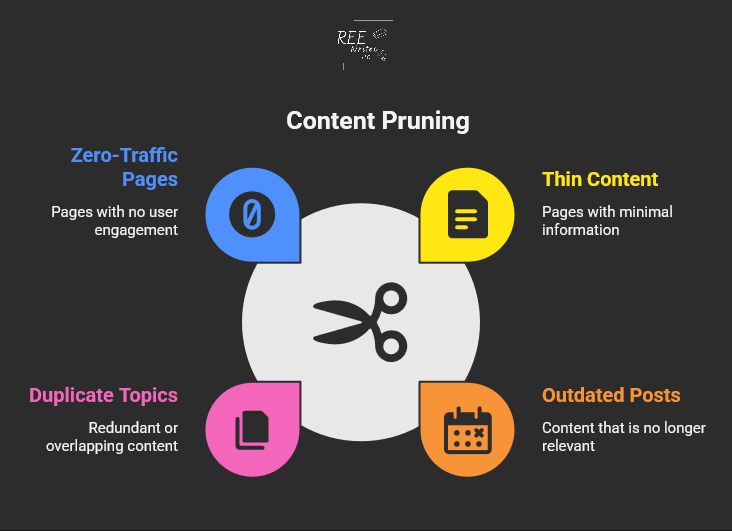
Thin content: Pages with little useful information
Outdated posts: Content with old dates or incorrect facts
Duplicate topics: Multiple pages targeting the same keywords
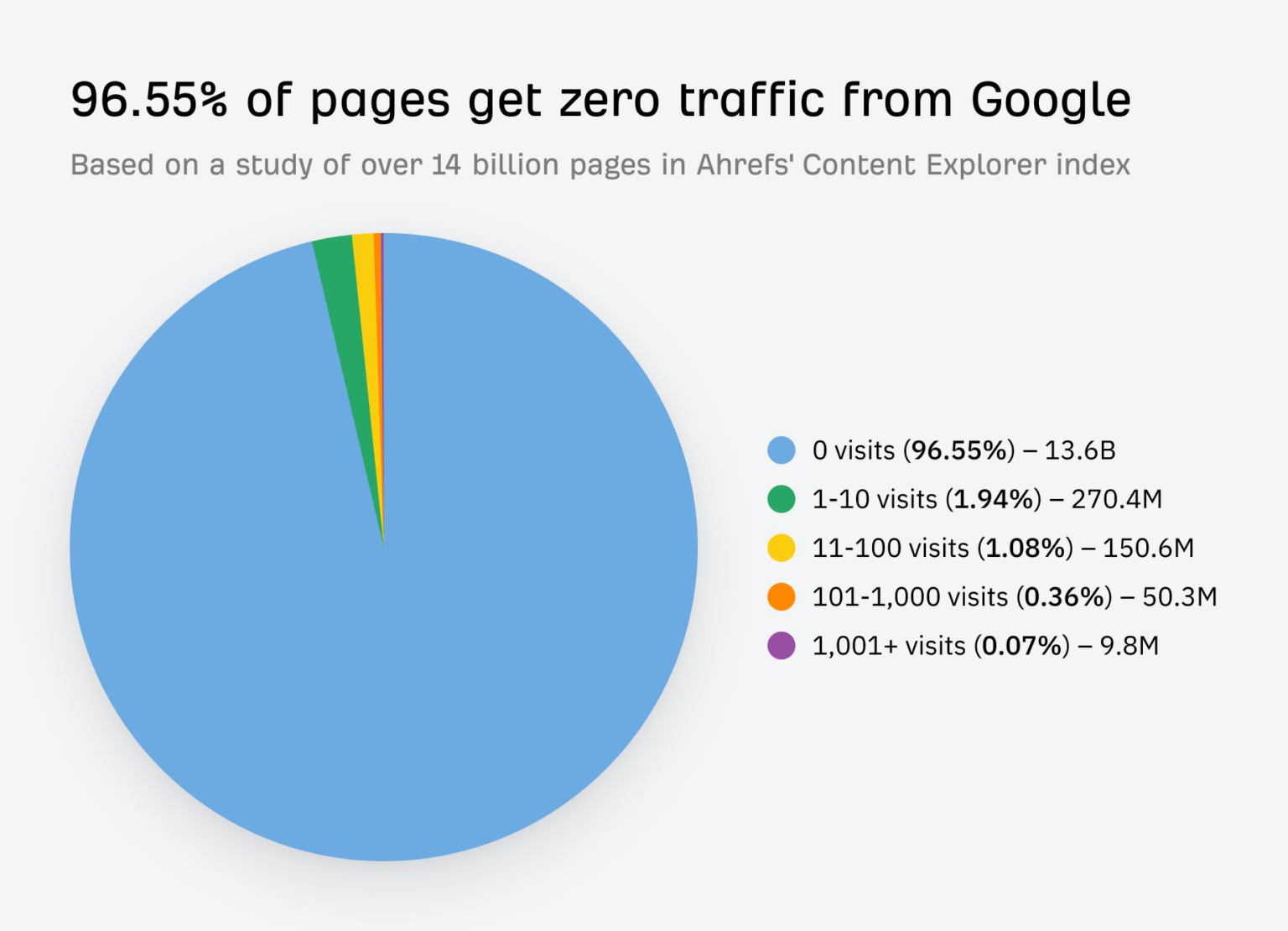
Zero-traffic pages: Content that gets no visits or engagement
Taking action to remove or improve your content is a crucial part of a full website review. The key is finding pages that drain your site’s SEO power without giving anything back in return.
Benefits you’ll see from pruning content
So, what’s in it for you? A clean website leads to some amazing results.
A case study by Seer Interactive shows the real impact of content pruning. Their client experienced declining traffic for five years straight. After removing 14,000 low-value pages, they achieved a 23% increase in organic traffic year-over-year.
Imagine what a 23% traffic increase could do for your business.
Steps to Prune Your Website
Ready to clean up your site? Here’s a simple process that works for websites of any size.
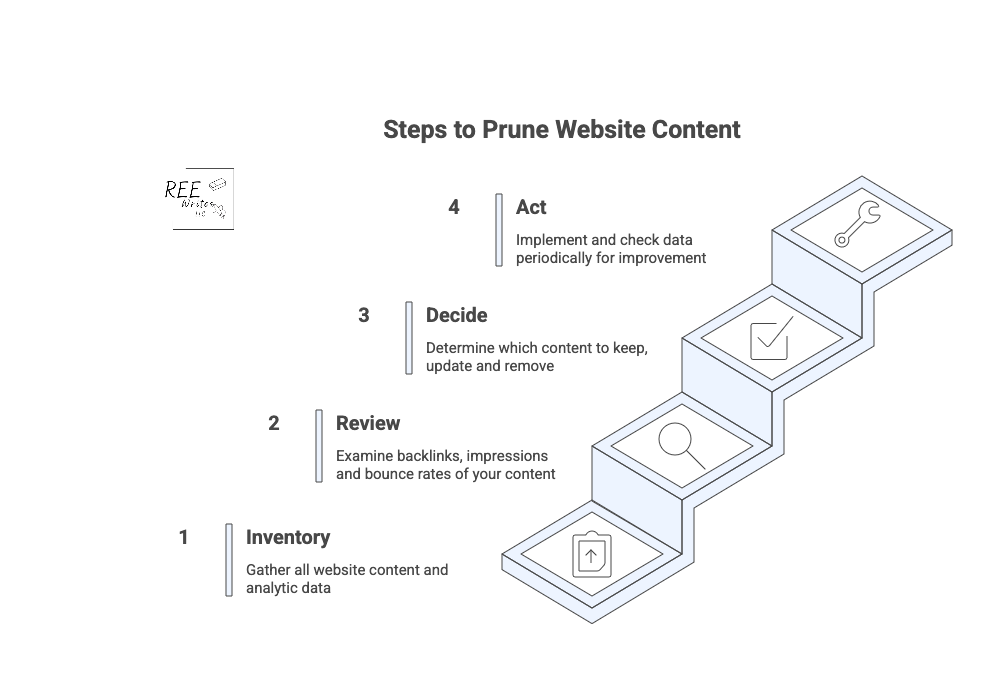
Conduct a full content inventory
Start by creating a complete list of all your pages. You can use tools like:
Google Analytics for traffic data
Google Search Console for search performance
Screaming Frog for technical crawls
Your content management system (CMS) export for a basic page list
Export everything into a spreadsheet so you can analyze the data easily. (I’ve listed more tools further in this article.)
Review analytics to find problem pages
Look for pages that meet these criteria:
Less than 50 organic sessions in the past 12 months
When you delete pages, always set up 301 redirects to send visitors and search engines to relevant replacement content. This preserves any SEO value the old page had.
The right tools can speed up your content audit and help you make better decisions about what to keep and what to get rid of.
Essential analytics tools
Start with these free options:
Google Analytics: Shows traffic, bounce rates, and user behavior
Google Search Console: Reveals search performance and indexing issues
Screaming Frog: Crawls your site for technical SEO problems
For deeper analysis, consider paid tools like:
Ahrefs: Comprehensive SEO data and competitor research
SEMrush: Keyword tracking and content gap analysis
Clearscope: Content optimization and performance insights
Simple scoring systems
Create a simple point system to evaluate each page:
Traffic: 0 to 10 points based on monthly visitors
Engagement: 0 to 10 points for time on page and bounce rate
Links: 0 to 10 points for backlinks and internal links
Relevance: 0 to 10 points for topic alignment with your goals
Pages scoring below 15 to 20 points are good candidates for pruning.
Organizing your audit data
Use spreadsheets to track your decisions and results. Include columns for:
URL and page title
Current performance metrics
Action taken (keep, update, merge, delete)
New redirect URL (if applicable)
Implementation date
This documentation helps you track results and avoid repeating work.
Wrap Up
Content pruning is a smart way to strengthen your SEO and help your site’s best content shine. Include regular audits to review and trim low-quality content, to keep your site health and support higher search rankings.
It may seem like a big job, but remember, every small step you take to improve your website’s health is a win for your business. By focusing on quality, you’re not just improving your SEO; you’re building a stronger, more efficient business that works for you.
Try content pruning in your next website audit for greater visibility.
A full content audit can feel like a massive project, taking days or even weeks to complete. But you’re busy running a business—nobody’s got time for that.
What if you could find your biggest content problems and opportunities in the time it takes to drink your morning coffee? ☕
You don’t need to block out your entire week to make a real impact on your website’s performance. This guide will walk you through a simple, focused process to audit your website’s content in just 15 minutes.
We don’t need to find every little flaw. In 15 minutes, you can spot the “low-hanging fruit,” or quick fixes that can boost your organic traffic and improve your site’s user experience (UX) right now.
What’s the difference between a content gap analysis and a content audit?
Before we dive in, let’s clear something up. People often use the terms “content audit” and “content gap analysis” interchangeably, but they are two very different tasks with different goals. Knowing the difference helps you choose the right tool for the job.
Define the terms “content gap analysis” and “content audit”
A content audit is like looking in the mirror. You’re analyzing the content you already have on your website. The goal is to evaluate its performance, find weaknesses, and see what’s working well. You’ll look at metrics like page views, keyword rankings, and bounce rates to decide if a piece of content should be kept, updated, or removed.
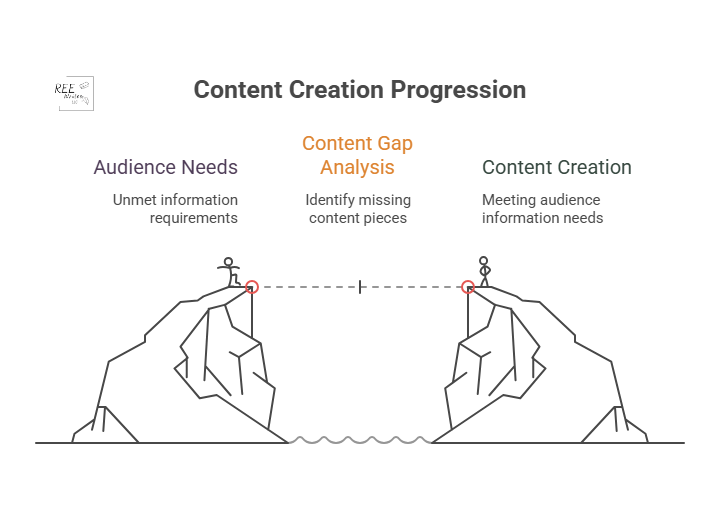
A content gap analysis on the other hand, is like looking out the window at your neighbors. You’re researching what content your competitors have that you don’t. The goal is to find topics and keywords that your audience is searching for but that you haven’t covered. This helps you plan future content that can attract a wider audience.
When to do a content gap analysis
You should run a content gap analysis when you’re focused on growth and expansion. It’s the perfect tool for when you need to:
You should perform a content audit when you want to improve what you already have. It’s your go-to move for content consolidation and optimization. An audit is ideal when you need to:
Improve the performance of underperforming content.
Clean up outdated or irrelevant pages (thin content).
Find quick SEO wins to boost your rankings.
Ensure your existing content still meets your quality standards and business goals.
For example, case studies by cognitiveSEO show that several companies who conducted content audits led to significant increases in organic traffic just by pruning and improving existing content.
Source: Search Engine Land
What a 15-minute content audit can show you
This quick audit is all about speed and impact, so we’re not getting lost in the weeds. We’re looking for a handful of actionable insights that can make a difference right away.
Here are some things to do before you start that 15-minute timer.
Set realistic goals for a quick audit
In 15 minutes, you won’t be able to analyze every single page on your site, and that’s okay.
Your goal is simple: find 3 to 5 high-impact action items. This could be identifying a blog post to update, a title tag to rewrite, or a broken page to redirect.
Focus on big problems, not small details
This audit uses the 80/20 principle. We’re looking for the 20% of problems that are causing 80% of your performance issues.
Don’t worry about a typo on a page that gets two visits a month. Instead, focus on a high-traffic page with a terrible bounce rate or a page that has high impressions but almost no clicks. These are the big problems that, once fixed, deliver the biggest returns.
Identify your content’s “low-hanging fruit”
“Low-hanging fruit” refers to opportunities that require minimal effort for maximum gain. In a quick content audit, this typically includes:
Pages ranking on the bottom of page one or the top of page two in Google search results.
Content with high impressions but a low click-through rate (CTR).
Popular posts that can be updated with new information to boost their rankings further.
This 15-minute audit is like a health screening, not major surgery. It’s designed to give you a quick, actionable snapshot of your site’s condition. It will give you a clear to-do list to get started on, but it won’t replace the need for a deeper, more comprehensive audit every 6 to 12 months.
Create a content inventory or content audit matrix
To keep your findings organized, you need a simple content inventory spreadsheet, sometimes called an inventory or matrix.
Don’t overcomplicate it. Create a new sheet with these basic columns:
URL: The address of the page.
Topic/Keyword: The main topic the page covers.
Traffic (30 days): The number of sessions from organic search.
Impressions (30 days): How many times it appeared in search results.
CTR (30 days): The click-through rate, or how many times someone clicked on your webpage.
Action: A simple note on what to do (“Update,” “Improve Title,” “Redirect”).
Okay, it’s time to start the clock! ⏱️ The first two minutes are for getting your workspace set up. Efficiency is key, so have these tools open and ready to go.
Get these tools for an effective content audit
For this quick audit, you only need three things, and they’re all free:
Google Search Console (GSC): Shows how your site performs in Google search.
Google Analytics (GA): Reveals what visitors do once they are on your site.
A spreadsheet: Google Sheets or Excel to create your content inventory.
(Paid tools like Ahrefs and Semrush are fantastic for deep dives, but you don’t need them for this rapid-fire check-up.)
Open your Performance report in Google Search Console
Log in to your Google Search Console account. Then go to the Performance report, and set the date range to the last 28 or 30 days.
This is where you’ll find data straight from Google, including impressions, clicks, CTR, and your average position for different queries.
Access your All Pages report in Google Analytics
In a separate tab, open your Google Analytics (GA4) account. Go to Reports > Engagement > Pages and screens.
Filter the report to show only organic search traffic. This view will show you your most visited pages, average engagement time, and other on-site metrics.
Prepare a simple spreadsheet or a notepad
Have your spreadsheet ready with the columns we discussed earlier. As you go through the next steps, you’ll quickly paste in URLs and jot down notes. This prevents you from getting sidetracked and ensures you have a clear action plan when the 15 minutes are up.
Use a timer to stay on track
Set a real timer on your phone or computer for 15 minutes. This creates a sense of urgency and forces you to stay focused on the high-impact tasks instead of falling down a rabbit hole of data analysis.
Minutes 3 to 7: Find your best and worst pages
With your tools open and your timer running, it’s time to dig in. In this four-minute block, you’ll be a detective, quickly scanning for clues about your content’s health.
Spot your top-performing content
In Google Analytics, sort your Pages and screens report by organic users to see your most popular pages. These are your workhorses.
For the top 3 to 5 pages, ask yourself: “Is this content fully up-to-date?” and “Can I add internal links from this page to other important pages?” Add these URLs to your spreadsheet with a note like “Check for internal linking opportunities.”
Find pages with high impressions but low clicks
Switch back to Google Search Console. In the Performance report, click the Pages tab. Then filter your results to find pages that have a high number of impressions but a low CTR.
This is a red flag for a poor user experience. Add one of these pages to your spreadsheet with the note: “Review for search intent mismatch.”
Minutes 8 to 12: Look for quick SEO wins
Now that you’ve identified some key pages, let’s spend the next four minutes looking for technical and on-page issues that are easy to fix but can have a big impact.
Check for pages with missing title tags
A missing or duplicate title tag is a basic SEO mistake that can hold your webpage back. You can spot these using GSC or a free browser extension.
If you find any, fixing them is one of the quickest wins you can get. A unique, compelling title tag is critical for both search engines and users.
Find content that ranks for the wrong keywords
In GSC, click on a specific page from your list, then click the “Queries” tab. Are the keywords listed here relevant to your page’s content?
Sometimes a page will rank for an unexpected term. This isn’t always bad! It could be an opportunity to re-optimize the page for that term or create a new piece of content that serves that search intent even better.
Identify opportunities for internal links
Source: Zyppy
Internal linking is one of the most underrated SEO tactics. It helps Google understand your information architecture and spreads authority throughout your site.
Quickly open the pages on your list in a new tab. How do they look? Have you viewed these pages on a mobile device?
Check for things that would annoy a user, like:
Aggressive pop-ups that block the content.
Slow load times.
Text that’s hard to read.
Broken images or videos.
Make a quick note of any glaring UX issues in your spreadsheet. Fixing these can directly impact how long people stay on your site and how Google perceives its quality.
Minutes 13 to 15: Decide what to do next
The timer is about to go off! In these final minutes, your goal is to turn your messy notes into a clean, prioritized action plan. This is where the audit becomes truly valuable.
Use a simple “keep, update, or remove” framework
Source: SEOBuddy
For every URL in your spreadsheet, assign it one of three statuses:
Keep: The content is performing well and is up-to-date. No action is needed right now.
Update: The content has potential but needs work. This could be a small tweak (like a new title), combining elements from two or more posts, or a major rewrite.
Remove: The content is outdated, irrelevant, and gets no traffic. These pages can be deleted and redirected (using a 301 redirect) to a more relevant page, called content pruning. Pruning this “dead weight” can sometimes improve your site’s overall SEO health.
Prioritize tasks that will have the biggest impact
How do you choose your priorities? Go back to the 80/20 rule. Which task will likely drive the most traffic or conversions for the least amount of effort? Updating the title tag on a page with 50,000 monthly impressions is more important than fixing a typo on a page with 10 monthly impressions (although you can do the latter quickly).
Look at your list of “Update” and “Remove” tasks, and choose the 3 to 5 you think will have the biggest and fastest impact. This is your official to-do list. You can’t do everything at once—save the rest for later.
Schedule a deeper audit for a later date
Finally, acknowledge that this was just a sprint. Put a reminder on your calendar three or six months from now to perform a more in-depth site audit. Consistent, iterative improvement is the key to a long-term, successful content performance strategy.
Your 15-Minute Audit is Complete!
And just like that, within just 15 minutes, you’ve moved from feeling overwhelmed by your website’s content to having a clear, prioritized list of actions that can improve your SEO.
This quick content audit proves you don’t need weeks to make real progress. While it doesn’t cover everything, it gives you an actionable list to start improving your SEO and providing more value to your audience right away. Run this quick check today and take the first step toward more organic traffic.
You don’t need weeks to make progress. By focusing on high-impact tasks and ignoring the small stuff, you can make meaningful changes quickly. Now, take that short to-do list you created and schedule time to get it done. Run this quick audit every quarter, and you’ll build powerful momentum toward better rankings and a healthier website.
References
Antara. (2025). Google AI Search Impact: Website Traffic Slashes by 50%. Analytics Insight. Retrieved from https://www.analyticsinsight.net/news/google-ai-search-impact-website-traffic-slashes-by-50
Content pruning for SEO. (n.d.). LearningSEO. Retrieved from https://learningseo.io/seo_roadmap/deepen-knowledge/content/content-pruning/
Dean, B. (2022). We Analyzed 4 Million Google Search Results. Here’s What We Learned About Organic Click Through Rate. Backlinko. Retrieved from https://backlinko.com/google-ctr-stats
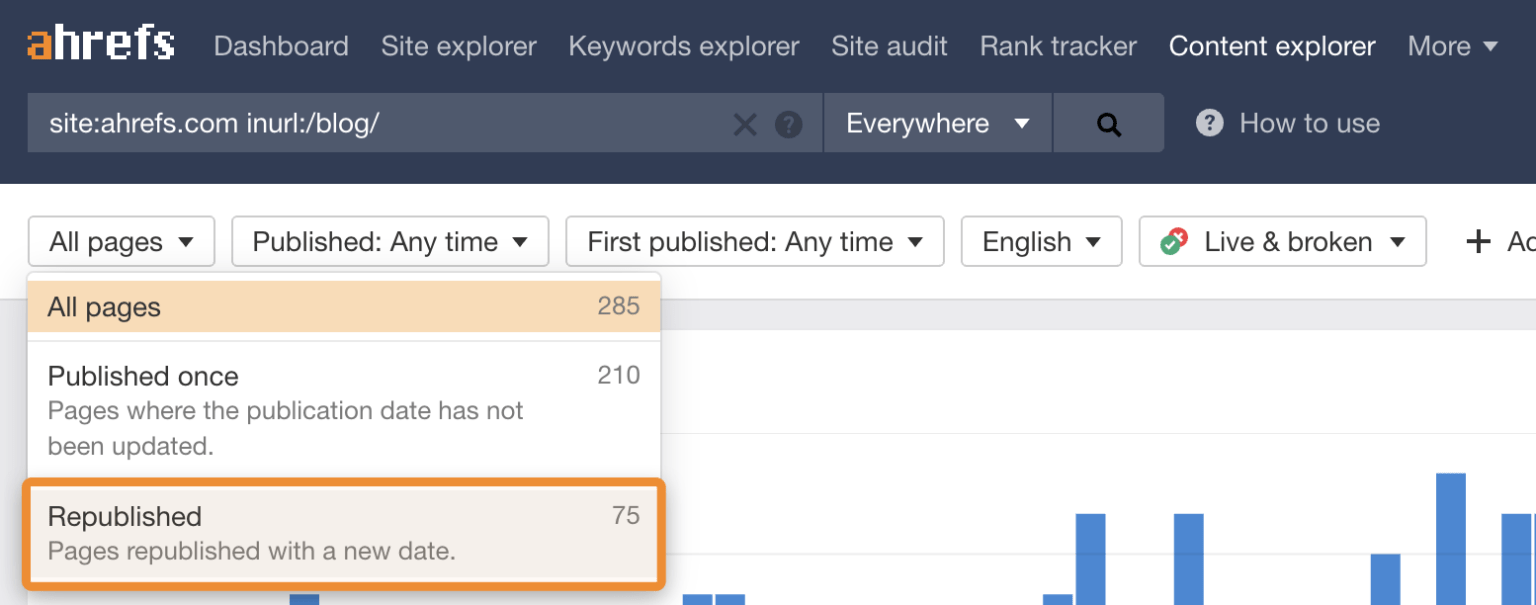
Hardwick, J. (2020). Republishing Content: How to Update Old Blog Posts for SEO. Ahrefs. Retrieved from https://ahrefs.com/blog/republishing-content/
Sauciuc, A. (2025). Is Content Pruning Good for SEO? Case Studies + Experts’ Opinions. cognitiveSEO. Retrieved from https://cognitiveseo.com/blog/17548/content-pruning-for-seo/
Shepard, C. (2025). 23 Million Internal Links – SEO Case Study. Zyppy. Retrieved from https://zyppy.com/seo/seo-study/
Soulo, T. (2023). 96.55% of Content Gets No Traffic From Google. Here’s How to Be in the Other 3.45% [New Research for 2023]. Ahrefs. Retrieved from https://ahrefs.com/blog/search-traffic-study/
Are you creating content, but still feel like you’re falling behind your competition? You publish blog posts, update your site, but it seems like everyone else is getting more traffic and ranking higher on Google.
Do you know exactly what your audience is searching for, that you haven’t covered in your content? A content gap analysis is a powerful way to find those hidden opportunities as a clear roadmap to attract more visitors with your content.
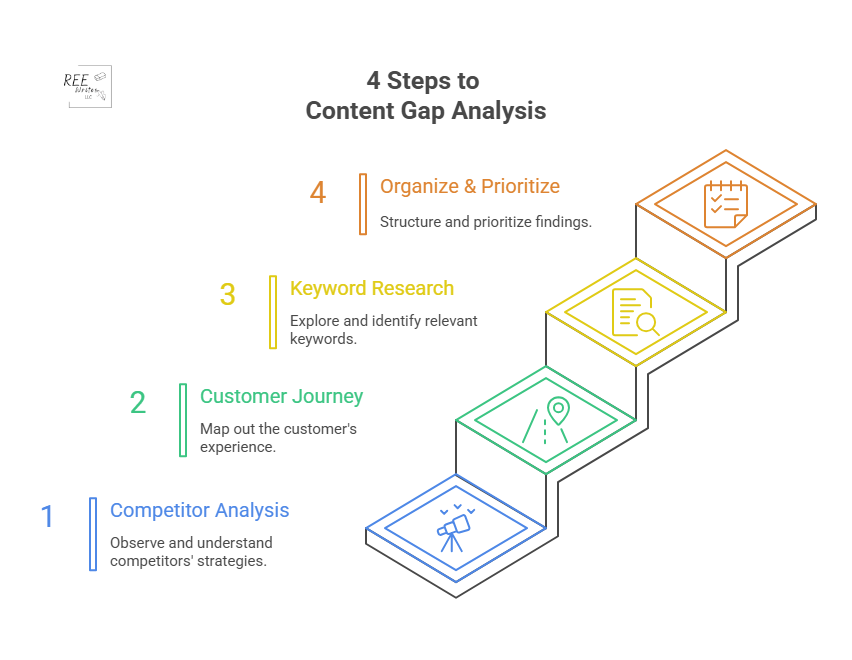
Let’s go over a 4-step process to find these gaps, fill them with valuable content, and grow your audience.
It’s a great question, and the answer is simpler than you might think. A content gap analysis is a powerful way to find opportunities for your business.
A content gap analysis finds topics and keywords important to your audience that your business doesn’t cover. It usually involves looking at the keywords your competitors rank for in search results that you don’t.
The goal is simple: identify holes in your content that your audience needs you to fill. Creating useful resources builds trust and authority with potential customers.
Think of it like a grocery store owner checking a rival’s aisles. If they see customers constantly buying a popular brand of organic granola that they don’t stock, they’re missing out on sales. That’s called a “product gap.”
You’re doing the same thing, but with information. You’re looking for information your audience wants, but they can’t find on your site.
Content strategies must be hyper-focused on customer needs to be effective. A content gap analysis is the most direct way to align your strategy with your audience’s needs.
Now that we’ve covered the basics, let’s look at how this can help your search engine optimization (SEO) and make your content work harder for you.
How Content Gap Analysis Affects Your SEO
Conducting a content gap analysis is a core part of a smart SEO and content strategy that delivers real results. It helps you stop creating content based on guesses and start making data-driven decisions that directly impact your growth. Here’s why it’s so important.
Find new keyword opportunities
Think you know all the important keywords for your industry? There’s always more to discover.
A content gap analysis uncovers valuable keywords your competitors are using to attract visitors—visitors that could be yours. These are often long-tail keywords or specific questions that show a user is further along in their buying journey.
Long-tail keywords (phrases of 3+ words) make up a significant portion of all Google searches. These less-competitive phrases often have higher conversion rates because the user’s search intent is much more specific. By finding gaps, you’ll also find these high-intent long-tail keywords.
Different types of content gaps
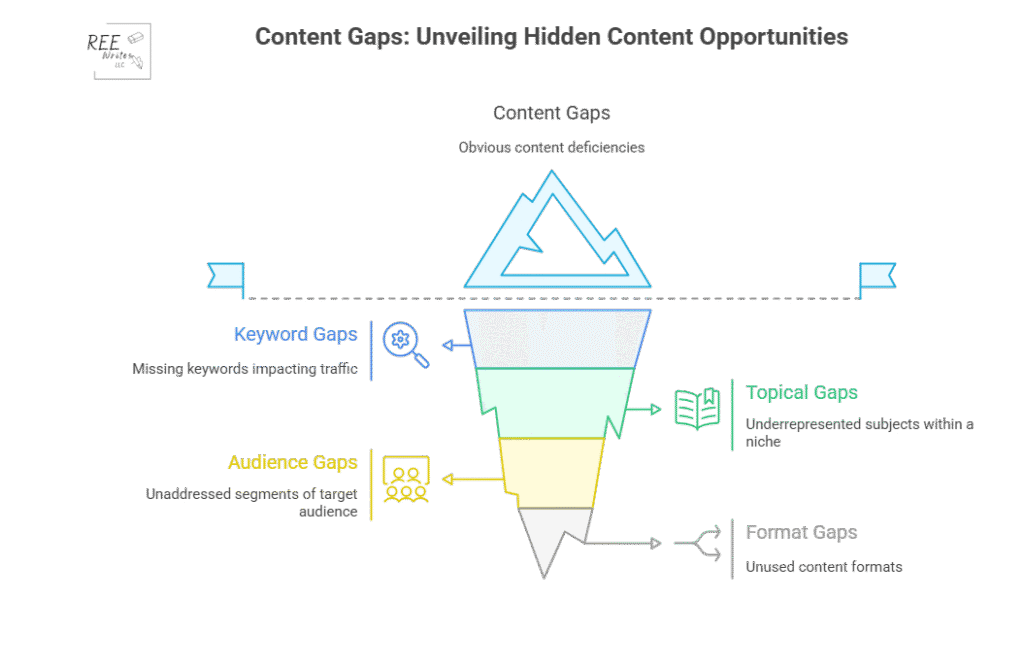
There are four types of content gaps you can address to be sure that your content strategy is thorough and promotes conversions:
Formats: Content types like videos, blogs, case studies and podcasts your audience likes, but you don’t have.
Understand your audience
What questions are your potential customers asking? What are their biggest problems? A content gap analysis helps you get a clearer picture of what your audience needs at every stage of their journey. By seeing what topics are popular on competitor sites, you get direct insight into the conversations happening in your industry. This allows you to create content that truly resonates and helps people.
Let’s say for example that you’re a B2B software company, and you see your main competitor has an entire section of their blog dedicated to “integrations with other software.” If you have no content on this topic, you could address this gap by creating a series of articles on how their product works with other popular tools, and get an increase in qualified leads from your blog within a few months.
Outperform competitors
To get ahead, you have to be better than your competitors and cover the topics they’ve missed.
You can systematically cover topics your competition already ranks for, but you can create more comprehensive, up-to-date, and helpful content to win the top spot on Google. You can also find the “gaps within the gaps”—topics that none of your competitors are adequately covering. This analysis gives you a strategic advantage.
Competitor analysis is an important piece of your marketing and content strategy. It’s the foundation for identifying opportunities to gain a competitive edge in search rankings.
Improve the customer journey
The customer journey isn’t a straight line. People move from being aware they have a problem, to considering different solutions, to making a final decision. You need content that supports them at every stage.
Source: Talkative
A content gap analysis helps you see if you’re missing content for a critical stage. For example, you might have great blog posts for the “awareness” stage, but no comparison guides for the “consideration” stage.
Ensuring a seamless customer journey with helpful information at each touchpoint can significantly increase customer satisfaction and conversion rates. Customers who receive helpful content throughout their journey are more likely to become loyal brand advocates. Filling your content gaps can help you do that.
4 Steps to Content Gap Analysis
Now that you understand why it’s so important, let’s get into the how. Here’s a four-step process to find and fill the gaps in your own content strategy.
Step 1: Analyze Your Competitor’s Content
What’s already working for others in your space? Let’s find out, using SEO tools to get a data-backed look at your competitors’ content performance.
First, identify your SEO competitors. These are websites that consistently show up on the first page of Google for the keywords you want to rank for.
Next, use an SEO tool to do the heavy lifting. Tools like Ahrefs, Semrush, and Moz have specific “gap analysis” features built for this exact purpose. These competitive analysis tools are essential for your digital marketing strategy, saving you hundreds of hours of manual research.
Source: Semrush
Here’s a typical workflow using Semrush’s Keyword Gap tool:
Enter the domains: Input your own website’s domain and the domains of up to four of your top SEO competitors.
Run the analysis: The tool will compare the keyword profiles of all the websites.
Find the gaps: Filter the results to show keywords where your competitors rank (e.g., in the top 10 results), but your site does not. Semrush has a “Missing” filter perfect for this.
This process will give you a spreadsheet full of valuable keywords and topic ideas that are already proven to attract visitors in your industry. This data-driven approach removes guesswork and gives you a clear starting point.
Step 2: Map the Customer Journey
A content gap can also exist within your own site. You might be missing content for crucial stages of the customer journey, leaving potential customers stuck.
Think about the journey in three simple stages:
Awareness Stage: The person knows they have a problem but doesn’t know the solution yet. They are looking for educational, top-level information. Examples: “Why is my skin so dry in the winter?” “How to improve team productivity.”
Consideration Stage: The person now understands their problem and is researching different solutions or methods to solve it. Examples: “Hyaluronic acid vs. glycerin for dry skin.” “Asana vs. Trello for project management.”
Decision Stage: The person has decided on a type of solution and is now comparing specific products or services to make a purchase. Examples: “CeraVe Moisturizing Cream review.” “Best price on Asana business plan.”
Now audit your existing content. To do a content audit, create a simple spreadsheet and categorize your current articles, guides, and landing pages into these three stages. You’ll quickly see where the gaps are. Do you have dozens of “awareness” blog posts but no “consideration” comparison guides? That’s a huge content gap you need to fill to guide users toward a purchase.
Step 3: Use Keyword Research to Find Questions
Sometimes the biggest opportunities lie in the specific questions people are asking. These questions are a goldmine for content ideas because they tell you exactly what’s on your audience’s mind.
Source: Swarm Digital
There are several free and easy ways to find these questions:
Google’s “People Also Ask” (PAA) Box: When you search for a keyword, Google often shows a box with related questions. This is a direct look into what other users are searching for. Click on a question, and more will appear.
AnswerThePublic: This free tool takes your keyword and generates a visualization of hundreds of questions related to it, broken down by who, what, where, when, why, and how.
Forums: Search for your topic on these sites like Reddit and Quora and look at the discussions. What are people confused about? What problems are they trying to solve? The language is natural, giving you raw insight into your audience’s pain points.
For example, if your main topic is “email marketing,” you might discover from the PAA box that people are asking, “How often should a small business send emails?” or “What are the best free email marketing tools?” These are perfect topics for new articles that address a very specific need.
Step 4: Organize and Prioritize Your Ideas
By now, you should have a long list of potential content ideas from your competitor analysis, customer journey mapping, and question research. The final step is to organize these ideas and decide what to work on first.
Create a master spreadsheet for your content ideas. For each idea, include these columns:
Topic Idea
Target/Focus Keyword
Stage of Customer Journey
Monthly Search Volume
Keyword Difficulty
Business Relevance (1 to 5)
How to Choose Project Management Software
choose project management software
Consideration
800
Medium
5
Asana vs. Trello
asana vs trello
Consideration
2,500
High
4
Best Free Email Marketing Tools
free email marketing tools
Decision
5,000
High
3
Use this data to prioritize. A good approach is to look for topics with a sweet spot of:
High business relevance
Decent search volume (100 to 1,000 searches per month minimum)
Manageable keyword difficulty (KD)
Then group related topics into topic clusters to build authority on a subject and improve your internal linking structure. This ensures you’re creating content that will not only attract traffic but attract the right leads who are likely to be interested in your products or services.
A content gap analysis takes the guesswork out of your content strategy. Instead of wondering what to write next, you’ll have a clear roadmap based on real data about your audience and competitors. Do a content gap analysis regularly to fill the holes in your content, meet your audience’s needs, and steadily grow your organic traffic.
References
Ahrefs. (2023). Ahrefs Keyword Explorer Data. Ahrefs Pte. Ltd. Retrieved from [https://ahrefs.com/keywords-explorer.
AirOps (2024). Content Gap Analysis: Types, Examples & Step-by-Step Guide. Retrieved from https://www.airops.com/blog/content-gap-analysis-examples
du Plessis, C. (2022). A Scoping Review of the Effect of Content Marketing on Online Consumer Behavior. SAGE Open, 12(2). https://doi.org/10.1177/21582440221093042
Search Engine Journal. (2025). The State of SEO: A 2025 Report. Retrieved from https://www.searchenginejournal.com/state-of-seo/
Do you ever feel like you’re caught in a tug-of-war with your content? 55% of B2B marketers and content creators struggle to create content. Part of that struggle is finding a balance SEO requirements with creative expression. It’s normal to feel torn between pleasing search engines and connecting with real people by writing something fresh, engaging, and authentically you (or your business).
Well, you don’t have to choose. Creating SEO-friendly creative content isn’t about sacrificing your voice for rankings. It’s about finding a smart way to satisfy both.
There’s a myth floating around that SEO forces writers into creating dull, robotic content stuffed with keywords. Maybe you’ve heard that SEO kills creativity, turning vibrant writing into formulaic text designed only for machines.
But actually, search engines have gotten much smarter. They’re no longer just looking for keywords; they’re looking for content that genuinely helps people by focusing on user intent (the info a person is looking for online).
Think about it: what makes content great for readers? Often, it’s creativity! A unique perspective, an engaging story, a clear explanation with helpful visuals – these creative elements keep people on your page longer, encourage them to explore more, and even prompt them to share your content. These are known as engagement metrics, and they matter for SEO.
Google’s “Helpful Content Update” specifically targets content written primarily for search engines instead of humans. This system rewards content that provides a satisfying user experience (UX) and demonstrates first-hand experience or deep knowledge.
When you use creative techniques like storytelling, compelling visuals, or interactive elements, you make your content more engaging. This isn’t just good for the reader; it sends positive signals to search engines.
Metrics like average engagement time (how long people stay on your page), engagement rate (the percentage of visits with meaningful interaction), and lower bounce rates (people leaving after viewing only one page) indicate that users find your content valuable. Search engines interpret these signals as signs of quality content that satisfies user intent.
According to Contentsquare’s 2024 Digital Experience Benchmarking Report, poor page interaction (measured by Interaction to Next Paint or INP) reduces engagement by -11.7%. Creative, engaging content naturally improves interaction and keeps users on the page longer. Longer average engagement time suggests users find your content valuable.
Brands who successfully balance SEO and creativity
Many successful brands prove that SEO and creativity can coexist and thrive. They create content that’s not only optimized for search but also genuinely interesting, helpful, and reflective of their unique brand voice. Some examples include:
Flyhomes: Achieved massive organic growth (over 1.1M monthly visits) by creating comprehensive, data-rich cost of living guides. This balanced a creative approach to a common user need (housing information) with strong SEO content strategy.
Brainly: Leveraged user-generated content (questions and answers) to create millions of unique pages targeting long-tail keywords, tripling their keyword rankings by fostering a creative, peer-to-peer learning environment.
Liquid Death, CeraVe, E.L.F. Cosmetics: These brands demonstrate the power of a “social-first” brand building approach, often involving creative, engaging content that resonates with communities, which can indirectly boost SEO through increased visibility and brand mentions.
These examples show that focusing on user needs with creative execution, supported by smart SEO, is a winning formula.
Next, let’s look at the first crucial step before you even start writing: understanding why someone is searching in the first place.
Understand User Search Intent Before You Write
Before you pour your creative energy into a piece of content, you need to know why someone would search for your topic. What are they really trying to achieve? The “why” behind a search query is called search intent or user intent.
Product pages, service pages, e-commerce category pages, pricing pages, sign-up forms
Knowing which intent you’re targeting helps direct your creative approach.
Informational intent (I want to know)
Users with informational intent are looking for knowledge. They may be asking “how to fix a leaky faucet,” “what are the benefits of meditation,” or “history of the Eiffel Tower.”
Your creative challenge here is to present information clearly, engagingly, and comprehensively. Think step-by-step guides, insightful explainers, helpful tutorials, or visually appealing infographics (linkable assets).
Here, the user already knows the destination – a specific website or brand. They may search for “YouTube,” “Amazon login,” or “Backlinko blog.”
This isn’t the place to get creative, because the goal is to ensure your official pages (homepage, login page, key product pages) are easy to find. Your creativity can focus on clear branding and UX on those specific pages.
Commercial intent (I want to compare before doing)
These users are in the research phase before making a purchase or commitment. They’re comparing options, looking for reviews, and trying to find the best fit.
Searches may include “best running shoes for beginners,” “Surfer SEO vs Clearscope,” or “Mailchimp alternatives.” Your creative opportunity lies in providing persuasive, helpful comparisons, in-depth reviews, detailed case studies, or compelling testimonials.
Commercial intent searches represent the crucial middle-of-the-funnel stage, at 14.51% of Google searches.
Transactional intent (I want to do/buy)
Users with transactional intent are ready to act. They’re looking to “buy noise-canceling headphones,” find “pizza delivery near me,” or get a “free trial for project management software.”
Creativity here focuses on clear calls-to-action (CTAs), persuasive product descriptions, easy checkout processes, and highlighting value propositions like discounts or free shipping.
While purely transactional searches may seem low (0.69% according to SparkToro/Datos), many commercial searches lead directly to a transaction. Optimizing product and service pages for this intent is vital for conversions.
Understanding these types is the first step. But how do you figure out the intent behind your specific keywords?
Use keyword modifiers as clues
Often, the words used in the search query itself hint at the intent.
While titles with question-based keywords may have a slightly lower click-through rate (CTR) overall (15.5% vs 16.3% for non-question titles), they are strong indicators of informational intent.
Moz observed that searching “blender” brings up mixed results (the software and the kitchen appliance), indicating Google isn’t sure of the primary intent. However, searching “coffee maker” predominantly shows e-commerce category pages, clearly signaling commercial or transactional intent.
Check “People Also Ask” (PAA) and related searches
The PAA boxes directly show questions users are asking related to your keyword. These questions are a goldmine for understanding specific informational needs or comparison points. Similarly, the “Related searches” section at the bottom of the SERP shows how users refine or continue their search, offering clues about their ultimate goal.
If you search “best email marketing tools,” the PAA section may include questions like “What is the #1 email marketing tool?” or “Which email platform is best for small business?” This clearly signals users are in a commercial investigation phase, comparing options.
Leverage keyword research tools with intent labels
Many SEO tools can save you time, as they automatically categorize keywords by search intent, such as Moz Pro, Semrush, Ahrefs, seoClarity, and various AI platforms. However, always double-check the SERPs yourself, especially for keywords that could have mixed intent.
For instance, using Moz Pro’s Keyword Suggestions, you can see that the tool identifies “coffee maker” as having high commercial intent, confirming the manual SERP analysis.
By understanding the why behind the search, you can tailor your creative approach to meet that specific need, making your content far more effective for both users and search engines.
With a clear understanding of user intent, how do you find the actual words and phrases your audience uses? The answer is keyword research.
Keyword Research for Creative Minds
Often, keyword research gets a bad rap among creative types. It can feel like a purely technical, data-driven chore that stifles creativity. But what if we reframed it? Think of keyword research not as a restriction, but as a powerful tool for audience insight.
Keywords are the actual words and phrases your potential readers use when they’re looking for information, solutions, or inspiration online. Understanding these terms helps you:
Know the language your audience speaks.
Identify their specific questions and pain points.
Discover content topics they’re actively interested in.
Find angles that resonate with their needs.
Approached this way, keyword research becomes a source of creative inspiration, not a barrier to it.
Use question-based keywords for content inspiration
Keywords phrased as questions (starting with “who,” “what,” “where,” “when,” “why,” or “how”) are direct lines into your audience’s minds. They explicitly state the problem or information gap the user is trying to fill.
Each question is a potential blog post, video topic, or section within a larger guide. Tools like AnswerThePublic or simply analyzing the PAA boxes in Google search results are great ways to find these.
Explore long-tail keywords for specific creative angles
Long-tail keywords are longer, more specific phrases, typically three or more words. Think “easy vegan weeknight dinner recipes” instead of just “vegan recipes.” Because they’re specific, they usually have lower search volume but also less competition and much clearer intent.
Look at related keywords and “People Also Search For” (PASF) for thematic depth
When you research a primary keyword (also called a focus keyword), tools and Google itself will show you related terms and topics. Google’s “Related Searches” (or “People Also Search For”) section shows what users search for next.
Exploring these related areas helps you understand the broader context around your topic and identify adjacent themes your audience cares about. This allows you to create a richer, more comprehensive (and creative!) exploration of a subject, rather than just a single, narrow piece.
Researching “how to start a podcast” may reveal related searches like “podcast equipment for beginners,” “podcast hosting platforms,” “how to monetize a podcast,” and “podcast interview techniques.” Each of these could become a separate creative content piece supporting the main topic.
Search semantic and LSI keywords
Modern search engines like Google don’t just match keywords; they understand meaning and context, which is called semantic search. They recognize synonyms, related concepts, and the relationships between words. Latent Semantic Indexing (LSI) keywords are terms conceptually linked to your main topic.
Using these related terms helps Google grasp the full meaning of your content and allows you to write more naturally and creatively without awkwardly repeating your main keyword.
Because Google understands semantics, using varied language and explaining concepts in different ways actually helps your SEO by providing richer contextual clues. This directly rewards creative expression in writing.
Identify related terms and entities
Go beyond simple keywords and identify the main entities (people, places, organizations, concepts) associated with your topic.
Also, actively look for synonyms and related phrases by using SEO tools, analyzing top-ranking content, or simply brainstorming related ideas. Weaving these terms and entities naturally into your writing adds semantic depth and demonstrates comprehensive understanding.
For example, if your content is about “sustainable travel,” related terms may include “eco-tourism,” “carbon offsetting,” “responsible travel,” “low-impact accommodation.” Related entities could be “Greta Thunberg,” “Costa Rica” (as a destination known for eco-tourism), “WWF,” or specific eco-lodges.
All these pages are linked together internally. Grouping your researched keywords into these clusters helps you plan content systematically.
Topic clusters provide a framework that supports creativity. The pillar page establishes the foundation, while the cluster pages allow you to explore specific angles using diverse creative formats (videos, infographics, deep-dive articles, case studies). This structure also signals topical authority to Google, boosting your credibility and rankings.
Use clusters to guide creative content planning
Once you’ve grouped your keywords into clusters, use this structure as a roadmap. Plan out your pillar content and the supporting cluster content.
Decide which creative formats best suit each subtopic based on its specific keywords and user intent. This ensures you cover the subject comprehensively while keeping your content organized and interconnected. Use keyword clustering tools (which group keywords based on semantic meaning or shared SERP results) to help automate this grouping process.
Building content around topics where your website demonstrates expertise and trustworthiness (Topic Authority) can significantly improve your search rankings. Topic clusters are key to building and showing your authority.
Okay, you’ve got your intent figured out and a list of keywords that actually spark some creative ideas. How do you weave those keywords into your writing and still sound human?
Smart, Natural Keyword Placement
The goal here is simple: integrate keywords seamlessly so they support the reader’s journey, not interrupt it. Forget about “keyword density” percentages and focus on natural language. Keyword stuffing (jamming keywords in unnaturally) creates a terrible reading experience and can get your site penalized by search engines.
Instead, focus on placing your keywords strategically in key areas where they have the most impact for both readers and search engines, always prioritizing clarity and flow.
Include keywords in your title tag
Your page’s title tag (the clickable headline shown in search results) is prime real estate. It’s a strong signal to search engines about your page’s topic and heavily influences whether users click.
Google often rewrites title tags if they’re too long, stuffed with keywords, or don’t seem to match the content’s intent well. A clear, relevant title tag that includes the keyword naturally has a better chance of being displayed as you intended.
Weave keywords into headings and subheadings
Headings (H1, H2, H3, etc.) break up your text and create a clear structure, making it easier for readers to scan and understand the content. They also help search engines understand the hierarchy and main points of your page.
Use your primary keyword in your main title (H1) using a conversational tone. Incorporate variations or related keywords into your subheadings (H2s, H3s) where they fit logically and describe the section’s content accurately.
Good heading structure directly improves UX by making content readable and scannable. When users can quickly find the information they need, they’re more likely to stay engaged – a positive signal for SEO.
Place keywords early in your introduction
Include your primary keyword somewhere in the first paragraph, or at least within the first 100 to 150 words of your content. This immediately confirms the topic for your audience and search engines, which shows its relevance right from the start.
For example, if your article targets “mindfulness techniques for stress,” your introduction could start with: “Feeling overwhelmed? Discover simple mindfulness techniques for stress reduction that you can practice anywhere…”
Integrate keywords naturally within the body content
Sprinkle your primary keyword, along with synonyms and related terms (semantic keywords), throughout the main body of your text. Don’t obsess over frequency or density; focus on whether the language sounds natural and makes sense in context. If a sentence sounds awkward with the keyword, rephrase it or use a variation.
Use keywords in URLs
Your page’s web address (URL) is another place to include your primary keyword, if possible. Keep URLs short, descriptive, and use hyphens (-) to separate words (yourwebsite.com/seo-friendly-creative-content).
A clear URL helps users and search engines understand the page topic at a glance. Pages with the primary keyword in the URL tend to have a 45% higher click-through rate from search results.
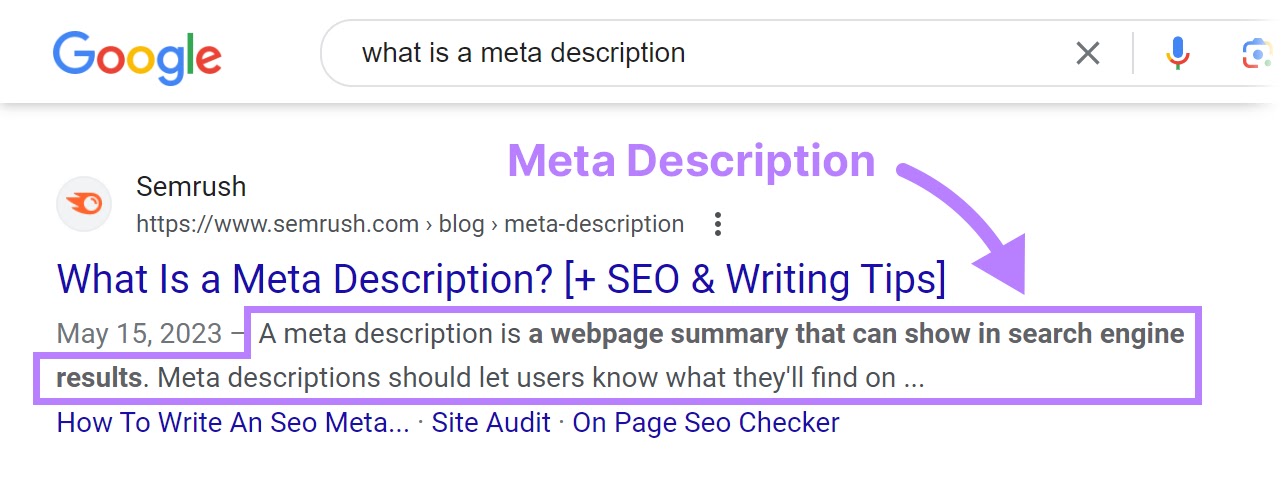
Optimize meta descriptions with keywords
Source: Semrush
The meta description is the short snippet of text that appears under your title tag in search results.
For this article, a meta description could be: “Learn proven techniques to create SEO-friendly content while maintaining your creative voice. Boost rankings without boring readers.”
While it’s not a direct ranking factor, it heavily influences whether someone clicks on your link. Write a compelling description (around 155 characters or less) that accurately summarizes the page and includes your primary keyword naturally. Think of it as ad copy for your content.
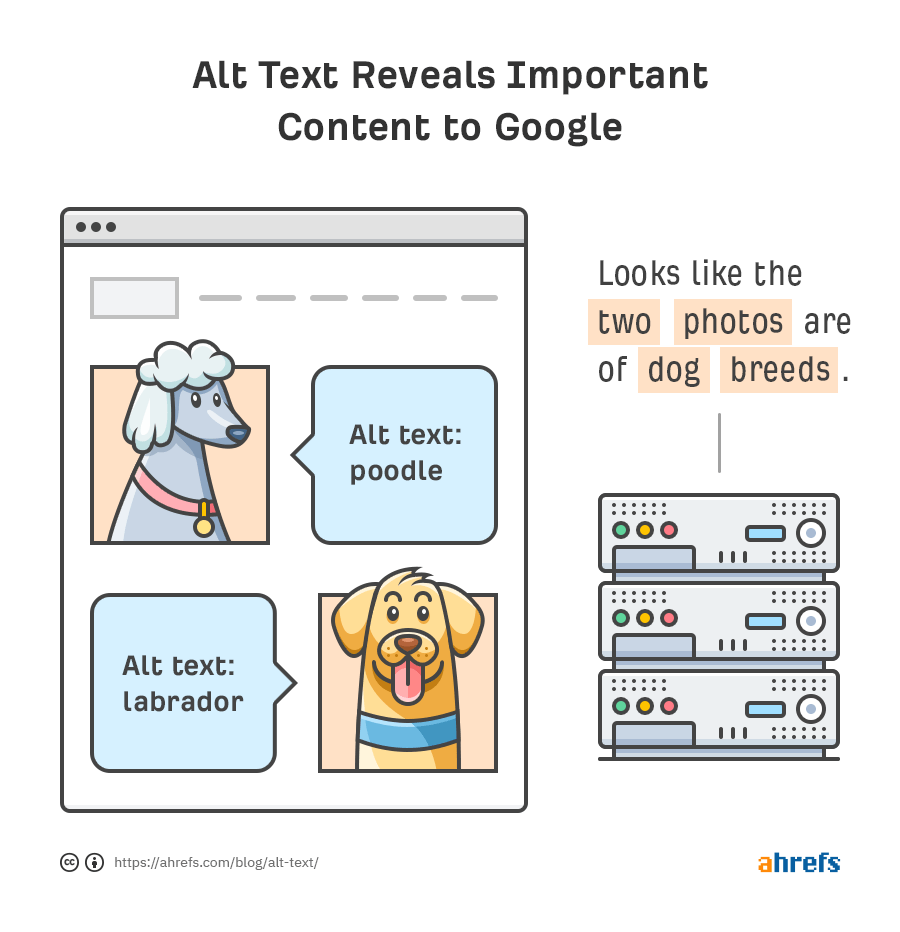
The digital health platform ZOE saw significant organic growth (754% in 6 months) partly by optimizing their images with descriptive alt text and filenames, earning them over 72,000 image snippets in search results.
Search engines can’t “see” images like humans do, so you need to provide context:
Use descriptive file names that include keywords like “creative-seo-writing-tips.png” instead of generic names like “IMG_001.jpg.”
“Looking for the best vacuum cleaner? Our best vacuum cleaner is the best vacuum cleaner for pet hair. Buy the best vacuum cleaner today!”
“Choosing the best vacuum cleaner depends on your home. Do you need powerful suction for pet hair, or a lightweight model for stairs? Let’s explore top-rated options.”
“We offer cloud computing solutions. Our cloud computing solutions provide scalable cloud computing solutions for your business.”
“Explore our enterprise cloud features for scalable performance. These cloud-based services adapt as your business grows, offering flexible computing solutions.”
SEO writing tips
“Get SEO writing tips here. These SEO writing tips improve SEO writing. Use our SEO writing tips for better SEO writing.”
“Need effective SEO writing tips? This guide covers keyword integration, readability, and how to craft content that ranks well and engages readers.”
See the difference? Natural integration flows better and focuses on providing value, while forced usage sounds repetitive and spammy.
If using the exact keyword phrase sounds unnatural, you can also use synonyms and related terms. Using variations like “content optimization techniques,” “writing for search engines,” or “creative SEO strategies” instead of just “SEO-friendly creative content” keeps your language fresh and provides broader semantic signals to Google.
Keyword placement is important, but it’s only part of the puzzle. How you structure and format the entire piece plays a huge role in keeping both readers and search engine bots happy.
Good Structure and Formatting for Bots and People
Think about the last time you landed on a webpage that was just a giant wall of text. Did you read it, or did you go elsewhere for the info?
How your content looks and flows—content design—is just as important as what it says. Good structure and formatting make your content easy to read and digest for humans, which improves UX.
Luckily, the formatting elements that make content user-friendly also help search engine crawlers understand your content’s structure, hierarchy, and key points. It’s a win-win!
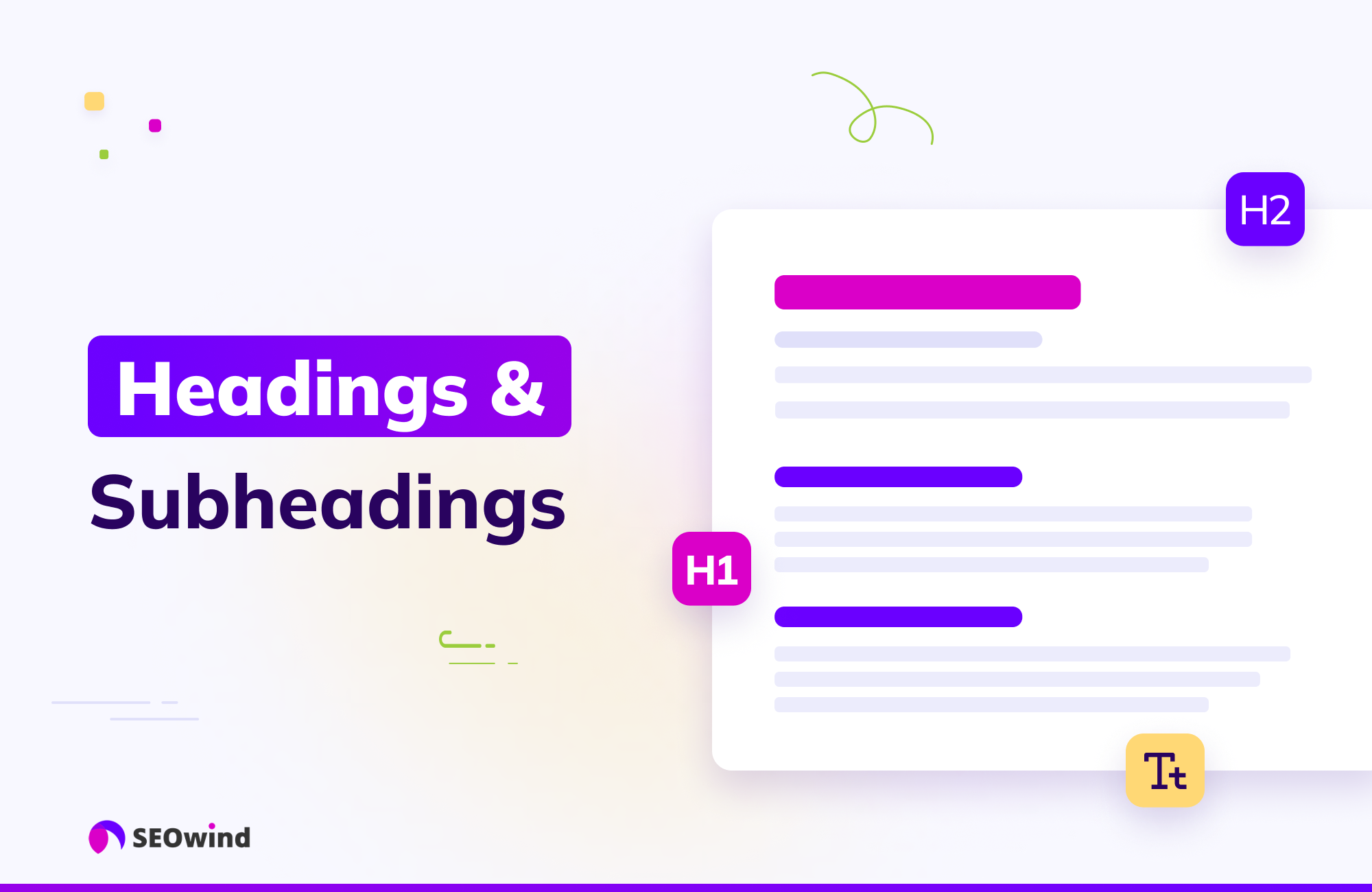
Use clear headings and subheadings
Source: SEOwind
We already talked about headings in the context of keyword placement, but their primary role is structure. Use a clear heading hierarchy:
H1: Your main title (only one per page).
H2s: Major sections of your article.
H3s (up to H6 if needed): Sub-points within those sections, which
breaks up your content into digestible chunks,
allows readers to scan for relevant information quickly, and
tells search engines how your content is organized.
Keep your paragraphs focused and brief, withno more than 4 sentences or lines each.
Shorter paragraphs are less intimidating and much easier to read, especially on mobile screens. Similarly, vary your sentence length but lean towards shorter, clearer sentences (averaging under 20 to 25 words is a good target).
Many readability formulas, like the Flesch-Kincaid Grade Level, penalize long sentences and paragraphs. Aim for a 7th-grade reading level or below to make your content accessible to a wider audience.
Whenever you’re listing items, steps, or key takeaways, use bullet points or numbered lists. Lists break up the visual monotony of paragraphs, make information highly scannable, and help readers digest complex information quickly.
Google frequently uses content formatted as lists (both bulleted and numbered) to generate Featured Snippets at the top of search results. Structuring key information in lists is a creative way to potentially capture this valuable SERP real estate.
Employ bold and italic text strategically
Use bold text or italics sparingly to emphasize key terms, definitions, or important phrases within your paragraphs. This helps guide the reader’s eye and makes the content easier to scan for crucial information. Don’t overdo it though, or the formatting loses its impact and makes the content harder to read.
It helps to create your own internal style guide for governance. For instance, you may want to bold takeaway sentences or put important terms in italics the first time you define them.
Beyond these specific elements, ensure your content flows logically from one section to the next. Start with an introduction that sets the stage, develop your main points with clear transitions, and end with a conclusion that summarizes the key message.
Visuals also play a critical role in structure and engagement.
Ensure your visuals are high-quality, directly relevant to the surrounding text, and properly optimized with descriptive file names and alt text. Compressing images is also vital for page speed.
Websites with visual content get 94% more views and traffic than text-only pages.
Embed videos where appropriate
Videos are incredibly engaging and can significantly increase the amount of time visitors spend on your page.
If it’s better to explain a concept visually so that your audience will understand it more easily, embed a relevant video. Make sure to optimize the video’s title and description as well.
With over half of web traffic coming from smartphones and tablets, your content must look good and be easy to navigate on smaller screens. This means using a mobile-responsive design, ensuring text is readable without zooming in, and checking that buttons and links are easy to access on different devices.
Google uses mobile-first indexing, meaning it primarily looks at the mobile version of your site for ranking purposes. A poor mobile experience leads to high bounce rates and hurts your SEO.
Structure and formatting lay the groundwork for a positive UX, but to get the most impact, the words you choose need to resonate with your audience. So let’s talk about how to keep your unique writing voice alive (and creative) while still hitting those important SEO marks.
Writing Techniques That Boost SEO Without Killing Your Voice
This is where the magic happens—blending the art of writing with the science of SEO.
Think of SEO principles not as rigid rules that suffocate creativity, but as guidelines that help your brilliant writing get discovered. The key is to prioritize your reader and write naturally, then layer in optimization techniques thoughtfully.
Clearly introduce the topic or problem your content addresses and briefly state what the reader will gain by sticking around. Instead of a dry opening like, “This post will discuss creative SEO,” try something more engaging: “Tired of choosing between writing content you love and content that ranks? What if you could do both? This guide explores practical ways to inject your creative spark into SEO writing.”
Above all, write for the humans who will be reading your content. Use language that feels natural to you and resonates with your target audience.
Readers (and increasingly, algorithms) can often detect content that feels forced, overly optimized, or purely AI-generated without a human touch. So don’t try to force keywords or sentence structures that feel awkward or unlike you.
Let your unique perspective and personality shine through. Your unique, genuine voice and experience are the differentiators in a crowded market, and that authenticity builds trust and connection, which aligns perfectly with Google’s emphasis on E-E-A-T.
Write in a conversational tone
Imagine you’re explaining your topic to a friend. Writing in a conversational tone – using “you,” asking questions, incorporating contractions (like “you’re” or “it’s”), and keeping the language approachable makes your content feel more personal and easier to read. This style naturally aligns with how people search using voice assistants, and helps search engines understand the context through natural language processing (NLP).
Conversational writing often naturally includes the long-tail keywords and question-based phrases that are vital for modern SEO, especially voice search. Plus, it enhances UX, a known ranking factor.
Use active voice for clarity and impact
Whenever possible, use active voice (“The writer crafted the sentence”) rather than passive voice (“The sentence was crafted by the writer”). Active voice is more direct, concise, energetic, and easier to understand. It makes your writing feel more confident and engaging.
Readability tools flag passive voice.Using passive voice is fine on occasion, but aim to keep passive voice under 10% as suggested by Yoast) to improve clarity, readability and flow.
Incorporate storytelling to engage and rank
Humans are wired for stories. Weaving narratives, personal anecdotes, relatable examples, or compelling case studies into your content makes it far more engaging and memorable.
Stories capture attention, evoke emotion, and can dramatically increase the time readers spend on your page (dwell time), and reduce how often they bounce away immediately. These improved engagement metrics send positive signals to search engines, indirectly boosting your SEO.
Tell stories that illustrate your points in a fresh way
Doing so provides E-E-A-T, makes your content more valuable to readers, and increases the likelihood it will be shared and linked to. Original research and content showcasing deep expertise are highly effective and can generate 40% more engagement.
Maintaining your creative voice while optimizing for SEO is achievable with these techniques. And thankfully, you don’t have to manage every single detail manually. There are some fantastic tools available to help streamline the process.
Tools That Support Both SEO and Creative Writing
Leveraging the right tools can make creating SEO-friendly creative content much smoother and more efficient. These tools can handle some of the more technical aspects of SEO, freeing up your mental energy to focus on the creative side – crafting compelling narratives, developing unique angles, and polishing your prose.
Keyword research tools
Keyword research tools like Semrush, Ahrefs, Moz Keyword Explorer, Google Keyword Planner, and Keywords Everywhere are essential for the audience insight phase. They help you:
Find relevant keywords your audience is searching for.
Analyze search volume (how many people search) and keyword difficulty (how hard it is to rank).
Understand search intent (many tools now offer intent labels).
Discover related terms, questions, and topic ideas.
Some tools like Keyword Insights or Surfer SEO even help group keywords into topic clusters.
You could use Semrush’s Keyword Magic Tool to find primary keywords for your topic, or its Topic Research tool to identify content gaps by analyzing competitors.
Content optimization tools
Once you have your topic and keywords, use tools like Surfer SEO, Clearscope or MarketMuse to help optimize your content for ranking. They typically work by analyzing the current top-ranking pages for your primary keyword and providing data-driven recommendations on the:
Content structure (the number of headings, paragraphs, images)
Topics to cover to ensure comprehensiveness
Readability scores
These are powerful tools, but be careful to only rely on these tools for guidance, not instructions. Over-optimizing based solely on tool recommendations can sometimes lead to content that sounds stiff and robotic. Always use your judgment to maintain your voice and prioritize the experience of your audience.
AI writing assistants
AI tools like ChatGPT, Jasper, Claude, Perplexity, Gemini, and Copy.ai can be incredibly helpful assistants in the creative process to:
Brainstorm ideas and angles
Generate outlines based on a topic or keyword
Draft sections of content (introductions, conclusions, specific points)
Rewrite sentences or paragraphs for clarity, tone, or conciseness
AI tools designed specifically for SEO (like Writesonic or SEO.AI) can often integrate keyword research and optimization suggestions directly into the writing workflow.
Use AI tools to enhance human creativity, not replace it. Studies show that AI-assisted content (human oversight and input) performs significantly better than purely AI-generated content. Although 86% of SEOs use AI, most top-ranking content still has little AI involvement.
Readability checkers
Readability tools like Hemingway App, Grammarly and Readable analyze your writing and provide feedback on its clarity and simplicity. They typically check:
Sentence length and complexity
Paragraph length
Use of passive voice
Complex or jargon-filled words
Overall readability score (often using metrics like Flesch Reading Ease or Flesch-Kincaid Grade Level). Using these tools helps ensure your creative writing is still accessible and easy for your target audience (and search engines) to understand, helping you hit that target 7th-grade reading level. Grammarly also offers tone detection to help maintain consistency.
I love the Hemingway App. When you paste your text there, it highlights sentences that are too long or complex, prompting you to simplify them for better readability and flow.
SEO plugins
If you use a content management system like WordPress, SEO plugins are invaluable. They provide real-time feedback directly within your writing interface on:
Keyword usage and placement
Title tag and meta description optimization
Readability
Internal linking
Other on-page SEO factors. These plugins make it easier to check the essential SEO boxes as you write and edit
SEO plugins to try include Yoast SEO, Rank Math, and AIOSEO (All in One SEO). Yoast SEO includes specific checks for readability based on metrics like Flesch Reading Ease, sentence length, paragraph length, passive voice, and transition words.
When choosing tools, consider your budget, technical comfort level, and specific needs. Many offer free versions or trials, so you can experiment to find the ones that best complement your creative workflow.
Strike the Right Chord with SEO and Creativity
Finding the sweet spot between SEO requirements and your creative expression will help make your voice heard in the crowded online world. Don’t let perceived constraints of SEO dim your creative spark.
Embrace these techniques, leverage helpful tools, and start crafting content that resonates deeply with the people you want to reach, and watch your content climb search rankings. When you focus on creating high-quality, engaging, and helpful content that reflects your unique perspective, your content will naturally align with the core principles of good SEO. And your audience and the search engines will thank you for it.
Alves, L. (2025). 15 of the Best Readability Scoring and Checker Tools (2025). Search Atlas. Retrieved from https://searchatlas.com/blog/readability-tools/
Balancing SEO and Readability — An Editor’s Perspective. (2025). Blueleaf Editing. Retrieved from https://blueleafediting.com/balancing-seo-and-readability-an-editors-perspective/
Bleeding Edge. (n.d.). A Complete Guide to Search Intent & AI: Winning the Search Game in 2025. BleedingEdge.tv. Retrieved from https://bleedingedge.tv/a-complete-guide-to-search-intent-ai-winning-the-search-game-in-2025/
D., S. (2025). 18 SEO Case Studies from First-Person Accounts. Surfer SEO. Retrieved from https://surferseo.com/blog/seo-case-studies/
Dean, B. (2025). Google’s 200 Ranking Factors: The Complete List. Backlinko. Retrieved from https://backlinko.com/google-ranking-factors
Dean, B. (2025). Search Intent: The Definitive Guide. Backlinko SEO Hub. Retrieved from https://backlinko.com/hub/seo/search-intent
Dean, B. (n.d.). 74 Important SEO Statistics for 2025. Backlinko. Retrieved from https://backlinko.com/seo-stats
Drexler, O. (2024). The Ultimate Keyword Research Guide [EASY WAY]. Mayple. Retrieved from https://www.mayple.com/resources/digital-marketing/keyword-research
Emperado, M. L. G. (2025). Top 30 SEO Statistics 2025: Key Trends and Insights to Optimize Your Search Strategy. DesignRush. Retrieved from https://www.designrush.com/agency/search-engine-optimization/trends/seo-statistics
Envisionit Agency. (2025). SEO metrics that matter: Ditch the outdated and track these instead. Envisionit Agency. Retrieved from https://envisionitagency.com/blog/envisionitagency-com-blog-seo-metrics-that-matter/
Greenlane Marketing. (n.d.). User Intent in SEO: A Practical Guide for 2024. GreenlaneMarketing.com. Retrieved from https://www.greenlanemarketing.com/resources/articles/user-intent-seo
How to structure content for better readability and SEO in 2024? JEMSU. Retrieved from https://jemsu.com/how-to-structure-content-for-better-readability-and-seo-in-2024/
Ichir, L. (2022). Leverage Synonyms in your SEO Content Strategy. Topicseed. Retrieved from https://topicseed.com/blog/synonyms-seo/
Ineza, O. (n.d.). Why Keyword Research is Still Important for ASO in 2025. RPLG.io. Retrieved from https://rplg.io/why-app-keyword-research-is-important-for-aso/
Jeske, S. (2024). Enhancing Your Content Strategy with SEO Best Practices. MarketMuse. Retrieved from https://blog.marketmuse.com/enhancing-your-content-strategy-with-seo-best-practices/
Jhean, G. (2025). 19 SEO Case Studies: Strategies That Work in 2025. All in One SEO. Retrieved from https://aioseo.com/seo-case-studies/
Kaatz, J. (n.d.) Is Readability Important For SEO? Illumination Marketing. Retrieved from https://www.marketingillumination.com/blogs/readability-important-for-seo
Lunn, M. (n.d.). The Ultimate Guide to Keyword Research in 2025. LeadPoint Digital. Retrieved from https://www.leadpointdigital.com/the-ultimate-guide-to-keyword-research-in-2025/
Mahale, N. (2025). What is Search Intent? Types, Examples & How to Optimize. Writesonic. Retrieved from https://writesonic.com/blog/what-is-search-intent
McKenzie, L. (2025). The Complete SEO Checklist. Backlinko. Retrieved from https://backlinko.com/seo-checklist/
Mortensen, O. (2025). 6 Tips on How to Avoid Keyword Stuffing in 2025 [That Actually Work]. SEO.ai. Retrieved from https://seo.ai/blog/how-to-avoid-keyword-stuffing
Optimizing Content with Keyword Clustering for SEO in 2025 [Tips + Tools + Examples]. SlamMediaLab.com. Retrieved from https://www.slammedialab.com/post/keyword-clustering
Pandey, S. (2020). Semantic SEO Guide 2025: Optimizing for Topics & Entities. NiuMatrix.com. Retrieved from https://niumatrix.com/semantic-seo-guide/
Patel, N. (n.d.). Search Engine Trends for 2024. NeilPatel.com. Retrieved from https://neilpatel.com/blog/search-engine-trends/
Rose-Collins, F. (2025). Visual Storytelling in SEO: How Infographics & Slides Improve User Engagement and Rankings. Ranktracker. Retrieved from https://www.ranktracker.com/blog/visual-storytelling-in-seo-how-infographics-slides-improve-user-engagement-and-rankings/
S., M. (2025). 18 Tips to Write SEO-Friendly Content That Ranks in 2025. Hostinger. Retrieved from https://www.hostinger.com/tutorials/write-seo-friendly-content
Search Engine Land. (n.d.). Your 2025 playbook for AI-powered cross-channel brand visibility. SearchEngineLand.com. Retrieved from https://searchengineland.com/your-2025-playbook-for-ai-powered-cross-channel-brand-visibility-454026
SEO Statistics That Prove Its Effectiveness in 2023. (2023). Markitors. Retrieved from https://markitors.com/seo-statistics-that-prove-its-effectiveness-in-2023/
SEO Trends 2025: 20 Stats to Boost Your Search Rankings. (2025). Digidop. Retrieved from https://www.digidop.com/blog/seo-trends-2025-20-stats
User Intent in SEO: Understanding the “Why” Behind the Search. (n.d.). seoClarity. Retrieved from https://www.seoclarity.net/blog/user-intent-seo
Spera, M. (2022). The Only 12 SEO Best Practices You Need to Know [2025 Checklist]. GrowthMarketingPro. Retrieved from https://www.growthmarketingpro.com/seo-best-practices-checklist/
Super, S. (2024). Keyword Integration: A Comprehensive Guide For SEO Success. Linkbot Library. Retrieved from https://library.linkbot.com/keyword-integration/
Tallwave. (n.d.). SEO in 2024: Riding the Wave of Change. Tallwave.com. Retrieved from https://tallwave.com/blog/seo-in-2024/
Tanguay, A. (2024). Topic clusters and SEO: Everything you need to know in 2025. Search Engine Land. Retrieved from https://searchengineland.com/topic-clusters-and-seo-everything-you-need-to-know-in-2025-448378
The Complete Guide to Optimized Content for SEO in 2025. (2024). The AD Firm. Retrieved from https://www.theadfirm.net/the-complete-guide-to-optimized-content-for-seo-in-2025/