A full content audit can feel like a massive project, taking days or even weeks to complete. But you’re busy running a business—nobody’s got time for that.
What if you could find your biggest content problems and opportunities in the time it takes to drink your morning coffee? ☕
You don’t need to block out your entire week to make a real impact on your website’s performance. This guide will walk you through a simple, focused process to audit your website’s content in just 15 minutes.
We don’t need to find every little flaw. In 15 minutes, you can spot the “low-hanging fruit,” or quick fixes that can boost your organic traffic and improve your site’s user experience (UX) right now.
What’s the difference between a content gap analysis and a content audit?
Before we dive in, let’s clear something up. People often use the terms “content audit” and “content gap analysis” interchangeably, but they are two very different tasks with different goals. Knowing the difference helps you choose the right tool for the job.
Define the terms “content gap analysis” and “content audit”
A content audit is like looking in the mirror. You’re analyzing the content you already have on your website. The goal is to evaluate its performance, find weaknesses, and see what’s working well. You’ll look at metrics like page views, keyword rankings, and bounce rates to decide if a piece of content should be kept, updated, or removed.
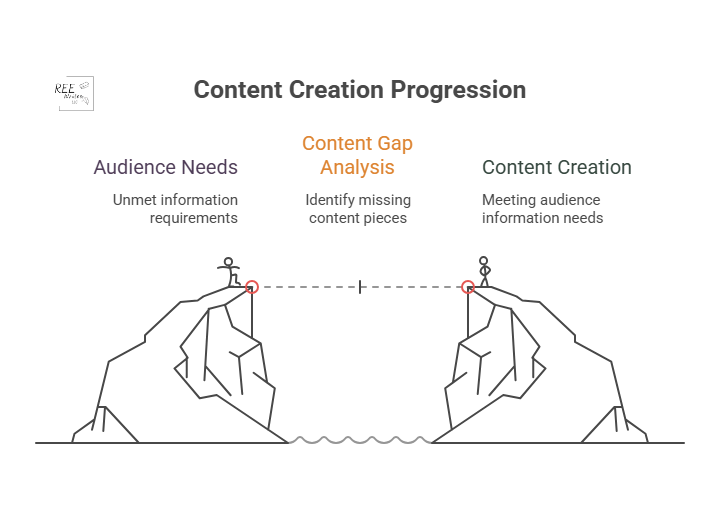
A content gap analysis on the other hand, is like looking out the window at your neighbors. You’re researching what content your competitors have that you don’t. The goal is to find topics and keywords that your audience is searching for but that you haven’t covered. This helps you plan future content that can attract a wider audience.
When to do a content gap analysis
You should run a content gap analysis when you’re focused on growth and expansion. It’s the perfect tool for when you need to:
You should perform a content audit when you want to improve what you already have. It’s your go-to move for content consolidation and optimization. An audit is ideal when you need to:
Improve the performance of underperforming content.
Clean up outdated or irrelevant pages (thin content).
Find quick SEO wins to boost your rankings.
Ensure your existing content still meets your quality standards and business goals.
For example, case studies by cognitiveSEO show that several companies who conducted content audits led to significant increases in organic traffic just by pruning and improving existing content.
Source: Search Engine Land
What a 15-minute content audit can show you
This quick audit is all about speed and impact, so we’re not getting lost in the weeds. We’re looking for a handful of actionable insights that can make a difference right away.
Here are some things to do before you start that 15-minute timer.
Set realistic goals for a quick audit
In 15 minutes, you won’t be able to analyze every single page on your site, and that’s okay.
Your goal is simple: find 3 to 5 high-impact action items. This could be identifying a blog post to update, a title tag to rewrite, or a broken page to redirect.
Focus on big problems, not small details
This audit uses the 80/20 principle. We’re looking for the 20% of problems that are causing 80% of your performance issues.
Don’t worry about a typo on a page that gets two visits a month. Instead, focus on a high-traffic page with a terrible bounce rate or a page that has high impressions but almost no clicks. These are the big problems that, once fixed, deliver the biggest returns.
Identify your content’s “low-hanging fruit”
“Low-hanging fruit” refers to opportunities that require minimal effort for maximum gain. In a quick content audit, this typically includes:
Pages ranking on the bottom of page one or the top of page two in Google search results.
Content with high impressions but a low click-through rate (CTR).
Popular posts that can be updated with new information to boost their rankings further.
This 15-minute audit is like a health screening, not major surgery. It’s designed to give you a quick, actionable snapshot of your site’s condition. It will give you a clear to-do list to get started on, but it won’t replace the need for a deeper, more comprehensive audit every 6 to 12 months.
Create a content inventory or content audit matrix
To keep your findings organized, you need a simple content inventory spreadsheet, sometimes called an inventory or matrix.
Don’t overcomplicate it. Create a new sheet with these basic columns:
URL: The address of the page.
Topic/Keyword: The main topic the page covers.
Traffic (30 days): The number of sessions from organic search.
Impressions (30 days): How many times it appeared in search results.
CTR (30 days): The click-through rate, or how many times someone clicked on your webpage.
Action: A simple note on what to do (“Update,” “Improve Title,” “Redirect”).
Okay, it’s time to start the clock! ⏱️ The first two minutes are for getting your workspace set up. Efficiency is key, so have these tools open and ready to go.
Get these tools for an effective content audit
For this quick audit, you only need three things, and they’re all free:
Google Search Console (GSC): Shows how your site performs in Google search.
Google Analytics (GA): Reveals what visitors do once they are on your site.
A spreadsheet: Google Sheets or Excel to create your content inventory.
(Paid tools like Ahrefs and Semrush are fantastic for deep dives, but you don’t need them for this rapid-fire check-up.)
Open your Performance report in Google Search Console
Log in to your Google Search Console account. Then go to the Performance report, and set the date range to the last 28 or 30 days.
This is where you’ll find data straight from Google, including impressions, clicks, CTR, and your average position for different queries.
Access your All Pages report in Google Analytics
In a separate tab, open your Google Analytics (GA4) account. Go to Reports > Engagement > Pages and screens.
Filter the report to show only organic search traffic. This view will show you your most visited pages, average engagement time, and other on-site metrics.
Prepare a simple spreadsheet or a notepad
Have your spreadsheet ready with the columns we discussed earlier. As you go through the next steps, you’ll quickly paste in URLs and jot down notes. This prevents you from getting sidetracked and ensures you have a clear action plan when the 15 minutes are up.
Use a timer to stay on track
Set a real timer on your phone or computer for 15 minutes. This creates a sense of urgency and forces you to stay focused on the high-impact tasks instead of falling down a rabbit hole of data analysis.
Minutes 3 to 7: Find your best and worst pages
With your tools open and your timer running, it’s time to dig in. In this four-minute block, you’ll be a detective, quickly scanning for clues about your content’s health.
Spot your top-performing content
In Google Analytics, sort your Pages and screens report by organic users to see your most popular pages. These are your workhorses.
For the top 3 to 5 pages, ask yourself: “Is this content fully up-to-date?” and “Can I add internal links from this page to other important pages?” Add these URLs to your spreadsheet with a note like “Check for internal linking opportunities.”
Find pages with high impressions but low clicks
Switch back to Google Search Console. In the Performance report, click the Pages tab. Then filter your results to find pages that have a high number of impressions but a low CTR.
This is a red flag for a poor user experience. Add one of these pages to your spreadsheet with the note: “Review for search intent mismatch.”
Minutes 8 to 12: Look for quick SEO wins
Now that you’ve identified some key pages, let’s spend the next four minutes looking for technical and on-page issues that are easy to fix but can have a big impact.
Check for pages with missing title tags
A missing or duplicate title tag is a basic SEO mistake that can hold your webpage back. You can spot these using GSC or a free browser extension.
If you find any, fixing them is one of the quickest wins you can get. A unique, compelling title tag is critical for both search engines and users.
Find content that ranks for the wrong keywords
In GSC, click on a specific page from your list, then click the “Queries” tab. Are the keywords listed here relevant to your page’s content?
Sometimes a page will rank for an unexpected term. This isn’t always bad! It could be an opportunity to re-optimize the page for that term or create a new piece of content that serves that search intent even better.
Identify opportunities for internal links
Source: Zyppy
Internal linking is one of the most underrated SEO tactics. It helps Google understand your information architecture and spreads authority throughout your site.
Quickly open the pages on your list in a new tab. How do they look? Have you viewed these pages on a mobile device?
Check for things that would annoy a user, like:
Aggressive pop-ups that block the content.
Slow load times.
Text that’s hard to read.
Broken images or videos.
Make a quick note of any glaring UX issues in your spreadsheet. Fixing these can directly impact how long people stay on your site and how Google perceives its quality.
Minutes 13 to 15: Decide what to do next
The timer is about to go off! In these final minutes, your goal is to turn your messy notes into a clean, prioritized action plan. This is where the audit becomes truly valuable.
Use a simple “keep, update, or remove” framework
Source: SEOBuddy
For every URL in your spreadsheet, assign it one of three statuses:
Keep: The content is performing well and is up-to-date. No action is needed right now.
Update: The content has potential but needs work. This could be a small tweak (like a new title), combining elements from two or more posts, or a major rewrite.
Remove: The content is outdated, irrelevant, and gets no traffic. These pages can be deleted and redirected (using a 301 redirect) to a more relevant page, called content pruning. Pruning this “dead weight” can sometimes improve your site’s overall SEO health.
Prioritize tasks that will have the biggest impact
How do you choose your priorities? Go back to the 80/20 rule. Which task will likely drive the most traffic or conversions for the least amount of effort? Updating the title tag on a page with 50,000 monthly impressions is more important than fixing a typo on a page with 10 monthly impressions (although you can do the latter quickly).
Look at your list of “Update” and “Remove” tasks, and choose the 3 to 5 you think will have the biggest and fastest impact. This is your official to-do list. You can’t do everything at once—save the rest for later.
Schedule a deeper audit for a later date
Finally, acknowledge that this was just a sprint. Put a reminder on your calendar three or six months from now to perform a more in-depth site audit. Consistent, iterative improvement is the key to a long-term, successful content performance strategy.
Your 15-Minute Audit is Complete!
And just like that, within just 15 minutes, you’ve moved from feeling overwhelmed by your website’s content to having a clear, prioritized list of actions that can improve your SEO.
This quick content audit proves you don’t need weeks to make real progress. While it doesn’t cover everything, it gives you an actionable list to start improving your SEO and providing more value to your audience right away. Run this quick check today and take the first step toward more organic traffic.
You don’t need weeks to make progress. By focusing on high-impact tasks and ignoring the small stuff, you can make meaningful changes quickly. Now, take that short to-do list you created and schedule time to get it done. Run this quick audit every quarter, and you’ll build powerful momentum toward better rankings and a healthier website.
References
Antara. (2025). Google AI Search Impact: Website Traffic Slashes by 50%. Analytics Insight. Retrieved from https://www.analyticsinsight.net/news/google-ai-search-impact-website-traffic-slashes-by-50
Content pruning for SEO. (n.d.). LearningSEO. Retrieved from https://learningseo.io/seo_roadmap/deepen-knowledge/content/content-pruning/
Dean, B. (2022). We Analyzed 4 Million Google Search Results. Here’s What We Learned About Organic Click Through Rate. Backlinko. Retrieved from https://backlinko.com/google-ctr-stats
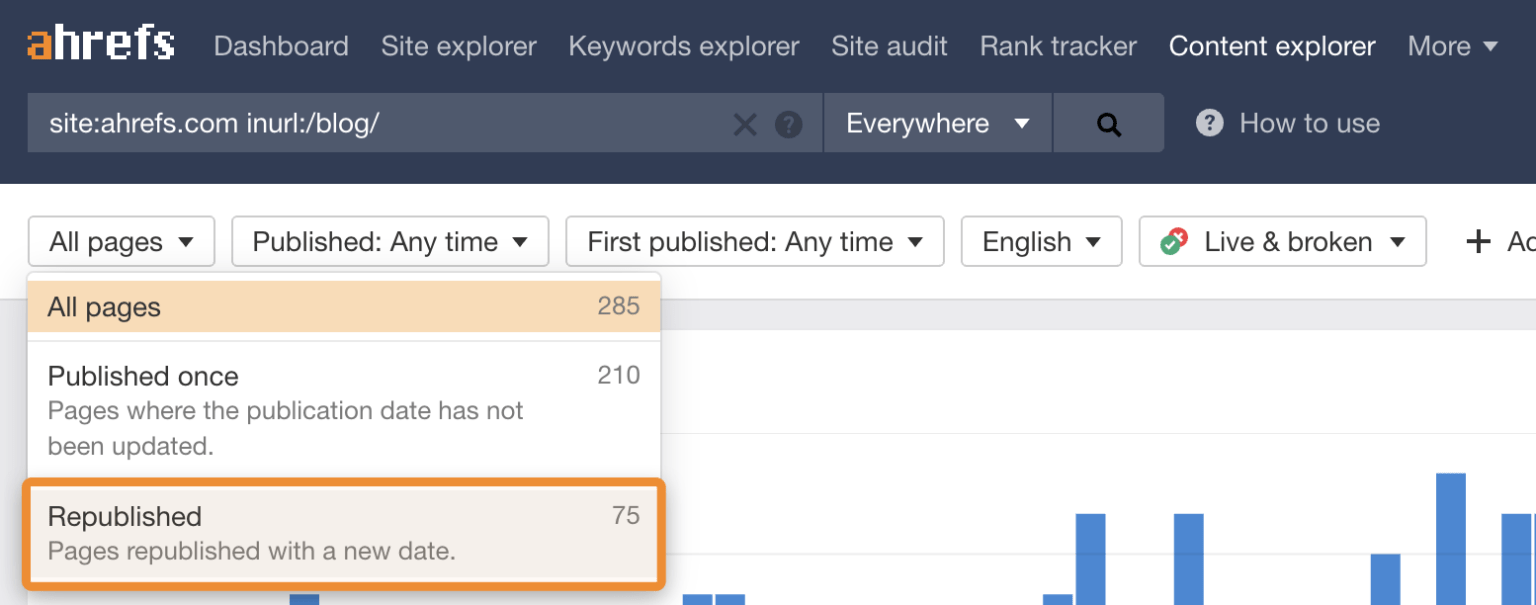
Hardwick, J. (2020). Republishing Content: How to Update Old Blog Posts for SEO. Ahrefs. Retrieved from https://ahrefs.com/blog/republishing-content/
Sauciuc, A. (2025). Is Content Pruning Good for SEO? Case Studies + Experts’ Opinions. cognitiveSEO. Retrieved from https://cognitiveseo.com/blog/17548/content-pruning-for-seo/
Shepard, C. (2025). 23 Million Internal Links – SEO Case Study. Zyppy. Retrieved from https://zyppy.com/seo/seo-study/
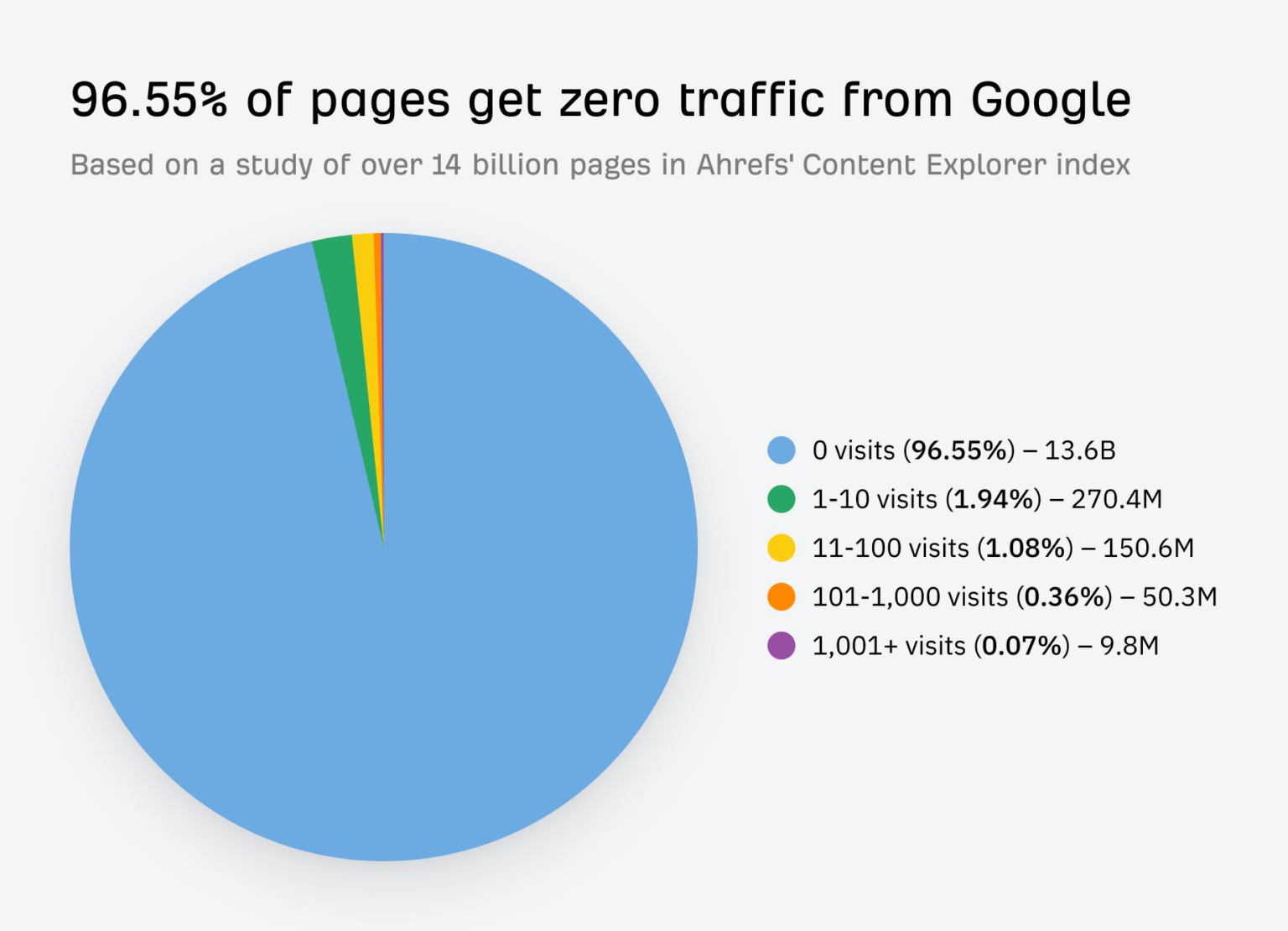
Soulo, T. (2023). 96.55% of Content Gets No Traffic From Google. Here’s How to Be in the Other 3.45% [New Research for 2023]. Ahrefs. Retrieved from https://ahrefs.com/blog/search-traffic-study/
Are you creating content, but still feel like you’re falling behind your competition? You publish blog posts, update your site, but it seems like everyone else is getting more traffic and ranking higher on Google.
Do you know exactly what your audience is searching for, that you haven’t covered in your content? A content gap analysis is a powerful way to find those hidden opportunities as a clear roadmap to attract more visitors with your content.
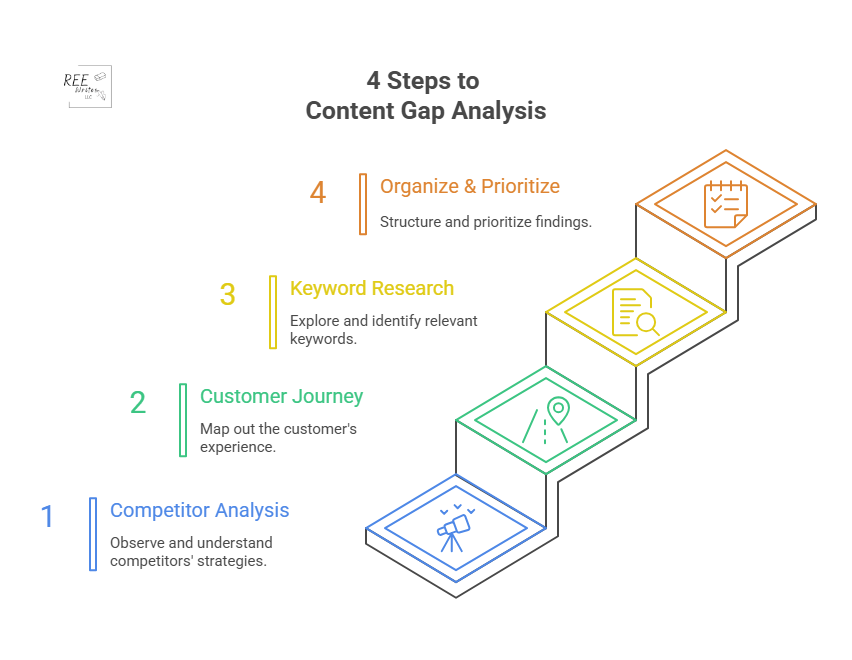
Let’s go over a 4-step process to find these gaps, fill them with valuable content, and grow your audience.
It’s a great question, and the answer is simpler than you might think. A content gap analysis is a powerful way to find opportunities for your business.
A content gap analysis finds topics and keywords important to your audience that your business doesn’t cover. It usually involves looking at the keywords your competitors rank for in search results that you don’t.
The goal is simple: identify holes in your content that your audience needs you to fill. Creating useful resources builds trust and authority with potential customers.
Think of it like a grocery store owner checking a rival’s aisles. If they see customers constantly buying a popular brand of organic granola that they don’t stock, they’re missing out on sales. That’s called a “product gap.”
You’re doing the same thing, but with information. You’re looking for information your audience wants, but they can’t find on your site.
Content strategies must be hyper-focused on customer needs to be effective. A content gap analysis is the most direct way to align your strategy with your audience’s needs.
Now that we’ve covered the basics, let’s look at how this can help your search engine optimization (SEO) and make your content work harder for you.
How Content Gap Analysis Affects Your SEO
Conducting a content gap analysis is a core part of a smart SEO and content strategy that delivers real results. It helps you stop creating content based on guesses and start making data-driven decisions that directly impact your growth. Here’s why it’s so important.
Find new keyword opportunities
Think you know all the important keywords for your industry? There’s always more to discover.
A content gap analysis uncovers valuable keywords your competitors are using to attract visitors—visitors that could be yours. These are often long-tail keywords or specific questions that show a user is further along in their buying journey.
Long-tail keywords (phrases of 3+ words) make up a significant portion of all Google searches. These less-competitive phrases often have higher conversion rates because the user’s search intent is much more specific. By finding gaps, you’ll also find these high-intent long-tail keywords.
Different types of content gaps
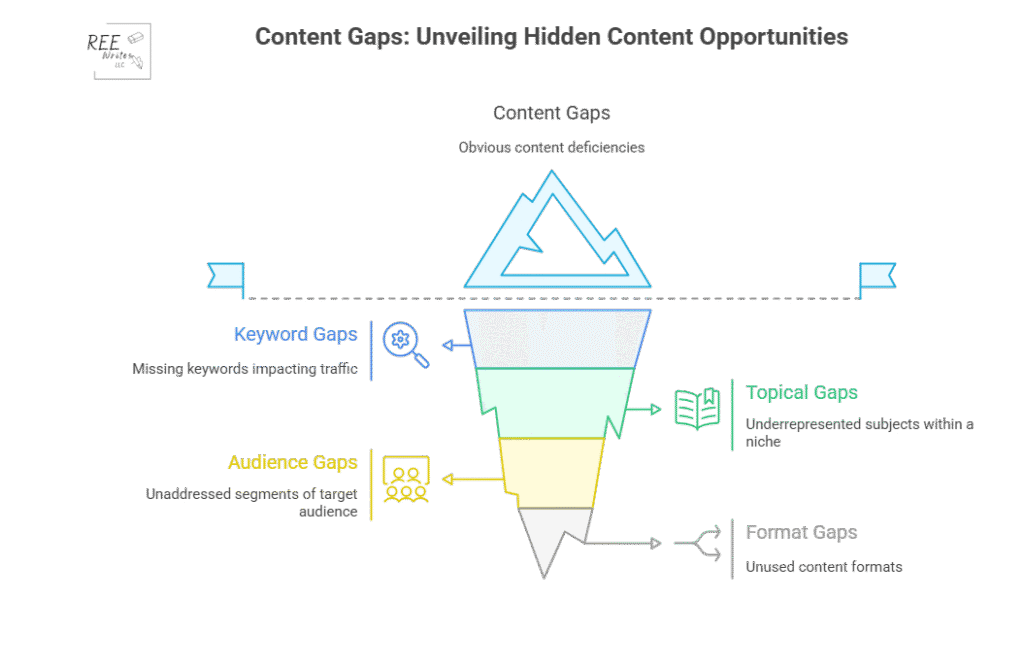
There are four types of content gaps you can address to be sure that your content strategy is thorough and promotes conversions:
Formats: Content types like videos, blogs, case studies and podcasts your audience likes, but you don’t have.
Understand your audience
What questions are your potential customers asking? What are their biggest problems? A content gap analysis helps you get a clearer picture of what your audience needs at every stage of their journey. By seeing what topics are popular on competitor sites, you get direct insight into the conversations happening in your industry. This allows you to create content that truly resonates and helps people.
Let’s say for example that you’re a B2B software company, and you see your main competitor has an entire section of their blog dedicated to “integrations with other software.” If you have no content on this topic, you could address this gap by creating a series of articles on how their product works with other popular tools, and get an increase in qualified leads from your blog within a few months.
Outperform competitors
To get ahead, you have to be better than your competitors and cover the topics they’ve missed.
You can systematically cover topics your competition already ranks for, but you can create more comprehensive, up-to-date, and helpful content to win the top spot on Google. You can also find the “gaps within the gaps”—topics that none of your competitors are adequately covering. This analysis gives you a strategic advantage.
Competitor analysis is an important piece of your marketing and content strategy. It’s the foundation for identifying opportunities to gain a competitive edge in search rankings.
Improve the customer journey
The customer journey isn’t a straight line. People move from being aware they have a problem, to considering different solutions, to making a final decision. You need content that supports them at every stage.
Source: Talkative
A content gap analysis helps you see if you’re missing content for a critical stage. For example, you might have great blog posts for the “awareness” stage, but no comparison guides for the “consideration” stage.
Ensuring a seamless customer journey with helpful information at each touchpoint can significantly increase customer satisfaction and conversion rates. Customers who receive helpful content throughout their journey are more likely to become loyal brand advocates. Filling your content gaps can help you do that.
4 Steps to Content Gap Analysis
Now that you understand why it’s so important, let’s get into the how. Here’s a four-step process to find and fill the gaps in your own content strategy.
Step 1: Analyze Your Competitor’s Content
What’s already working for others in your space? Let’s find out, using SEO tools to get a data-backed look at your competitors’ content performance.
First, identify your SEO competitors. These are websites that consistently show up on the first page of Google for the keywords you want to rank for.
Next, use an SEO tool to do the heavy lifting. Tools like Ahrefs, Semrush, and Moz have specific “gap analysis” features built for this exact purpose. These competitive analysis tools are essential for your digital marketing strategy, saving you hundreds of hours of manual research.
Source: Semrush
Here’s a typical workflow using Semrush’s Keyword Gap tool:
Enter the domains: Input your own website’s domain and the domains of up to four of your top SEO competitors.
Run the analysis: The tool will compare the keyword profiles of all the websites.
Find the gaps: Filter the results to show keywords where your competitors rank (e.g., in the top 10 results), but your site does not. Semrush has a “Missing” filter perfect for this.
This process will give you a spreadsheet full of valuable keywords and topic ideas that are already proven to attract visitors in your industry. This data-driven approach removes guesswork and gives you a clear starting point.
Step 2: Map the Customer Journey
A content gap can also exist within your own site. You might be missing content for crucial stages of the customer journey, leaving potential customers stuck.
Think about the journey in three simple stages:
Awareness Stage: The person knows they have a problem but doesn’t know the solution yet. They are looking for educational, top-level information. Examples: “Why is my skin so dry in the winter?” “How to improve team productivity.”
Consideration Stage: The person now understands their problem and is researching different solutions or methods to solve it. Examples: “Hyaluronic acid vs. glycerin for dry skin.” “Asana vs. Trello for project management.”
Decision Stage: The person has decided on a type of solution and is now comparing specific products or services to make a purchase. Examples: “CeraVe Moisturizing Cream review.” “Best price on Asana business plan.”
Now audit your existing content. To do a content audit, create a simple spreadsheet and categorize your current articles, guides, and landing pages into these three stages. You’ll quickly see where the gaps are. Do you have dozens of “awareness” blog posts but no “consideration” comparison guides? That’s a huge content gap you need to fill to guide users toward a purchase.
Step 3: Use Keyword Research to Find Questions
Sometimes the biggest opportunities lie in the specific questions people are asking. These questions are a goldmine for content ideas because they tell you exactly what’s on your audience’s mind.
Source: Swarm Digital
There are several free and easy ways to find these questions:
Google’s “People Also Ask” (PAA) Box: When you search for a keyword, Google often shows a box with related questions. This is a direct look into what other users are searching for. Click on a question, and more will appear.
AnswerThePublic: This free tool takes your keyword and generates a visualization of hundreds of questions related to it, broken down by who, what, where, when, why, and how.
Forums: Search for your topic on these sites like Reddit and Quora and look at the discussions. What are people confused about? What problems are they trying to solve? The language is natural, giving you raw insight into your audience’s pain points.
For example, if your main topic is “email marketing,” you might discover from the PAA box that people are asking, “How often should a small business send emails?” or “What are the best free email marketing tools?” These are perfect topics for new articles that address a very specific need.
Step 4: Organize and Prioritize Your Ideas
By now, you should have a long list of potential content ideas from your competitor analysis, customer journey mapping, and question research. The final step is to organize these ideas and decide what to work on first.
Create a master spreadsheet for your content ideas. For each idea, include these columns:
Topic Idea
Target/Focus Keyword
Stage of Customer Journey
Monthly Search Volume
Keyword Difficulty
Business Relevance (1 to 5)
How to Choose Project Management Software
choose project management software
Consideration
800
Medium
5
Asana vs. Trello
asana vs trello
Consideration
2,500
High
4
Best Free Email Marketing Tools
free email marketing tools
Decision
5,000
High
3
Use this data to prioritize. A good approach is to look for topics with a sweet spot of:
High business relevance
Decent search volume (100 to 1,000 searches per month minimum)
Manageable keyword difficulty (KD)
Then group related topics into topic clusters to build authority on a subject and improve your internal linking structure. This ensures you’re creating content that will not only attract traffic but attract the right leads who are likely to be interested in your products or services.
A content gap analysis takes the guesswork out of your content strategy. Instead of wondering what to write next, you’ll have a clear roadmap based on real data about your audience and competitors. Do a content gap analysis regularly to fill the holes in your content, meet your audience’s needs, and steadily grow your organic traffic.
References
Ahrefs. (2023). Ahrefs Keyword Explorer Data. Ahrefs Pte. Ltd. Retrieved from [https://ahrefs.com/keywords-explorer.
AirOps (2024). Content Gap Analysis: Types, Examples & Step-by-Step Guide. Retrieved from https://www.airops.com/blog/content-gap-analysis-examples
du Plessis, C. (2022). A Scoping Review of the Effect of Content Marketing on Online Consumer Behavior. SAGE Open, 12(2). https://doi.org/10.1177/21582440221093042
Search Engine Journal. (2025). The State of SEO: A 2025 Report. Retrieved from https://www.searchenginejournal.com/state-of-seo/
You pour your heart and soul into writing. You research, you draft, you edit. But does your content actually connect with people online? Do they stick around to read what you have to say?
Just writing well isn’t enough. You need a strategy that understands how people read online and what makes them stay. You want to hold their attention, build trust, and guide your reader toward a goal like learning something new, signing up for your list, or buying a product.
This article is your guide to doing just that. We’ll explore the science of online reading, break down proven structures, show you how to plan efficiently, and reveal simple formatting tricks that make a huge difference.
Get ready to make your long-form content impossible to ignore. Let’s dive in to how you can structure blog posts that keep readers glued to your page (“sticky”), and make your content work harder for you.
Why do some articles feel effortless to read, while others make your eyes glaze over after two sentences? It’s because of human psychology. Before you can write content they’ll actually read, you have to understand how people interact with text online.
How human attention spans work online (and why traditional writing methods fail)
We’re bombarded with information from every direction–notifications ping, new tabs open, and there’s always another headline with every click and scroll. This fast-paced knowledge dump has changed how we consume content.
Traditional writing with long paragraphs and slow build-up often fails online because it doesn’t cater to the need for quick scanning and immediate value. People aren’t settling in to read content with a cup of tea; they’re often scanning on a phone while juggling other tasks.
Think of your own habits. When you land on a page, do you read every single word from the start? You probably just scan headings, bold text, bullet points, and the first sentences of paragraphs to get the gist. And if it looks like too much work, or you don’t quickly find something interesting, you move on.
Your readers do the same thing.
The impact of visual hierarchy on reading patterns
Visual hierarchy is about arranging elements on your page so the most important information stands out. It guides the reader’s eye naturally.
People connect with content that makes them feel something.
Structure and formatting help readers navigate your content, but emotional triggers are what keep them mentally invested. Which emotions, and how? Try these:
Curiosity: Hint at what’s coming next keeps readers scrolling. Use questions, create suspense, or promise a solution to a problem where they have to open a loop.
Empathy: Share a relatable story or acknowledge your audience’s pain point to show you understand their struggles.
Hope: Offer solutions, tips, or a path to a better outcome to tap into their desire for improvement.
Surprise: Present unexpected facts or perspectives to grab their attention.
Validation: Confirm their feelings or experiences to make them feel understood and build trust.
When you tap into these emotions, you create a stronger connection. You move beyond just presenting facts and make your content resonate on a personal level. Emotional content is more likely to be shared and remembered than purely factual information.
Structure matters more than raw writing talent
You don’t need to be a literary genius to write engaging online content, but you do need good structure.
Think of it like building a house. You can use the most beautiful bricks, but if the foundation and framework are weak, the house won’t stand.
Content structure provides that framework. It organizes your ideas logically, guides the reader smoothly from one point to the next, and makes your content easy to follow.
On the other hand, even brilliant writing can be lost in a wall of text without clear headings, short paragraphs, and a logical flow. Online readers value clarity and accessibility over elaborate prose.
Analytics data shows content structure (use of headings, lists, etc.) directly impacts metrics like average time on page and bounce rate.
Good content structure keeps people reading. Different structures serve different purposes and appeal to readers in unique ways, so let’s go over 7 proven structures that can keep their attention.
7 Types of Blog Posts That Keep Readers Hooked
Choosing the right structure for your blog post can make a huge difference in how well it performs. Instead of just writing whatever comes to mind, select a framework that best suits your topic and your goal:
The problem-solution framework for practical topics
How-to guides with clear step-by-step instructions
List-based articles that deliver scannable value
The storytelling method for emotional connection
Comparison posts that help readers make decisions
FAQ structure for addressing common pain points
Case study format for demonstrating proof and results
1. The problem-solution framework for practical topics
This highly effective content structure addresses a specific issue your audience faces and offers a way to fix it. It works because it immediately connects with the reader’s pain point.
Here’s how it flows:
Introduce the Problem: Start by describing the challenge, frustration, or pain point your reader is experiencing. Make sure they feel understood.
Agitate the Problem: Briefly explain the negative consequences of this problem if it’s not addressed. This reinforces the need for a solution.
Present the Solution: Introduce your solution – your product, service, method, or advice. Explain what it is.
Explain How it Works: Detail the steps involved or the benefits of your solution.
Show Proof (optional): Include a case study, testimonial, or data showing the solution’s effectiveness.
Call to Action (CTA): Tell the reader what to do next.
Let’s see how you could apply this framework with a blog post about saving money:
You could start by describing the stress of living paycheck to paycheck (Problem).
Next, describe the inability to save for emergencies or fun things (Agitation).
Then introduce budgeting as the Solution.
Explain how to create a budget (How it works).
Tell a story of a client who saved $5,000 in a year using this method (Proof).
End by encouraging readers to download your budgeting template (Call to Action).
2. How-to guides with clear step-by-step instructions
People love learning how to do things. How-to guides are incredibly popular because they offer practical, actionable value.
Structure your how-to guide like this:
Introduce the Goal: What will the reader be able to do after reading your post? State it clearly upfront.
List Necessary Tools or Materials: If applicable, tell them what they’ll need.
Present Step-by-Step Instructions: Break down the process into simple, numbered steps. Use clear, concise language and avoid jargon.
Use Visuals: Include images or screenshots for each step whenever possible.
Offer Tips or Troubleshooting: Add extra advice or address common issues they might encounter.
Conclude: Briefly summarize and encourage them to try it. (You don’t need to use the word “Conclusion.”)
Say you wanted to create a guide on “How to Bake Perfect Chocolate Chip Cookies”:
State that your audience will learn how to bake amazing cookies (Goal).
List ingredients and tools (Materials).
Provide numbered steps for mixing, baking, and so on (Steps).
Include photos of each stage (Visuals).
Offer tips like not overmixing (Tips).
End by saying “Enjoy your cookies!” (Conclusion). It wouldn’t hurt engagement to also invite readers to share comments when they try the recipe (CTA).
“How-to” content receives high engagement, with users spending more time on pages compared to other formats, especially when steps are clearly numbered and include visuals.
3. List-based articles that deliver scannable value
Ah, the listicle. Love them or hate them, they work incredibly well online because they are inherently scannable and promise a specific amount of information. Readers know exactly what they’re getting – a list of points that are easy to scan.
Conclusion: Briefly summarize or offer a final thought.
Here’s how this would flow for a listicle called “10 Time-Saving Apps for Solopreneurs”:
The intro could explain why solopreneurs need time-saving tools.
Then, you describe #1 App Name (explanation), #2 App Name (explanation), and so on.
List-based content is among the most shared content formats online, because they’re easy to read, share, and come back to later.
4. The storytelling method for emotional connection
Stories are powerful. They grab our attention, make information memorable, and build a deep connection with the reader. Using storytelling in your blog posts makes them relatable and engaging.
Here’s how to structure a story-driven post:
Setup: Introduce the character (often you or a client) and the initial situation or challenge.
Conflict/Rising Action: Describe the problem, the struggle, or the obstacles faced. This is where you build tension and reader investment.
Climax: The turning point or the moment of realization/discovery.
Resolution: How the problem was solved or the lesson learned.
Takeaway or Moral: What can the reader learn from this story? How does it apply to them?
Let’s say you wrote a blog post about overcoming failure. Here’s how you could structure it:
Start with your initial excitement about a project (Setup).
Describe all the things that went wrong and how frustrating it was (Conflict).
Share the moment you realized what needed to change (Climax).
Explain how you implemented the change and succeeded (Resolution).
End with lessons about perseverance and your advice for the reader (Takeaway).
People remember stories far better than bullet points.
5. Comparison posts that help readers make decisions
When your audience is trying to choose between two or more options (products, services, methods), a comparison post is incredibly helpful. You position yourself as a trusted guide helping them make an informed decision.
Structure a comparison post in this order:
Introduction: Introduce the items being compared and state the goal–helping the reader decide which is best for them.
Criteria for Comparison: What factors are you using to compare them (price, features, ease of use, pros, cons)? Present these factors clearly.
Compare Each Item Based on Criteria: Dedicate a section to comparing the items based on each criterion. You can do this side-by-side or discuss each item’s performance on each criterion.
Summary Table (optional): Summarize the comparison points in a table makes them easy for readers to scan visually.
Recommendation: Offer your expert opinion on which option is best for different types of readers or situations.
Conclusion: Briefly summarize and reiterate the goal.
So if you wanted to compare two products in a post called “Product A vs. Product B: Which is Right for Your Business?,” you’d:
Introduce both products (Intro).
List factors like cost, features, and support (Criteria).
Compare Product A and Product B for each factor (Comparison).
Show a table (Summary).
Recommend Product A for small businesses and Product B for larger enterprises (Recommendation) for example.
Summarize the product offerings and your advice on choosing them (Conclusion)
Data from e-commerce blogs shows comparison posts often lead to higher click-through rates (CTRs) on affiliate links and product pages, indicating they effectively guide purchase decisions.
6. FAQ structure for addressing common pain points
If you find yourself answering the same questions from your audience over and over again, a Frequently Asked Questions (FAQ)-style blog post is a great way to provide value and address common pain points upfront. This structure is highly user-focused.
Here’s how to structure an FAQ post:
Introduction: State that this post will answer common questions about a specific topic.
Group Questions (optional ): If you have several questions, group similar questions under broader subheadings (“Pricing Questions,” “Usage Questions”).
List Questions as Subheadings: Make each question a subheading (H3 or H4).
Provide Clear, Concise Answers: Directly answer the question below the subheading. Keep answers focused, concise, and easy to understand.
Link to More Resources: If an answer requires more detail, link to other blog posts or pages on your site where readers can get more info.
Conclusion: Briefly wrap up and encourage readers to ask any further questions in the comments.
Say you’re writing a blog about “Your Top Questions About Starting a Podcast, Answered.” You could:
Introduce the topic (Intro)
Group questions into “Getting Started” and “Equipment” (Group Questions).
List questions like “What microphone do I need?” or “How do I choose a topic?” as subheadings, providing clear answers therein.
7. Case study format for demonstrating proof and results
When you need to show your audience detailed proof that your methods, products, or services actually work, a case study post is the answer. Case studies are customer success stories, and they provide concrete proof using real-world examples.
Structure a case study like this:
Headline Highlighting the Result: Start with the main outcome (“How [Client Name] Increased Traffic by X% Using Our Strategy”).
Introduction: Introduce the client and their initial situation or challenge (the “before”).
Problem: Detail the specific problems or goals the client had before working with you.
Solution: Explain the specific steps, strategies, or services you implemented to help them.
Results: Present the quantifiable outcomes and benefits achieved (the “after”). Use numbers, percentages, and data whenever possible.
Visual Proof (optional): Include charts, graphs, or screenshots demonstrating the results.
Conclusion or Takeaway: Summarize the success and explain what others can learn from this case.
Call to Action: Encourage readers facing similar problems to contact you.
Have you seen results with your clients? You could write a case study like, “How Sarah Doubled Her Email List in 3 Months with My Lead Magnet Workshop:”
Introduce Sarah and her scenario of having a small email list (Intro).
Explain her goal was rapid list growth (Problem).
Detail your workshop contents and her implementation steps (Solution).
Show the jump in her subscriber count with a graph or other visual element (Results).
Summarize that targeted training works (Takeaway).
Invite readers to join the next workshop (Call to Action).
Choosing one of these content structures gives your writing a clear direction and makes it easier for your reader to follow along and get the information they need. Regarding how long your blog post should be, try to write posts that are at least 2,000 words for a better SEO ranking (or long enough to address your topic without fluff).
Now let’s talk about the elements that enhance all of these structures.
Attention-grabbing headlines that promise specific value
Your headline is the first thing people see, often in search results or on social media. It’s your single chance to make a strong first impression and convince someone to click, so a generic headline won’t cut it.
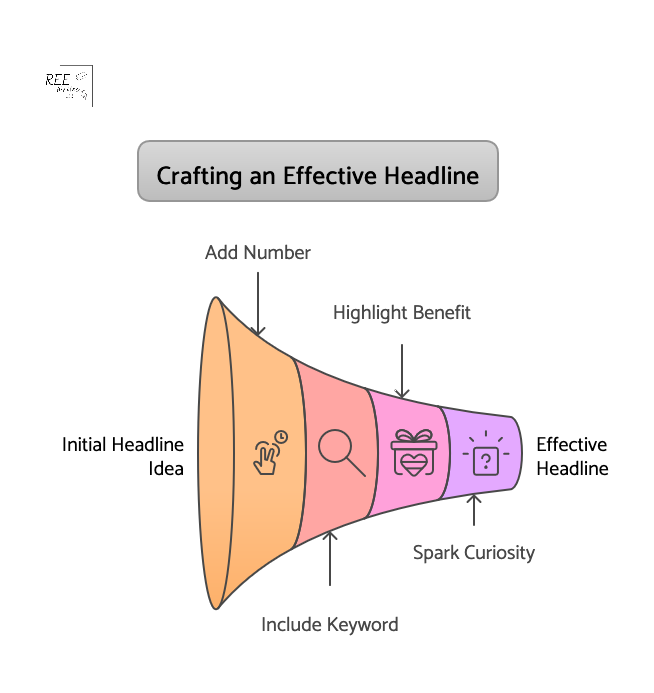
Your headline must promise something specific and valuable to the reader.
For example, instead of using the headline “Tips for Better Writing,” which sounds generic and average, try something like “7 Quick Ways to Write Blog Posts People Actually Finish.”
The second headline is specific (7 ways, quick) and promises a clear benefit (posts people finish).
Great headlines include elements in many of the blog post structures we previously covered:
Your hook is the first sentence or two of your introduction, and it needs to be compelling enough to draw the reader in. Get straight to the point or pique their curiosity immediately.
Effective hooks often:
Ask a relatable question: “Struggling to get people to read your blog posts?”
Share a surprising statistic: “Did you know the average online attention span is just 8 seconds?”
Tell a brief, intriguing story: “I used to spend hours writing, only to see people bounce after a paragraph…”
State a bold or contrarian claim: “Everything you think you know about online reading is wrong.”
Promise a direct benefit: “Imagine writing posts that keep readers scrolling non-stop.”
Look at successful bloggers and writers in your niche. How do they start their articles? What makes you want to keep reading? Practice writing several different hooks for the same article and see which feels strongest.
Strategic use of subheadings to guide readers through your content
Source: SEOwind
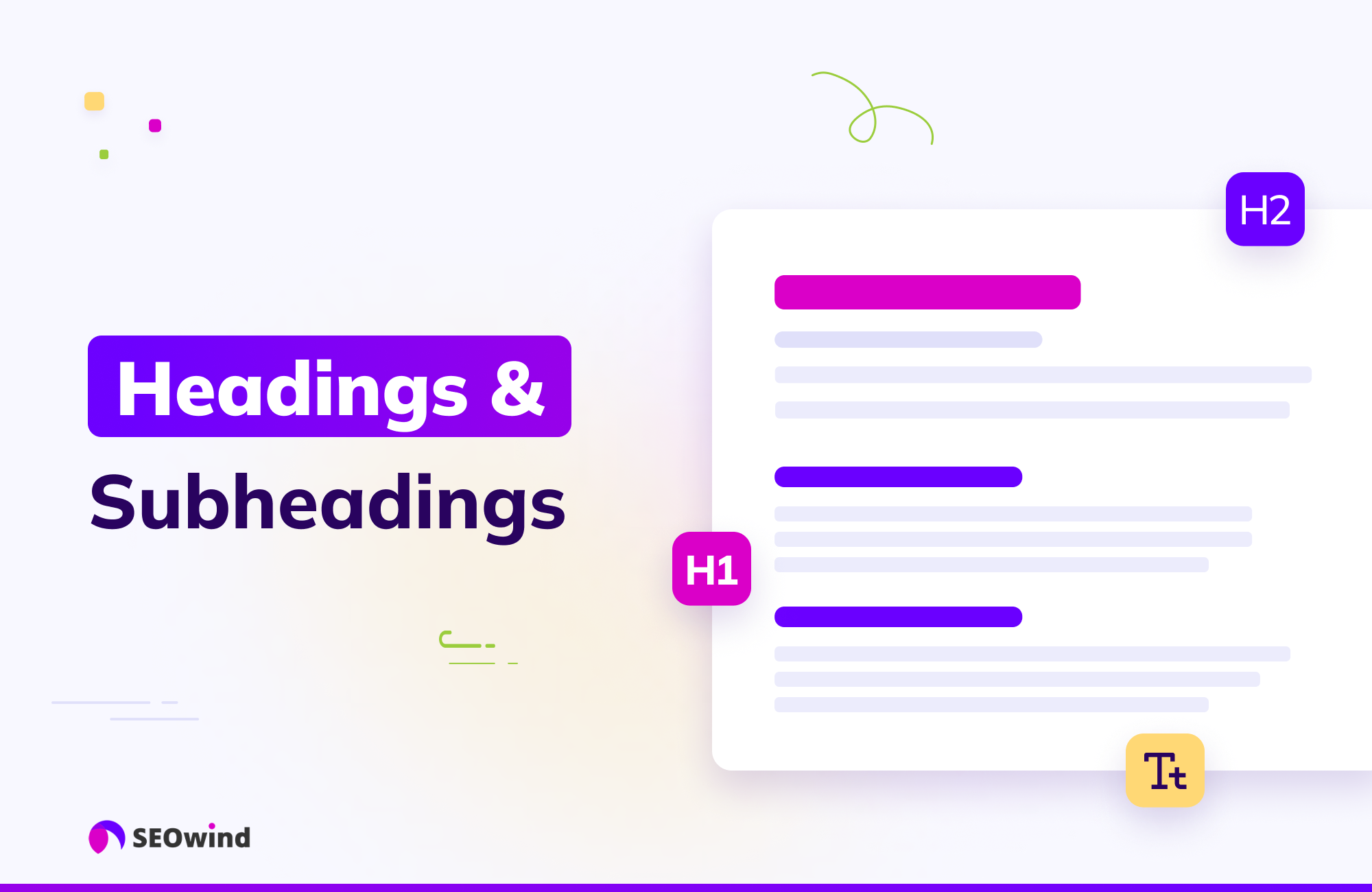
Subheadings are mini-headlines throughout your article that break up walls of text and allow readers to scan the main points quickly.
Make them descriptive: Tell the reader what the section is about.
Use keywords: This helps with SEO and lets scanners know the relevance of the section.
Break up your content logically: Each subheading should cover a distinct idea or step.
Use H2, H3, H4 tags appropriately: This creates a clear hierarchy for both readers and search engines.
Remember the “F” and “Z” scanning patterns we discussed earlier? Subheadings are where your reader’s eyes will land as they scan down the page. If your subheadings are clear and interesting, the reader is more likely to stop and read the paragraphs below them.
Forget what you learned about paragraph length in English class. Short paragraphs are where it’s at. Walls of text look daunting on a screen, especially on mobile devices.
Short paragraphs encourage scanning. A reader can quickly glance at a short paragraph and decide if they want to read it fully. But if they see long paragraphs, they might skip the whole thing.
Content readability tools like Hemingway App, Grammarly and Readable flag long paragraphs that can hinder one’s reading experience, because shorter paragraphs improve comprehension and engagement.
Using bucket brigades to maintain momentum
Bucket brigades are short phrases that act as transition sentences, pulling the reader from one paragraph to the next. They’re like mini-hooks between paragraphs that create flow and curiosity, and encourage the reader to keep going. (I’m using them in this article!) They often use punctuation that creates a slight pause or question, like colons or ellipses.
Examples of bucket brigades:
Here’s the deal:
But why does this matter?
And guess what happened next?
What does this mean for you?
The best part?
So, how do you do it?
Do you see how they make you want to keep reading to find the answer? Using simple phrases like these keeps the momentum going and reduces the chances of a reader dropping off between points.
Once you master these essential elements–headlines, hooks, subheadings, short paragraphs, and bucket brigades–you build a strong foundation for content that holds attention.
More Writing Tips to Keep Readers Scrolling to the End
Keeping a reader engaged isn’t just about the essentials. Your body copy should also hold their attention, and you can do that with the flow and energy of your writing at the sentence and paragraph level. These techniques make your content feel conversational, interesting, and easy to follow.
Smooth transitions are like bridges between different ideas or sections in your content. They prevent the reader from feeling lost or abrupt as they move from one point to the next.
Good transitions:
Summarize the previous point and introduce the next.
Use transition words or phrases.
Ask a question related to the next section.
Create anticipation for what’s coming.
For example, at the end of a section about headline writing, you might transition to a new section about introductions by writing: “Once you’ve hooked them with a great headline, how do you make sure they keep reading? That’s where your opening hook comes in.” This sentence connects the two topics logically.
Blog posts with clear transitions have better flow and keep readers engaged for longer periods, according to content readability analysis.
Varying your sentence structure and length keeps the reader’s brain engaged and makes your writing more dynamic.
Mix short sentences with slightly longer ones.
Start sentences with different words.
Use active voice.
Insert a single sentence here and there as a powerful paragraph break.
Consider this example:
A) “Readers have short attention spans. You need to grab them fast. Headlines are important. Hooks are also important.”
B) “Readers online have incredibly short attention spans. So, how do you possibly grab them fast enough? It starts, of course, with a powerful headline. But once they click? That’s where your opening hook takes over.”
Which version is more interesting to read? If you chose B, you see my point.
Your readers want to connect with a human, not a robot. Injecting your personality into your writing makes it unique, relatable, and enjoyable to read. But clarity is still king – don’t let personality make your points unclear.
How to add personality:
Use contractions (like “you’re” instead of “you are”).
Use personal pronouns (“I,” “we,” “you”).
Tell relevant personal anecdotes or stories.
Use conversational language (as if you’re talking to a friend, but keep it professional).
Share your opinions or perspectives (where appropriate).
Use humor (if it fits your brand and topic).
Compare these two examples:
A) “This technique is recommended for optimal results.”
B) “I’ve used this technique myself, and honestly? The results were incredible—I saved hours of time.”
Example B seems more personal and trustworthy, wouldn’t you agree?
When you open a loop, the reader’s brain wants to close it.
Copywriting experts often use open loops in sales pages and articles to keep readers engaged and guide them towards a desired action.
An open loop is a psychological technique where you start discussing something or ask a question, but you delay providing the answer or resolution until later in the content. (Episodic TV does this all the time via “cliffhangers.”) This creates curiosity and encourages the reader to keep going to find out what happens or get the answer.
Some ways to use open loops in your content:
In the introduction, mention you’ll reveal a “secret tactic” later in the post.
Ask a compelling question early on and promise to answer it in a specific section.
Start a short story but pause it and say you’ll finish it after the next few points.
Hint at a surprising result or outcome that you’ll detail later.
For instance, early in a post about writing, you might say, “And one of the most powerful techniques I discovered completely changed how I write introductions. I’ll share exactly what it is in Section 3.”
The last sentence builds anticipation—now the reader has a reason to read on (or skip) to Section 3.
By implementing these writing tips, you make your content flow better, sound more human, and actively encourage readers to stay engaged from the first sentence to the last.
Next up: Making your content visually appealing.
Visual Elements That Enhance Readability
We’ve talked about structure and writing style, but how your content looks on the page is just as important for online readers. Visual elements break up text, highlight key information, and make your post more inviting.
Featured image: Choose a compelling image that represents your post and grabs attention in social feeds and search results.
Within the Post: Use images to illustrate points, break up walls of text, or add personality.
Charts and graphs: If you have data, present it visually. A chart is much easier to understand than a paragraph of numbers.
Infographics: Summarize complex processes or data-heavy topics into a shareable infographic.
Break up text: Place images between sections or after long paragraphs.
In a post about social media statistics, instead of listing numbers, you could create and insert a simple bar chart showing which platforms are most popular. For a how-to guide, include a screenshot of each step to make it easy for your readers to learn and follow along.
Few things will make an online reader bounce from your site faster than a giant wall of text. Content with formatting like lists and bold text is easier to read and understand, and improves reader satisfaction.
Use simple formatting techniques to create visual breaks and make your content scannable with:
Bold or italic text to highlight crucial words or phrases (use sparingly).
Instead of writing a long paragraph listing the benefits of your service, use a bulleted list. Instead of just stating a key term, bold it when you first introduce it.
Callout boxes to highlight key points
Callout boxes (sometimes called block quotes or pull quotes) are a great way to make important information pop off the page. They are visually distinct from the main body of text and draw the reader’s eye.
Use callout boxes for:
Key statistics or data points
Memorable quotes
Definitions of important terms
Key takeaways from a section
Actionable tips
If you mention a compelling statistic about email marketing conversion rates, put it in a callout box. If you have a powerful quote from a case study participant, highlight it this way. This ensures that even scanners will catch the most critical information.
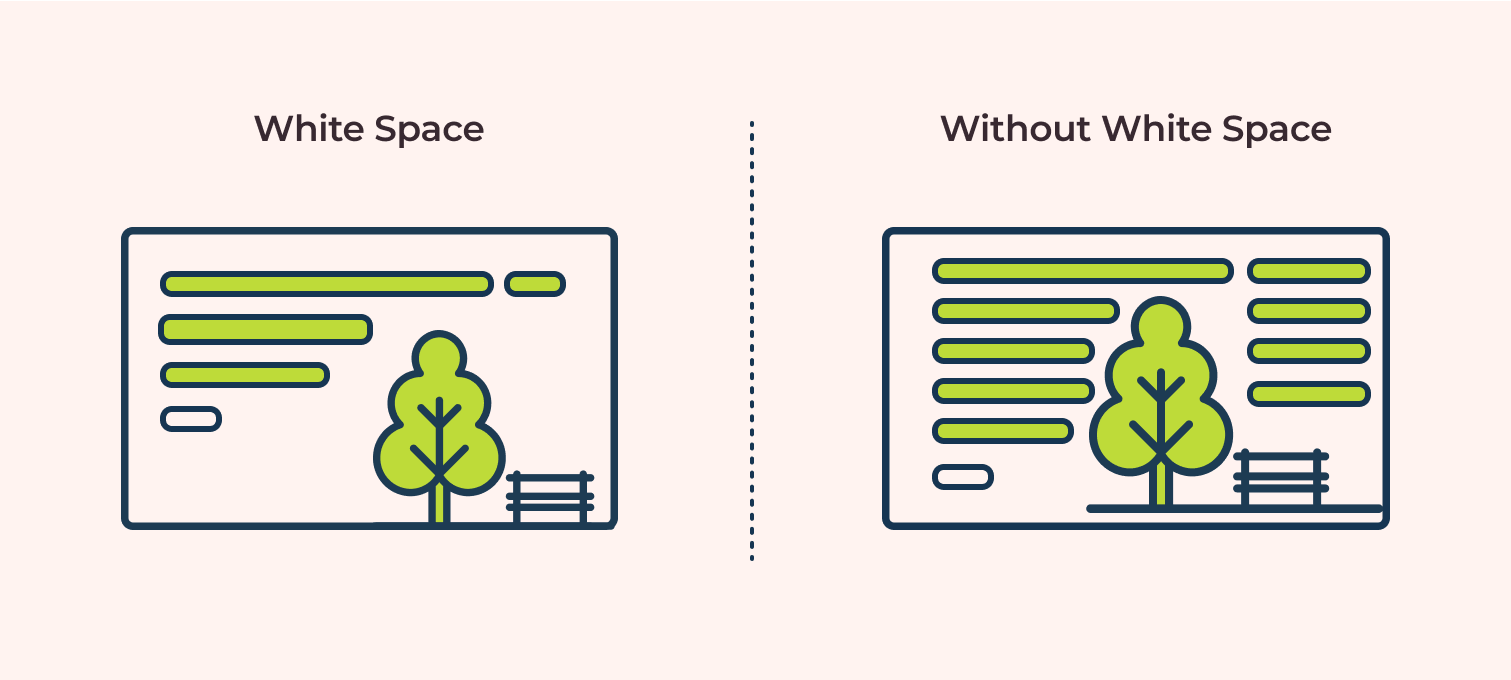
White space is the empty space on your page–the margins, the space between lines of text, the space between paragraphs, and the space around images. It’s essential for readability because it makes your content easier on the eyes.
Too little white space makes your content look cramped, overwhelming, and difficult to read. Enough white space makes the content feel light, airy, and inviting.
Pay attention to:
Line spacing: Ensure enough space between lines of text.
Paragraph spacing: Add extra space between paragraphs (short paragraphs help with this too).
Margins: Don’t let your text stretch all the way across the screen; use margins.
Space around images and other elements: Give visuals room to breathe.
Look at two versions of the same blog post–one with tiny margins and no space between single-sentence paragraphs, and one with healthy margins and extra space between paragraphs. The second one gives you a more pleasant reading experience.
User experience (UX) research consistently shows that adequate white space improves readability and reduces eye strain, encouraging users to stay on the page longer. By intentionally using visuals and formatting, you make your content visually appealing and easy for busy online readers to consume.
In the final section of this pillar post, let’s strategize how to produce this content without spending all your time on it as a busy solopreneur.
Content Planning Tips for Time-Strapped Solopreneurs
As a solopreneur, you wear many hats. Content creation is vital, but it can feel overwhelming when you’re also handling sales, marketing, client work, and everything else. The key is smart planning and efficient execution.
How to create a sustainable content calendar you’ll actually follow
A content calendar isn’t just a nice-to-have; it’s a necessity for staying consistent and organized. But it needs to be realistic for your schedule.
Here’s how to build one you can stick to:
Assess Your Capacity: How much time can you realistically dedicate to content each week or month?
Choose Your Publishing Frequency: How often can you publish based on your capacity? Once a week? Twice a month?
Note: Consistent quality is more important than frequency. It’s better to post high-quality content once a month than post mediocre content every week.)
Brainstorm Topics: Generate a list of topics based on your audience’s needs, your expertise, and your business goals. Refer back to the structures we discussed.
Map Topics to Dates: Assign topics to specific dates on a calendar. Don’t just write “Blog Post”; write “Blog Post: [Specific Topic/Headline Idea].”
Break Down Tasks: For each post, list the steps: Research, Outline, Draft, Edit, Format, Publish, Promote.
Schedule Time Blocks: Put specific time blocks in your calendar for each of those tasks. Treat them like appointments.
Example: Instead of a vague note like “I need to write blog posts,” your calendar could have:
Monday, 9 to 10 AM: Research for “5 Lead Magnet Ideas” post.
Tuesday, 1 to 3 PM: Draft “5 Lead Magnet Ideas” post.
Wednesday, 10 to 11 AM: Edit and Format “5 Lead Magnet Ideas” post.
Thursday, 2 PM: Publish “5 Lead Magnet Ideas” post.
Having a visual plan reduces mental clutter, and makes the process feel less daunting and stressful. Those who use a content calendar are significantly more likely to report success with their content strategy. CoSchedule has a free content calendar (not sponsored).
Productivity research often highlights batching similar tasks as a key strategy for improving focus and output.
Batch writing means dedicating a block of time to complete a specific writing task for multiple pieces of content. This is a productivity superpower for solopreneurs.
Instead of working on one blog post from start to finish, you might do your content batching like so:
Batch Outline: Outline three blog posts in one sitting.
Batch Draft: Draft the intros for five blog posts, then draft the main body for all five, then draft the conclusions for all five.
Batch Edit: Edit several drafted posts back-to-back.
Why does this work? It reduces context switching. Your brain stays in “outlining mode” or “drafting mode,” which is more efficient than switching between tasks for a single post.
Here’s how this could look:
On Monday, you outline 3 posts. On Tuesday, you draft the first half of all 3. On Wednesday, you draft the second half. By the end of the week, you have 3 drafts ready for editing, instead of maybe just one finished post.
Incorporate batching strategy into your content calendar, and watch your productivity soar!
Repurposing strategies to get more mileage from single pieces
You spent time creating that awesome blog post. Don’t let it live and die on your blog! You can reuse your content in so many ways to reach more potential clients and customers.
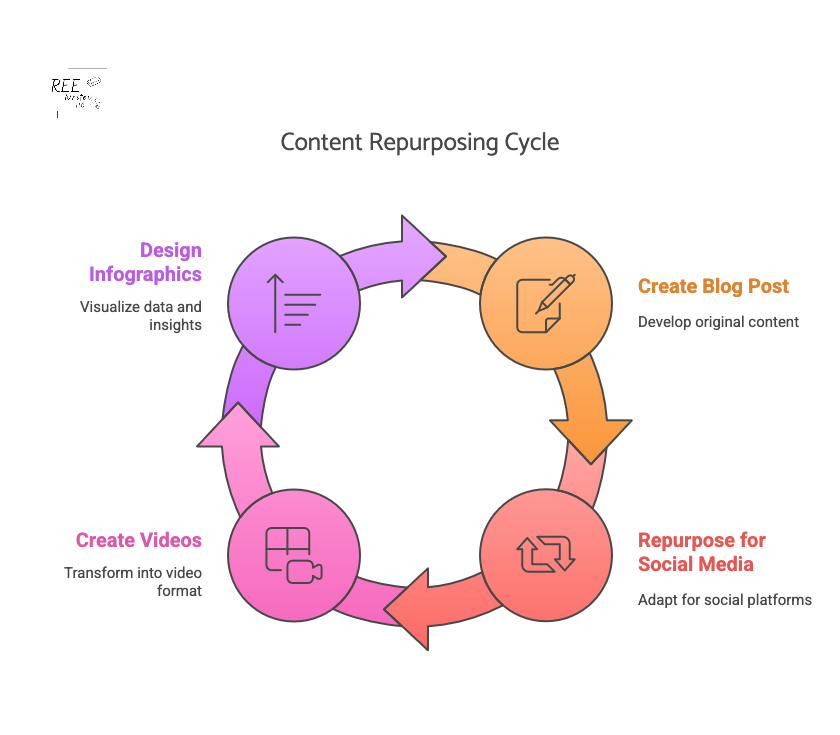
Repurposing means taking the core ideas from one piece of content and turning them into different formats for other platforms. This is crucial for solopreneurs because it maximizes the return on your content creation effort.
Turn key points into social media posts (threads, carousel posts, individual updates).
Create graphics or infographics from data points or lists.
Record a short video summarizing the main ideas.
Turn the article into a script for a podcast episode or YouTube video.
Expand a section into a longer guide or email series.
Create quote images from impactful sentences.
Say you write a pillar blog post on “10 Marketing Mistakes Solopreneurs Make.” You can reuse parts of that post to:
Turn each mistake into a separate social media post for the next 10 days.
Create an infographic summarizing all 10 points.
Record a 5-minute video discussing the top 3 mistakes.
Turn the post into a solo podcast episode.
Business owners who effectively repurpose content can see a significant increase in their reach and engagement across channels. Repurposing allows you to reach different audiences on different platforms without creating everything from scratch.
Simple research methods that don’t eat up your whole day
Effective blog posts often require research – understanding your audience, finding data, or gathering information on a topic. But research can feel like a black hole that swallows your time. Keep it simple and focused.
Quick research methods:
Listen to Your Audience: What questions do they ask in emails, comments, or on social media? What problems do they mention?
Check Competitors: See what topics successful blogs in your niche are covering. What are they not covering?
Browse Forums and Groups: Look at discussions on platforms like Reddit, Facebook Groups, or Quora in your niche to see what pain points people have with your topic.
Use Google Search: Look at the “People Also Ask” section and related searches for your topic ideas.
Set Time Limits: Decide in advance how long you will spend on research for a specific post (30 to 60 minutes) and stick to it. (This should be part of your content calendar.)
Let’s suppose you want to write about email marketing for beginners. You check a keyword tool and see lots of searches for the long-tail keywords “best email subject lines” and “how to grow email list fast.” Later, you browse a Facebook group and see beginners asking about choosing email software. This quick research tells you exactly what problems to address and what keywords to use, saving you hours of aimless searching and guessing.
Efficient research methods are key to consistent content creation, allowing solopreneurs to spend more time writing and promoting.
By implementing these planning and productivity tips, you can create a consistent stream of engaging content without burning out.
Phew, we’ve covered a lot of ground! From understanding how people consume online content to specific structures, planning tricks, visual boosts, and writing techniques—you now have a powerful toolkit for creating blog posts that don’t just hook your readers, but keep them engaged.
When you focus on clear structure, scannable formats, emotional connection, and maintaining momentum with your writing, you respect your reader’s time and deliver information in a way that resonates with them.
Adding visuals and paying attention to white space makes your posts inviting, while using transitions, varying sentences, injecting personality, and creating open loops keeps your readers scrolling all the way to the end.
And as a solopreneur, strategizing your content strategy with calendars, batching, and repurposing ensures you can consistently create great content without sacrificing all your time.
Whether you use the problem-solution framework, a listicle, or weave in storytelling, choose the right content structure to give your content purpose and direction. Start with one of them for your next post, and watch how it impacts your reader engagement metrics. You might be surprised at how much longer they stick around.
Hamby, A. & Edson Escalas, J. (2023). Connecting the Plot Points: How Consumers Use and Respond to Narratives. Association for Consumer Research. Retrieved from https://doi.org/10.1086/727829